Messenger Not Conecting

A forum for everything else that does not fit into the other categories

Postby Jimmy » Sun Jan 28, 2007 5:09 pm

Normaly this will happen then work fine again the next day yet it hasn't fixed it self this time, I spent all last night trying to conect (I did other things too, honest :lol: ) and have tried again now but it keeps failing, I get a message saying I cant conect then run te trouble shoot thingy, this is what the trouble shoot displays:
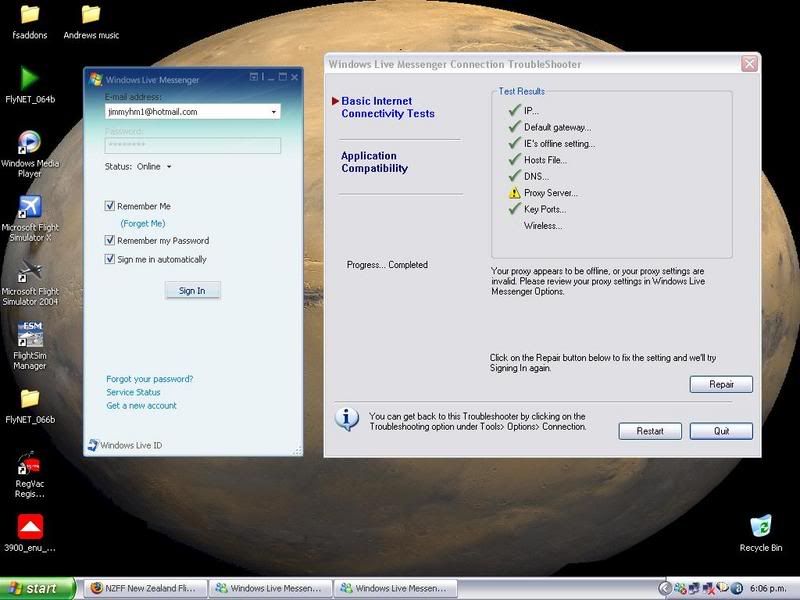
user posted image

I havent a clue how to fix this, I would love to know please :P

Thanks
James
Jimmy
 

Postby Chris Donaldson » Sun Jan 28, 2007 5:12 pm

Sounds as tho some TPC/IP settings may have been interfered with?

I had a similar problem a few weeks ago, but my problem was with the "Default Gateway" I used this little tool which resets all your modem TCP settings & fixes most internet troubles.

WinSock Fix
Chris Donaldson
 

Postby Jimmy » Sun Jan 28, 2007 5:42 pm

Yes thatl be the cause, I did a registery clean with a program called registeryvacum. hmmm It was recomened on the voz fourms. thanks chris :D

I have tried to undo the registery cleaners work, odly there were three undo files and im not sure if undoing actuly worked. I ran that program and but im still getting the error, its now saying the keyports has somethign wrong too....
Jimmy
 

Postby ardypilot » Sun Jan 28, 2007 5:52 pm

Sometimes you have to open your internet browser and let your computer know you are connected to the net before running messneger.
User avatar
ardypilot
NZFF Pro
 
Joined: Wed Apr 26, 2006 10:01 am
Posts: 6802
Location: Auckland

Postby Chris Donaldson » Sun Jan 28, 2007 6:14 pm

Jimmy wrote: Yes thatl be the cause, I did a registery clean with a program called registeryvacum. hmmm It was recomened on the voz fourms. thanks chris :D

I have tried to undo the registery cleaners work, odly there were three undo files and im not sure if undoing actuly worked. I ran that program and but im still getting the error, its now saying the keyports has somethign wrong too....

Cool Jimmy, glad I could help, just run that program and it will reset your settings for you, and should fix the problem. I NEVER! touch registry cleaners, something that shouldn't be messed with unless you really know what your doing, I've stuffed a few things but fiddling.

Hope all is working :D
Chris Donaldson
 

Postby Jimmy » Sun Jan 28, 2007 8:50 pm

hmm I have run that program twice and its not fixed it.

About the registery cleaners, I have read they can improve perforamce so I will try anything, but yes ill be keeping away from them now. ow this is really makeing me wrroy..
Jimmy
 

Postby ZK-MAT » Sun Jan 28, 2007 9:37 pm

The error message above refers to your proxy settings. I think (but are not 100% sure) that MSN shares these with IE.

Open IE, go to Tools / Internet options, and have a look around there, particularly on the settings button. You shouldn't be using a Proxy server (which is one that fetches info from the web for you then relays it to your PC, either used by 1. schools 2. paranoid people, or 3. me when I couldn't get to NZFF via Telstra :) ). So if there's anything in there make a note of what it is then delete it.

OR, use System Restore to send your PC back to when it worked :)
User avatar
ZK-MAT
Senior Member
 
Joined: Sun Apr 30, 2006 11:41 pm
Posts: 1690
Location: Papamoa

Postby Jimmy » Mon Jan 29, 2007 10:47 am

well after running that program a few more times and now the next day it works fine again :D Goodness knows what the problem was..

Thanks for the help :)
Jimmy
 

Postby BerG » Mon Jan 29, 2007 11:14 am

The time and date must be set correctly on your computer for Windows Live messenger to connect.
BerG
 

Postby Craig » Mon Jan 29, 2007 12:01 pm

Sometimes its not your computer. It could just be a problem of theirs
Craig
 

Postby gokanru » Mon Jan 29, 2007 11:29 pm

I use 2 registry cleaners,Tuneup Utilities and Registry First Aid.I've never had a problem with them and they do improve performance.the best thing about them.......they are idiot proof.....thats why I use them :lol:
gokanru


Return to Off Topic

Who is online

Users browsing this forum: No registered users and 17 guests