my new video card, not a 6800 a 7600!

The place to ask for help or solve each others technical issues and discuss hardware

Postby Jimmy » Thu Jan 11, 2007 6:35 am

Well it has finaly arived, about 20mins ago (hence my posting here so early :P )

Instead of getting a 6800GS I got a free upgrade to a 7600GS "sonic" 256mb DDR3 AGP (heres hopeing it works in 4x:unsure: )

I tried to install it yet have a big plug at the back of the card, I also have a little cord with a plug to plug into the plug hole on the card, this little plug has two normal power conector plugs on the other end (like to plug into the powersupply).

I think I know what this is, only problem is my single free powersupply plug is a blody mile away on the other side of the pc box! And I only have the one left. Why does it need to plug into two psu conectors for?

It is possible I can some how get my last conector too the oter side of the box but the problem is I sill only have the one.

btw the two power conectors on the little cord I got are excacly the same, 3 pins in each. (thers like a gap were there shoudl be a forth) So its not one of those plugs were you go into oe side and can plug into something else on the other..

Help very much appreciated!

Thanks
James
Jimmy
 

Postby brownbox » Thu Jan 11, 2007 7:16 am

oooo, a Geforce 7600GS Sonic DDR3. Exactly what I have, but not PCIE! :clap:

Anyway...

Heres what I would do:
Take a power plug out two of your other things e.g hdd or cd rom. Then buy something like this
http://www.xpcomputers.co.nz/views.asp?hw_id=557

Put it onto one of your spare plugs then plug the ones coming from the splitter back into the Hd and CD. That would leave you with two plugs left.


It is possible I can some how get my last conector too the oter side of the box but the problem is I sill only have the one.


Hmm, if your video card is at the back of the case, and your plugs are at the front, it is most likely they are just stuck there with some cable ties and they should be able to be undone, until you get them back to the power supply. Then just run them down the back of the case to the video card.


Why does it need to plug into two psu conectors for?

Im unsure of this, but perhaps it is because the card draws the power from both wires?


btw the two power conectors on the little cord I got are excacly the same, 3 pins in each. (thers like a gap were there shoudl be a forth) So its not one of those plugs were you go into oe side and can plug into something else on the other..


Which pins are missing? There are 4 wires- Red=5Volts, Yellow=12Volts Black=earth (same with other one).

Hope I helped in some way or another :thumbup:

Wow, I made quite a big stroy! :clap:
Desktop:Core 2 Duo E4300 1.8@ 3.0Ghz@ 1.36v. 4Gb Supertalent DDR2-800 2.1v@ 5-5-5-15. Asus P5N-E SLI Pencil Modded. Corsair TX 650. 512MB Palit Geforce 8800GT. 2x200GB IDE+640GB SATAII. Windows Vista Ultimate X86. Samsung SH-S222A
Phone:Nokia N900 Vodafone
Car: 1993 Mitsubishi Mirage Asti Z. Steel Blue Pearl

1996 Toyota Curren 2.0L 5 Spd Manual Silver. 205/50/R16 on Enkei K-95. Lowered on Jamex Superlows. Remote locking. Remote boot release. Cruise control
1996 Mitsubishi GTO MR

Image
User avatar
brownbox
Senior Member
 
Joined: Thu Apr 27, 2006 10:55 pm
Posts: 1318

Postby Jimmy » Thu Jan 11, 2007 7:52 am

Thanks for that brownbox :D

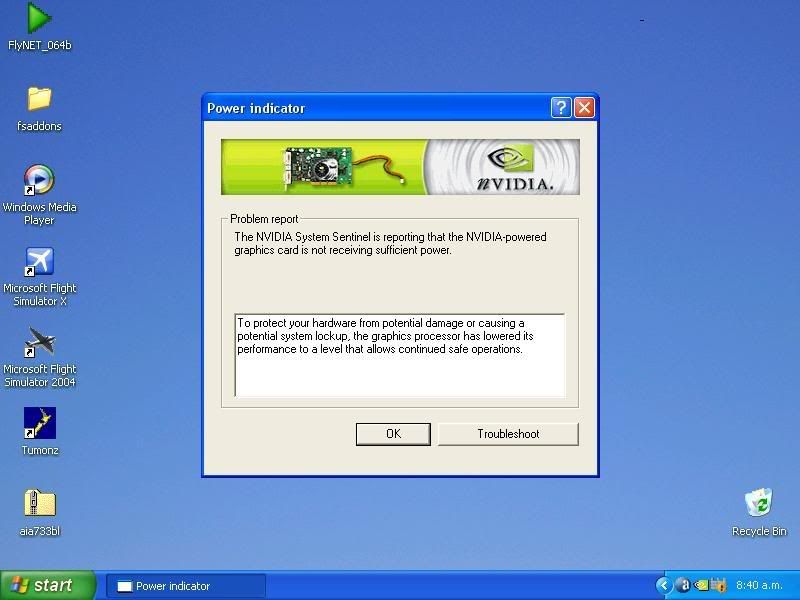
I have been talking to my spanish friend on msn and he suggested just putting the card in and not worying about the other cords. So i did and it seems to be working okay, only thing is after the driver install I got this message:

user posted image

So what if I just plug into one of the the little power plugs conectors? woudl that be sufficent?

James
Jimmy
 

Postby ZK-Brock » Thu Jan 11, 2007 8:25 am

That'd probably do it James. I understand that you haven't plugged it into the PSU yet, which could cause a lockup at bigger settings.

You finally got your card as well!
ZK-Brock
NZFF Pro
 
Joined: Sun Jul 23, 2006 3:35 pm
Posts: 2035

Postby ronwestnz » Thu Jan 11, 2007 8:43 am

Your card needs it own power supply, to run the graphics processor.

Not to be the bearer of bad news, but if you at the point of running a card such as this, you my need to upgrade your power supply.

The system i have came as a spec built to a price, had the wizzy bits, but only had a standard power supply, of which one of the power leads was plugged into the video card.

the card was a 5900 fx, not a grunter but grunty enough to burn out two 500w power supplies.

i then purchased one with a dedicated graphics power supply built in and haven't had an issue since, thou i still frequently monitor my power supplies output readings to make sure now of the voltage drop showing signs of damage.

i currently have one of these power supplies and performs well, and is around the $150 price range.

heres a guide to the size of power supply needed these days
  • Motherboard 15-30W
  • Low-End CPU 20-50 W
  • Mid To High-End CPU 40-100W
  • RAM 7 W per 128MB
  • PCI Add-In Card 5 W
  • Low To Mid-Range Graphics 20-60 W
  • High-End Graphics 60-100 W
  • IDE Hard Drive 10-30 W
  • Optical Drives 10-25 W

That actually tells me, that i need to upgrade my power supply wheni begin my pc upgrade, bummer.
Image
ronwestnz
Member
 
Joined: Mon Jan 01, 2007 9:34 am
Posts: 73
Location: NZPM

Postby brownbox » Thu Jan 11, 2007 11:30 am

oh no James be careful! Some people try running their cards without power, and they break because the card is underpowered! Just a heads up :thumbup:
Desktop:Core 2 Duo E4300 1.8@ 3.0Ghz@ 1.36v. 4Gb Supertalent DDR2-800 2.1v@ 5-5-5-15. Asus P5N-E SLI Pencil Modded. Corsair TX 650. 512MB Palit Geforce 8800GT. 2x200GB IDE+640GB SATAII. Windows Vista Ultimate X86. Samsung SH-S222A
Phone:Nokia N900 Vodafone
Car: 1993 Mitsubishi Mirage Asti Z. Steel Blue Pearl

1996 Toyota Curren 2.0L 5 Spd Manual Silver. 205/50/R16 on Enkei K-95. Lowered on Jamex Superlows. Remote locking. Remote boot release. Cruise control
1996 Mitsubishi GTO MR

Image
User avatar
brownbox
Senior Member
 
Joined: Thu Apr 27, 2006 10:55 pm
Posts: 1318

Postby Jimmy » Thu Jan 11, 2007 11:34 am

I have a 450W PSU. In the mean time (im gana get one of those spliter things for the powersuppy cords)I just used the plug from my dvd drive to plug into the graphics card along with the other spare. It got rid of the start up message so I think its getting enough power.

I have just had my first system lock up thow. I had only just loaded a flight and was sitting there in 2d view , everything was fine cos I saw and herd the rain and stuff hitting the windsheild, but when I pressed shift-z everything just stoped, after a wee while I herd the computer doing starup noises yet I could still see a frozen aircraft panel on the screen :unsure: I just held down the power button and it restarted fine.

I hope it wont become a regular thing! I went for my first flight, jsut around Christchurch...it was miserable, anytime I looked with in 180 degress of NZCh or looked at any big clouds I got way less than 10 fps, and got no more than 17 on the whole flight, landing was done with 5fps. grr maby more RAM will also help....
Jimmy
 

Postby JonARNZ » Thu Jan 11, 2007 11:35 am

I wouldn't be to worried at this stage Jimmy, I had the same message when I installed my card, I didn't need to upgrade the power supply, I just needed to plug it into the power supply, so getting a little extension etc if you cant move it would be the first step as already suggested. I think you'll then find its fine.
ARNZX flightsim.co.nz
Asus Sabretooth X79 MB | i73930K CPU | 8GB DDR3 1600 C7 Ram | GTX 560Ti DCII OC | Corsair H80 Water Cooling
User avatar
JonARNZ
Senior Member
 
Joined: Sat Oct 21, 2006 12:49 pm
Posts: 1523
Location: Auckland

Postby brownbox » Thu Jan 11, 2007 2:14 pm

I have a 450W PSU

Thats plenty enough. Im using a no name supposedly 400W PSU and my computers running fine atm ;)
Desktop:Core 2 Duo E4300 1.8@ 3.0Ghz@ 1.36v. 4Gb Supertalent DDR2-800 2.1v@ 5-5-5-15. Asus P5N-E SLI Pencil Modded. Corsair TX 650. 512MB Palit Geforce 8800GT. 2x200GB IDE+640GB SATAII. Windows Vista Ultimate X86. Samsung SH-S222A
Phone:Nokia N900 Vodafone
Car: 1993 Mitsubishi Mirage Asti Z. Steel Blue Pearl

1996 Toyota Curren 2.0L 5 Spd Manual Silver. 205/50/R16 on Enkei K-95. Lowered on Jamex Superlows. Remote locking. Remote boot release. Cruise control
1996 Mitsubishi GTO MR

Image
User avatar
brownbox
Senior Member
 
Joined: Thu Apr 27, 2006 10:55 pm
Posts: 1318

Postby HardCorePawn » Thu Jan 11, 2007 3:53 pm

Jimmy,

I really wished you lived in the AKL area... I would love to come round and "fix"[1] your machine for you. It pains me to see all the issues you've been having with your PC. Especially the 'hissing' noises you were getting?!!?

I'm thinking a rebuild from the ground up, with a full format and reinstall of Windows and FS.

I just reinstalled FS the other day after a format/reinstall[2], and as a test, I cranked all the sliders up to max (texture size/quality, autogen, clouds, traffic etc) and went for a quick buzz from NZAR to NZAA... using default 172 and default scenary etc...

FPS didnt budge below the 25 max that I had set once.

Core2Duo E6400
4Gigs Corsair Twin2X DDR2-800 (running in dual channel interleave mode)
256meg Asus Geforce 7600GT PCIe

I'm thinking I need to stress it with some scenary and more complex models... what models are you flying into NZCH, and are you using any special NZCH scenary?


cheers,
HCP


[1] you can choose between fixing it with a 30lb sledge or screw drivers and install discs :)

[2] following an unfortunate incident involving a piece of malware and my clumsy fingers double clicking when i was just trying to select the file to delete it
"Son, we are about the break the surly bonds of gravity, and punch the face of God." -- Homer Simpson

Image
User avatar
HardCorePawn
Senior Member
 
Joined: Fri Sep 01, 2006 4:18 pm
Posts: 1277
Location: 2500' above Godzone

Postby Jimmy » Thu Jan 11, 2007 6:19 pm

thanks everyone.

yeah itd be great if you could come "fix" my pc HCP, id take the new vid card out before you start with the sledge hammer thow! :lol: btw I am still getting those hisses, more than when there was no vid card or my old one, its quite noticeable even with fs9 running but as soon as I minimize it it stops...
what models are you flying into NZCH, and are you using any special NZCH scenary?


I just have heaths NZCH and it doesnt really matter what model I use, defualt beechcraft or posky A330, fps are the same. :(


I am hopeing more RAM will fix it, but now would certianly be the time to know if theres some underlying problem with my whole system.

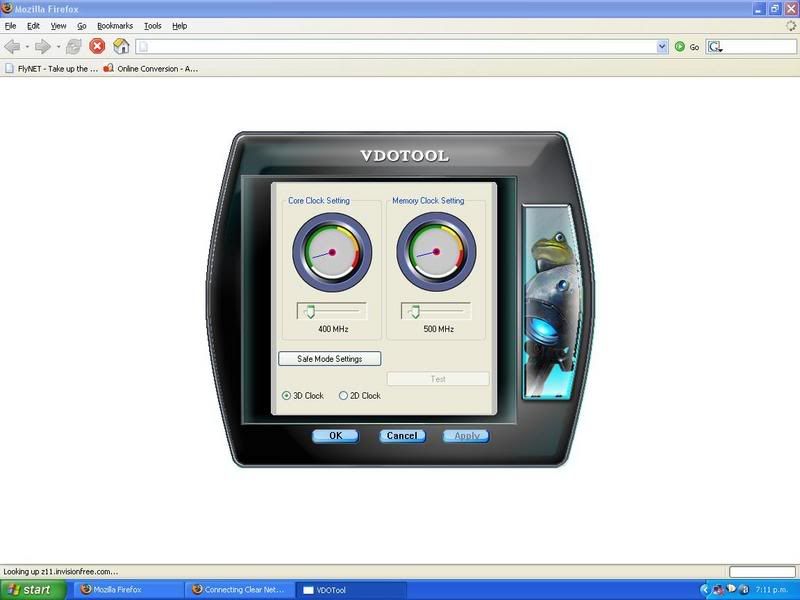
I installed the drivers that came on the disc with my 7600 and theres a little icon in the icon tray called "vdotool" heres the most interesting dialog box from it:

user posted image

I can drag these sliders right to max, I am prety sure theres some fps improvemnt. "safe mode" is were the slide3rs were put from the original lack of power (I suppose) .

The odd thign is, I can put all the sliders on max but after a restart they are all back in the safe mode posistion so id have to reset them everyttime!!? Can anyone explain just what this program/dialog box is al about?


James
Jimmy
 

Postby brownbox » Thu Jan 11, 2007 7:04 pm

My Palit Gefore 7600GS came with this tool aswell, and its useless. Just resets back to default after a restart. I gave up with it in the end

This is your answer if you need to overclock ;) Its what I use anyway
http://downloads.guru3d.com/download.php?det=815
;)
Desktop:Core 2 Duo E4300 1.8@ 3.0Ghz@ 1.36v. 4Gb Supertalent DDR2-800 2.1v@ 5-5-5-15. Asus P5N-E SLI Pencil Modded. Corsair TX 650. 512MB Palit Geforce 8800GT. 2x200GB IDE+640GB SATAII. Windows Vista Ultimate X86. Samsung SH-S222A
Phone:Nokia N900 Vodafone
Car: 1993 Mitsubishi Mirage Asti Z. Steel Blue Pearl

1996 Toyota Curren 2.0L 5 Spd Manual Silver. 205/50/R16 on Enkei K-95. Lowered on Jamex Superlows. Remote locking. Remote boot release. Cruise control
1996 Mitsubishi GTO MR

Image
User avatar
brownbox
Senior Member
 
Joined: Thu Apr 27, 2006 10:55 pm
Posts: 1318

Postby Jimmy » Thu Jan 11, 2007 9:51 pm

okay, well I dont wana overclock quite yet, I just wana haveperforamce that I hsould be having.

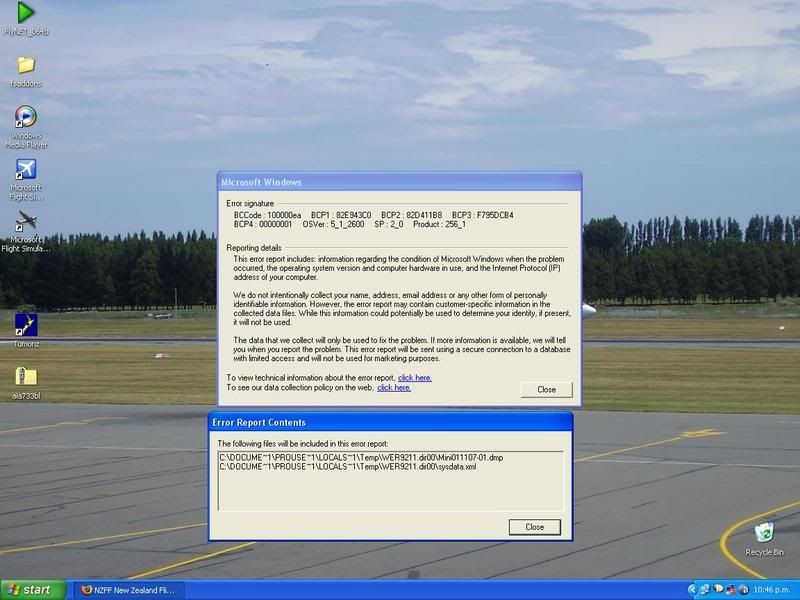
I moved all the little sliders to max and took of for a circut around nzch, got no more than 9fps (no autogen, a few clouds, no water deatil) and then beofer long I had my second system lock up, it stayed all frozen for a while, I pressed ctr alt del, it then just sat and eventuly restarted itself. THis is the error report it gave after restart:


user posted image

Brownbox, what driver do you use?

I have a blody 7600GS and I still have issues , sooo grumpy argh :angry:
Jimmy
 

Postby Alex » Thu Jan 11, 2007 10:02 pm

Are you using FS nine or ten?

Alex
Alex
NZFF Pro
 
Joined: Fri Jul 14, 2006 3:39 pm
Posts: 3620

Postby Zöltuger » Thu Jan 11, 2007 10:28 pm

looks to me like your card isn't getting enough power. possibly also due to your AGP 4x motherboard, but i think brownbox is using the same card/motherboard combo with no issues
Zöltuger
 

Postby ZK-MAT » Thu Jan 11, 2007 11:02 pm

Remove that CH scenery, rinse and repeat, or try somewhere else for benchmarking James. I reckon it's the scenery. Presently I use default CH scenery as every one I try seems to slow things right down.
User avatar
ZK-MAT
Senior Member
 
Joined: Sun Apr 30, 2006 11:41 pm
Posts: 1690
Location: Papamoa

Postby brownbox » Fri Jan 12, 2007 7:11 am

but i think brownbox is using the same card/motherboard combo with no issues

Not quite. He has the AGP 256MB DDR3 Palit 7600GS, and I have the PCIE one ;)
Mobo is different too :)

Cheers
BB
Desktop:Core 2 Duo E4300 1.8@ 3.0Ghz@ 1.36v. 4Gb Supertalent DDR2-800 2.1v@ 5-5-5-15. Asus P5N-E SLI Pencil Modded. Corsair TX 650. 512MB Palit Geforce 8800GT. 2x200GB IDE+640GB SATAII. Windows Vista Ultimate X86. Samsung SH-S222A
Phone:Nokia N900 Vodafone
Car: 1993 Mitsubishi Mirage Asti Z. Steel Blue Pearl

1996 Toyota Curren 2.0L 5 Spd Manual Silver. 205/50/R16 on Enkei K-95. Lowered on Jamex Superlows. Remote locking. Remote boot release. Cruise control
1996 Mitsubishi GTO MR

Image
User avatar
brownbox
Senior Member
 
Joined: Thu Apr 27, 2006 10:55 pm
Posts: 1318

Postby Jimmy » Fri Jan 12, 2007 10:09 am

Well, I have 2 pwer supply cables running into it, I thought that would be supplying enough! Is there anywere I can tell how much its getting? Could that lack of power be causeing the system lock up when ever I have all those sliders on max?

I forgot to mention I flew into auckland yesterday, completly defualt (all this is in fs9 remember) scenery and I had times of 2fps and made the final approach and landing with ab out 7, the outside world looked very ugly.

I don't think its a problem with my 4x slot cos in the "information" dialog box of "vdotool" it says bustype: agp 0x 4x. so it must have been designed to run on 4x or else would it just be trying to run at 8x....?

So yeah I don'tthink removing the scenery will help, it didnt at akl. I loaded up the defualt flight last night, switched to VC and got about 13frames :blink:

James

[EDIT]

Just trying to download a new driver, is my card a "go 7 series"?

[EDIT2]

Loaded up posky 763 ta NZWN, grand total of 4frames 2d panel and 10 from spot :(

What are the chances haveing 1.5gb ram compared to 768mb would fix it?
Last edited by Jimmy on Fri Jan 12, 2007 10:25 am, edited 1 time in total.
Jimmy
 

Postby brownbox » Fri Jan 12, 2007 11:17 am

Just trying to download a new driver, is my card a "go 7 series"?

In Nvidias driver section, your card is a "Geforce and TNT2" ;)
Desktop:Core 2 Duo E4300 1.8@ 3.0Ghz@ 1.36v. 4Gb Supertalent DDR2-800 2.1v@ 5-5-5-15. Asus P5N-E SLI Pencil Modded. Corsair TX 650. 512MB Palit Geforce 8800GT. 2x200GB IDE+640GB SATAII. Windows Vista Ultimate X86. Samsung SH-S222A
Phone:Nokia N900 Vodafone
Car: 1993 Mitsubishi Mirage Asti Z. Steel Blue Pearl

1996 Toyota Curren 2.0L 5 Spd Manual Silver. 205/50/R16 on Enkei K-95. Lowered on Jamex Superlows. Remote locking. Remote boot release. Cruise control
1996 Mitsubishi GTO MR

Image
User avatar
brownbox
Senior Member
 
Joined: Thu Apr 27, 2006 10:55 pm
Posts: 1318

Postby HardCorePawn » Fri Jan 12, 2007 2:32 pm

sorry to be a nuisance, but can you please list the complete specs of your machine again, as in:

CPU:
MOBO:
RAM:
VID:
HDD:
OS:

cheers,
HCP
"Son, we are about the break the surly bonds of gravity, and punch the face of God." -- Homer Simpson

Image
User avatar
HardCorePawn
Senior Member
 
Joined: Fri Sep 01, 2006 4:18 pm
Posts: 1277
Location: 2500' above Godzone

Next

Return to Technical Issues

Who is online

Users browsing this forum: No registered users and 8 guests