Password manager!?!?!

Read and write about updates, changes, or any issues regarding the NZFF website and community

Postby Jimmy » Tue Dec 05, 2006 10:47 am

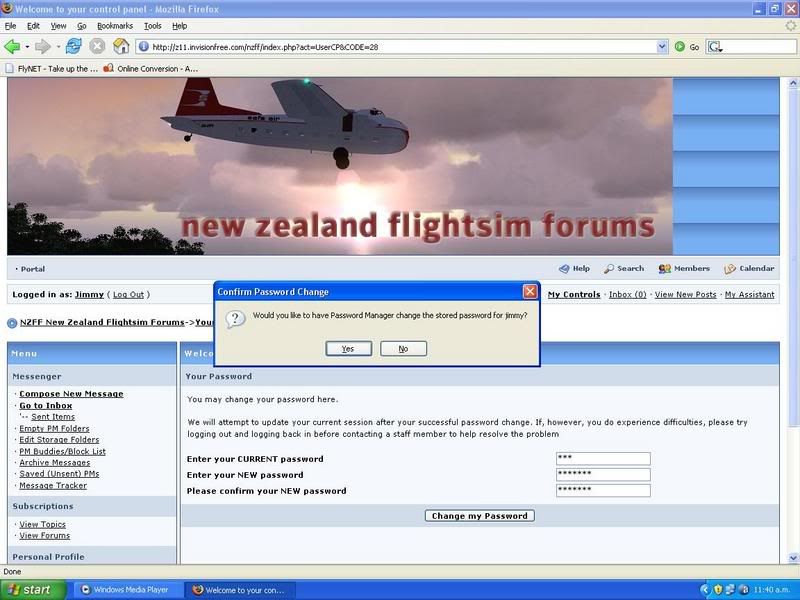
I had finaly got around to changing my password after trolly had to log in to test my PM folders error, I entered my old on enad my new one twice and when I tried to change it I got this message:

user posted image

I really don't like the sound of a password manager storing all my passwords somewere! I have read in the pctools mag about a program that will store all your passwords for you :blink: Sounds very unsecure

Does any one know what this is? A firefox tool or something, I have never installed anything like this. <_<

Thanks
James
Last edited by Jimmy on Tue Dec 05, 2006 10:49 am, edited 1 time in total.
Jimmy
 

Postby HardCorePawn » Tue Dec 05, 2006 11:35 am

Yep, this is an inbuilt feature of Firefox.... its actually very handy...

secure? no idea...
"Son, we are about the break the surly bonds of gravity, and punch the face of God." -- Homer Simpson

Image
User avatar
HardCorePawn
Senior Member
 
Joined: Fri Sep 01, 2006 4:18 pm
Posts: 1277
Location: 2500' above Godzone

Postby creator2003 » Tue Dec 05, 2006 11:37 am

yeah james i use one and ive never had any problem with anyone or anything its part of the browers ,use it ? well if you want a quick fill in card /dont use it ? well type in your password each time
up to you !!!
hope this helps any
mike
creator2003
 

Postby ardypilot » Tue Dec 05, 2006 11:42 am

In Mozilla go to: Tools-Options-Security-Passwords-Show Passwords and it will show you a list of all the stored passwords it keeps so that you can automatically log onto websites (NZFF, photobucket, hotmail etc). Just delete your old NZFF password and it will only store your current one!
User avatar
ardypilot
NZFF Pro
 
Joined: Wed Apr 26, 2006 10:01 am
Posts: 6802
Location: Auckland

Postby Zöltuger » Tue Dec 05, 2006 3:11 pm

i'm not paranoid on the net, but i don't trust those password saving utilities... <_<

i keep myself logged in here anyway. it's a pain having to type the special ö on a laptop keyboard...
Zöltuger
 

Postby ZK-MAT » Tue Dec 05, 2006 5:15 pm

It's a part of Firefox, not an add on utility. I like it, but you can disable it by taking the tick out of remember passwords on the tools / options menu :D
User avatar
ZK-MAT
Senior Member
 
Joined: Sun Apr 30, 2006 11:41 pm
Posts: 1690
Location: Papamoa


Return to Forum Community Discussion

Who is online

Users browsing this forum: No registered users and 4 guests
