IS your multiplayer working

For everything about online flying around New Zealand

Postby Pedro » Sat Sep 23, 2006 6:35 pm

Thanks Craig.
I joined earlier and all was fine. I left the session and went to rejoin and no go.
I click on join and it pauses for 30 sec's or so then gives a message about not being able to connect.

Peter :unsure:
Pedro
 

Postby Pedro » Sat Sep 23, 2006 6:41 pm

Craig are you on line now

Timed at1841
Pedro
 

Postby Craig » Sat Sep 23, 2006 6:41 pm

Pedro wrote: Thanks Craig.
I joined earlier and all was fine. I left the session and went to rejoin and no go.
I click on join and it pauses for 30 sec's or so then gives a message about not being able to connect.

Peter :unsure:

hopefully everything will be sweet for tonight :unsure:
Craig
 

Postby Craig » Sat Sep 23, 2006 6:42 pm

Pedro wrote: Craig are you on line now

Timed at1841

yup. A320 yssy --> nzaa
Craig
 

Postby Pedro » Sat Sep 23, 2006 6:48 pm

I'm still unable to join the session. I will probably look in a little later and see what happens.


Is anyone else in the session with you?
Pedro
 

Postby Craig » Sat Sep 23, 2006 6:51 pm

Pedro wrote: I'm still unable to join the session. I will probably look in a little later and see what happens.


Is anyone else in the session with you?

http://203.114.130.15:81/

Bardos was earlier
Craig
 

Postby Pedro » Sat Sep 23, 2006 7:03 pm

I guess from that I must assume that the problem is mine. I will have to look again at my settings although I have not touched a thing. I will monitor and see what happens

Peter
Pedro
 

Postby Charl » Sat Sep 23, 2006 8:55 pm

Mmm tried every 10 mins or so between 8:30 and now, same "Unable to connect...not all players able to connect" garbage.
We need a technician here
User avatar
Charl
NZFF Pro
 
Joined: Mon May 01, 2006 8:28 am
Posts: 9691
Location: Auckland

Postby Pedro » Sun Sep 24, 2006 9:40 am

Exactly my problem too. I am not going to point any fingers because I could be barking up the wrong tree, but it only happened after Crazy_Criag came on. This could be quite co-incidental. I had the same problem blocking the multiplayer session on Friday. Could be worth an experiment if he is around.
I will go online at 1100 hrs and again at 1300 today 24th to see if I still cause any problems.

Peter
Last edited by Pedro on Sun Sep 24, 2006 10:29 am, edited 1 time in total.
Pedro
 

Postby Craig » Sun Sep 24, 2006 12:18 pm

Hi Peter

I was online from about 1500 yesterday till 0230 this morning ( :o ). While i was online Bardos, Natas, trolly and chris joined with no probs... :(
Craig
 

Postby Pedro » Sun Sep 24, 2006 12:27 pm

Hi Craig,

I don't what the problem is. I have been on this morning and have had no problems. I had a Capt. Cipo with me and things worked out just fine. The only thing to do to prove a point would be perhaps we alternatively log on and see if we have problems with getting connected. There were a couple of others with the same problem I believe.

Cheers
Peter.
Pedro
 

Postby Pedro » Sun Sep 24, 2006 1:13 pm

Its 1312 on 24th I tried to log in but I have had the same error message "cannot connect Blah Blah Blah . The only other person on was Charl. I wonder what is going on.
Peter
Pedro
 

Postby Pedro » Sun Sep 24, 2006 1:19 pm

Thanks Charl,

Yes no problems now. I will go and log on see if you can join me
Pedro
 

Postby Charl » Sun Sep 24, 2006 1:38 pm

We are incompatible!
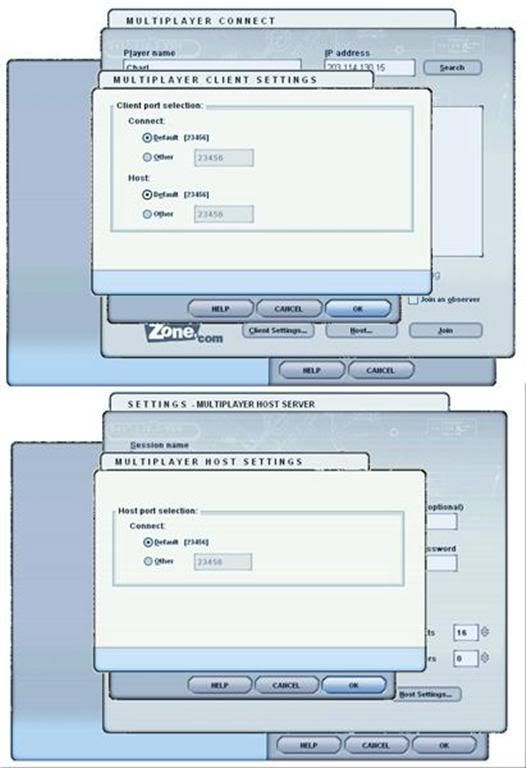
Here are my port settings (All 23456)
user posted image
I connect through a router.
Maybe someone can come to the rescue here?
Last edited by Charl on Sun Sep 24, 2006 1:42 pm, edited 1 time in total.
User avatar
Charl
NZFF Pro
 
Joined: Mon May 01, 2006 8:28 am
Posts: 9691
Location: Auckland

Postby ZK-MAT » Sun Sep 24, 2006 2:33 pm

I guess this is why the default Multiplayer didn't really take hold .... Good old Microsoft can't get basisc TCP/IP and UDP protocols sorted.

I'm clutching at straws here and these images will not probably match your set up but this is how to open ports (sometimes called 'Push Through', 'Pinholing' or 'Virtual Servers') using a DSE router.


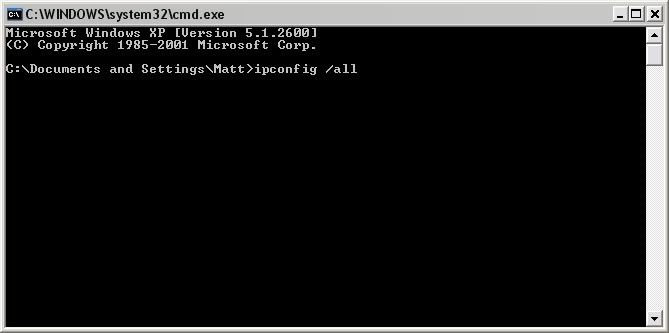
Open up the command prompt by clicking Start / Run then typing cmd then press enter. Type ipconfig /all


user posted image

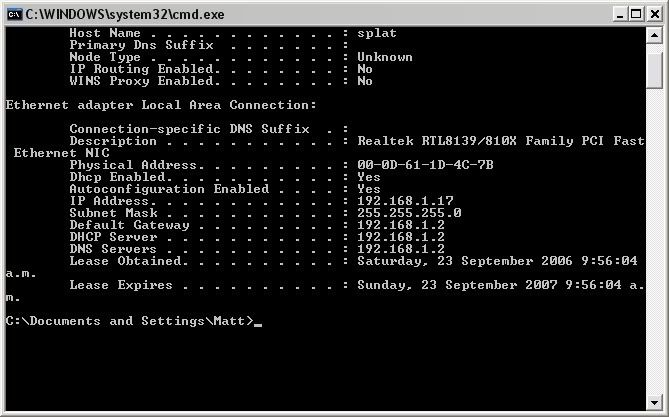
Look for an IP address starting with 192.* 168.* or 10.* This is your LOCAL IP address of your PC, not your WWW IP address. If you use a router it will generally allocate the same one each time. Write it down. In this example mine is 192.168.1.17.


user posted image


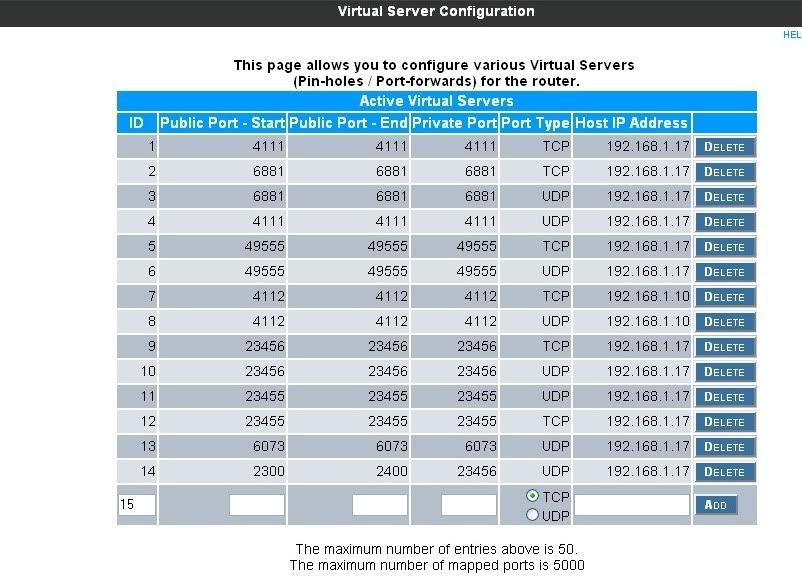
Go into your router config page. It's usually 192.168.1.2 (for DSE), 10.1.1.1 (for Dynalink) or look at your product's documentation. Look at the shot below. I have forwarded any data traffic that comes through my router on those ports relevant to MS FS directly too my PC's home IP address.

This means that data gets to my PC directly, rather than the router receiving it, saying "WTH is this, I have no idea what it's for, it's probably malicious, lets send it back where it came with a 'no one's home, sorry' message"

user posted image

All the best ...
User avatar
ZK-MAT
Senior Member
 
Joined: Sun Apr 30, 2006 11:41 pm
Posts: 1690
Location: Papamoa

Previous

Return to Multiplayer

Who is online

Users browsing this forum: No registered users and 4 guests