Repainting fs aircraft

Discuss aircraft addons and repaints for Flight Simulator here

Postby Jimmy » Sat Jul 08, 2006 11:09 am

yup the pictures the same on both sides just in reverse. I can not just mirror the image then paste it on the other side thow becoause all the words would be backwards!
Im still working on the other side ,its hard to make sure the colour stays the same on both sides as photos are taken in all sorts of differant light :blink:

All I could suggest for the part of the vinel that the engine is covering is to find another photo from another angle and copy it in?

yes im trying to do this but as I said the colour differences can be chellenging. it should work thow , ill keep trying !
Jimmy
 

Postby ardypilot » Sat Jul 08, 2006 11:46 am

Well done for staying committed.

If it was me attempting that repaint I am sure I would have given up a long time ago!

I look forward to the final outcome ;)
User avatar
ardypilot
NZFF Pro
 
Joined: Wed Apr 26, 2006 10:01 am
Posts: 6802
Location: Auckland

Postby Jimmy » Sun Jul 09, 2006 9:11 pm

Hi
I need some more photos of the starboared side of the aircraft.
Iv looked on heaps of plane spotting websites but can not find anything I can use or are to low resolution.

Does anyone have any photos of the starbored side?
Photots of The other side wpuld also be very greatfuly accepted. :)

thanks
Jimmy
 

Postby Zenith » Mon Jul 10, 2006 7:25 pm

In the posky repainting tutorial it says to open "Image tool" I'v searched google for ages and can not finad the corrct one, I downloaded one called image tool 3.0 but it wasn't the thing I needed.


Not sure if its on the FS9 CDs but it was included in the FS2002 CDs as one of those little xtras when you go into the CDs guts.
Zenith
 

Postby Jimmy » Mon Jul 10, 2006 7:29 pm

OKay thanks zenith, my install of fs2002 was of the liburys copy (good how you don't need the cd to run 2002) lol
Ill get it out again sometime and have a look.


Thanks

P.S..I realy need some more photos guys :P
Jimmy
 

Postby ardypilot » Tue Jul 11, 2006 10:37 am

P.S..I realy need some more photos guys


It looks like you finished it in your avatar?!
User avatar
ardypilot
NZFF Pro
 
Joined: Wed Apr 26, 2006 10:01 am
Posts: 6802
Location: Auckland

Postby Jimmy » Tue Jul 11, 2006 11:43 am

It looks like you finished it in your avatar?!


Haha yeah , its just a clever angle, iv only done the outer engine caseing and theres still a white patch behind the wing and iv only done half of the other side :lol: lol

I expected you guys would think its done ,quite funny realy, if you look closer you wil notice its not :D

P>S why isnt it showing my new avator yet anyway?
Jimmy
 

Postby Jimmy » Thu Jul 13, 2006 7:26 pm

another update for you all. :D
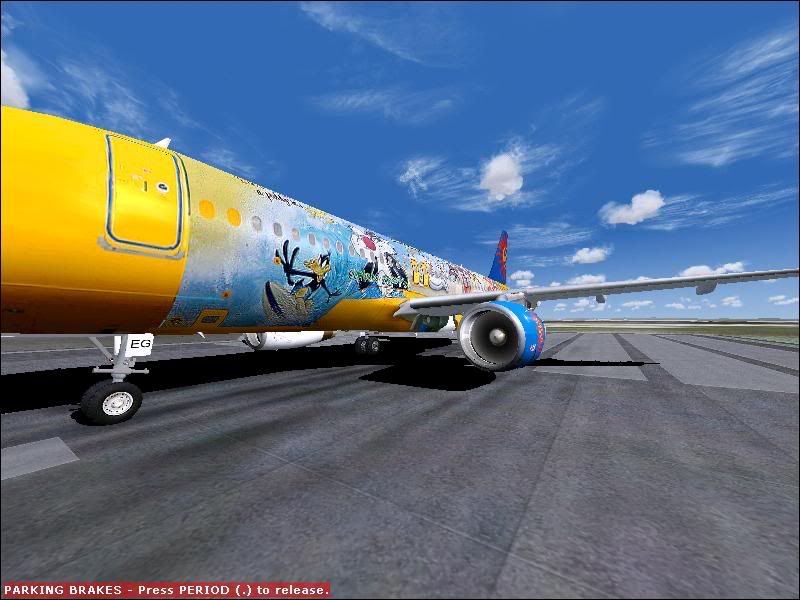
.heres the last few days worh of leaning over my keyboard staring at little pixels as I paint in the missing parts of the fusalarge vinal. :lol:

user posted image


As you can see I have filled in the part infrount of the wing and handpainted a few things that don't show to clearly in the photos.
At this very moment im working on the coulor of the lower part as its all black from the shadowing in the photograph. Its slow and hard to make look good ,whatim doing is cuting and pasting from the lighter (higher) part of the nose and putting it lowwer down, It still gets much darker at the bottom so when your in fs and bank into the sun it still looks like the bootom is in complete shadow. Do I need to fix this (it would be quite hard to do)

Anyway iv still got to finish the side you can see in the screenie(it still needs alot of work as you can see) and then do the other half of the other side.

Thanks for looking :)
Last edited by Jimmy on Thu Jul 13, 2006 7:29 pm, edited 1 time in total.
Jimmy
 

Postby creator2003 » Fri Jul 14, 2006 9:04 am

i know this is a late posting to your question about image tool but better late than never you will find it here microsoft
hope this helps buy the way there is a nice and easy way if you want to pay for it
abacus fs re paint there is a free trial copy to download and test before you buy but you see everything in real time as you paint on aircraft re paints can be done in about an hour or so very easy and pro looking importing photo textures no prob
cheers mike ;)
creator2003
 

Postby Charl » Fri Jul 14, 2006 9:34 am

Yes I'd second that.
It ain't cheap, but it saves a lot of pain.
I like the fact that it writes the aircraft.cfg file as well.
I'm using it for the Great NZ GA Project, where I will churn out Quick 'n Dirty Cessnas by the dozen.
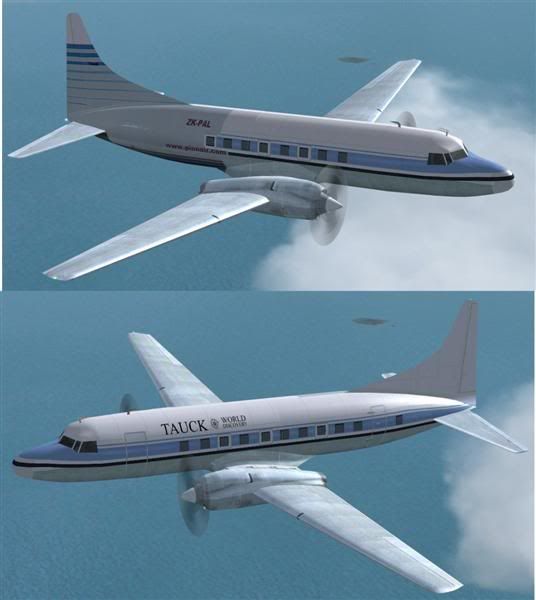
Here's an example, using an old Convair 580. I pasted a photograph of the tail section and added text to the front. This took all of 15 minutes.


user posted image
User avatar
Charl
NZFF Pro
 
Joined: Mon May 01, 2006 8:28 am
Posts: 9691
Location: Auckland

Postby Jimmy » Fri Jul 14, 2006 10:50 am

Thanks guys, that certainly sounds alot easyeir than using mspaint and microsoft photo editor Iv been resizing images in photo editor to the write amout of pixels then pasteing them on to the texture set which I have oaded in mspaint, handpainting certan bits is very challenging not to metion slow(half an hour to get one line looking write)

I may just try and finish this off how im doing it as I can't afford to buy the fs repainter (im saveing for a new computer).

Thanks.

P.S. is it alright for the bottom of the fusalarge textures to be all dark like you can see in my screen shot?(it looks realy dark up in the air :( )
Jimmy
 

Postby Jimmy » Fri Jul 21, 2006 6:49 pm

I am realy taking my time with this! Its been almost three weeks now, I have actuly started the whole project again on tuesday and its comeing along butifuly! (i'm such a bad speller lol)

anyway I expect ill have it finished and ready for you guys to enjoy in 1 to 2 weeks :blink: lol itll be good thow!
Jimmy
 

Postby ardypilot » Sat Jul 22, 2006 10:06 pm

Choice James!

Show us another sneak preview screenie aye ;)
User avatar
ardypilot
NZFF Pro
 
Joined: Wed Apr 26, 2006 10:01 am
Posts: 6802
Location: Auckland

Postby Jimmy » Sun Jul 23, 2006 1:23 pm

Okay dokay , here is this weeks progress.....

user posted image

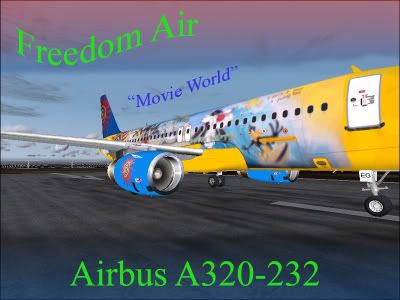
notice my attempt at dirt lol ill fix that , the dirt under the door and windows aint bad thow.
Sadly its a low res photo on the fusalarge, its all I could find :(
To keep things the same detail and res etc on both sides ill just reverse the image and then fix the text so that its not in reverse ! :blink:

what do you think of the quality? I think iv still got alot to work on, I have handpainted some parts of the vinal :) like the words "I tawt i saw a puddy tat" :lol: (as you can probably tell)

Please coment B)
James
Last edited by Jimmy on Sun Jul 23, 2006 1:32 pm, edited 1 time in total.
Jimmy
 

Postby Charl » Sun Jul 23, 2006 2:01 pm

Well I'm doing a bit of painting myself for the first time, so I've some idea of what you're doing - and a pretty stout effort I'd say.
I wouldn't have taken on such a biggie, for sure! Good on yer, James
Last edited by Charl on Sun Jul 23, 2006 2:01 pm, edited 1 time in total.
User avatar
Charl
NZFF Pro
 
Joined: Mon May 01, 2006 8:28 am
Posts: 9691
Location: Auckland

Postby ardypilot » Sun Jul 23, 2006 3:10 pm

Great work Jimmy!

It really is amazing what you can accomplish when you put your mind to it ;)
User avatar
ardypilot
NZFF Pro
 
Joined: Wed Apr 26, 2006 10:01 am
Posts: 6802
Location: Auckland

Postby Alex » Sun Jul 23, 2006 3:32 pm

Great work mate. Look forward to its release. :D

Alex
Alex
NZFF Pro
 
Joined: Fri Jul 14, 2006 3:39 pm
Posts: 3620

Postby ZK-MAT » Sun Jul 23, 2006 6:07 pm

You've inspired me James! I downloaded DXTBMP and had a go last night, and after messing about for ages in Photoshop I am in awe at what you have done, with so much detail, with the programs you have. Well done mate, an awesome effort. I too look forward to the download :)
User avatar
ZK-MAT
Senior Member
 
Joined: Sun Apr 30, 2006 11:41 pm
Posts: 1690
Location: Papamoa

Postby Jimmy » Sun Jul 23, 2006 11:42 pm

thanks , i thort it looked terible lol
iv been useing adobe photoshop over te last week so i'm doing the whole layering thing.

I reversed the image for the fusealarge today and am working on handpainting the words so thayr not in reverse lol

i hope to have it done by the end of next weekend :)
Jimmy
 

Postby Jimmy » Tue Jul 25, 2006 12:30 pm

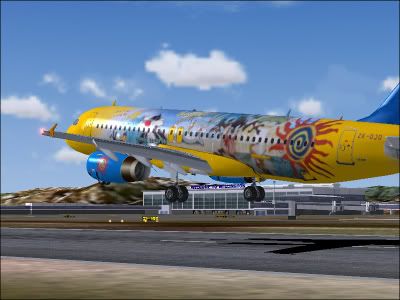
Heres another preview for you:

user posted image

:D
Jimmy
 

PreviousNext

Return to Aircraft

Who is online

Users browsing this forum: No registered users and 10 guests