Hi
I decided this school holidays I would like to learn how to repaint aircraft, I know it'll take way longer than the two week holidays but its a good time to try and start.
I don't realy no much about repainting so is this something to difficult for me to learn?
(The only thing I ever made for fs was a AFCAD wigram aerodome. I got realy carried away and started maeing all the streets around the airport with the taxiway maker) lol
If its not going to be too hard whats the best way for me to start. I don't care if what i do looks like a 3year olds work I just want to give it try ,something a bit differant.
Repainting fs aircraft
44 posts
• Page 1 of 3 • 1, 2, 3
 by ardypilot » Wed Jul 05, 2006 12:26 pm
Hi Jimmy.
Here are some repainting tutorials from the project opensky website.
 http://www.projectopensky.com/john/Lesson1.pdf
http://www.projectopensky.com/john/lesson2_1.pdf
http://www.projectopensky.com/john/Lesson2_2.pdf
There is also a good html repaint gude here: http://www.simviation.com/fstutorials_repaint.htm
You will also need a program called DXTbmp to converted bmp files into extended bmp files. It is freeware and available here: http://www.simviation.com/fsdesign_utilities.htm
All the best!
Here are some repainting tutorials from the project opensky website.
http://www.projectopensky.com/john/Lesson1.pdf http://www.projectopensky.com/john/lesson2_1.pdf http://www.projectopensky.com/john/Lesson2_2.pdfThere is also a good html repaint gude here: http://www.simviation.com/fstutorials_repaint.htm
You will also need a program called DXTbmp to converted bmp files into extended bmp files. It is freeware and available here: http://www.simviation.com/fsdesign_utilities.htm
All the best!
-

ardypilot - NZFF Pro
- Joined: Wed Apr 26, 2006 10:01 am
- Posts: 6802
- Location: Auckland
by Jimmy » Wed Jul 05, 2006 3:24 pm
Thanks for the links trolly 
Iv got something else to do now instead of spending all day posting in this forum
Id love to be able to repaint a A320 in freedom air colours. Freedoms A320 look great but I cant find a FS one in that scheame
Iv got something else to do now instead of spending all day posting in this forum
Id love to be able to repaint a A320 in freedom air colours. Freedoms A320 look great but I cant find a FS one in that scheame
Last edited by Jimmy on Wed Jul 05, 2006 3:37 pm, edited 1 time in total.
- Jimmy
by ardypilot » Wed Jul 05, 2006 5:16 pm
It would be great to see the Freedom Air A320!
If you ever get around to it, upload it somewhere, then link us to it
By the way, just incase you are interested; there is a repaint of the default B737 in both Freedom Airs white and yellow colours available here: http://flightsim.co.nz/REPAINTS/b737_400.zip
If you ever get around to it, upload it somewhere, then link us to it
By the way, just incase you are interested; there is a repaint of the default B737 in both Freedom Airs white and yellow colours available here: http://flightsim.co.nz/REPAINTS/b737_400.zip
-
ardypilot - NZFF Pro
- Joined: Wed Apr 26, 2006 10:01 am
- Posts: 6802
- Location: Auckland
by Jimmy » Wed Jul 05, 2006 5:19 pm
Heres something to laugh at
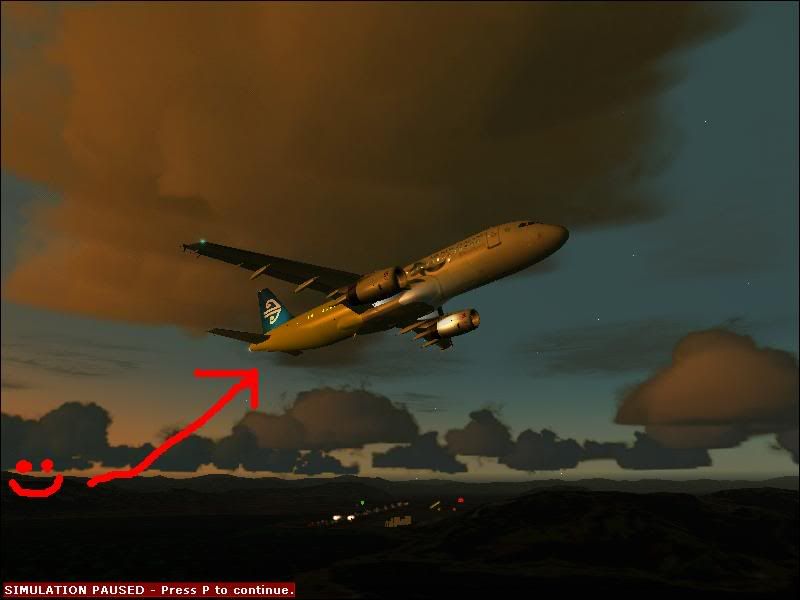
I did this with out reading any manuals!
Iv actuly painted the whole fusalarge yellow now but I haven't taken any pictures yet , if anyone has any freedom A320 photos id love to see them please. I searched google for photos but there wasn't much.
I did this with out reading any manuals!
Iv actuly painted the whole fusalarge yellow now but I haven't taken any pictures yet , if anyone has any freedom A320 photos id love to see them please. I searched google for photos but there wasn't much.
- Jimmy
by Jimmy » Wed Jul 05, 2006 9:38 pm
Now that iv had a play around to try and figure it out by painting the whole aircraft yellow iv deleted it all and am starting again and doing way more detail ,Im simply painting over the air new zealand textures, its certainly very easy but is this the corect thing to do?
the IFDG readme says:
Whats a "paint-kit" ?
the IFDG readme says:
REPAINT POLICY:
- You must use the paint-kit to create any repaints of the A320!
- You may paint the A320 (USING THE PAINT KIT) in any livery, real or fictional.
- You may upload your repaint as AN ENTIRELY FUNCTIONAL PACKAGE (no "textures only!") anywhere you want. You must include this readme, but modify the LIVERY line to reflect your authorship. If you using another author's textures, be sure to obtain their permission, and acknowledge them properly.
- Please visit our forum (url at the bottom of this readme) and inform us of your repaint by posting in the Repaint Discussion section of the livery you have done, where you will be uploading, and include a couple of screenshots.
Whats a "paint-kit" ?
- Jimmy
by ardypilot » Thu Jul 06, 2006 9:38 am
Whats a "paint-kit" ?
A repaint kit is basically a blank set of textures which you can edit and paint, usually in .psd (Adobe Photoshop) format.
"File Description:
This is the official iFDG A320 Paintkit. It includes 3 A320 models, 3 A320 FDE's, blank bitmaps, and PSD's for the full fuselage and other major components. Please follow the instructions included in the documentation."
Download the one you need here: ifdg_a320__paintkit.zip
if anyone has any freedom A320 photos id love to see them please
Airliners.net has over 1 million planespotting photos, so make that your first port of call when searching for aircraft images.
You should find everything you need here: http://www.airliners.net/search/photo.s ... entry=true
Last edited by ardypilot on Thu Jul 06, 2006 9:40 am, edited 1 time in total.
-
ardypilot - NZFF Pro
- Joined: Wed Apr 26, 2006 10:01 am
- Posts: 6802
- Location: Auckland
by Jimmy » Thu Jul 06, 2006 10:42 am
Thanks trolly 
Can I do my freedom paintjob over top of the lord of the rings air new zealand textures? I find that easier because I know where to put every thing and for some details I don't have to wroy about painting myself , as long as I aknolage the original painter?
Can I do my freedom paintjob over top of the lord of the rings air new zealand textures? I find that easier because I know where to put every thing and for some details I don't have to wroy about painting myself , as long as I aknolage the original painter?
- Jimmy
by Jimmy » Thu Jul 06, 2006 1:45 pm
I downnloaded the paint kit and i see that it already has the difficult to paint parts already done ,so Ill just use the paint kit as it already out lines the windows doors etc..
these two links don't seem to be working
these two links don't seem to be working
Last edited by Jimmy on Thu Jul 06, 2006 1:51 pm, edited 1 time in total.
- Jimmy
by ZK-LGD » Thu Jul 06, 2006 4:18 pm
Howdy,
Evolve AI does a Freedom A320 IAE (Base pack: e322iae9.zip and ev320fom.zip for the repaint). Can be had from Avsim, if memory serves me correctly. Would need to alter the .air file to get it to show up in the AC selection menu; don't know what it flies like as I don't fly big iron.
Jimmy wrote: Freedoms A320 look great but I cant find a FS one in that scheame
Evolve AI does a Freedom A320 IAE (Base pack: e322iae9.zip and ev320fom.zip for the repaint). Can be had from Avsim, if memory serves me correctly. Would need to alter the .air file to get it to show up in the AC selection menu; don't know what it flies like as I don't fly big iron.
Last edited by ZK-LGD on Thu Jul 06, 2006 4:20 pm, edited 1 time in total.
Regards,
Dorian
Dorian
-

ZK-LGD - Sim-holic
- Joined: Fri Apr 28, 2006 3:34 pm
- Posts: 742
- Location: Springfield, Canterbury
by ardypilot » Thu Jul 06, 2006 5:18 pm
I just found the yellow Freedom Air iFDG A320 on avsim.
http://library.avsim.net/search.php?Sea ... &Go=Search
There does not seem to be a movieworld one though- so perhaps you could paint that one Jimmy?
http://library.avsim.net/search.php?Sea ... &Go=SearchFile Description:
Original model by iFDG, repaint by Jim Martin. Highly detailed repaint of this aircraft used by this New Zeland based carrier. Fully reflective textures 32 bit for maximum detail.
Filename: jhm320fr.zip
License: Freeware
Added: 22nd April 2006
Downloads: 176
Size: 5353kb
There does not seem to be a movieworld one though- so perhaps you could paint that one Jimmy?
-
ardypilot - NZFF Pro
- Joined: Wed Apr 26, 2006 10:01 am
- Posts: 6802
- Location: Auckland
by Jimmy » Thu Jul 06, 2006 7:23 pm
Sorry about all these questions but iv got anothor one 
In the posky repainting tutorial it says to open "Image tool" I'v searched google for ages and can not finad the corrct one, I downloaded one called image tool 3.0 but it wasn't the thing I needed.
Does anyone no where i can get the one thats refered to in the lessons?
In the posky repainting tutorial it says to open "Image tool" I'v searched google for ages and can not finad the corrct one, I downloaded one called image tool 3.0 but it wasn't the thing I needed.
Does anyone no where i can get the one thats refered to in the lessons?
- Jimmy
by ardypilot » Thu Jul 06, 2006 10:18 pm
The Freedom Air iFDG A320 on avsim is flyable. I just took it for a short flight out of Canberra
Depends if they are copyrighted.
I have not read the tutorial myself, but if you can tell me what this "Image tool" does exactly, then I will try and help.
Cheers
Can I cut and paste from real photos ?
Depends if they are copyrighted.
In the posky repainting tutorial it says to open "Image tool"
I have not read the tutorial myself, but if you can tell me what this "Image tool" does exactly, then I will try and help.
Cheers
-
ardypilot - NZFF Pro
- Joined: Wed Apr 26, 2006 10:01 am
- Posts: 6802
- Location: Auckland
by Jimmy » Thu Jul 06, 2006 10:31 pm
The Freedom Air iFDG A320 on avsim is flyable. I just took it for a short flight out of Canberra
Ha yeah I know . I posted that message like 2minites after you put the link lol
I hadnt seen your post i was jus replying to LGD.
Any way im not trying to do the tutorial because I don't have paint shop
and you need that to follow along with the lesson.
I'm just useing the mspaint the one tat comes with xp
I did the tail today, it took many hours , I cut part of the tail out of a photo(the logo bit) and did the reat of the tail myself trying to bleend it as best as possible...
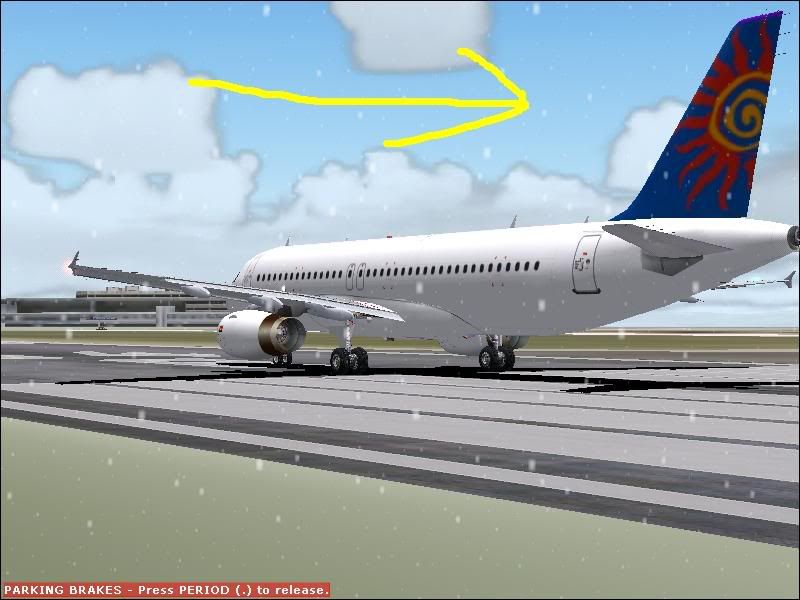
I still havnt read any thing on how your actuly ment to repaint but my random methods seem to be working!
Any suggestions on how I should do the movieworld paint scheame on the fusalarge as there is so much detail?
- Jimmy
by Jimmy » Fri Jul 07, 2006 5:08 pm
I'm having alot of trouble doing the movie world picture on the body of the aircraft.
Any sugestions on how I could do this part?
I also am diffaculty finding wat sort of yellow to use that will match the photo even when i use the little tool that piks up the colour there still is a very obveis line where the photo starts.
Thanks
Any sugestions on how I could do this part?
I also am diffaculty finding wat sort of yellow to use that will match the photo even when i use the little tool that piks up the colour there still is a very obveis line where the photo starts.
Thanks
- Jimmy
by Jimmy » Fri Jul 07, 2006 10:23 pm
Heres todays progress
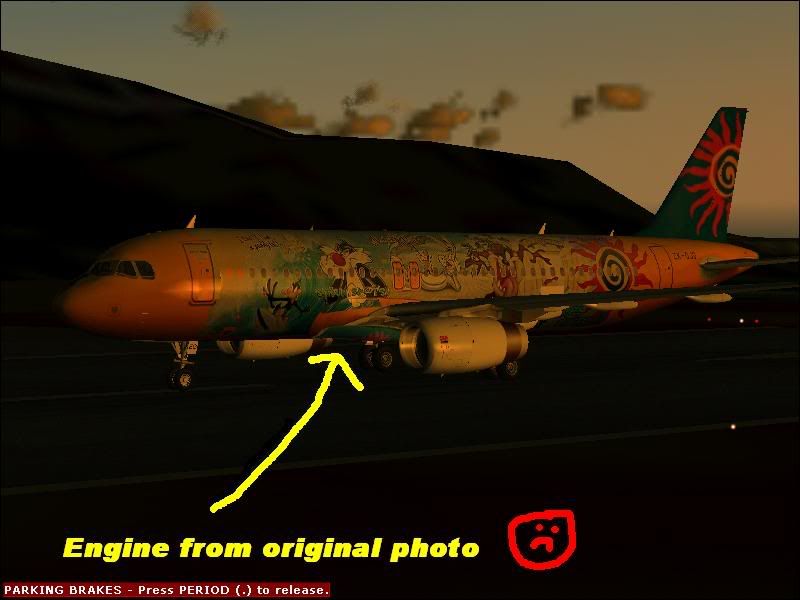
Notice where the engine can be seen ,the same thing hs happend with the wing on th other side of wing. So around he wing area is all messed up because the photo was taken side on, iv jus been useing real photos as thas relativly easy as i don't have a good painting utility. It took me all day to do this but i'm prety pleased(the wings the only bit that I can't stand,any ideas on how to fix this?)
What I do is find out what res the part im doing needs to be then I crop the photo to the exact part I need then change the resilution in microsoft photo editor.
This method is slow and difacult but I think its working.
Notice where the engine can be seen ,the same thing hs happend with the wing on th other side of wing. So around he wing area is all messed up because the photo was taken side on, iv jus been useing real photos as thas relativly easy as i don't have a good painting utility. It took me all day to do this but i'm prety pleased(the wings the only bit that I can't stand,any ideas on how to fix this?)
What I do is find out what res the part im doing needs to be then I crop the photo to the exact part I need then change the resilution in microsoft photo editor.
This method is slow and difacult but I think its working.
- Jimmy
by ardypilot » Sat Jul 08, 2006 10:25 am
Wow! Excellent progress Jimmy!
All I could suggest for the part of the vinel that the engine is covering is to find another photo from another angle and copy it in?
Is that loony tunes picture repeated on both sides of the fuselare by the way?
All I could suggest for the part of the vinel that the engine is covering is to find another photo from another angle and copy it in?
Is that loony tunes picture repeated on both sides of the fuselare by the way?
-
ardypilot - NZFF Pro
- Joined: Wed Apr 26, 2006 10:01 am
- Posts: 6802
- Location: Auckland
44 posts
• Page 1 of 3 • 1, 2, 3
Who is online
Users browsing this forum: No registered users and 23 guests