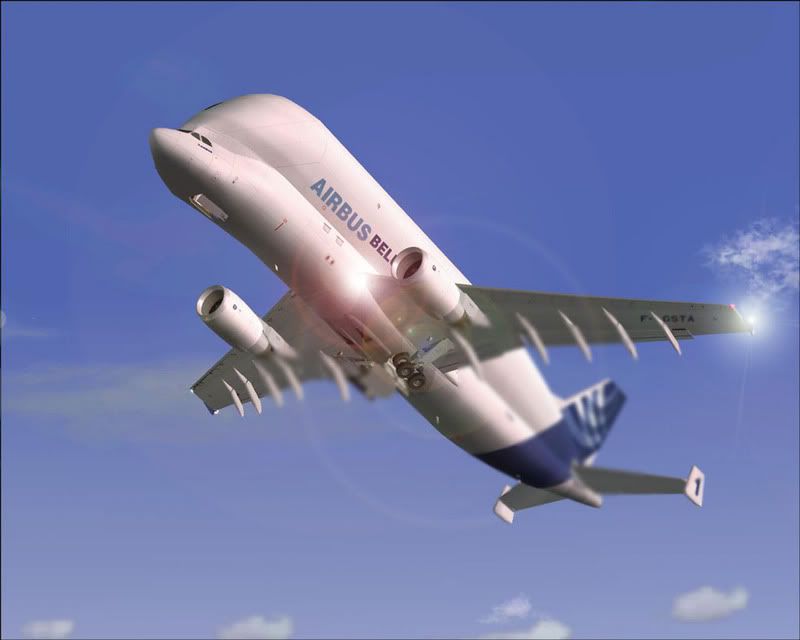
March Screenshot Competition

Post and comment on screen captures from the beautiful game here. Home of the monthly screenshot competition

Postby ooOO00OOoo » Wed Mar 28, 2007 8:14 pm

scon wrote:
h290master wrote:
victor_alpha_charlie wrote:
user posted image

That is one large mother of an aircraft :o

What a beautiful aircraft

You make a hideous thing look GREAT! :thumbup: :thumbup: :clap:
ooOO00OOoo
 

Postby scon » Thu Mar 29, 2007 8:12 am

How do you get clear shot like that, to get my shots which come out blurred I do ...

Print Scr

Copy to Microsoft Power Point

Right Click and Save as a JEPEG picture

and then up load


How do You guys get your shots so clear


(P.S. I do have a good Monitor and graphics card)
scon
Sim-holic
 
Joined: Mon Oct 16, 2006 7:16 pm
Posts: 963
Location: NZ

Postby Charl » Thu Mar 29, 2007 8:44 am

See this
User avatar
Charl
NZFF Pro
 
Joined: Mon May 01, 2006 8:28 am
Posts: 9691
Location: Auckland

Postby scon » Thu Mar 29, 2007 4:55 pm

Thanks I missed that part :thumbup: :thumbup:
scon
Sim-holic
 
Joined: Mon Oct 16, 2006 7:16 pm
Posts: 963
Location: NZ

Postby Zöltuger » Thu Mar 29, 2007 8:26 pm

V key works in FSX :D
Zöltuger
 

Postby Brennanx » Thu Mar 29, 2007 8:31 pm

Airbus Beluga is in my top 5 best list :thumbup: I just think it looks so coooooool.
Brennanx
Sim-holic
 
Joined: Thu Jan 25, 2007 6:47 pm
Posts: 795

Postby victor_alpha_charlie » Thu Mar 29, 2007 9:12 pm

wow thanks for the feedback guys! ;)
User avatar
victor_alpha_charlie
NZFF Pro
 
Joined: Wed Jan 10, 2007 11:09 am
Posts: 2372

Postby JonARNZ » Fri Mar 30, 2007 2:13 pm

Crikey! The month has flown by, thought I better throw my hat in the ring for this months screenie competition. Great entries this month, well done everyone! :thumbup: :clap:

" V1.....rotate..."

user posted image
ARNZX flightsim.co.nz
Asus Sabretooth X79 MB | i73930K CPU | 8GB DDR3 1600 C7 Ram | GTX 560Ti DCII OC | Corsair H80 Water Cooling
User avatar
JonARNZ
Senior Member
 
Joined: Sat Oct 21, 2006 12:49 pm
Posts: 1523
Location: Auckland

Postby hinch » Fri Mar 30, 2007 2:38 pm

another heavy rotating...but the livery is so photogenic i couldn't resist! it was that or embarrass myself in an aerobat...

user posted image
hinch
 

Postby flynz » Fri Mar 30, 2007 4:32 pm

hey victor alpha charlie i think you better take your aircraft for a checkup it appears to have some kind of large tumor on it :P
flynz
 

Postby brownbox » Fri Mar 30, 2007 4:40 pm

nice shot. Unfortunately, the Beluga cant be made to look nice, no matter what you do with it :P (no offence, its a lovely shot :thumbup: )
Desktop:Core 2 Duo E4300 1.8@ 3.0Ghz@ 1.36v. 4Gb Supertalent DDR2-800 2.1v@ 5-5-5-15. Asus P5N-E SLI Pencil Modded. Corsair TX 650. 512MB Palit Geforce 8800GT. 2x200GB IDE+640GB SATAII. Windows Vista Ultimate X86. Samsung SH-S222A
Phone:Nokia N900 Vodafone
Car: 1993 Mitsubishi Mirage Asti Z. Steel Blue Pearl

1996 Toyota Curren 2.0L 5 Spd Manual Silver. 205/50/R16 on Enkei K-95. Lowered on Jamex Superlows. Remote locking. Remote boot release. Cruise control
1996 Mitsubishi GTO MR

Image
User avatar
brownbox
Senior Member
 
Joined: Thu Apr 27, 2006 10:55 pm
Posts: 1318

Postby scon » Fri Mar 30, 2007 4:45 pm

Brennanx wrote: Airbus Beluga is in my top 5 best list :thumbup: I just think it looks so coooooool.

Have you seen a Psychiatrist Lately :P


By the way after you have pressed V in FSX what do you do then to get the pic.
scon
Sim-holic
 
Joined: Mon Oct 16, 2006 7:16 pm
Posts: 963
Location: NZ

Postby JonARNZ » Fri Mar 30, 2007 5:54 pm

scon wrote:
Brennanx wrote: Airbus Beluga is in my top 5 best list  :thumbup:   I just think it looks so coooooool.

Have you seen a Psychiatrist Lately :P


By the way after you have pressed V in FSX what do you do then to get the pic.

Its saved automatically as a bitmap in a folder called Flight Simulator X Files in your my Pictures folder
ARNZX flightsim.co.nz
Asus Sabretooth X79 MB | i73930K CPU | 8GB DDR3 1600 C7 Ram | GTX 560Ti DCII OC | Corsair H80 Water Cooling
User avatar
JonARNZ
Senior Member
 
Joined: Sat Oct 21, 2006 12:49 pm
Posts: 1523
Location: Auckland

Postby scon » Fri Mar 30, 2007 6:02 pm

JonARNZ wrote:
scon wrote:
Brennanx wrote: Airbus Beluga is in my top 5 best list  :thumbup:   I just think it looks so coooooool.

Have you seen a Psychiatrist Lately :P


By the way after you have pressed V in FSX what do you do then to get the pic.

Its saved automatically as a bitmap in a folder called Flight Simulator X Files in your my Pictures folder

Wouldn't it be better to be JEPG

isn't that what it has to be to upload here
scon
Sim-holic
 
Joined: Mon Oct 16, 2006 7:16 pm
Posts: 963
Location: NZ

Postby Alex » Fri Mar 30, 2007 6:53 pm

Yep, best to capture the image as a bitmap, then crop, resize and any other editing before converting it to a jpeg. ;)

Alex
Alex
NZFF Pro
 
Joined: Fri Jul 14, 2006 3:39 pm
Posts: 3620

Postby victor_alpha_charlie » Fri Mar 30, 2007 7:33 pm

JonARNZ wrote: Crikey! The month has flown by, thought I better throw my hat in the ring for this months screenie competition. Great entries this month, well done everyone! :thumbup: :clap:

" V1.....rotate..."

user posted image

well im screwed... Incredible shot! if you ever get sick of your computer.. and your skills.. call me Jon :lol:
User avatar
victor_alpha_charlie
NZFF Pro
 
Joined: Wed Jan 10, 2007 11:09 am
Posts: 2372

Postby Charl » Fri Mar 30, 2007 7:41 pm

scon wrote:
JonARNZ wrote:
scon wrote:
Brennanx wrote: Airbus Beluga is in my top 5 best list  :thumbup:   I just think it looks so coooooool.

Have you seen a Psychiatrist Lately :P


By the way after you have pressed V in FSX what do you do then to get the pic.

Its saved automatically as a bitmap in a folder called Flight Simulator X Files in your my Pictures folder

Wouldn't it be better to be JEPG

isn't that what it has to be to upload here

Do check that folder from time to time, as the BMP's tend to be kinda weighty - 15? MB each, depending on your setup.
User avatar
Charl
NZFF Pro
 
Joined: Mon May 01, 2006 8:28 am
Posts: 9691
Location: Auckland

Postby scon » Fri Mar 30, 2007 9:46 pm

How do you convert to JEPG


Found out now
Last edited by scon on Fri Mar 30, 2007 9:48 pm, edited 1 time in total.
scon
Sim-holic
 
Joined: Mon Oct 16, 2006 7:16 pm
Posts: 963
Location: NZ

Postby JonARNZ » Fri Mar 30, 2007 9:50 pm

The average is about 2.5MB (screen res will determine this size), so if you take heaps then yes, clear it out occasionally. BMP's are the best format for initial editing as they retain detail, then you can convert and compress if you need to (but not much, 15% is usually more than ample IMO)
ARNZX flightsim.co.nz
Asus Sabretooth X79 MB | i73930K CPU | 8GB DDR3 1600 C7 Ram | GTX 560Ti DCII OC | Corsair H80 Water Cooling
User avatar
JonARNZ
Senior Member
 
Joined: Sat Oct 21, 2006 12:49 pm
Posts: 1523
Location: Auckland

Postby Alex » Fri Mar 30, 2007 9:56 pm

I usually compress to get a size, so I try to compress my jpeg's to around 100-150kb each, thats my 'secret', you can't have good quality pictures if they are around 50kb. ;)

Alex
Last edited by Alex on Fri Mar 30, 2007 9:58 pm, edited 1 time in total.
Alex
NZFF Pro
 
Joined: Fri Jul 14, 2006 3:39 pm
Posts: 3620

Previous

Return to Screenshots

Who is online

Users browsing this forum: No registered users and 19 guests