Argh! Help! What is wrong! - ATC

A place to converse about the general aspects of flight simulation in New Zealand

Postby ScottyB » Sat Apr 26, 2008 7:09 pm

Hi everyone,

When i am in a flight and i go to speak with ATC (ie: to request take off) there is no sound. It says "1. Request takeoff" so i hit 1, just like i usually would. But now i hit 1 and there is no speech/sound. Instead, it sort of skips a frame and comes up with the next option (ie: "1. Acknowledge takeoff"). So i go into the ATC settings and it has nothing in the "Pilot Voice" drop down box (normally it would have "male 3"). Here is the pic of what i mean:

Whats Wrong!!??
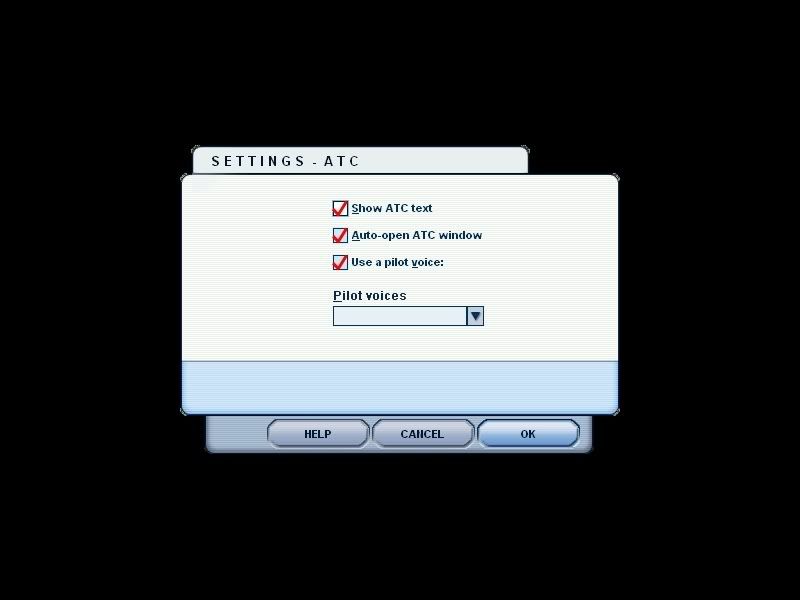


What have i done???? Please help me!!
Image
User avatar
ScottyB
Sim-holic
 
Topic author
Joined: Thu Aug 30, 2007 3:58 pm
Posts: 571
Location: New Zealand

Postby creator2003 » Sat Apr 26, 2008 7:19 pm

Try rebuilding the cfg? dont know if it would work but ...you will find the fs9/fsx cfg in this area -the creator part "C:\Documents and Settings\creator\Application Data\Microsoft/" you would also need to go to folder options and turn off hidden folders ...
you dump the old one somewhere else and delete and just restart the sim and it will build another ...
sound problems like this has never come up on the boards here so will just have to see what happens ...
mike
User avatar
creator2003
NZFF Pro
 
Joined: Fri Jun 16, 2006 12:08 am
Posts: 4633
Location: Cant U C im LOCO

Postby ScottyB » Sat Apr 26, 2008 7:26 pm

creator2003 wrote:
QUOTE (creator2003 @ Apr 26 2008, 07:19 PM) <{POST_SNAPBACK}>
Try rebuilding the cfg? dont know if it would work but ...you will find the fs9/fsx cfg in this area -the creator part "C:\Documents and Settings\creator\Application Data\Microsoft/" you would also need to go to folder options and turn off hidden folders ...
you dump the old one somewhere else and delete and just restart the sim and it will build another ...
sound problems like this has never come up on the boards here so will just have to see what happens ...
mike


Hi,

I tried to follow those steps but does not work. I might just try to install FS9 again and see what happens. Think that may work?

Cheers.
Image
User avatar
ScottyB
Sim-holic
 
Topic author
Joined: Thu Aug 30, 2007 3:58 pm
Posts: 571
Location: New Zealand

Postby creator2003 » Sat Apr 26, 2008 7:37 pm

You could just copy the files you mite need from the discs ???this would save a bit of time if you have a idea on where to look etc ...
User avatar
creator2003
NZFF Pro
 
Joined: Fri Jun 16, 2006 12:08 am
Posts: 4633
Location: Cant U C im LOCO

Postby ScottyB » Sun Apr 27, 2008 12:42 pm

It's fixed!! I just had to reinstall the whole thing but thats ok.

Thanks guys
Image
User avatar
ScottyB
Sim-holic
 
Topic author
Joined: Thu Aug 30, 2007 3:58 pm
Posts: 571
Location: New Zealand


Return to General

Who is online

Users browsing this forum: No registered users and 9 guests