Remove a Gauge

A place to converse about the general aspects of flight simulation in New Zealand

Postby ardypilot » Sun Feb 11, 2007 3:33 pm

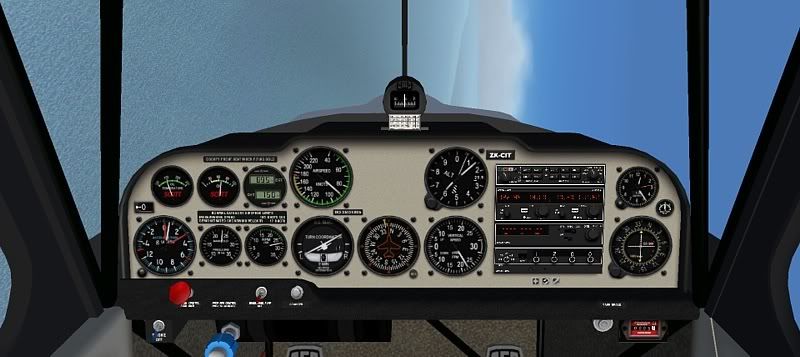
Is it possible to remove a single gauge from an aircraft's panel, so it won't be visable in both 2D and VC views?

I am trying to get rid of the attitude indicator in the Airhead Decathlon found here: airhead.hfdd.com/airworthy/04_8kcab.htm to resemble ZK-CIT, which does not have that gauge.
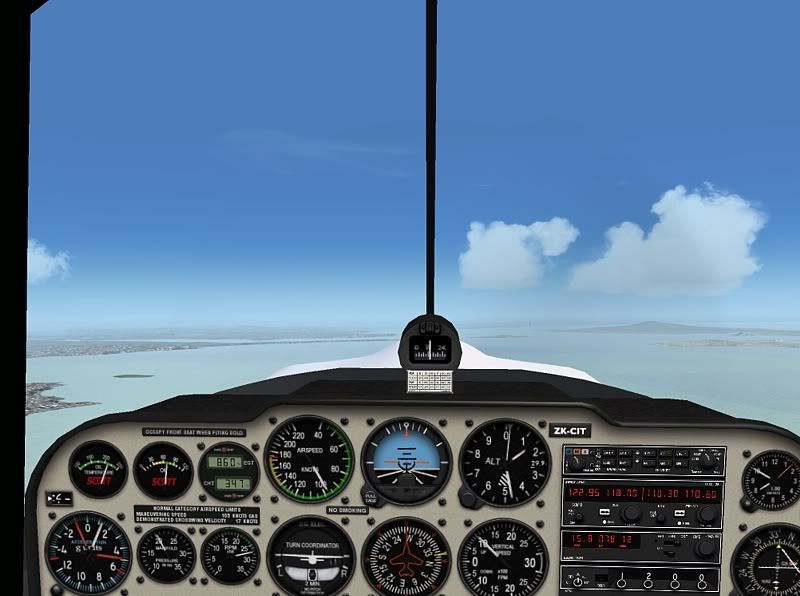
user posted image

Any tips or guides would be much appreciated,
cheers!
User avatar
ardypilot
NZFF Pro
 
Topic author
Joined: Wed Apr 26, 2006 10:01 am
Posts: 6802
Location: Auckland

Postby ZK-Brock » Sun Feb 11, 2007 3:57 pm

Hey Trolly, try FS Panel Studio. It's ademo so you cannot save your work, but with a bit of brains you can tweak the Panel CFG to add or remove gauges. However I don't think this works in the VC
ZK-Brock
NZFF Pro
 
Joined: Sun Jul 23, 2006 3:35 pm
Posts: 2035

Postby Jimmy » Sun Feb 11, 2007 4:24 pm

Yes Just open up the panel.cfg (found in the panel folder), for the 2d panel there will proably be a section called "main" or something and look for a line that says something like "atitudeindicator.....gau" witch will be followed by a series of numbers (those numbers are the location on the panel)

Excacly the same for the VC, it will be there in the panel.cfg jsut a little furthur down and you may have to look harder for the guage as the vc is usualy just in sections with "vc1.,"vc2" etc..

So just delete the line for the guage you don't want, oh back up the cfg first thow :D
Jimmy
 

Postby ardypilot » Sun Feb 11, 2007 5:22 pm
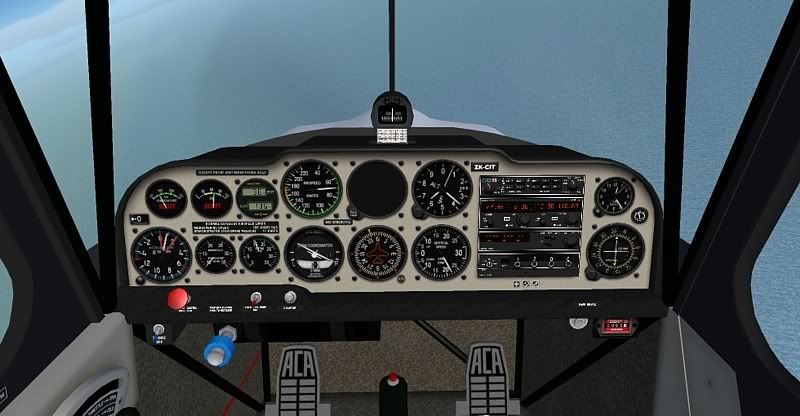
Cool thanks Jimmy, it was as easy as pie:
user posted image

Thats all I needed really, but have you got any idea how to move the empty black circle there?

EDIT: nevermind, I figured that out for myself. I just edited the .bmp file in the panel folder and now it looks just like the real thing, making you have to use the horizon level on the windscreen as your attitude indicator!
user posted image
Last edited by ardypilot on Sun Feb 11, 2007 5:35 pm, edited 1 time in total.
User avatar
ardypilot
NZFF Pro
 
Topic author
Joined: Wed Apr 26, 2006 10:01 am
Posts: 6802
Location: Auckland

Postby Jimmy » Sun Feb 11, 2007 7:03 pm

brilliant, pleased it worked :) I must do that to some of my aircraft as when I did my introductry flight last year the instructor went on and on about my looking at the instruments to much and shoudl use the horizon for referance, well easy solution for that, remove the whole gauges folder :D haha
Jimmy
 

Postby ardypilot » Sun Feb 11, 2007 7:47 pm

easy solution for that, remove the whole gauges folder

Lol you could actually do that and just use the 'shift+z' red lines of text at the top of the screen for guidence!
Last edited by ardypilot on Sun Feb 11, 2007 7:47 pm, edited 1 time in total.
User avatar
ardypilot
NZFF Pro
 
Topic author
Joined: Wed Apr 26, 2006 10:01 am
Posts: 6802
Location: Auckland


Return to General

Who is online

Users browsing this forum: No registered users and 12 guests