Naki wrote:QUOTE (Naki @ Jun 25 2009, 10:32 PM) <{POST_SNAPBACK}>Nice shots ..at the risk of hijacking Lawries thread ..have you got Rick Pipers Argosy working 100% in FSX?
Sooner than hijack Lawries thread thought it better to open a new one.
It is not 100% there are one or two miner problems with the virtual cockpit but apart from that the over all is quite acceptable.
Argosy and FS9 aircraft in FSX
34 posts
• Page 1 of 2 • 1, 2
 by dbcunnz » Thu Jun 25, 2009 10:49 pm

-


dbcunnz - NZFF Pro
- Topic author
- Joined: Thu Feb 21, 2008 12:56 pm
- Posts: 4009
- Location: Blenheim New Zealand

by Adrian Brausch » Sun Jul 19, 2009 10:01 pm
dbcunnz wrote:QUOTE (dbcunnz @ Jun 30 2009, 10:49 AM) <{POST_SNAPBACK}>Sooner than hijack Lawries thread thought it better to open a new one.
It is not 100% there are one or two miner problems with the virtual cockpit but apart from that the over all is quite acceptable.
I have fixed the problems with the Argosys VC,..namely the upper console being see though. I checked in the panel.cfg and the background bmp was missing for the overhead console so I made one then positioned all of the gauges for the overhead in their correct places so now its fully clickable..


-

Adrian Brausch - Senior Member
- Joined: Tue May 15, 2007 11:39 am
- Posts: 1437
- Location: Auckland
by dbcunnz » Sun Jul 19, 2009 10:54 pm
brausch wrote:QUOTE (brausch @ Jul 19 2009, 10:01 PM) <{POST_SNAPBACK}>I have fixed the problems with the Argosys VC,..namely the upper console being see though. I checked in the panel.cfg and the background bmp was missing for the overhead console so I made one then positioned all of the gauges for the overhead in their correct places so now its fully clickable..
Hi brausch is there any way that I can get the background.bmp and the details for positioning the gauges in their correct places
Doug
-
dbcunnz - NZFF Pro
- Topic author
- Joined: Thu Feb 21, 2008 12:56 pm
- Posts: 4009
- Location: Blenheim New Zealand
by Adrian Brausch » Sun Jul 19, 2009 11:32 pm
dbcunnz wrote:QUOTE (dbcunnz @ Jul 24 2009, 11:54 AM) <{POST_SNAPBACK}>Hi brausch is there any way that I can get the background.bmp and the details for positioning the gauges in their correct places
Doug
yeah man,..give me your email and ill send you the new overhead bmp and the new panel.cfg
-
Adrian Brausch - Senior Member
- Joined: Tue May 15, 2007 11:39 am
- Posts: 1437
- Location: Auckland
by Ian Warren » Sun Jul 19, 2009 11:56 pm
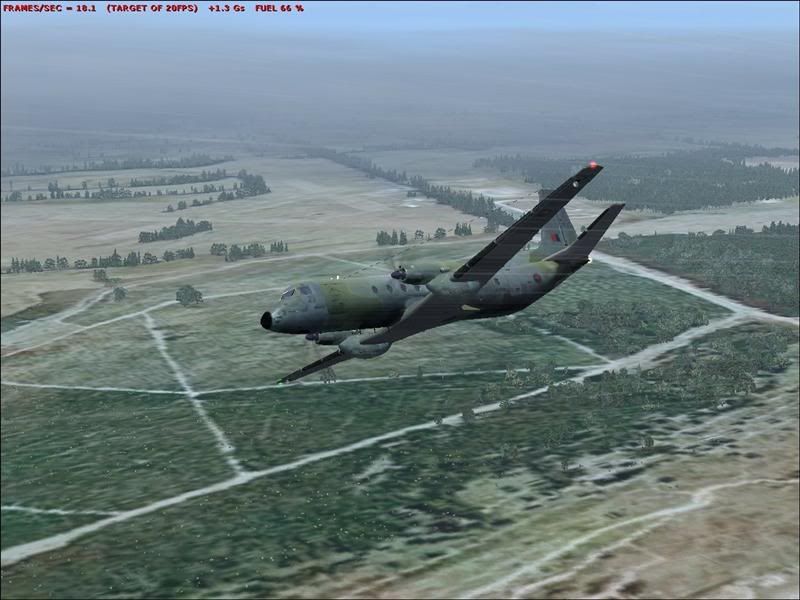
Adrian , it looks impressive , i best pull the HS748 and Andover out .. mm i did 

-

Ian Warren - NZFF Pro
- Joined: Fri May 05, 2006 5:23 pm
- Posts: 41187
- Location: AREA 51
by dbcunnz » Mon Jul 20, 2009 12:00 am
brausch wrote:QUOTE (brausch @ Jul 19 2009, 11:32 PM) <{POST_SNAPBACK}>yeah man,..give me your email and ill send you the new overhead bmp and the new panel.cfg
Thanks the SAF Argosy is my favorite aircraft have flown many hrs from top to bottom of NZ and to the Chathams and back
My email
cunniffe.d@ihug.co.nz
-
dbcunnz - NZFF Pro
- Topic author
- Joined: Thu Feb 21, 2008 12:56 pm
- Posts: 4009
- Location: Blenheim New Zealand
by dbcunnz » Mon Jul 20, 2009 12:06 am
Ian Warren wrote:QUOTE (Ian Warren @ Jul 19 2009, 11:56 PM) <{POST_SNAPBACK}>Adrian , it looks impressive , i best pull the HS748 and Andover out .. mm i did
Hi Ian I used to have the Andover in the 3 RNZAF textures but have somehow lost them now I only have the RAF Camo one do you know where I can get the RNZAF repaint from again
Doug
-
dbcunnz - NZFF Pro
- Topic author
- Joined: Thu Feb 21, 2008 12:56 pm
- Posts: 4009
- Location: Blenheim New Zealand
by Ian Warren » Mon Jul 20, 2009 12:26 am
Doug , this is a very old screen , over West Melton dated when FSX was first released , at the moment my FS PC is in the shop , not playing the game so to speak .. this paint has not been released , it was .. well old WIP , because the latter pc is out was tinkering with the Andover today , my network is down and cant post any updated screens or files.
Adrian might be able to get a copy to you
Adrian might be able to get a copy to you
Last edited by Ian Warren on Mon Jul 20, 2009 12:38 am, edited 1 time in total.
-
Ian Warren - NZFF Pro
- Joined: Fri May 05, 2006 5:23 pm
- Posts: 41187
- Location: AREA 51
by Adrian Brausch » Mon Jul 20, 2009 12:48 am
Ian Warren wrote:QUOTE (Ian Warren @ Jul 24 2009, 12:26 PM) <{POST_SNAPBACK}>Doug , this is a very old screen , over West Melton dated when FSX was first released , at the moment my FS PC is in the shop , not playing the game so to speak .. this paint has not been released , it was .. well old WIP , because the latter pc is out was tinkering with the Andover today , my network is down and cant post any updated screens or files.
Adrian might be able to get a copy to you
yep can do Doug. On another note I bet this old girl hasnt been seen for a while ,..thought it was time to pull her out of the hangar for a check flight


-
Adrian Brausch - Senior Member
- Joined: Tue May 15, 2007 11:39 am
- Posts: 1437
- Location: Auckland

by Ian Warren » Mon Jul 20, 2009 12:58 am
Adrian , brings back memories I do have photos , both sitting in Hamilton , painted and stripped of the Nationwide Air scheme with a Yellow/orange pin strip arr the 80s
I do have photos , both sitting in Hamilton , painted and stripped of the Nationwide Air scheme with a Yellow/orange pin strip arr the 80s-
Ian Warren - NZFF Pro
- Joined: Fri May 05, 2006 5:23 pm
- Posts: 41187
- Location: AREA 51
by dbcunnz » Mon Jul 20, 2009 1:17 am
brausch wrote:QUOTE (brausch @ Jul 20 2009, 12:48 AM) <{POST_SNAPBACK}>yep can do Doug. On another note I bet this old girl hasnt been seen for a while ,..thought it was time to pull her out of the hangar for a check flight
Hi Adrian thanks for the panel.zip now another Question have you got the VC cockpit that will work in FSX for the Carvair as it is another one of my favorites I have in my FSX but as I am using the Matrox and three 22inch screens I need the VC cockpit
Edit I have tried to get the VC cockpit of the DC4 to work but have had no success.Last edited by dbcunnz on Mon Jul 20, 2009 1:20 am, edited 1 time in total.
-
dbcunnz - NZFF Pro
- Topic author
- Joined: Thu Feb 21, 2008 12:56 pm
- Posts: 4009
- Location: Blenheim New Zealand
by Adrian Brausch » Mon Jul 20, 2009 1:26 am
dbcunnz wrote:QUOTE (dbcunnz @ Jul 24 2009, 01:17 PM) <{POST_SNAPBACK}>Hi Adrian thanks for the panel.zip now another Question have you got the VC cockpit that will work in FSX for the Carvair as it is another one of my favorites I have in my FSX but as I am using the Matrox and three 22inch screens I need the VC cockpit
Edit I have tried to get the VC cockpit of the DC4 to work but have had no success.
The carvair has a VC,..kindof,..no gauges justa rough representation of a cockpit. I use a dc-6 panel from Tom Gibsons website " Calclassics". its a pretty complete panel..
BTW,..I have sent you the andover repaints to your email..Last edited by Adrian Brausch on Mon Jul 20, 2009 1:27 am, edited 1 time in total.
-
Adrian Brausch - Senior Member
- Joined: Tue May 15, 2007 11:39 am
- Posts: 1437
- Location: Auckland
by Adrian Brausch » Mon Jul 20, 2009 6:34 pm
Ian Warren wrote:QUOTE (Ian Warren @ Jul 24 2009, 01:58 PM) <{POST_SNAPBACK}>Adrian , brings back memories
the old girl..
http://www.airliners.net/photo/Unknown/Avi...b151a60a2b9b7bc
-
Adrian Brausch - Senior Member
- Joined: Tue May 15, 2007 11:39 am
- Posts: 1437
- Location: Auckland
by Adrian Brausch » Mon Jul 20, 2009 8:39 pm
another old TProp that works well in FSX..repaint into Airwork paint scheme. ( boring I know but I like freighters what can I say ..)


-
Adrian Brausch - Senior Member
- Joined: Tue May 15, 2007 11:39 am
- Posts: 1437
- Location: Auckland

by Adrian Brausch » Mon Jul 20, 2009 10:20 pm
mavman wrote:QUOTE (mavman @ Jul 25 2009, 11:03 AM) <{POST_SNAPBACK}>Nice screenies.....what model Friendship is this?
thanks man,..the model is made by Miguel Garnica, the original download is on flightsim. Just do a search using his name and you will find it.
-
Adrian Brausch - Senior Member
- Joined: Tue May 15, 2007 11:39 am
- Posts: 1437
- Location: Auckland
by dbcunnz » Tue Jul 21, 2009 12:26 am
brausch wrote:QUOTE (brausch @ Jul 20 2009, 12:55 AM) <{POST_SNAPBACK}>Doug, the Argosy VC fix is in your email..
There is another problem with the Argosy I don't know if you have struck it but when you go into reverse thrust the throttles go in when using F2 and the revs go up to reverse thrust speed but the propellers do not go into reverse thrust so instead of slowing you up it give you forward thrust which is very undesirable when landing.
Maybe there is some way of changing this in the aircraft.cfg file.
Does anyone knows how to rectify this problem???
Edit: Found a fix for the Argosy problem revers thrust working fine now.
Another problem is with the Carvair in FSX the propellers show up ad discs is there a propeller file in the Texture folder that I can change to fix this if there is what file can I get to fix it??
Also is there any way to get a DC4 VC cockpit to work in the Carvair???Last edited by dbcunnz on Tue Jul 21, 2009 1:55 am, edited 1 time in total.
-
dbcunnz - NZFF Pro
- Topic author
- Joined: Thu Feb 21, 2008 12:56 pm
- Posts: 4009
- Location: Blenheim New Zealand
by Adrian Brausch » Tue Jul 21, 2009 8:51 pm
Another problem is with the Carvair in FSX the propellers show up ad discs is there a propeller file in the Texture folder that I can change to fix this if there is what file can I get to fix it??
Also is there any way to get a DC4 VC cockpit to work in the Carvair???
[/quote]
I will send you a new prop texture that will fix that, and only some models built specifically for FSX using the latest compiling tools can accept VC cockpits from other aircraft models as far as I am aware . ..so any models pre-dating these FSX specific models cannot accept VCs from any other model. If you go into the carvairs model folder , right click on the file called " new_carv.mdl " and open it using notepad (wait for 10-20 seconds for it to open) you will see in the top left hand corner (amongst a bunch of alien looking script ) this file name " MDL8MDLH ". that indicates that it was compiled using " old " techniques and wont accept a VC from ANY othe model. If you go and do the same with say the default 737_800 , clicking on the file called " B737_800.mdl " , you will see this at the top of the opened notepad ..." MDLXMDLH " . this tells you that it is compiled using current FSX specific techniques and can accept VC's from other FSX specific models. You will notice a file called " B737_800_interior.mdl " in the default 737_800's folder,..this is its VC model. You can use that process to check any models suitability for a " VC transplant "
BTW I just got a message from my email saying the andover repaints didnt get sent due to file size so I will cut them into 2 files and will attempt to resend them to you,..sorry mate ..
Also is there any way to get a DC4 VC cockpit to work in the Carvair???
[/quote]
I will send you a new prop texture that will fix that, and only some models built specifically for FSX using the latest compiling tools can accept VC cockpits from other aircraft models as far as I am aware . ..so any models pre-dating these FSX specific models cannot accept VCs from any other model. If you go into the carvairs model folder , right click on the file called " new_carv.mdl " and open it using notepad (wait for 10-20 seconds for it to open) you will see in the top left hand corner (amongst a bunch of alien looking script ) this file name " MDL8MDLH ". that indicates that it was compiled using " old " techniques and wont accept a VC from ANY othe model. If you go and do the same with say the default 737_800 , clicking on the file called " B737_800.mdl " , you will see this at the top of the opened notepad ..." MDLXMDLH " . this tells you that it is compiled using current FSX specific techniques and can accept VC's from other FSX specific models. You will notice a file called " B737_800_interior.mdl " in the default 737_800's folder,..this is its VC model. You can use that process to check any models suitability for a " VC transplant "
BTW I just got a message from my email saying the andover repaints didnt get sent due to file size so I will cut them into 2 files and will attempt to resend them to you,..sorry mate ..
Last edited by Adrian Brausch on Tue Jul 21, 2009 8:54 pm, edited 1 time in total.
-
Adrian Brausch - Senior Member
- Joined: Tue May 15, 2007 11:39 am
- Posts: 1437
- Location: Auckland
34 posts
• Page 1 of 2 • 1, 2
Who is online
Users browsing this forum: No registered users and 2 guests