 Posted: Tue May 20, 2008 7:25 pm
Hey guys, does anyone know here how I can get it to sort data by the titles in the top line of the pic? Eg I want to get it so it sorts the data from Shortest distance-longest distance. Pic here:
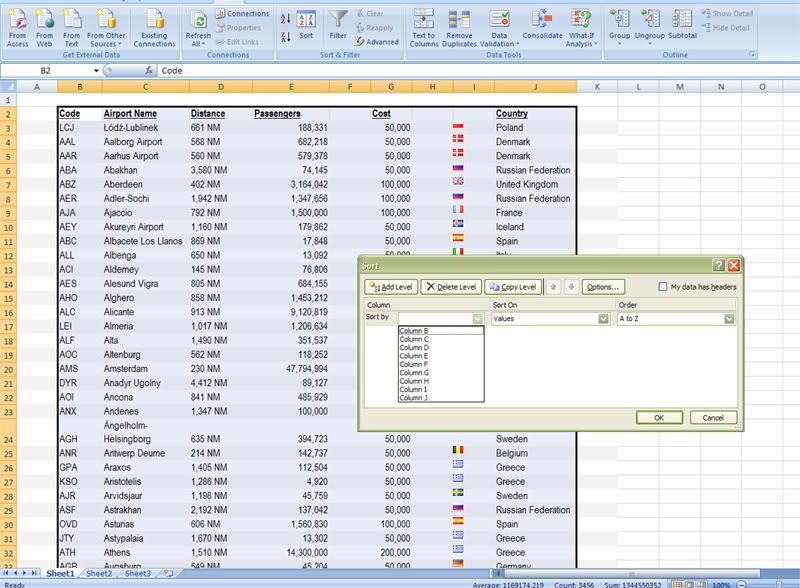
Posted: Tue May 20, 2008 7:25 pmPosted: Tue May 20, 2008 7:51 pmPosted: Tue May 20, 2008 8:09 pmPosted: Tue May 20, 2008 8:13 pmPosted: Tue May 20, 2008 8:38 pmCharl wrote:QUOTE (Charl @ May 20 2008, 08:13 PM) <{POST_SNAPBACK}>Create 2 columns, 1 for the value, the other for the "NM" text.
Use Data/text to columns to do this quickly.
Worked a treat. Thanks heaps!
Posted: Thu May 22, 2008 7:30 pmvictor_alpha_charlie wrote:QUOTE (victor_alpha_charlie @ May 20 2008, 08:38 PM) <{POST_SNAPBACK}>Worked a treat. Thanks heaps!
The other option is to format the cells so that it adds the NM to the end of the number as a format rather than a text string.
Jamie