Posted: Fri Jan 09, 2009 1:00 pm
Hi Everyone
In a few of my other posts I have been alluding to a upcoming payware project that I am involved in. Although it is still a fair way off, we thought it would be good to share some details of it with you now so that you can keep up with progress on this exciting project. We are still without a name and many details have yet to be finalised, but this will be released under the Sim Pilot Experience brand.
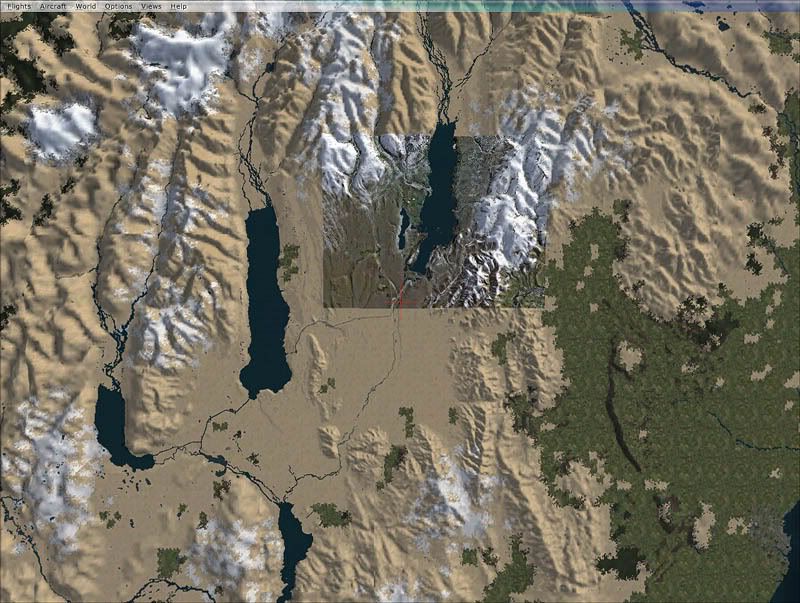
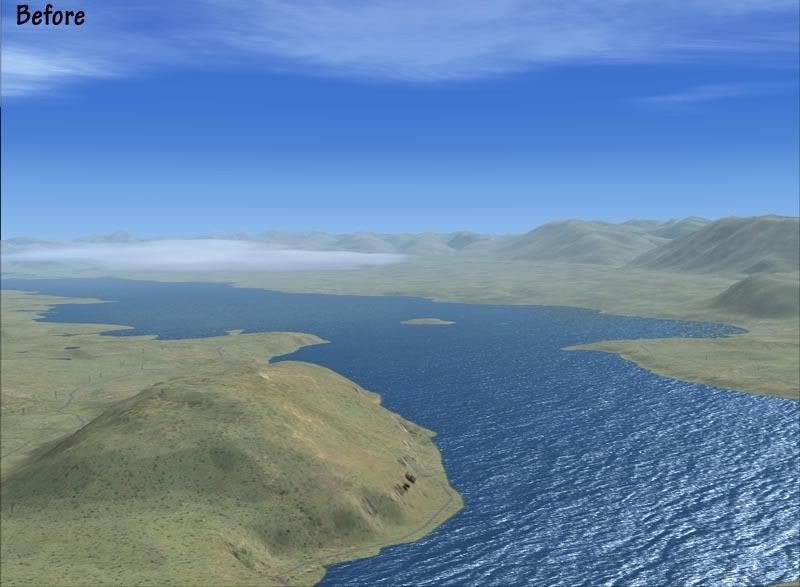
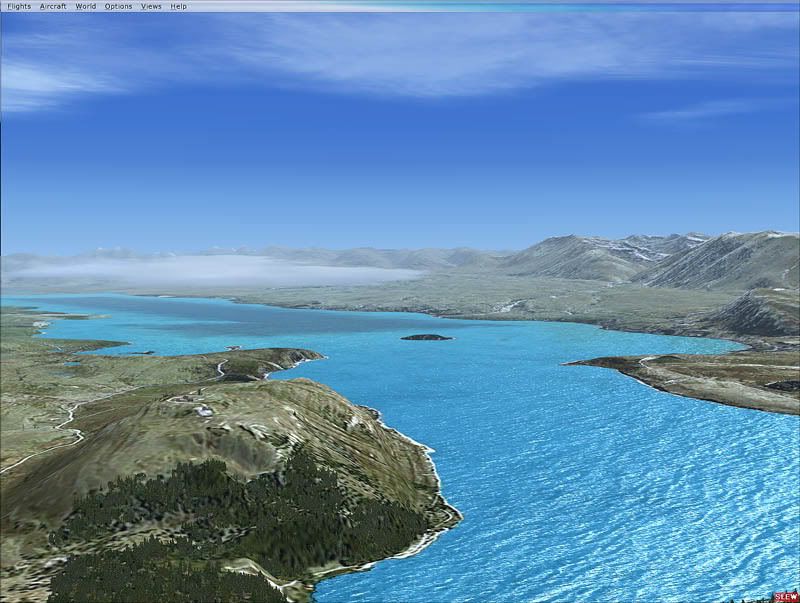
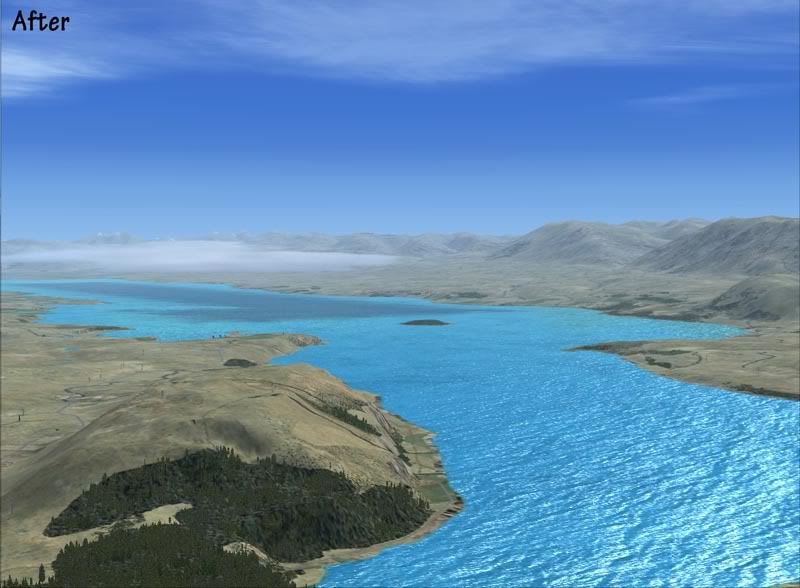
One of the major flaws of the RTM version of FSX was the landclass was woeful...most of New Zealand looked like a desert, many small towns were completely missing, and large areas of vegetation were completely overlooked. The water class wasn't much better with large tidal estuaries and inlets, which in reality are brown, shallow and muddy appearing as clean and deep. It locked up the potential that is inherent in the FSX display engine and reduced immersion provided by the simulator.
This addon for Micorsoft FSX not only rectifies this, but adds some exciting new features to unlock the potential in FSX and create a highly accurate and realistic Environment. Some of these features may be a world first.
Why is this more than just a landclass replacement?
There are many landclass files avaliable for New Zealand.....ours is different. If the aim of Flight Simulator is 'As real as it gets', then this addon stays true to this ideal. Not only are we using the best commercial data avaliable, we are compiling it in a way that maintains 100% spatial accuracy.
How do we do this?
The 'default' method of presenting changes in landcover in Flightsim is to use a simple raster/pixel image where each pixel represents a different type of vegetation or land cover. Using this method, the maxium accuracy that can be achieved is over 1.2km meaning that boundaries of forests and towns blend into each other over large distances. The real world is not like that. Forests stop at the boundary of the property. Farms stop at the edge of a road.
We have managed to compile the data in a way that gets around this limtation and maintains the full spatial accuracy of the data resulting in over 20 times better accuracy. Every boundary, road and object in our addon should be closer than 50 metres of its actual location.
If a forest stops at the boundary of a road in real life, it will do the same in FSX.
If a town boundary is stopped by a river or stream, it will do the same in FSX.
As well as very accurate landclass and water class for the whole of New Zealand, the package will also come with*:
Properly classified roads and freeways for the whole country
Rock outcrops
Tramping huts and tracks
Minor streams to compliment the larger River polygons.
Radar stations and radio masts for the whole country
Fencelines for the whole country**
Tanks (such as petroleum) for the whole country.
Waterfalls
There may also be some replacement key texturs to better display a landtype unique to New Zealand (although this package is not a texture replacement. Default textures are used when possible)
Although this is in the early stages of development, I've attached some screen shots below to see the difference between the default data and this addon
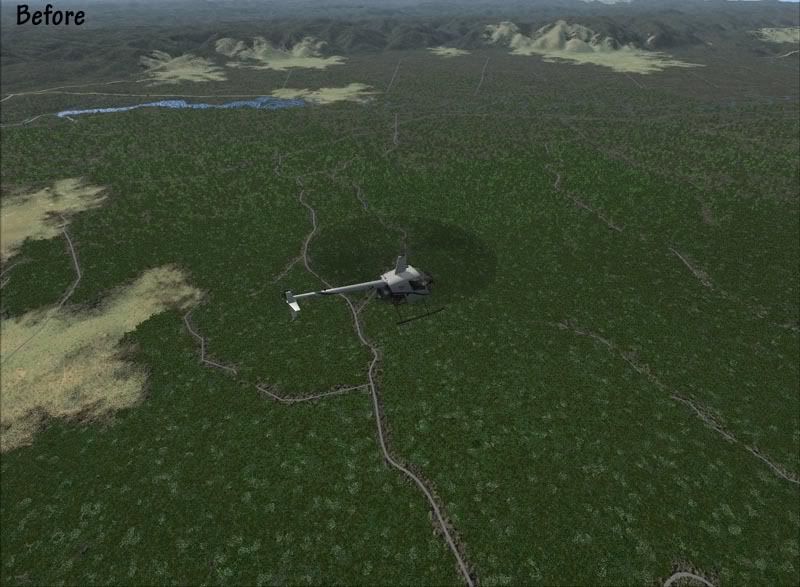
Near Murupara in the Bay of Plenty: Before
Near Murupara in the Bay of Plenty: After
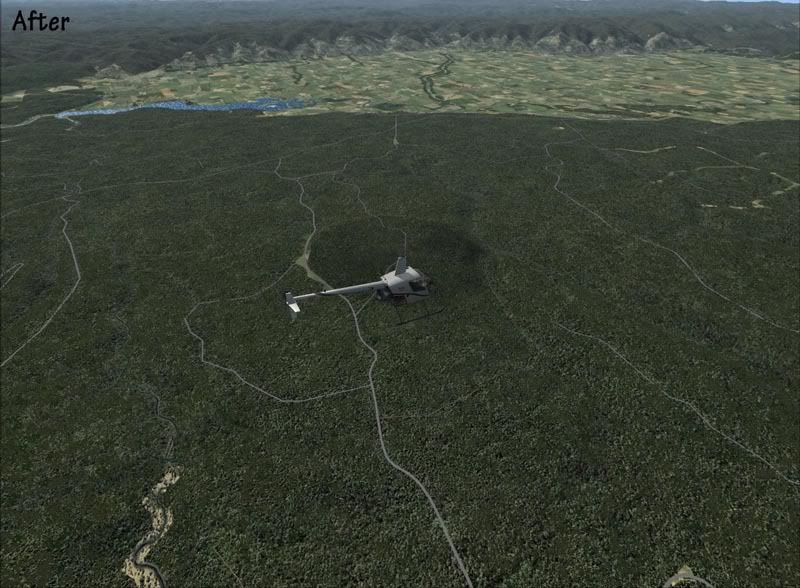
Note: Areas of pasture are clearly defined in the valley.
Plantation forest is perfectly delineated- It has been completely missed in the default data.
Riparian trees are visible down the edges of the streams- these have a mixed vegetation type which will give colour in Autumn.
Roads have been correctly classified by surface and number of lanes. Tracks covering the whole of the country have been added (including tramping tracks). None of this is avaliable in the default data.
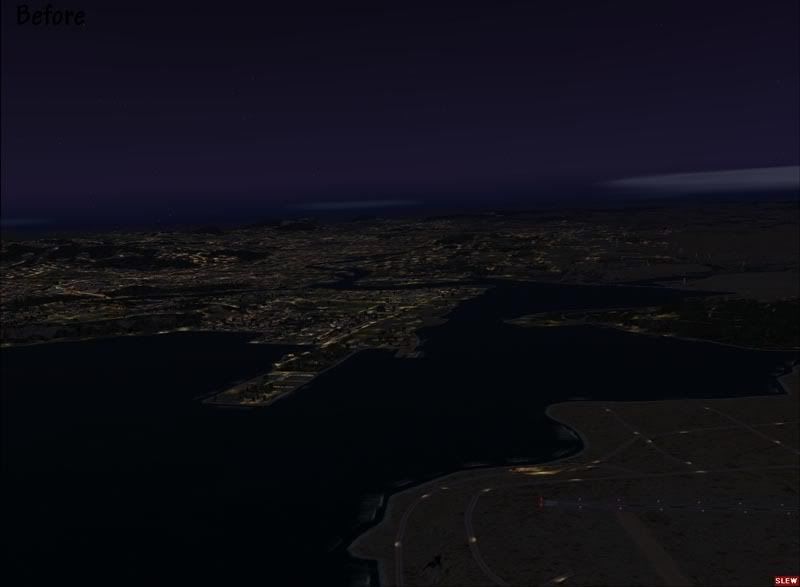
Near Whangarei Airport: Before
Near Whangarei Airport: After
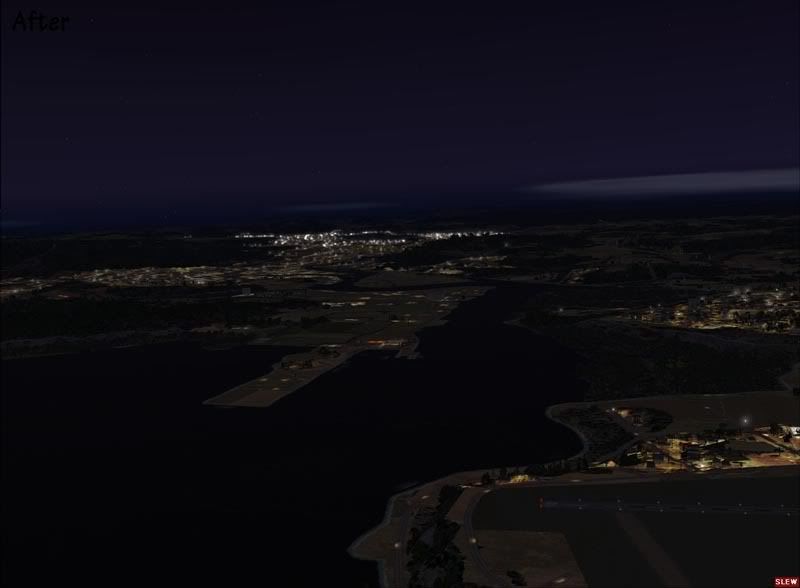
Note: Urban areas match their real world locations and aren't 'splashed on' like when using traditional landclass methods.
Night lighting is provided for urban streets which adds depth and realism to the night scene.
Airport boundaries are correctly delineated.
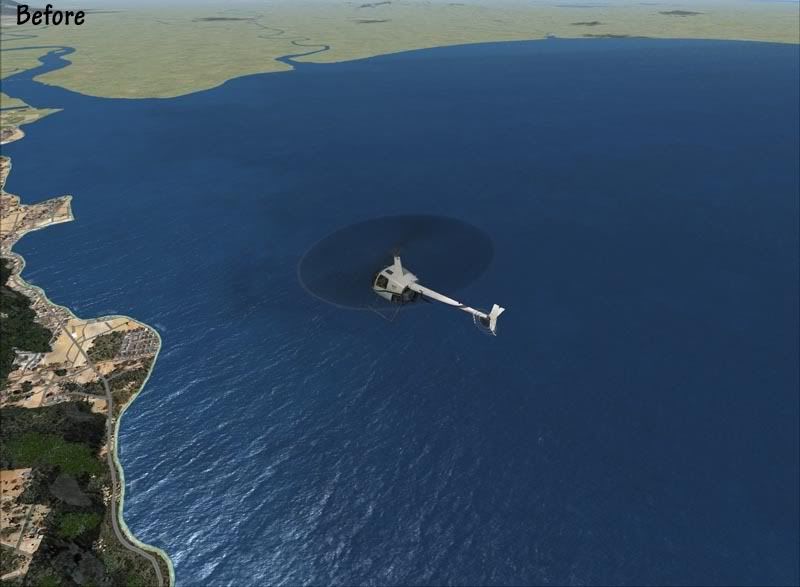
Near Thames: Before
Near Thames: After
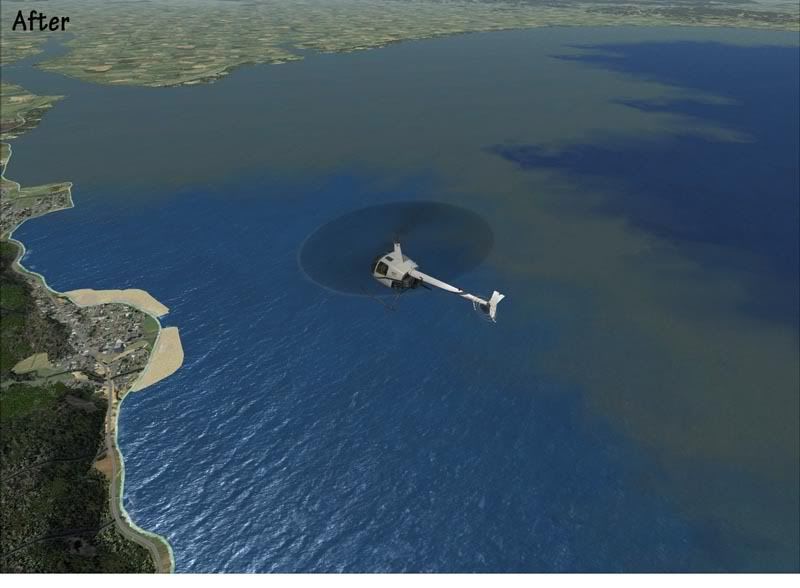
Note: Water class better represents areas of muddy water coming from the river.
The foreshore area is accurately defined with mangroves, beaches and rocks included.
Small towns and settlements are all included and correctly textured.
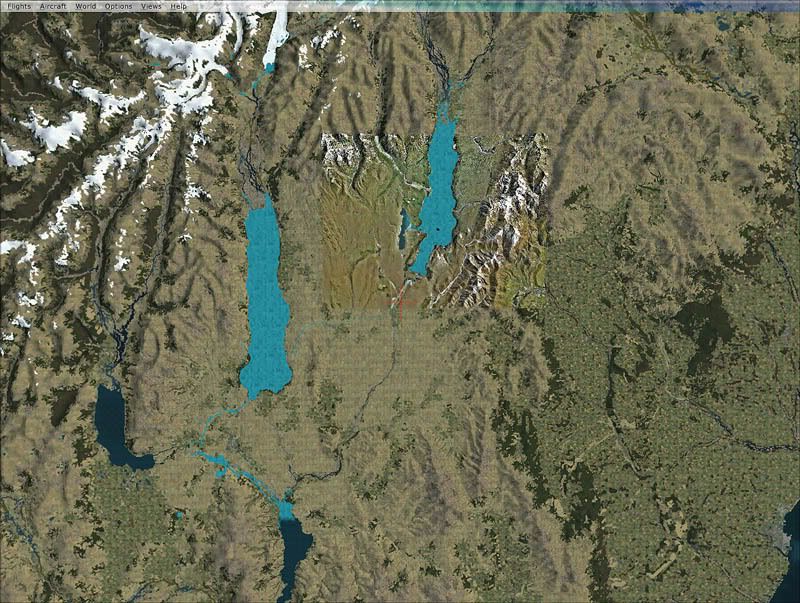
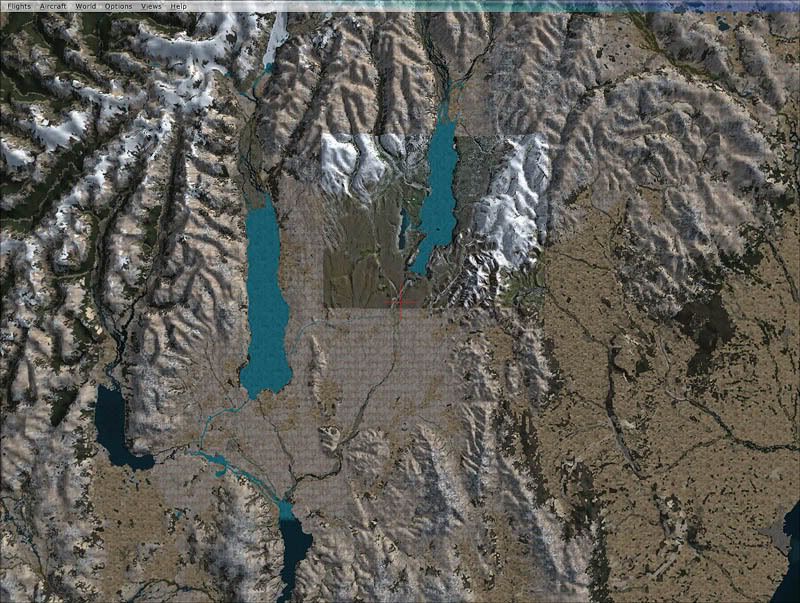
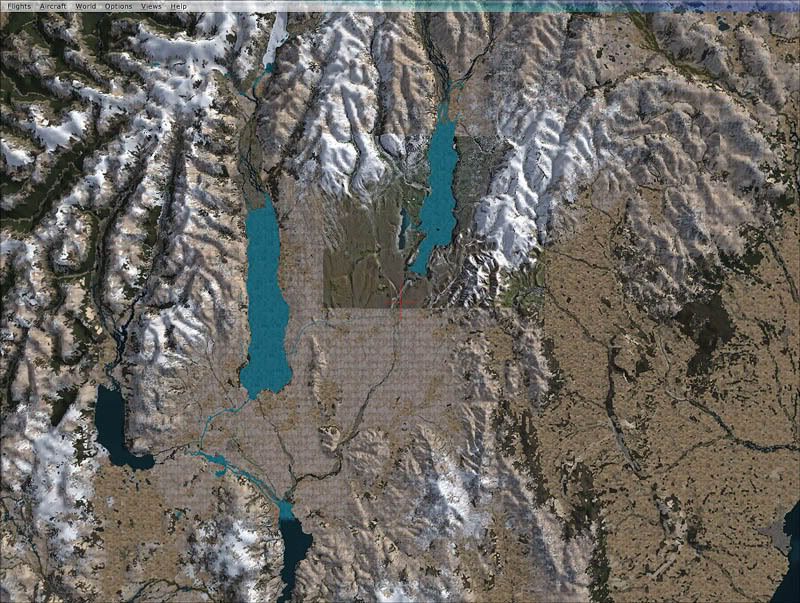
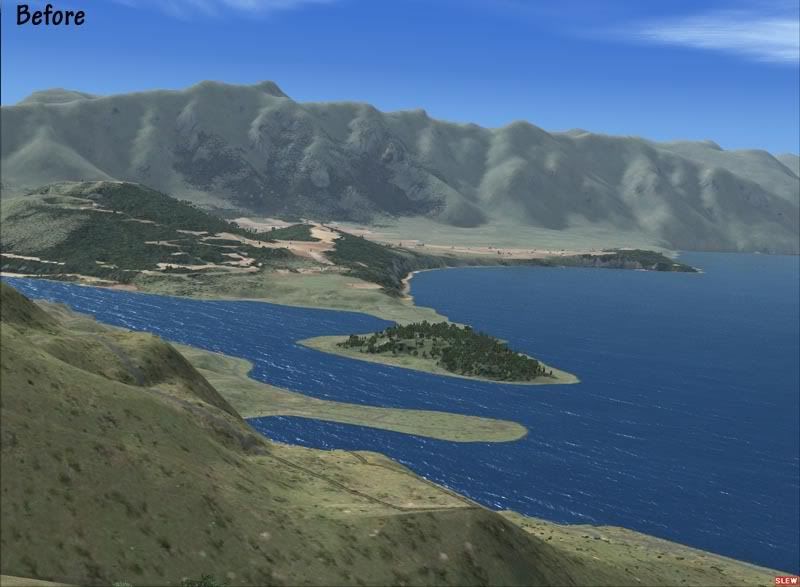
Queenstown: Before
Queenstown: After
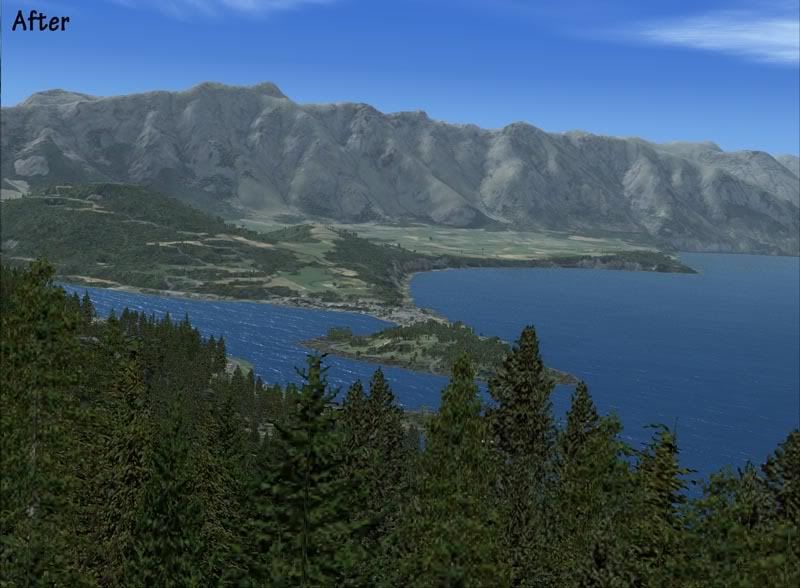
Note: Small areas of vegetation such as plantation pine are all included.
Areas of 'desert' have been replaced with a texture that better represents the far south.
Different Alpine tussock species have been included using GIS data.
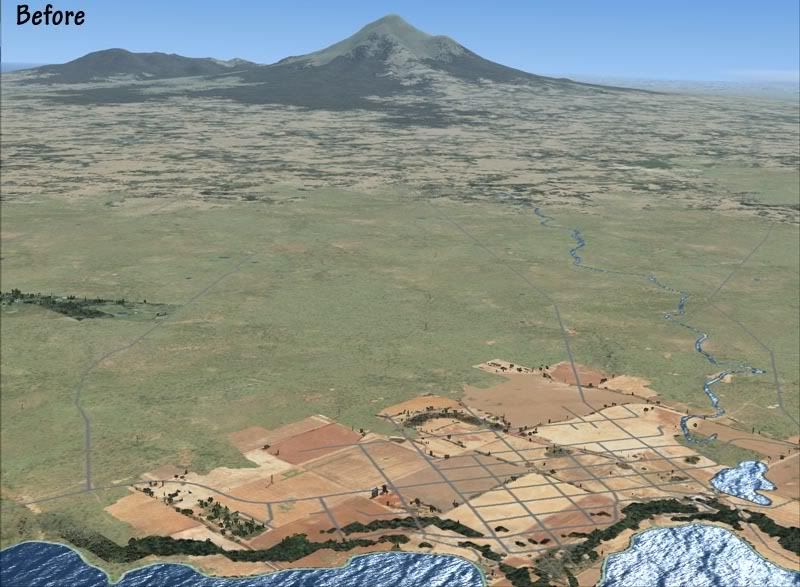
Taranaki: Before
Taranaki: After
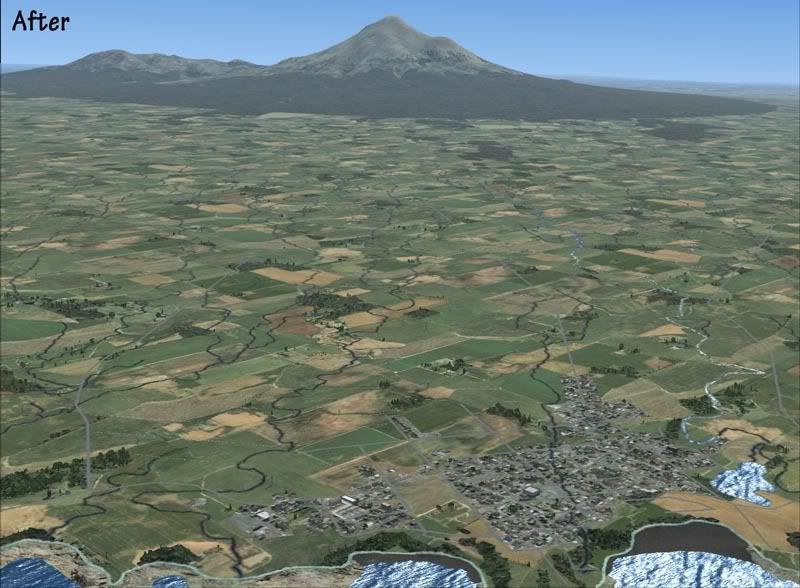
Note: The 'desert' has been replaced, where appropriate with farm pasture.
The distinctive boundary of the National Park is clearly visible and accurately defined.
'Black sand' beaches are included where appropriate.
I will update this thread with more news, features and screen shots as they become avaliable.
*Please note that this is a work in progress so features and scenes are liable to change.
** Early testing shows a significant performance hit so this may be limited.
In a few of my other posts I have been alluding to a upcoming payware project that I am involved in. Although it is still a fair way off, we thought it would be good to share some details of it with you now so that you can keep up with progress on this exciting project. We are still without a name and many details have yet to be finalised, but this will be released under the Sim Pilot Experience brand.
One of the major flaws of the RTM version of FSX was the landclass was woeful...most of New Zealand looked like a desert, many small towns were completely missing, and large areas of vegetation were completely overlooked. The water class wasn't much better with large tidal estuaries and inlets, which in reality are brown, shallow and muddy appearing as clean and deep. It locked up the potential that is inherent in the FSX display engine and reduced immersion provided by the simulator.
This addon for Micorsoft FSX not only rectifies this, but adds some exciting new features to unlock the potential in FSX and create a highly accurate and realistic Environment. Some of these features may be a world first.
Why is this more than just a landclass replacement?
There are many landclass files avaliable for New Zealand.....ours is different. If the aim of Flight Simulator is 'As real as it gets', then this addon stays true to this ideal. Not only are we using the best commercial data avaliable, we are compiling it in a way that maintains 100% spatial accuracy.
How do we do this?
The 'default' method of presenting changes in landcover in Flightsim is to use a simple raster/pixel image where each pixel represents a different type of vegetation or land cover. Using this method, the maxium accuracy that can be achieved is over 1.2km meaning that boundaries of forests and towns blend into each other over large distances. The real world is not like that. Forests stop at the boundary of the property. Farms stop at the edge of a road.
We have managed to compile the data in a way that gets around this limtation and maintains the full spatial accuracy of the data resulting in over 20 times better accuracy. Every boundary, road and object in our addon should be closer than 50 metres of its actual location.
If a forest stops at the boundary of a road in real life, it will do the same in FSX.
If a town boundary is stopped by a river or stream, it will do the same in FSX.
As well as very accurate landclass and water class for the whole of New Zealand, the package will also come with*:
Properly classified roads and freeways for the whole country
Rock outcrops
Tramping huts and tracks
Minor streams to compliment the larger River polygons.
Radar stations and radio masts for the whole country
Fencelines for the whole country**
Tanks (such as petroleum) for the whole country.
Waterfalls
There may also be some replacement key texturs to better display a landtype unique to New Zealand (although this package is not a texture replacement. Default textures are used when possible)
Although this is in the early stages of development, I've attached some screen shots below to see the difference between the default data and this addon
Near Murupara in the Bay of Plenty: Before
Near Murupara in the Bay of Plenty: After
Note: Areas of pasture are clearly defined in the valley.
Plantation forest is perfectly delineated- It has been completely missed in the default data.
Riparian trees are visible down the edges of the streams- these have a mixed vegetation type which will give colour in Autumn.
Roads have been correctly classified by surface and number of lanes. Tracks covering the whole of the country have been added (including tramping tracks). None of this is avaliable in the default data.
Near Whangarei Airport: Before
Near Whangarei Airport: After
Note: Urban areas match their real world locations and aren't 'splashed on' like when using traditional landclass methods.
Night lighting is provided for urban streets which adds depth and realism to the night scene.
Airport boundaries are correctly delineated.
Near Thames: Before
Near Thames: After
Note: Water class better represents areas of muddy water coming from the river.
The foreshore area is accurately defined with mangroves, beaches and rocks included.
Small towns and settlements are all included and correctly textured.
Queenstown: Before
Queenstown: After
Note: Small areas of vegetation such as plantation pine are all included.
Areas of 'desert' have been replaced with a texture that better represents the far south.
Different Alpine tussock species have been included using GIS data.
Taranaki: Before
Taranaki: After
Note: The 'desert' has been replaced, where appropriate with farm pasture.
The distinctive boundary of the National Park is clearly visible and accurately defined.
'Black sand' beaches are included where appropriate.
I will update this thread with more news, features and screen shots as they become avaliable.
*Please note that this is a work in progress so features and scenes are liable to change.
** Early testing shows a significant performance hit so this may be limited.