I have uploaded a set of FS2004 gauges for my earlier piston powered Fletcher here (174kb)
Just place the CAB file in your FS9/gauges folder.
Tonight I will upload The new Walter Turbine Fletcher and a revised Piston Fletcher package to AVSIM and FLIGHTSIM.com.
Both packages are FS2004 compatible.
Deane
Fletcher 400HP Gauge update for FS2004
14 posts
• Page 1 of 1
 by Ian Warren » Sun Feb 10, 2008 1:56 pm
deaneb wrote:QUOTE (deaneb @ Feb 10 2008, 11:52 AM) <{POST_SNAPBACK}>Tonight I will upload The new Walter Turbine Fletcher and a revised Piston Fletcher package to AVSIM and FLIGHTSIM.com.
Deane
Well done ! and Thanx Deanehey ya tried it off a moving Carrier yet , now thats fun
Last edited by Ian Warren on Sun Feb 10, 2008 1:57 pm, edited 1 time in total.


-

Ian Warren - NZFF Pro
- Joined: Fri May 05, 2006 5:23 pm
- Posts: 41187
- Location: AREA 51


by Nosecone » Sun Feb 10, 2008 3:29 pm
Great stuff. When the Fletcher was first released I added gauges from other aircraft that were the same as the gauges you had (well most of them). I came a cross a load gauge that I tweaked to work with the smoke system, as the load in the Fletcher was being released the needle on the gauge and the two green lights would in turn go to the empty position. You can start and stop the the gauge by pressing the smoke system key Works well.

Last edited by Nosecone on Sun Feb 10, 2008 3:33 pm, edited 1 time in total.
-

Nosecone - Forum Addict
- Joined: Thu Jan 31, 2008 9:22 am
- Posts: 234
- Location: Upper Hutt
by deaneb » Sun Feb 10, 2008 4:02 pm
I assume the gauge is in a .gau format not an XML gauge ??
Could you sent it to me - deaneb@ihug.co.nz
I will have a look and see if I can do some mods to it
cheers
Deane
Could you sent it to me - deaneb@ihug.co.nz
I will have a look and see if I can do some mods to it
cheers
Deane

-

deaneb - Senior Member
- Topic author
- Joined: Sat Aug 12, 2006 4:40 pm
- Posts: 1565
- Location: Blenheim
by Nosecone » Sun Feb 10, 2008 4:34 pm
QUOTE
I assume the gauge is in a .gau format not an XML gauge ??
Could you sent it to me - deaneb@ihug.co.nz
I will have a look and see if I can do some mods to it[/quote]
Yes it is a .gau format. It came from the cropdusting 300 by Xavier Gassó "Viper. When I finish work tomorrow morning I will send you a copy. The gauge added a nice touch as the other gauge would not work in 2004.
Could you sent it to me - deaneb@ihug.co.nz
I will have a look and see if I can do some mods to it[/quote]
Yes it is a .gau format. It came from the cropdusting 300 by Xavier Gassó "Viper. When I finish work tomorrow morning I will send you a copy. The gauge added a nice touch as the other gauge would not work in 2004.
-
Nosecone - Forum Addict
- Joined: Thu Jan 31, 2008 9:22 am
- Posts: 234
- Location: Upper Hutt
by deaneb » Sun Feb 10, 2008 6:15 pm
Nosecone wrote:QUOTE (Nosecone @ Feb 10 2008, 05:34 PM) <{POST_SNAPBACK}>Yes it is a .gau format. It came from the cropdusting 300 by Xavier Gassó "Viper. When I finish work tomorrow morning I will send you a copy. The gauge added a nice touch as the other gauge would not work in 2004.
Actually it is in XML. I just downloaded the chopper and had a look. It works off a timer which basically counts down the "weight", but has no effect on the actual aircraft weight, unlike my FSX system. I use the FSX glider ballast parameter to release weight as you spread, but you can't do this with FS2004
Deane
-
deaneb - Senior Member
- Topic author
- Joined: Sat Aug 12, 2006 4:40 pm
- Posts: 1565
- Location: Blenheim

by deaneb » Sun Feb 10, 2008 8:43 pm
helikiwi8 wrote:QUOTE (helikiwi8 @ Feb 10 2008, 08:09 PM) <{POST_SNAPBACK}>is there anyway to add a dump (or heavy sow) button in FSX
some times i'm spreading up hill and would love a bit of insurance
thanks brett
No - not as far as I can see. The ballast parameter has a preset discharge rate, which is set up in the aircraft.cfg file.
I'd also like to be able to have a load option, but there is no way to achieve this either as I have asked some experts. I may need to look into some advanced coding within missions to see if this can be achieved by stopping close to a ground vehicle or something - but this is pie in the sky stuff just now.
Deane
-
deaneb - Senior Member
- Topic author
- Joined: Sat Aug 12, 2006 4:40 pm
- Posts: 1565
- Location: Blenheim
by ardypilot » Sun Feb 10, 2008 11:51 pm
QUOTE
Just place the CAB file in your FS9/gauges folder.[/quote]
Did as you said and this greeted me in the 400HP model:
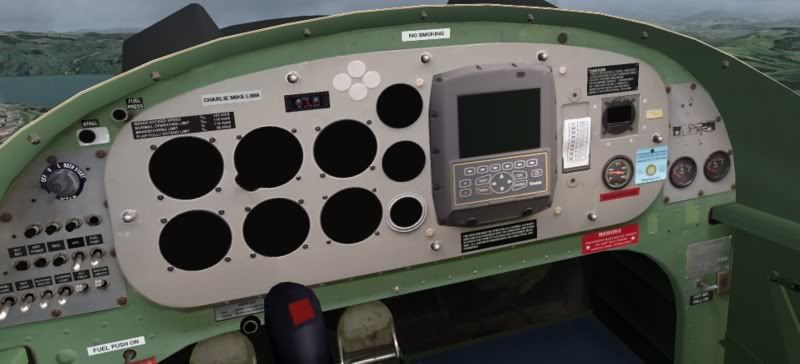
Perhaps I have the incorrect panel.cfg? (I'm using the original that came with the first FU24 zip- could you correct me if I'm wrong please Deane?
Did as you said and this greeted me in the 400HP model:
Perhaps I have the incorrect panel.cfg? (I'm using the original that came with the first FU24 zip- could you correct me if I'm wrong please Deane?
Last edited by ardypilot on Mon Feb 11, 2008 1:10 pm, edited 1 time in total.
-

ardypilot - NZFF Pro
- Joined: Wed Apr 26, 2006 10:01 am
- Posts: 6802
- Location: Auckland
by Nosecone » Mon Feb 11, 2008 7:55 am
QUOTE
Actually it is in XML. I just downloaded the chopper and had a look[/quote]
Sorry Deane you are right . I tweaked some of the settings in the gauge file to roughly represent the amount of time it would take to empty the hopper, and as you said it does not affect the weight in fs9
Sorry Deane you are right
. I tweaked some of the settings in the gauge file to roughly represent the amount of time it would take to empty the hopper, and as you said it does not affect the weight in fs9-
Nosecone - Forum Addict
- Joined: Thu Jan 31, 2008 9:22 am
- Posts: 234
- Location: Upper Hutt
by deaneb » Mon Feb 11, 2008 11:17 am
Trolly wrote:QUOTE (Trolly @ Feb 11 2008, 12:51 AM) <{POST_SNAPBACK}>Did as you said and this greeted me in the 400HP model:
Perhaps I have the incorrect panel.cfg? (I'm using the original that came with the first FU24 zip- could you correct me if I'm wrong please Deane?
Looks like you missed the picture out ??
-
deaneb - Senior Member
- Topic author
- Joined: Sat Aug 12, 2006 4:40 pm
- Posts: 1565
- Location: Blenheim
by deaneb » Thu Feb 14, 2008 5:25 pm
Trolly wrote:QUOTE (Trolly @ Feb 11 2008, 12:51 AM) <{POST_SNAPBACK}>Did as you said and this greeted me in the 400HP model:
Perhaps I have the incorrect panel.cfg? (I'm using the original that came with the first FU24 zip- could you correct me if I'm wrong please Deane?
Trolly - sorry for delayed reply - I've been in Dorkland for the last 3 days. Drop me an E-mail and I'll send you a panel.cfg File for FS2004. If that don't work, then I can't tell what the problem could be.
Deane
-
deaneb - Senior Member
- Topic author
- Joined: Sat Aug 12, 2006 4:40 pm
- Posts: 1565
- Location: Blenheim
14 posts
• Page 1 of 1
Who is online
Users browsing this forum: No registered users and 17 guests