Page 1 of 1

PostPosted: Sat Mar 01, 2008 10:36 pm
by NZ255
Hi, I have been putting up with it for a while but I'd thought I'd post the problem and see if I can get it sorted.
It happens in other aircraft (unsure which) but I can tell you the PMDG 737 is doing it. What happens is I open a panel (e.g. throttle), then if I switch to VC and hover over a button (to open/active something e.g. the radio stack panel), the screen changes to the way it looked when I was looking at the throttle in VC(bottom left half) but cuts off when the (if this case radio panel) ends. This picture might explain better:
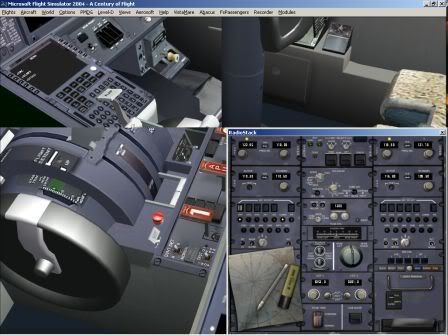
This gets very frustrating, because wherever you move the mouse (almost), a new picture pops up over the main screen and you can't tell which is the real one.

I think I figured out what was causing the problem (the computer freezed before I could check), running it in full screen fixed it ( I think) but when in full screen, the screen goes all funny, it flashes to that pic below for a couple of secs, either whenever you right click on the screen or click on an option, and also when you do an alt-tab to switch to another window.
I managed to take a photo with our digital camera because the computer freezed up when I did an alt-tab'er to change to another window:
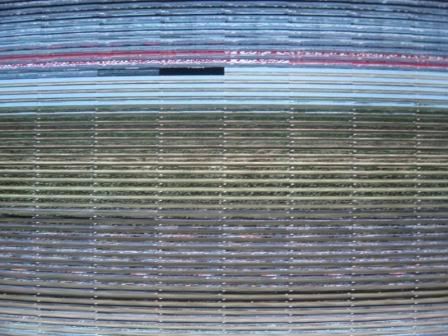
Could this be a refresh rate thing with my graphics card?? Just popped into my head as I'm typing this.

Thanks a lot for reading this and your answer (if you provide one :) )

Nick

Please tell me if this make no scene at all because I am kind of tired - thanks again,

nick
PostPosted: Sat Mar 01, 2008 10:44 pm
by Jimmy
Itll be the AA. I have the same thing, haven't found anything for it yet.

Try turning the AA off on your card and see if thats it.

Thanks
James

PostPosted: Sun Mar 02, 2008 1:23 am
by ardypilot
I had a simular problem once with the screen going all distorted- updating my graphics card driver fixed it :)

PostPosted: Sun Mar 02, 2008 7:44 am
by AlisterC
You are not alone in this problem Nick. I know many pilots who have the very same problem. I'm guessing you are using a nvidia graphics card?
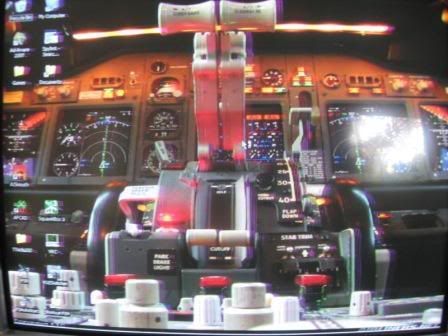
I had the same problem as picture 1 for a while, but seem to have fixed it now. It's all due to the graphics card/ drivers.

With the latest drivers I don't see that problem anymore. You'll want to try 169.21 from nvidia website first of all.

Other than that, using a second screen will help solve the problem. FS doesn't seem to like having windows on top the main fs9 window. Moving it off will return it to normal. If you can't (ie don't have a second screen available).. try this, it also worked for me.

http://www.download.com/WinUtil/3000-2340_4-10210223.html

Winutil is a very small program that will add a couple of button options to all windows you have opened (even kneeboard etc). What you do is make them transparent. You can still see and use them, but you can also see through them. Having them transparent solves the problem too.

Edit: Oh, and you'll also need to turn off TOOL TIPS in your fs options to stop the views messing up when you hover the mouse over a switch. Nothing but perhaps a driver fix will help that I'm afraid..

Edit 2: Oh, 169.21 might be the right driver for me, but you need to check it's the right one for your card before installing :) If you've got an ATI card, well then you'll need to find something that suits that.

PostPosted: Sun Mar 02, 2008 8:48 am
by NZ255
Ok first off, I do have 2 monitors hooked up, I do have a Nvidia card (FX 5200(I only have PCI, not express)) I have tried that driver before on recommendation from the nvidia search thing on their website and when that driver is installed, on restart, my desktop goes all funny and has purple vertical lines flashing across the screen. Also the computer freezes up and i had to take the pictures below with a digital camera.
I instaled that driver so I could get a pic of it but now what I have to do is take out the video card, start the comp, uninstall the driver, then put the card back in and use the driver off the cd. (I'm not blaming you for this BTW :) )


Nick

PostPosted: Sun Mar 02, 2008 1:04 pm
by AlisterC
Sorry to hear that Nick!! :S Haven't got much else to suggest either :(

PostPosted: Sun Mar 02, 2008 7:16 pm
by Alex
Yea, it'll probably be a hunt for a driver that improves your situation; though I've seen different driver sets fix problems that looked like this in the past. ;)

Alex

PostPosted: Fri Mar 07, 2008 6:20 pm
by s0cks
Not that you have to, but have you considered upgrading your GFX card? The 5 series line is the worst series nVidia released. I would hazard a guess that an upgrade would see marked improvements.

I guess you don't have PCI-Express on your motherboard, but you can get a 7600GS AGP for around $160, or a 7900GS AGP for $260. Either one would probably double you graphics performance.

If you get strange random lines and crashes like you did I would imagine it is a problem with either your graphics card or the motherboard. I had this too with a faulty card of mine. Its entirely possible that the older drivers are fine as they will be of lower performance or more "simplified". New complicated drivers demanding more performance from the video card could be pushing it too hard. I would guess you have a graphics memory problem, either overheating or just faulty.

PostPosted: Sat Mar 08, 2008 10:33 am
by NZ255
s0cks wrote:
QUOTE (s0cks @ Mar 7 2008, 07:20 PM) <{POST_SNAPBACK}>
Not that you have to, but have you considered upgrading your GFX card? The 5 series line is the worst series nVidia released. I would hazard a guess that an upgrade would see marked improvements.

I guess you don't have PCI-Express on your motherboard, but you can get a 7600GS AGP for around $160, or a 7900GS AGP for $260. Either one would probably double you graphics performance.

If you get strange random lines and crashes like you did I would imagine it is a problem with either your graphics card or the motherboard. I had this too with a faulty card of mine. Its entirely possible that the older drivers are fine as they will be of lower performance or more "simplified". New complicated drivers demanding more performance from the video card could be pushing it too hard. I would guess you have a graphics memory problem, either overheating or just faulty.


Would only having a 1.5V AGP slot mean I can't handle that card?

PostPosted: Sat Mar 08, 2008 8:56 pm
by s0cks
NZ255 wrote:
QUOTE (NZ255 @ Mar 8 2008, 11:33 AM) <{POST_SNAPBACK}>
Would only having a 1.5V AGP slot mean I can't handle that card?


I'm 99% certain it will. The newer cards have power connections on them (kind of like a ahrd drive does). You just plug in a spare molex. It'll get all the power it could ever need from that, and generally the slot voltage doesn't matter. What you should check is speed (2x,4x, or 8x). I would imagine you have 8x (it was a VERY long time ago they came out), but if you only have 4x or 2x it may not fit and probably isn't worth getting anyway as it'll run pretty slow.

Hope that helps.

PostPosted: Sat Mar 08, 2008 9:02 pm
by Alex
It may pay to check your power supply as well for the wattage, and whether you have a free connector hanging inside your case. :)

Alex

PostPosted: Sat Mar 08, 2008 10:45 pm
by NZ255
Yeah it's an ex work desktop (quite new) but only has 2 slots in the AGP port.

PostPosted: Mon Mar 10, 2008 10:35 pm
by s0cks
Sounds like it won't work then. You're actually running a PCI graphics card? Thats insane. PCI is sloooow. Anyway, that doesn't really help you. I can only suggest a motherboard too which would cost not too much more and allow you to get PCI-E. But you'd have to re-install Windows which would be a PITA.

PostPosted: Tue Mar 11, 2008 6:49 am
by NZ255
s0cks wrote:
QUOTE (s0cks @ Mar 10 2008, 11:35 PM) <{POST_SNAPBACK}>
Sounds like it won't work then. You're actually running a PCI graphics card? Thats insane. PCI is sloooow. Anyway, that doesn't really help you. I can only suggest a motherboard too which would cost not too much more and allow you to get PCI-E. But you'd have to re-install Windows which would be a PITA.

Would you have to reinstall if you kept the same hard drive with windows on it?

PostPosted: Tue Mar 11, 2008 2:23 pm
by s0cks
NZ255 wrote:
QUOTE (NZ255 @ Mar 11 2008, 07:49 AM) <{POST_SNAPBACK}>
Would you have to reinstall if you kept the same hard drive with windows on it?


Yes, because a new motherboard would use completely different drivers for all the different chipsets. Its highly unlikely that Windows would boot if you changed the motherboard. I'm not even sure a repair install would work because I think it still uses the same drivers. Its not a massive task. Probably 1 day to install and configure Windows and all the programs you use. At least you wouldn't have to re-install FS.

PostPosted: Tue Mar 11, 2008 3:29 pm
by NZ255
s0cks wrote:
QUOTE (s0cks @ Mar 11 2008, 03:23 PM) <{POST_SNAPBACK}>
Yes, because a new motherboard would use completely different drivers for all the different chipsets. Its highly unlikely that Windows would boot if you changed the motherboard. I'm not even sure a repair install would work because I think it still uses the same drivers. Its not a massive task. Probably 1 day to install and configure Windows and all the programs you use. At least you wouldn't have to re-install FS.


Is there a way we can recycle the licence? Because we have the CD's?

PostPosted: Tue Mar 11, 2008 7:36 pm
by s0cks
NZ255 wrote:
QUOTE (NZ255 @ Mar 11 2008, 04:29 PM) <{POST_SNAPBACK}>
Is there a way we can recycle the licence? Because we have the CD's?


Yes you can use the same license. If it won't properly activate you can ring them up and they'll activate it for you. I've done this countless times and they never ask why.