Page 1 of 1

PostPosted: Wed Jul 26, 2006 9:11 pm
by brownbox
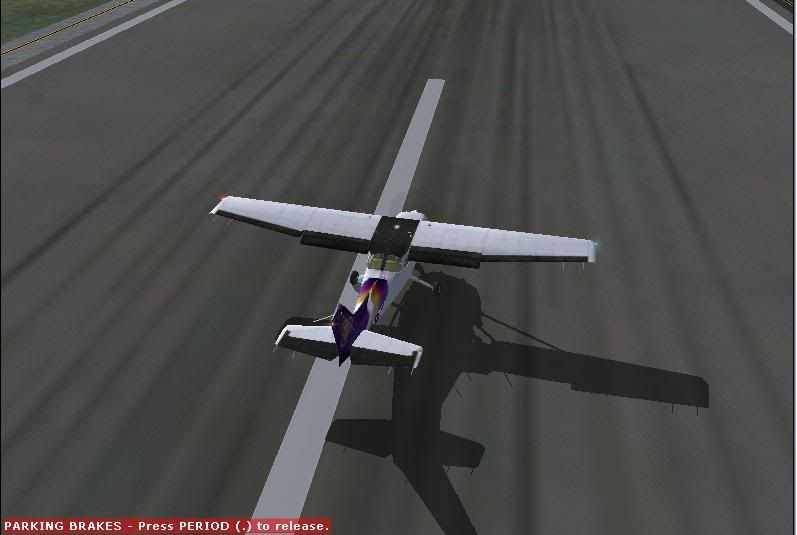
i see that in everyones screenshots, all the aircraft have realistic smooth edges. However, on my one i am getting jagged edges everywhere.
Here is an example:
user posted image

How can i fix it? :(

PostPosted: Wed Jul 26, 2006 9:16 pm
by Jimmy
Ha looks just like my sim lol
umm whats your mipping quality at? I think that has something to do with edges lol

PostPosted: Wed Jul 26, 2006 9:26 pm
by Charl
Jaggies are fixed with anti-aliasing.
Most video cards prefer you to set aa using the video card settings box, not in FS2004. I leave it out in my settings.
user posted image

PostPosted: Wed Jul 26, 2006 9:35 pm
by ardypilot
I was just loading up my sim to take a screenie for you BB when I saw Charl's reply- good timing lol ;)

I think it depends what video card you are running, but some cards will give you better performance if you turn Antialiasing (AA) on in the video card settings and off in the simulator settings as shown in Charl's post above.

user posted image

If you get even worse performance this way, try turning AA on in the sim, and setting the video card settings to "application controlled" to get rid of the jaggie edges.

(I use the application controlled option as my GFX card is old, and if I turn it off in the sim then my 'select and aircraft' screen goes black and when loading a flight the screen flickers) <_<

By the way, I have moved this topic to the technical issues forum to fit its appropriate category.

PostPosted: Thu Jul 27, 2006 7:46 pm
by brownbox
i dont beleive my graphics card has aa :(

PostPosted: Thu Jul 27, 2006 8:39 pm
by Alex
What graphics card are you using at the moment?

Alex

PostPosted: Thu Jul 27, 2006 9:36 pm
by brownbox
the factory one :) sis m661mx.

PostPosted: Fri Jul 28, 2006 4:12 pm
by Alex
Ok, make sure you have the latest drivers and stuff, sometimes they include a video setting toolbox ;) .

Alex

PostPosted: Sat Jul 29, 2006 2:22 pm
by brownbox
nope nothing there :unsure:

PostPosted: Sat Jul 29, 2006 4:02 pm
by Zöltuger
it sounds from google that it is a laptop chipset
i know my laptop doesn't have AA (intel graphics), so maybe it doesn't have it after all

PostPosted: Sat Jul 29, 2006 5:11 pm
by brownbox
ahh well still good for a laptop. The screenshot i provided was from the absolute worst looking angle :)

PostPosted: Sat Aug 05, 2006 9:16 am
by ZK-Brock
What I do to avoid jaggies is use ATi Tray Tools, along with my RAdeon 9600XT card. I set up a profile for FS2004 that enables 4X AA, so AA will only occur when FS is running.