Page 1 of 2

PostPosted: Tue Mar 06, 2007 7:42 pm
by brownbox
Heres what you do.

Go into your game list or program list. Open up as many as you can simultaniously, and see what you can do :)
Next, post your computer specs, along with, if possible, your cpu temperature after running this test for 10 minutes

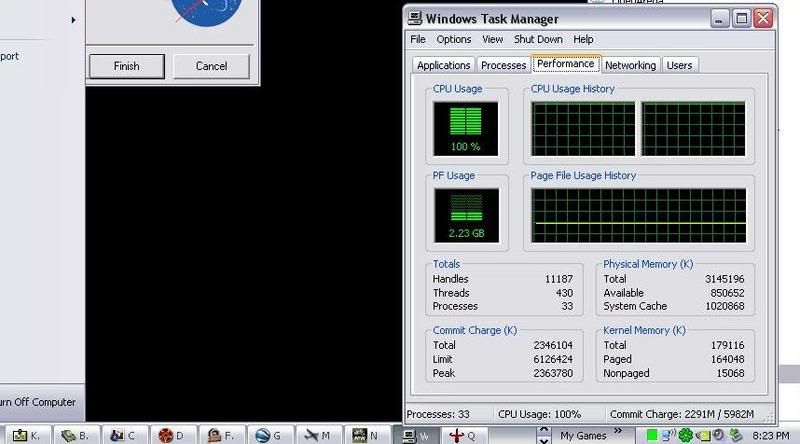
Heres what I got
user posted image
This was with 17 of my unlimited games running

End temp:45'C

Pentium D 3.0Ghz
3GB RAM DDR2 667
PostPosted: Tue Mar 06, 2007 9:04 pm
by Zöltuger
user posted image
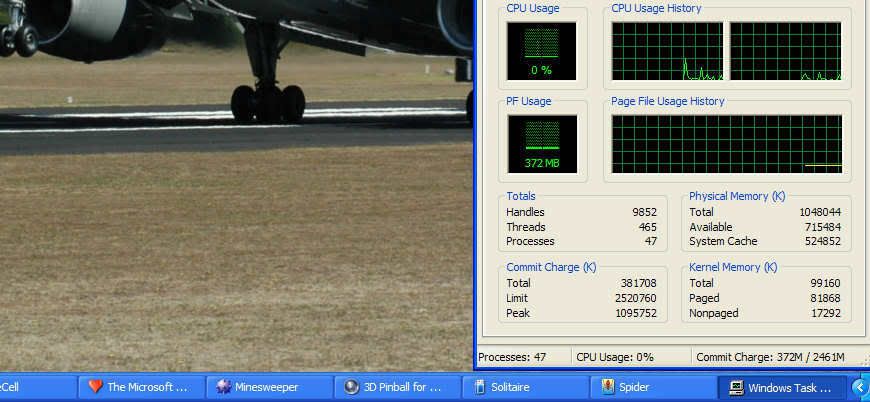
End temp: 40 deg C

Pentium 4 3.0GHz
1GB memory

PostPosted: Tue Mar 06, 2007 9:14 pm
by ZK-MAT
You really pulled out the RAM and CPU intensive games there Zöltuger!!

PostPosted: Tue Mar 06, 2007 9:17 pm
by ZK-Brock
heheh, I don't think those really compete Tim! :lol:

PostPosted: Tue Mar 06, 2007 9:18 pm
by Zöltuger
hey, i've got IE7 open too ^_^
nah, my PC struggles to run FSX as it is, opening it with a whole bunch of other games will lead to system hanging very quickly.

PostPosted: Tue Mar 06, 2007 9:58 pm
by Jimmy
:lol:

If I did this all id get is fs and some defualt apps, and nero photoshop and a few other small programs, proably not the best benchmark, especialy for those of us whom are paranoid about how long the /add/remove programs list is :P

Kool idea thow, a nice fast way to shut your computer down if in a hurry :rolleyes:

PostPosted: Wed Mar 07, 2007 6:11 am
by brownbox
while running this test, nothing was doable on the computer. Except moving around in the task manager, and the print screen button

PostPosted: Thu Mar 08, 2007 12:50 pm
by lowellyerex
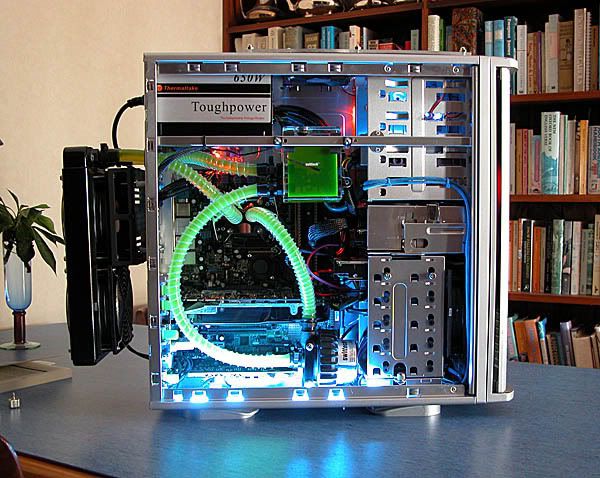
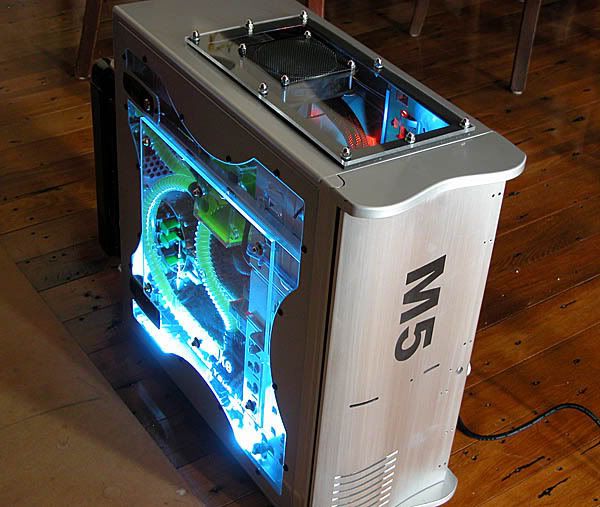
Now don't get me started on benchmarks and hardware. I've got a thing for hardware. I recently rebuilt my box. My new baby's called M5, here she is:

user posted image

user posted image

M5's specs are currently (subject to change without notice):

CPU: Core 2 Duo E6600 overclocked to 3.2 GHz
MoBo: ASUS P5B Deluxe
RAM: Corsair Dominator 8500, 2Gb, overclocked to 1068MHz (DDR2)
GPU: Nvidia 8800GTX, 760Mb RAM, 128 parallel ALU's, default clock speeds
Sound: Creative Audigy 2ZS
Hard Drive: 320Gb as a RAID 0 array, SATA-2 with NCQ.
DVD Burner: Pioneer DVR109 (best drive I've ever owned)
Cooling: Swiftech Apex Ultra water cooling, CPU only at this stage. Custom Swiftech air cooler on Northbridge.

I must say I prefer precise benchmarks, but I fired up a few heavy apps out of interest:

user posted image

Here I'm actually flying FSX at 30fps in a window, while playing music on iTunes, running Photoshop, running Half-Life 2 in a window and running Google Earth. Note also that the Steam client is downloading an update for itself (as always!), and Diskeeper 2007 is running in the background. PC Probe is showing a steady 44°C core temp. OK, so I'm boasting, but hey, after spending that much money on hardware...

The next upgrade's got to be a 23" monitor to fit all those windows in!

Out of interest, my SuperPi 1 million decimal place time is 14 seconds, and my 3DMark06 score is 11,800.

PostPosted: Thu Mar 08, 2007 4:08 pm
by Charl
24"
Widescreen.
Uh, Dave, probably time for a total system upgrade.
What do you do with your discards, I'll spring for the shipping, deal?

PostPosted: Thu Mar 08, 2007 4:46 pm
by lowellyerex
Actually Charl I have accumulated some parts, the best of which I have put into a cheap second case. That itself is a pretty decent system (3.4 GHz P4, 2GB RAM, GeForce 7800GTX) for FSX, but is not used as I only have one monitor - so I still have to compete for computer time with my son!

I used the second box to try out a release candidate of Windows Vista. It has some nice features, but I'll wait as long as possible to move to M5 to Vista. I the guess FSX DX10 patch will put the pressure on - especially as I already have a DX10 video card. I see we have to wait till April for FSX SP1, and mid-year for the DX10 patch. Well I guess it gives them time to iron out some of the Vista bugs and driver issues.

Dave.

PostPosted: Thu Mar 08, 2007 4:49 pm
by Zöltuger
oh man, that is one sweet rig :D :drool:
i'd be looking at something with similar specs when i upgrade at the end of the year- but it won't be nearly as classy with all the watercooling and overclocking that you have

PostPosted: Thu Mar 08, 2007 4:54 pm
by Ian Warren
mmm , looking at that u won't need a monitor ....... :unsure: y'd spend all night lookin at the Case :lol: :lol: ,

PostPosted: Thu Mar 08, 2007 5:56 pm
by lowellyerex
Thanks for the kind comments guys. Yes Ian, it looks even better in real life. I went to some trouble this time to make the case look pretty. Cold cathode blue lighting at the bottom, and hidden intense orange LED spots picking out the RAM fins, cables and video card. And then there's the cool Borg-like tubing full of green blood! Took some major mods to the old Tsunami case (carried over from M4) to fit it all in - especially the water cooling. I had to lose a side fan, so I hacked a hole in the top and put in a window and another fan to exhaust hot air away from the top of the case and the RAM. Then there was that enormous 8800GTX card. Had to hack a hole in the back of the hard drive cage to fit it in! My next mod is to connect the 8800GTX up to the water loop - just waiting for compatible Swiftech parts.

The card runs real hot, and cannot really be overclocked without water - not that that's needed just yet, I can run current games (except FSX of course!) with all settings at max. FSX just stresses one of the processor cores to the max, and leaves the card alone. The card fan doesn't even crank up. Maybe DX10 will fix that - I hope!

And Zoltuger, I suspect you're a bit of a hardware fan too? Are you going to build your own rig?

PostPosted: Thu Mar 08, 2007 8:21 pm
by Charl
Well anytime you tire of that second box...
I am about to upgrade my ancient one to just that spec, hoping to get one last shot with my (AGP) RADEON X800 PRO graphics card before succumbing to VISTA, DX10, and the whole catastrophe. ;)

PostPosted: Thu Mar 08, 2007 8:25 pm
by Jimmy
:drool: :drool: :drool:

Impresive! I'm gana be building a system later this year some time, very basic mainly useing stuff outa my surrent system, your awsome looking case is giving me some fantastic ideas :P how much owudl a nice case like that cost? Even without all the water cooling? (water cooling is such a neat thing, iv always wounderd thow; what if you spring a leak? :lol: )

Awsome stuff lowellyerex.
James

PostPosted: Thu Mar 08, 2007 9:51 pm
by Zöltuger
lowellyerex wrote: And Zoltuger, I suspect you're a bit of a hardware fan too? Are you going to build your own rig?

I like hardware, but not nearly to the same extent... watercooling and such is a bit too far for me, I don't have the passion (or the cashin' for that matter) for cathode tubes and massive windows. The silent 120mm fan with the blue LED is as sophisticated as I get <_<
I plan to build myself a new rig in November- I'm looking forward to this next generation of Intel processors B)

PostPosted: Thu Mar 08, 2007 9:55 pm
by lowellyerex
I totally recommend having a go at building a system yourself. Fantastically satisfying, and you learn heaps about the components and how they work. I get a kick every time I push the power on button and see it all come to life. Oh, and the Core 2 processors are the dog's bollocks!

Anyway, I'm in danger of hijacking brownbox's thread, so I'll leave it there.


Dave

PostPosted: Fri Mar 09, 2007 6:27 am
by brownbox
No worries. Id love to hear more about M5! :drool:

I like hardware, but Im too poor to do any fnacy mods like that. Id rather spend money on components or games :)

Some day, I will upgrade... some day :lol:

PostPosted: Fri Mar 09, 2007 7:28 am
by Charl
brownbox wrote: No worries. Id love to hear more about M5!  :drool:

Yeah me too.
I'd be interested to hear how you go about sourcing the bits.
The nightmare is to get a 631-pin this which doesn't fit the MKXIV that, because the line was discontinued in 1998 etc etc

PostPosted: Fri Mar 09, 2007 1:17 pm
by lowellyerex
The endless cycle eh brownbox? Latest game requires another hardware upgrade.

And yes Charl, it can be very difficult to upgrade older systems - often impossible. I usually get about one upgrade cycle per motherboard (a new processor, some more RAM), then it's time to start from scratch. The problem is not only socket types, but processor support, bus types and speed, RAM support, RAM speed etc. It's a lot easier if you're starting from scratch.

I usually start by hitting the hardware sites (xbit, anandtech, tom's etc.) and getting up to speed on the latest hardware, and importantly, what's coming up. Then I put together an outline of desirable system components shaped by my budget, and what I want to achieve. Usually what I want to achieve is max overall performance, system life (upgradability or compatibility with up-coming components), and overclockability (partly for fun, and partly to be able to push the system for a bit longer). Sometimes it's worth stretching the budget to achieve some of these (e.g. don't skimp on budget RAM if you want to overclock - my current RAM was more expensive than the Core 2 processor!). If there's about to be a fundamental architecture change, then it may be worth holding off for a bit (e.g. the move from AGP to PCIe graphics bus - you wouldn't have wanted to be stuck with an AGP mobo at that time, but then again, if you're an early adopter of PCIe, you'll have limited and likely expensive graphics card choices - that happened to me, the only card I could get was an expensive ATI X600XT. Soon after I had to mothball it and fork out again for a 7800GTX.).

Once you've pinned down the specs, hit the online stores to check availability and prices (you'll probably be doing this as you go to make sure things are within budget). A great site for comparing prices is www.pricespy.co.nz. Once all the boxes are in, the real fun begins - building and modding. There's nothing quite like taking that brand new $250 mobo out of its box, carefully laying it on its antistatic bag, and taking to it with a pair of pliers, a screw driver and a bottle of toluene! (to rip off the stock heatsinks, and clean up the ic's of course). I must say that I draw the line at "penciling" resistors on the board - that's for the extreme hard core only.

Dave