Page 1 of 2

PostPosted: Mon Jan 15, 2007 3:06 pm
by brownbox
dont worry, Im not hacking away at anything inside the computer-just the outside. :D (its just a disaster waiting to happen).

Currently I have 2 fans goign in, 2 going out.

Heres my plan
I keep the same 2 going in, and I make two holes in the side, one by the CPU and one by the video card. Then I put grills on them, but no fan because of the extra noise :P

Because my computer has no airvents in the side of the case, I think it would benifit greatly from this. Also, when I get my power supply, I make sure I get one with two fans on it, adding another exhaust fan.

Oh and Im a little bored ;)

Cheers
BB

PostPosted: Mon Jan 15, 2007 3:30 pm
by Dreamweaver
Well some sense at last :P

When I read this I looked at all the PCs around me and all of them except what we call the dinosaur have Grilled vents along the lower part of the case. This is to aid Airflow into the tower.

Now on one of the PCs which I am deeply jealous of :wub: it has a Vent with a flexy tube mounted directly to the CPU. When I checked its temperature its way lower than the others. Whats more amazing is that it only has a single rear mounted fan in the case.

That case cost $80 :blink: yes cheap and does a superb job. Only problem I dont know the make.

PostPosted: Mon Jan 15, 2007 5:05 pm
by brownbox
if the hole is right next to the cpu anyway, it wouldnt make much of a difference would it? the fan would be pulling air from the nearest place it can? Im getting ideas.... :lol:

PostPosted: Mon Jan 15, 2007 6:35 pm
by Dreamweaver
Actually yes it does. The flexy Tube fits over the heatsink and goes directly out the vent. The CPU fan is Sucking the warm air out of the CPU and not blasting it around the case. Most of your heat build up in the case is caused by your CPU and Video Card.

PostPosted: Mon Jan 15, 2007 7:24 pm
by brownbox
ahhh right B)

PostPosted: Mon Jan 15, 2007 8:15 pm
by Charl
With summer at the window, and all this talk about cooling... led me to install a little utility which tells you how hot the bits are.
Surprisingly the CPU stays at an even 42 Deg C
One HDD is flagged yellow at 52, as is the "Mainboard" wherever that might be measured.
So what happens when you load up FS?
Well, as it starts the CPU revs a little, to 45.
But the Mainboard goes up 10 degrees by the time the main menu comes up!
Load a saved flight in feature-rich NZ, and you see 70 Deg.


Fly a little, pan a few times Beep! Beep! RED ALERT.

Now I have a Radeon 800 PRO which draws enough power to run my house.
And it has a monster fan mounted on the card.
This blows hot air off the card into the case, and I can only think this is what is being picked up.
There surely is nothing on the MB itself which gets that distressed by heavy graphics??

I have been inspired by BB, or perhaps it's just the heat...
SO I am going to try perforating the case and tubing the airflow out direct from the card.
Who knows I may get a whole summer session of FS without the thing falling over and rebooting, just as I am about to carry out the perfect landing :blink:

PostPosted: Mon Jan 15, 2007 8:28 pm
by Alex
Where can I get the utility that you use Charl? I occasionally wonder about the temperature of my hardware. :)

Alex

PostPosted: Mon Jan 15, 2007 8:31 pm
by Charl
There are literally dozens.
I picked the one which I hoped would least want to phone home with my Contacts List:
Hmonitor 4.3.0.1
Google will turn it up I'm sure.

PostPosted: Mon Jan 15, 2007 8:36 pm
by Alex
Thanks Charl, I'll check it out. :D

Alex

PostPosted: Mon Jan 15, 2007 9:21 pm
by brownbox
why not just get one of them VGA coolers like I got that sucks air from the case, through the heatsink and then out of the case. It seemed to have dropped my case temp by quite a bit and the video card temp. For an X800, itd cost a whole $25 for a cooler ;)


I have been inspired by BB, or perhaps it's just the heat.

Oh dear, must be the second one :lol:

PostPosted: Tue Jan 16, 2007 7:42 am
by Charl
OK...don't know VGA coolers, d'you have a link or a description maybe?

PostPosted: Tue Jan 16, 2007 9:00 am
by brownbox
http://www.cbcnz.com/product_info.php/c ... 34821460a0

Something along the lines of this

I brought this one because it has better compatibility with lots of cards
http://www.cbcnz.com/product_info.php/m ... 34821460a0

It also came with ram sinks ;)


Check trademe every now and again, they come cheap

PostPosted: Tue Jan 16, 2007 9:11 am
by creator2003
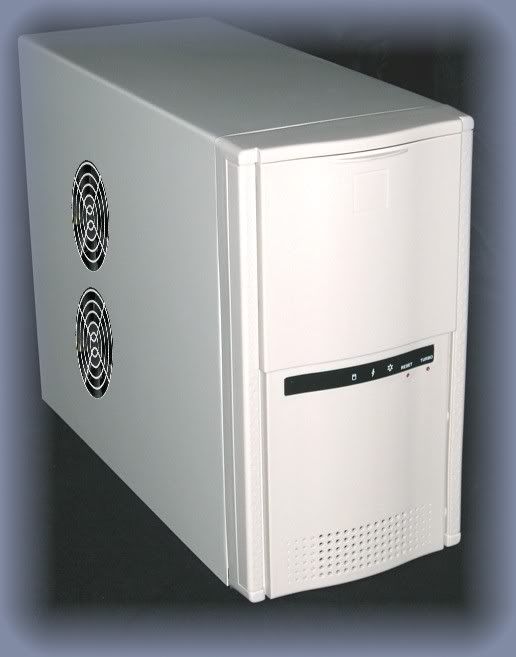
d/w i have one of those towers its a foxcon 775 tower box or something simular
like this....
user posted image
ive never had any problems with this and airflow { cost about $80}

PostPosted: Tue Jan 16, 2007 9:22 am
by Zöltuger
that's a nice tidy case you have there natas B) - wished mine looked like that, it's got cables all over the place, even cable ties don't fix it

PostPosted: Tue Jan 16, 2007 10:16 am
by creator2003
yeah the newer cables are alot tidyer ,but i also keep away from adding lots of stuff etc..cables and things i really dont need ,the newer cabling can be brought at a reasonable price even bright colours etc ,
i brought this case for the looks really i wanted it to look like any other from the outside ,but was told it has one of the best airflows and has got room for 8plus harddrives and anything else id like in the future ....{only for $80 }
cooling seems to be a obsession around here ,,i think of other countrys and there heat waves etc.. what do you think there puters would run like ??many would still be in there factory condition ,and still running fine ..
if and when i have a hot puter i open the side put a house hold fan on and blow the dust in ....
the inside of this box would create less airflow if i tryed putting in all the extra junk and would sound like i had a hairdryer going {no thank you }
my thoughts {keep it simple }less to work out when it all goes wrong

PostPosted: Tue Jan 16, 2007 11:25 am
by brownbox
Ok, how do i make the holes in the case?
I found this site
http://www.directron.com/modguide.html


Seems like the best way would be a jigsaw to cut the holes, then file the edges nice and clean. Then I plan to find two identical fan grills, and glue them onto the inside of the case. Hopefully looking something like this: (not my case)
user posted image

PostPosted: Tue Jan 16, 2007 11:38 am
by creator2003
yup that sounds like the best way to cut that hole out then drill four holes around the outside of it to mount the fans or plastic thingy like mine ,
funny enough i downloaded that test temp software and got this reading
user posted image
:lol: :lol: im uninstalling it now i dont need that beep beep thing
b*gger that :lol: :lol:
ps... the puter has been running non stop for at lest 3weeks without shut down
oh and the test was with fs9 running at auckland real ,and that temp warning goes on and off

PostPosted: Tue Jan 16, 2007 12:51 pm
by Alex
When I was using that program (^^) it only read the hard drive temp, sitting pretty at 32.0 I think. It went fairly soon after that. :P It seems like a good enough application though, if it can read the temperature.

Alex

PostPosted: Tue Jan 16, 2007 5:22 pm
by brownbox
i had speed fan, and it was measuring crap like 1000'c, and -50. :lol:

PostPosted: Tue Jan 16, 2007 6:54 pm
by Charl
brownbox wrote: http://www.cbcnz.com/product_info.php/c ... 34821460a0

Something along the lines of this

I brought this one because it has better compatibility with lots of cards
http://www.cbcnz.com/product_info.php/m ... 34821460a0

It also came with ram sinks ;)


Check trademe every now and again, they come cheap

Mmm so does it replace the existing fan on the graphics card?
(I so love websites that assume you know what to do with the product, and also know the power rating etc)