 Posted: Sat Mar 30, 2013 5:44 pm
 For some reason, I have completely black panels surrounding my gauges in all aircraft in my default 737-800
Anybody had the same problem in the past?
 Posted: Sat Mar 30, 2013 5:44 pm For some reason, I have completely black panels surrounding my gauges in all aircraft in my default 737-800Posted: Sun Mar 31, 2013 4:39 pmPosted: Sun Mar 31, 2013 10:55 pm
Ian Warren wrote:QUOTE (Ian Warren @ Apr 5 2013,4:39 AM) <{POST_SNAPBACK}>Black Panels on a Default 737 , have you tried a higher end model , I can't recall the last time I ever used a default unless resetting the flightsim on a new install , I never had this problem before altho it has appear sometimes with these higher end models , a graphics lag .
Ian, I have higher end models, but my point is that I didn't have the problem with my DEFAULT 737 a couple of weeks ago and am trying to see if I can resolve the issue as there are a number of liveries that I really enjoy in the default!!!
Hopefully someone out there might be able to help
Posted: Mon Apr 01, 2013 8:44 am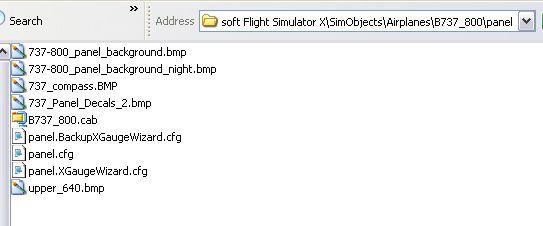 Posted: Mon Apr 01, 2013 9:02 amPosted: Mon Apr 01, 2013 4:46 pm
AlisterC wrote:QUOTE (AlisterC @ Apr 5 2013,8:44 PM) <{POST_SNAPBACK}>Hi Barrington,
Do you have all these files in your default B738 panel folder?
If you do, can you show us a screenshot of the problem?
Hi AlisterC
Have checked files and the only ones I do not have are:-
panel.XGaugeWizard.cfg
panel.XBackupXGaugeWizard.cfg
BarringtonZKIWI wrote:QUOTE (ZKIWI @ Apr 5 2013,9:02 PM) <{POST_SNAPBACK}>Barrington,
I have recently had the same issue plus a couple of others with the Carenado C208. I have narrowed it down to a change that an add on program that boosts FSX and changes the FSX.cfg file. The change it made was to turn off a specific setting that fixes an issue with high end graphics cards greater than 1GB RAM. I will hunt through the file and find the setting and drop you another message when i find it.
Hi ZKIWI,
Many thanks for your help
BarringtonZKIWI wrote:QUOTE (ZKIWI @ Apr 5 2013,9:02 PM) <{POST_SNAPBACK}>Barrington,
I have recently had the same issue plus a couple of others with the Carenado C208. I have narrowed it down to a change that an add on program that boosts FSX and changes the FSX.cfg file. The change it made was to turn off a specific setting that fixes an issue with high end graphics cards greater than 1GB RAM. I will hunt through the file and find the setting and drop you another message when i find it.
Hi ZKIWI,
Many thanks for your help
Barrington
Hi sorry for slow reply but i have been night flying this week so not really been on the computer.
The entry you are after is
HighMemFix=1
Ensure the above entry is in your FSX.CFG file under the [Graphics] sub heading.
This should help with black or disappearing panels when using a graphics card with 1GB or greater RAM, especially when swithing views or going from windowed to full screen mode.