Page 1 of 1

PostPosted: Thu Oct 25, 2012 5:47 pm
by Splitpin
Got home tonight , turned on the PC..... and " BEEP......beep beep beep" no start and the screen said it was going to sleep ....bugger. Reboot .... the same , by now Im in a cold sweat thinking about all the stuff Ive just loaded. One more reboot......same sad.gif
Ok ... dont panic ....go and have a smoke and a wine ..... came back, .....you got it, same thing.

What next .....grasping at straws....Pull the power cord, have another smoke..... put the power back on...and here i am smile.gif

Is this a sign of a problem ? i know the beeps mean something depending on the Bios , or whatever . Anyway who cares....... its going smile.gif

PostPosted: Thu Oct 25, 2012 5:58 pm
by Ian Warren
OH NO! it sounds like the caps on the mobo are going or 'cooked' i hope not for your sake ! ..similar beep happened couple of years back and that was the first sign .

PostPosted: Thu Oct 25, 2012 6:46 pm
by Adamski
Arrrgh! Not good sad.gif

You don't happen to remember the sequence of beeps, do you? You can Google it and find out what they meant.

PostPosted: Thu Oct 25, 2012 6:53 pm
by toprob
Yeah, it depends on the BIOS, here's a good resource....
ComputerHope

PostPosted: Thu Oct 25, 2012 7:31 pm
by Bazza
Sounds like a good time for a "Super Back-up." laugh.gif No laughing matter,,,

PostPosted: Thu Oct 25, 2012 8:24 pm
by IslandBoy77
Last time I heard one of those, Marty, it was flaky RAM. If you're able, do a visual inspection of the motherboard to verify no swollen capacitors and no signs of burning anywhere. If that's all ok, run MemTest 4.2 thru at least 5 passes (get the UBCD ISO & burn 2 CD as boot medium). Presuming you've got a WD or Seagate HDD, use the 5.19 WD tools in the HDD diagnostic section of UBCD for WD (there's only 1 4 seagate if I recall) and doing a full extended test. If all those are ok, post back and let us know.

PostPosted: Thu Oct 25, 2012 8:55 pm
by Splitpin
Thanks guys ..... all seems ok at the moment, but I'll follow all the advise and report back . Ive started it about 4 or 5 times since then , and nothing odd, just purrs away.

PostPosted: Thu Oct 25, 2012 9:09 pm
by Ian Warren
Strange it dose that .. but if it go's Funky Chicken on yeah again you can always borrow my laptop .. thing is if something starts pinging and beeping .. is the beginning of the end sad.gif

PostPosted: Thu Oct 25, 2012 9:20 pm
by Chairman
IslandBoy77 wrote:
QUOTE (IslandBoy77 @ Oct 25 2012,9:24 PM) <{POST_SNAPBACK}>
If you're able, do a visual inspection of the motherboard to verify no swollen capacitors and no signs of burning anywhere.

A close visual inspection. Get your face right in there and keep sniffing. Often easier to smell burnt than see it smile.gif

PostPosted: Fri Oct 26, 2012 1:56 am
by Adamski
Just looking at the (long) list of codes ... and their causes (good link, thanks Rob) ... it occurs to me that some of them aren't too major - and can be quite a common fault. I'm thinking of faulty or badly seated RAM ... things like that.

Another thing you might try is to go through all your components and cables and remove/re-seat them - making sure you note down what went where, in case these are stored somewhere. Is this the system that's been through the earthquake or subsequent tremor(s)? Could be that something's just got loose.

PostPosted: Fri Oct 26, 2012 8:02 am
by Ian Warren
If it is three short beeps three long beeps three short beeps then your really in trouble .

PostPosted: Fri Oct 26, 2012 8:05 am
by IslandBoy77
Marty - Adamski & Chairman have some good points there. It's odd how sometimes just unplugging / removing something & then reconnecting / plugging it back in can fix a niggly problem. RAM is the worst offender for this, but reseating the video card can be worthwhile as well. I wouldn't fiddle with the CPU unless the problem comes back and / or is persistent. The "sniff test" can be quite a good one - that "brown smell" can be quite a useful clue. The only problem with the sniffing method I've found is a) one sometimes needs to dismount the motherboard to get one's nose close enough b) if one's sense of smell isn't great, the amount of "brown" can sometimes be too small to detect and c) It's sometimes hard to really localise where the "brown" is coming from. But all that said, it's still a useful test. smile.gif

I've purchased a PSU tester (available on TM fairly cheaply) that I use to test all the cables coming from the PSU. Such testers are great for picking up obvious faults, but most of them aren't able to simulate any sort of "load", so it's possible for them to report a "clean" PSU but a fault is still there that only shows up when actual real-world usage takes place. A common enough fault that the PSU testers often DO pick up is when one of the main 5v or 12v "rails" has failed. Of course, not all PSUs have both -5v and +5v (so it pays to check for that), and many PSU testers aren't able to show which rail in a multi-12v rail PSU has failed (some PSUs have 2, 3 or 4 12v rails - but many only have one: I've not struck a case of a PSU that only had 1 failed 12v rail when there were 2, but I note that my tester, like many, only has a single light to indicate 12v power is there or not, so I don't know what would happen if 1 out of 2 rails was faulty - might just show no light?).

Unfortunately, if all the tests reveal nothing, there's still the possibility of the motherboard just being "weird": lost count the number of motherboard over the years that seem fine, look fine, test fine, but just do odd things, usually getting progressively worse until they just won't allow boot at all. sad.gif I hate discovering those types after wasting many hours thinking "what if I just try this next thing...?" blink.gif

PostPosted: Fri Oct 26, 2012 6:53 pm
by Splitpin
Wow , all this support ....thank you very much. Just did a full internal (eyes and nose) nothing loose or burnt . Start up tonight was normal ....... who knows ninja.gif

PostPosted: Fri Oct 26, 2012 7:12 pm
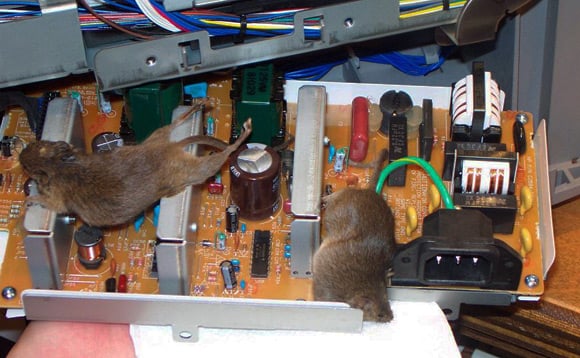
by toprob

PostPosted: Fri Oct 26, 2012 7:19 pm
by Adamski
toprob wrote:
QUOTE (toprob @ Oct 26 2012,7:12 PM) <{POST_SNAPBACK}>

I've seen links for far worse than that (I'll see if I can find them).

Just thinking though ... if that's what his PC is like, what must his *lungs* be like?

This may be the same source as yours, Rob: Dirty PCs ...

They leave the last one till last:

PostPosted: Fri Oct 26, 2012 7:41 pm
by AndrewJamez
about all thats missing in those pics is a birds nest.