Have to say am very impressed with the results. Would almost be prepared to say this early its improved the smoothness of FSX.....any thoughts or have I simply had too much Stones Green Ginger Wine

100% ad-free
 by wairoaboy » Wed Feb 01, 2012 9:27 pm

by Ian Warren » Wed Feb 01, 2012 9:47 pm
wairoaboy wrote:QUOTE (wairoaboy @ Feb 1 2012,10:27 PM) <{POST_SNAPBACK}>.....any thoughts or have I simply had too much Stones Green Ginger Wine
I tell you what .. i'll get a bottle of Stones Green Ginger Wine and see if the results are any better .. but first it may take a couple of weeks to source a supply

by AndrewJamez » Thu Feb 02, 2012 4:20 pm
by Rotordude » Thu Feb 02, 2012 6:08 pm
wairoaboy wrote:QUOTE (wairoaboy @ Feb 1 2012,10:27 PM) <{POST_SNAPBACK}>Hello fellow simmers. After sometime simply trialling and pottering over an abundance of settings I have to say.....I really do think the i7 2600k was a purchase could have done without. Gone from using 4cores (4.4Ghz 1.4v) with and without H/T enabled using the Jesus tweaks to simply 4.4Ghz 1.4v over two cores solely.
Have to say am very impressed with the results. Would almost be prepared to say this early its improved the smoothness of FSX.....any thoughts or have I simply had too much Stones Green Ginger Wine
1.4v is a bit high for a 4.4 OC.
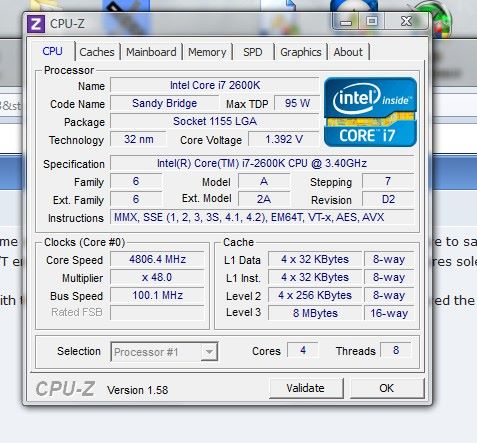
My 4.8 OC is only 1.392v HT enabled - Ram at 6-7-6-20-1T
Running close to a pure FSX config apart from 3 entries
[GRAPHICS]
HIGHMEMFIX=1
[TERRAIN]
LOD_RADIUS=8.500000
[BufferPools]
UsePools=0
Smooth as silk maxed out. apart from AI which is at 40%
I use a little tool called Bill2's process manager, a great little tool. Can set affinities and auto priorities, FSX does what it does naturally sits on 4 cores no HT no affinity mask, TrackIR - ASE - Ezdok and any other addon apps are set to run on the HT cores only and because they are not intensive apps they will sit solely on the FPU's happily. Hence no CPu hits, stalls or stutters with TiR panning or weather loads.
Worth a try, I am with a lot of others out there in the belief that the Jesus tweaks degrade to improve and are more a "Placebo Effect".
But then there there is the "What works best for you" is what is best at the end of the day.Last edited by Rotordude on Thu Feb 02, 2012 6:12 pm, edited 1 time in total.Regards always
Pete
by Dean » Thu Feb 02, 2012 11:43 pm


by AndrewJamez » Fri Feb 03, 2012 9:31 am

by kcgb » Fri Feb 03, 2012 2:38 pm
AndrewJamez wrote:QUOTE (AndrewJamez @ Feb 3 2012,10:31 AM) <{POST_SNAPBACK}>Running close to a pure FSX config apart from 3 entries
[GRAPHICS]
HIGHMEMFIX=1
[TERRAIN]
LOD_RADIUS=8.500000
[BufferPools]
UsePools=0
What graphis card you running? My experience with the buffer pools tweak set to 0 is that you need a gpu that can stay ahead of the cpu's rendering ability. These new cpu's can render masses of auto gen now and when the AA AF are at high settings, there can be a bottle neck at the gpu end. Thats why a buffer pool exists, to combat this problem. As long as you have a kick arse gpu compared to the cpu you'll be sweet with bufferpool=0 but my 560Ti cannot keep up with my 2500K..I get regular stutters. Maybe I need GTX580..
those are my only tweaks but my LOD is only 6.5 and I use a 570
by Lapun » Fri Feb 03, 2012 5:32 pm

by Ian Warren » Fri Feb 03, 2012 5:46 pm


by Rotordude » Fri Feb 03, 2012 6:11 pm
AndrewJamez wrote:QUOTE (AndrewJamez @ Feb 3 2012,10:31 AM) <{POST_SNAPBACK}>Running close to a pure FSX config apart from 3 entries
[GRAPHICS]
HIGHMEMFIX=1
[TERRAIN]
LOD_RADIUS=8.500000
[BufferPools]
UsePools=0
What graphis card you running? My experience with the buffer pools tweak set to 0 is that you need a gpu that can stay ahead of the cpu's rendering ability. These new cpu's can render masses of auto gen now and when the AA AF are at high settings, there can be a bottle neck at the gpu end. Thats why a buffer pool exists, to combat this problem. As long as you have a kick arse gpu compared to the cpu you'll be sweet with bufferpool=0 but my 560Ti cannot keep up with my 2500K..I get regular stutters. Maybe I need GTX580..
I kid you not! a EVGA 460 OC'ed
Bufferpools=0 does not direct render, that command actually sends the rendering to the back buffer of the GPU.
You will have to excuse me, but I seriously do laugh when I read posts about maxed out settings, super hi Super Sampling AA settings (every time you go up a level on SS you square the previous ratio) and ppl get the stutters and draw crashs so off they go to find old tweaks for 5 year old systems. Lets get real set the sim to the hardware thats it, if you have to come one notch back on AG to get a smooth flight do so, if you have to drop back a bit on AA so you dont get d3d crashs do so... and remind yourself wow this is 100 times better than that old Core2's and GF 6800's we used to have.
Go fly the sim, it's the best it has ever been and will get better, it is not FSX that is the problem now, it's the user and his/her over expectations of the new hardware.Regards always
Pete
by Rotordude » Fri Feb 03, 2012 6:26 pm
Ian Warren wrote:QUOTE (Ian Warren @ Feb 3 2012,6:46 PM) <{POST_SNAPBACK}>By compare .. everyone systems al seem to show different and many better than some screens ...... its the old story depends on your hardware and the compare game has been lost for even over recent six months , and even six weeks .. rule one ...if your happy with result compared to your previous Then your happy ... rule two do not compare yours to another , you maybe quite a few inches shorter ... rule three Its not a competition
EXACTLY!! FSX has come down to a screen shot platform where we have middle aged ppl competing for that ultimate ego boosting pat on the back, Hey I'm even guilty of that
I watched a Utoob of a 747 coming in on finals, the person nailed the cross wind landing like a pro, apart from stutters and low settings it was so sweet to watch. Not one comment on the skill, but s%@t loads of "F*#% your graphics suck" "your system sucks dude" "get a better computer" "video responce.. see wot a real pc can do" WOW nice feed back to nail a guys confidence to the ground.Last edited by Rotordude on Fri Feb 03, 2012 6:28 pm, edited 1 time in total.Regards always
Pete
by Ian Warren » Sat Feb 04, 2012 3:32 pm
Users browsing this forum: No registered users and 20 guests

.jpg)

