have had to go backwards a bit
it just didn't feel right when sitting in the cockpit - luckily though the real baron ZK-WLV is operating on a regular basis into NZAA lately and I was able to talk to the pilot and get a good look around the aircraft with a camera and a tape measure!
I now have a better idea of where I am headed and the first thing I had to do was rip out the floor from the forward edge of the seats forward and drop it by 18". of course this necessitated lifting the whole body by a couple of feet, inserting cross bracing and laying the new floor level. I'm nearly at that point now and then I will have to remake the throttle quadrant.
Once all that is done I will be able to get on with controls etc. As you can guess this all takes a lot of time which at this time of the year and an increasingly busy time at work, just ain't a happening thing.
Hopefully in the new year I can get more of a move on - thats after I install all the software I'm getting for xmas ( the FTX OZ set) and do some more flying on my world tour.
more pictures when I can
Cheers and Merry Xmas everyone
TG
Cockpit building
 by towerguy » Wed Dec 24, 2008 8:35 am
Last edited by towerguy on Wed Dec 24, 2008 8:36 am, edited 1 time in total.
CPU- i7 4790K @4.0Gb Cooler- Noctua NH-D15 M/B- Z97 ProGamer P/S- 750W RAM- 16Gb
Graphics- Nvidia GTX970 16Gb Drives- 2x 120Gb SSD Samsung 850EVO, 1x 2Tb HD, 1x DVD-RW
Sound- on M/B Logitec 5.1 surround sound system OS- Win 10 pro , all wrapped in a black Corsair case Display - Panasonic UHD 4k 50" Flatscreen TV.( 3840x2160 Res)
Graphics- Nvidia GTX970 16Gb Drives- 2x 120Gb SSD Samsung 850EVO, 1x 2Tb HD, 1x DVD-RW
Sound- on M/B Logitec 5.1 surround sound system OS- Win 10 pro , all wrapped in a black Corsair case Display - Panasonic UHD 4k 50" Flatscreen TV.( 3840x2160 Res)
-

towerguy - Sim-holic
- Topic author
- Joined: Mon Aug 07, 2006 4:27 pm
- Posts: 886
by danieljrm23 » Tue Jan 06, 2009 7:01 pm
Hey guys, I'm new here, This is my first post.
I've been playing FlightSim, from about Microsoft Flight Simulator for win95.
But i'm looking at building a small cockpit, nothing too fancy or realistic,
maybe have a couple of screens, a yoke and throttles. I'd be for flying a cessna.
Also maybe 2 old car seats mounted in there too. I have 2 identical 17" CRT's I was thinking of setting up a G1000 cockpit,
Does anyone have any pictures like the ones on this forum or anything small that could help me?
Also!
Does anyone know where i can get the hardware to add switches, such as a USB expansion card, I know Opencockpits.com sell
them but it'll cost just over$100 for me to get one sent over here.
Thanks
I've been playing FlightSim, from about Microsoft Flight Simulator for win95.
But i'm looking at building a small cockpit, nothing too fancy or realistic,
maybe have a couple of screens, a yoke and throttles. I'd be for flying a cessna.
Also maybe 2 old car seats mounted in there too. I have 2 identical 17" CRT's I was thinking of setting up a G1000 cockpit,
Does anyone have any pictures like the ones on this forum or anything small that could help me?
Also!
Does anyone know where i can get the hardware to add switches, such as a USB expansion card, I know Opencockpits.com sell
them but it'll cost just over$100 for me to get one sent over here.
Thanks
Last edited by danieljrm23 on Tue Jan 06, 2009 8:27 pm, edited 1 time in total.
- danieljrm23
by towerguy » Wed Jan 07, 2009 12:08 pm
I have a Hagstrom encoder card which works well for basic switches or you can check the tutorials on Avsim and Flightsim.com on how to hack a keyboard - these are both good basic starter steps - Hagstrom of course you have to pay for but hacking a spare keyboard is lots cheaper but requires a bit more work.
cheers
Craig
cheers
Craig
CPU- i7 4790K @4.0Gb Cooler- Noctua NH-D15 M/B- Z97 ProGamer P/S- 750W RAM- 16Gb
Graphics- Nvidia GTX970 16Gb Drives- 2x 120Gb SSD Samsung 850EVO, 1x 2Tb HD, 1x DVD-RW
Sound- on M/B Logitec 5.1 surround sound system OS- Win 10 pro , all wrapped in a black Corsair case Display - Panasonic UHD 4k 50" Flatscreen TV.( 3840x2160 Res)
Graphics- Nvidia GTX970 16Gb Drives- 2x 120Gb SSD Samsung 850EVO, 1x 2Tb HD, 1x DVD-RW
Sound- on M/B Logitec 5.1 surround sound system OS- Win 10 pro , all wrapped in a black Corsair case Display - Panasonic UHD 4k 50" Flatscreen TV.( 3840x2160 Res)
-
towerguy - Sim-holic
- Topic author
- Joined: Mon Aug 07, 2006 4:27 pm
- Posts: 886
 .
.by towerguy » Thu Jan 08, 2009 10:02 pm
not sure now but you can google their web page and get an idea
CPU- i7 4790K @4.0Gb Cooler- Noctua NH-D15 M/B- Z97 ProGamer P/S- 750W RAM- 16Gb
Graphics- Nvidia GTX970 16Gb Drives- 2x 120Gb SSD Samsung 850EVO, 1x 2Tb HD, 1x DVD-RW
Sound- on M/B Logitec 5.1 surround sound system OS- Win 10 pro , all wrapped in a black Corsair case Display - Panasonic UHD 4k 50" Flatscreen TV.( 3840x2160 Res)
Graphics- Nvidia GTX970 16Gb Drives- 2x 120Gb SSD Samsung 850EVO, 1x 2Tb HD, 1x DVD-RW
Sound- on M/B Logitec 5.1 surround sound system OS- Win 10 pro , all wrapped in a black Corsair case Display - Panasonic UHD 4k 50" Flatscreen TV.( 3840x2160 Res)
-
towerguy - Sim-holic
- Topic author
- Joined: Mon Aug 07, 2006 4:27 pm
- Posts: 886
by SeanG » Sun Jan 18, 2009 1:14 am
For a really good, and cost effective solution for inputs try Leo Bodnars awesome joystick boards: http://www.leobodnar.com/products/BU0836X/
I am using the older version in my TA-4 sim, and I can testify, hand on heart, that they rock. Your PC sees the board as a joystick, with up to 8 analogue inputs, 32 buttons and an 8 way hat switch. You can wire push buttons or toggle switches to the button inputs, then assign them in FS to do whatever.
This latest version, the BU0836X even removes the issue of making all the connections, by providing convienient push-in terminals.
All this for £44.99 + £4.99 shipping! Or for a cheaper option, but requires a little more work use the BU0836 (same as I have used) for £16.99 each + £4.99 shipping
At the price, I just can't fault the things!
If you use FSUIPC for button programming, you can do almost anything within FS with one of these boards
SeanG
I am using the older version in my TA-4 sim, and I can testify, hand on heart, that they rock. Your PC sees the board as a joystick, with up to 8 analogue inputs, 32 buttons and an 8 way hat switch. You can wire push buttons or toggle switches to the button inputs, then assign them in FS to do whatever.
This latest version, the BU0836X even removes the issue of making all the connections, by providing convienient push-in terminals.
All this for £44.99 + £4.99 shipping! Or for a cheaper option, but requires a little more work use the BU0836 (same as I have used) for £16.99 each + £4.99 shipping
At the price, I just can't fault the things!
If you use FSUIPC for button programming, you can do almost anything within FS with one of these boards
SeanG
Please note I have left this forum, due to an unfortunate incident. I can be contacted on the MilitaryAIWorks forum at http://www.militaryaiworks.com/
- SeanG
- Member
- Joined: Thu Oct 18, 2007 8:05 pm
- Posts: 128
- Location: Christchurch
by danieljrm23 » Mon Feb 09, 2009 6:43 am
I havent posted in awhile, been a bit busy.
But anyway,
So far, im just setting my computer up before i go and build anything.
I have just finished setting up 3xmonitors + my 5.1 surround sound.
I do have a question or two though.
I've read that FSX supports 5.1, I have set everything to 5.1, but I cant get anything more than stereo,
only the front two produce sound. any suggestions?
One more thing, I have an onboard 6200GS running on my 3rd monitor, this runs fine in FSX, but I know that if I upgrade
to FSX Accel, I cant play because it doesnt support Shader 1.4 (I think) Is there any way around this as well?
But anyway,
So far, im just setting my computer up before i go and build anything.
I have just finished setting up 3xmonitors + my 5.1 surround sound.
I do have a question or two though.
I've read that FSX supports 5.1, I have set everything to 5.1, but I cant get anything more than stereo,
only the front two produce sound.
any suggestions?One more thing, I have an onboard 6200GS running on my 3rd monitor, this runs fine in FSX, but I know that if I upgrade
to FSX Accel, I cant play because it doesnt support Shader 1.4 (I think) Is there any way around this as well?
- danieljrm23
by towerguy » Mon Feb 09, 2009 9:14 am
check in control panel - sounds and audio devices - (down the bottom should be speaker settings) - advanced - speaker settings
hope it helps
cheers
hope it helps
cheers
CPU- i7 4790K @4.0Gb Cooler- Noctua NH-D15 M/B- Z97 ProGamer P/S- 750W RAM- 16Gb
Graphics- Nvidia GTX970 16Gb Drives- 2x 120Gb SSD Samsung 850EVO, 1x 2Tb HD, 1x DVD-RW
Sound- on M/B Logitec 5.1 surround sound system OS- Win 10 pro , all wrapped in a black Corsair case Display - Panasonic UHD 4k 50" Flatscreen TV.( 3840x2160 Res)
Graphics- Nvidia GTX970 16Gb Drives- 2x 120Gb SSD Samsung 850EVO, 1x 2Tb HD, 1x DVD-RW
Sound- on M/B Logitec 5.1 surround sound system OS- Win 10 pro , all wrapped in a black Corsair case Display - Panasonic UHD 4k 50" Flatscreen TV.( 3840x2160 Res)
-
towerguy - Sim-holic
- Topic author
- Joined: Mon Aug 07, 2006 4:27 pm
- Posts: 886
by danieljrm23 » Thu Feb 12, 2009 7:16 am
Has anyone here bought + used the SAITEK PRO FLIGHT SWITCH PANEL ?
I'm thinking of Purchasing that along with the SAITEK PRO FLIGHT YOKE SYSTEM and the SAITEK PRO FLIGHT RUDDER PEDALS.
I'm thinking of Purchasing that along with the SAITEK PRO FLIGHT YOKE SYSTEM and the SAITEK PRO FLIGHT RUDDER PEDALS.
- danieljrm23
by ronwestnz » Thu Feb 12, 2009 4:24 pm
danieljrm23 wrote:QUOTE (danieljrm23 @ Feb 12 2009, 08:16 AM) <{POST_SNAPBACK}>Has anyone here bought + used the SAITEK PRO FLIGHT SWITCH PANEL ?
I'm thinking of Purchasing that along with the SAITEK PRO FLIGHT YOKE SYSTEM and the SAITEK PRO FLIGHT RUDDER PEDALS.
I looked at getting the panel, but after reading the reviews found the unit is hard coded for some fsx functions and the controls cant be assigned to different functions. so it only really works with some default aircraft.
the limited functions and lack of flexibility/capability didn't justify the price for me.

- ronwestnz
- Member
- Joined: Mon Jan 01, 2007 9:34 am
- Posts: 73
- Location: NZPM
by danieljrm23 » Mon Feb 16, 2009 7:00 pm
Just me back again, I got abit bored in the weekend and had a few spare bits of wood + old benches lying around, so I got busy =]
Theres are a few photos i just took before my camera died. so it's still not set up properly, but its an overall view of what i got done
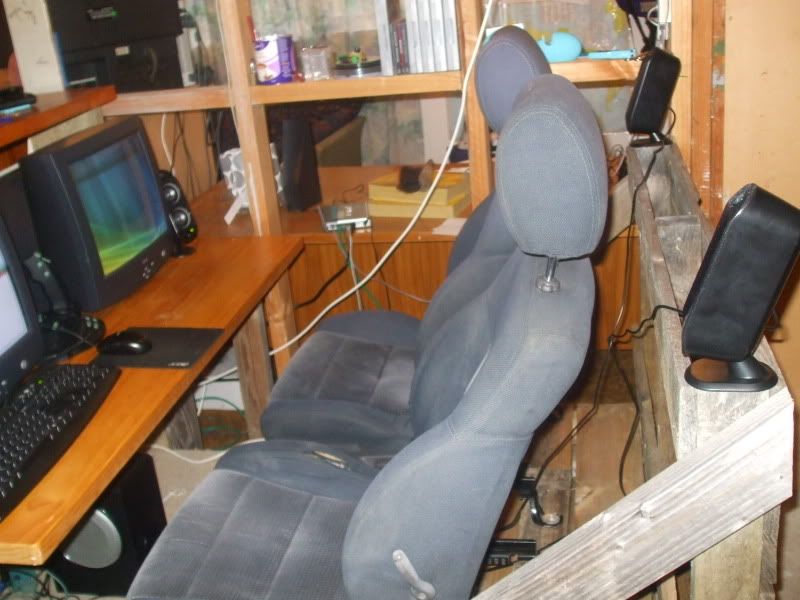
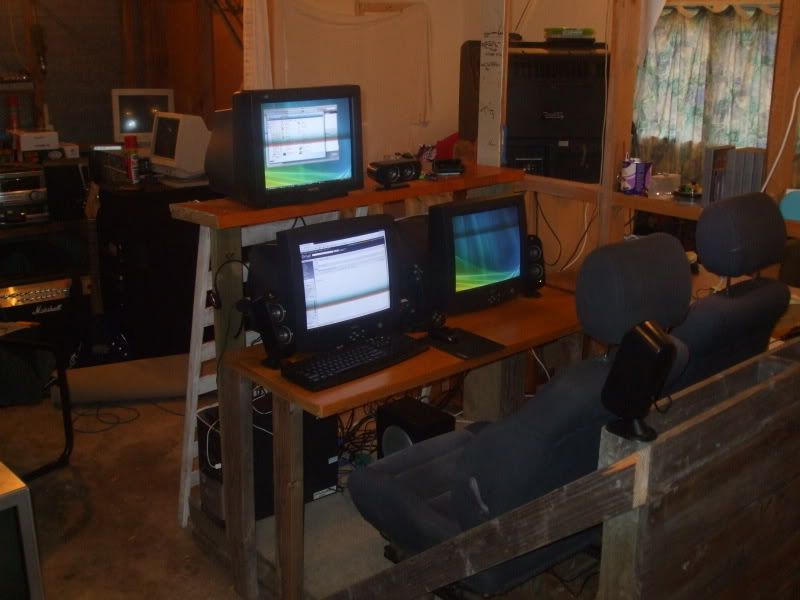
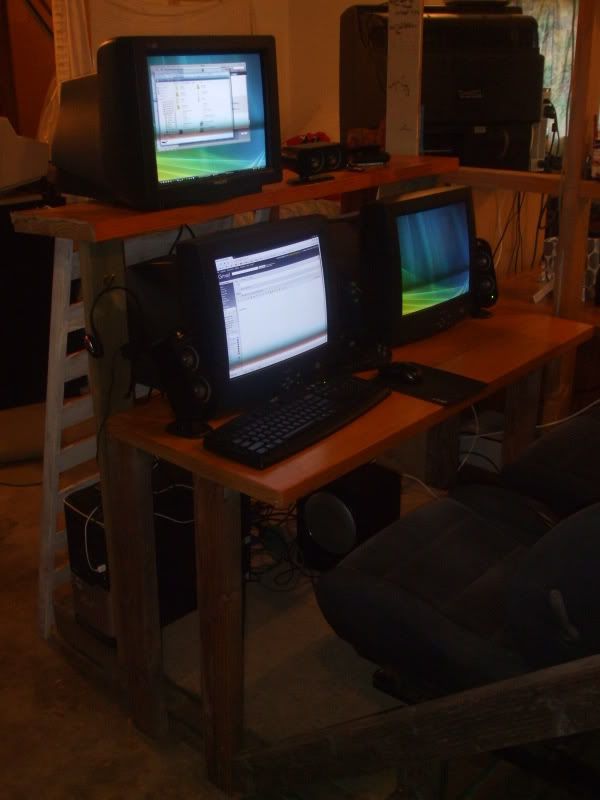
Theres are a few photos i just took before my camera died. so it's still not set up properly, but its an overall view of what i got done
- danieljrm23

by towerguy » Thu Feb 19, 2009 7:15 pm
Hi all
just a quick update to show that I'm still going along slowly
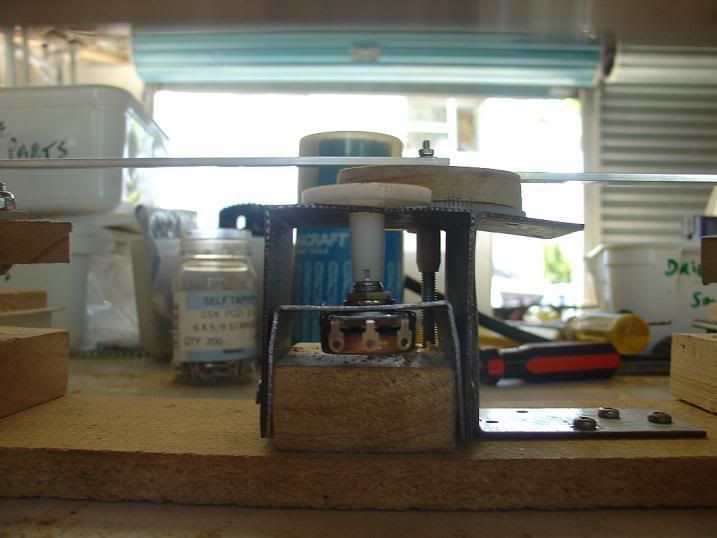
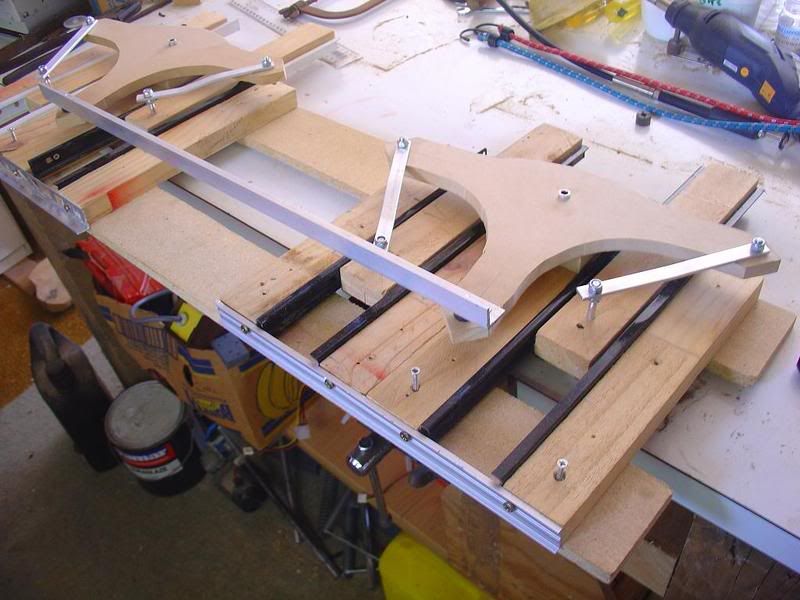
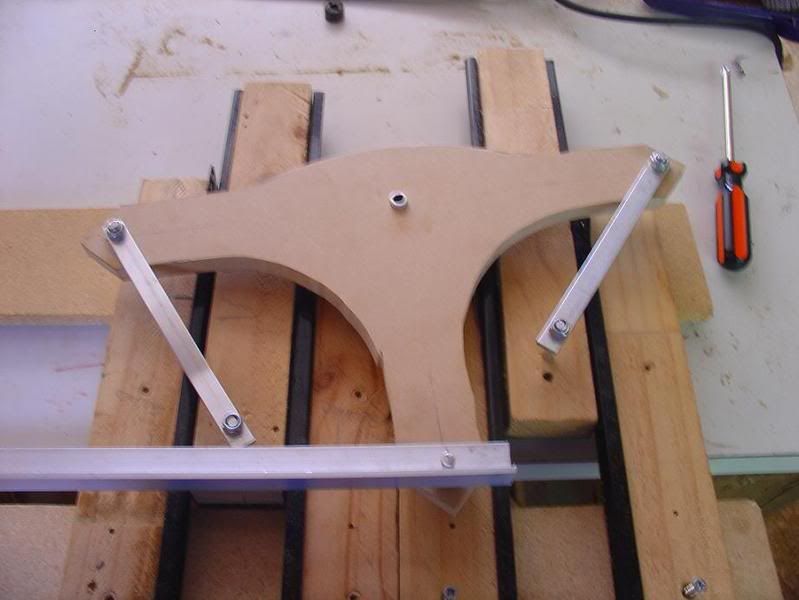
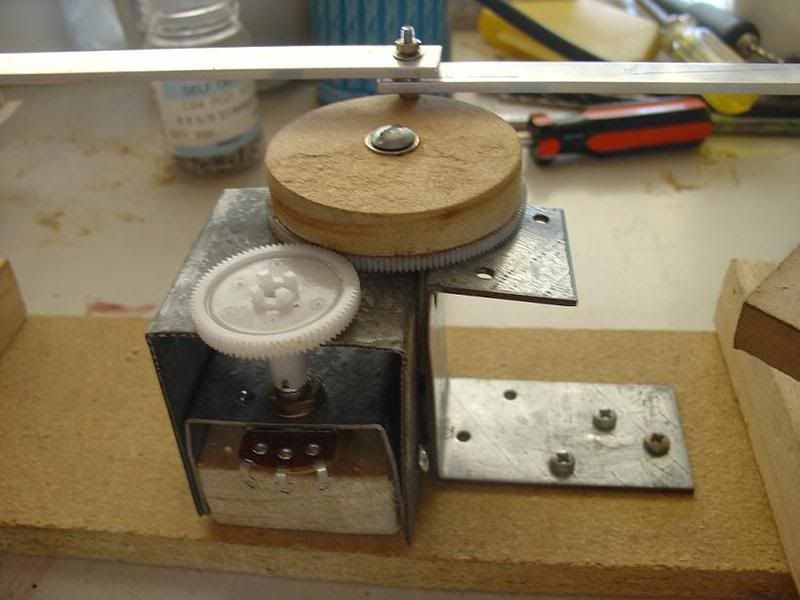
I've been working on the rudder pedal system which has taken a fair bit of thinking about and lots of tearing apart and restarting.
a front shot of the gears and pot system
an overall shot of the system and the linking bars so that both sides operate in tandem
a shot showing the links on one side in closer detail
the gear linkage to the main system
so you see I'm still plugging away and am now working on the actual pedals themselves as well as the throttle console and a rebuild of the landing gear lever.
Oh and I'm also in the middle of deleting and rebuilding my FSX installation because it keeps freezing up on me.
just a quick update to show that I'm still going along slowly
I've been working on the rudder pedal system which has taken a fair bit of thinking about and lots of tearing apart and restarting.
a front shot of the gears and pot system
an overall shot of the system and the linking bars so that both sides operate in tandem
a shot showing the links on one side in closer detail
the gear linkage to the main system
so you see I'm still plugging away and am now working on the actual pedals themselves as well as the throttle console and a rebuild of the landing gear lever.
Oh and I'm also in the middle of deleting and rebuilding my FSX installation because it keeps freezing up on me.
CPU- i7 4790K @4.0Gb Cooler- Noctua NH-D15 M/B- Z97 ProGamer P/S- 750W RAM- 16Gb
Graphics- Nvidia GTX970 16Gb Drives- 2x 120Gb SSD Samsung 850EVO, 1x 2Tb HD, 1x DVD-RW
Sound- on M/B Logitec 5.1 surround sound system OS- Win 10 pro , all wrapped in a black Corsair case Display - Panasonic UHD 4k 50" Flatscreen TV.( 3840x2160 Res)
Graphics- Nvidia GTX970 16Gb Drives- 2x 120Gb SSD Samsung 850EVO, 1x 2Tb HD, 1x DVD-RW
Sound- on M/B Logitec 5.1 surround sound system OS- Win 10 pro , all wrapped in a black Corsair case Display - Panasonic UHD 4k 50" Flatscreen TV.( 3840x2160 Res)
-
towerguy - Sim-holic
- Topic author
- Joined: Mon Aug 07, 2006 4:27 pm
- Posts: 886
by cambridgedan » Thu Mar 12, 2009 9:17 am
Hi guys, I am looking at building a replicaish Dash - 8,
Does anyone know of any good tutorals for building the different parts e.g. throttel etc.
Im going to have somthing like 12 screens on it and i dont even know if you can connect that many to one computer.
Any info would be great,
Cheers
Does anyone know of any good tutorals for building the different parts e.g. throttel etc.
Im going to have somthing like 12 screens on it and i dont even know if you can connect that many to one computer.
Any info would be great,
Cheers
Camera Equipment
-2x 5d MK II
-7d
-50mm L USM F/1.2
-70-300mm L USM IS f/4
-100-400mm L USM IS f/4.5
-24.105mm L IS USM F/4
-2x 580EX II Flash's
-Manfrotto Tripod
www.kiwiphotography.co.nz
-2x 5d MK II
-7d
-50mm L USM F/1.2
-70-300mm L USM IS f/4
-100-400mm L USM IS f/4.5
-24.105mm L IS USM F/4
-2x 580EX II Flash's
-Manfrotto Tripod
www.kiwiphotography.co.nz
-

cambridgedan - Forum Addict
- Joined: Wed Dec 17, 2008 10:58 am
- Posts: 161
- Location: Tauranga
by towerguy » Thu Mar 12, 2009 9:43 am
when starting out this is a good site to start out with
http://www.fscockpit.com/
plenty of reading and good leads
cheers
http://www.fscockpit.com/
plenty of reading and good leads
cheers
CPU- i7 4790K @4.0Gb Cooler- Noctua NH-D15 M/B- Z97 ProGamer P/S- 750W RAM- 16Gb
Graphics- Nvidia GTX970 16Gb Drives- 2x 120Gb SSD Samsung 850EVO, 1x 2Tb HD, 1x DVD-RW
Sound- on M/B Logitec 5.1 surround sound system OS- Win 10 pro , all wrapped in a black Corsair case Display - Panasonic UHD 4k 50" Flatscreen TV.( 3840x2160 Res)
Graphics- Nvidia GTX970 16Gb Drives- 2x 120Gb SSD Samsung 850EVO, 1x 2Tb HD, 1x DVD-RW
Sound- on M/B Logitec 5.1 surround sound system OS- Win 10 pro , all wrapped in a black Corsair case Display - Panasonic UHD 4k 50" Flatscreen TV.( 3840x2160 Res)
-
towerguy - Sim-holic
- Topic author
- Joined: Mon Aug 07, 2006 4:27 pm
- Posts: 886
by greaneyr » Thu Mar 12, 2009 8:07 pm
I know this sounds dumb, but who would have thought of adding two seats to a simpit? It just really adds another dimension to it, imho. I know the flightexperience sims have two seats, but the majority of those I've seen were all single-seaters.
Can't wait to see this progressing!
Can't wait to see this progressing!
-

greaneyr - Forum Addict
- Joined: Fri Nov 16, 2007 9:53 pm
- Posts: 459
- Location: Palmerston North
by jastheace » Tue Apr 28, 2009 8:58 pm
well i have jumped on the cockpit building band wagon, i am in the process of building a generic cockpit with 6 screens (eventually) 3 for scenery and 3 for the cockpit and other items, based very loosly on an airbus, boeing cockpit.
got a car seat from the wreckers and the timber i need, so going to work on it this long weekend, hope to have some shots for you over the weekend.
as we live in a rental house, it has to be able to dissambled and reassembled with a minimum of fuss, still to work out a few attachement details.
got a car seat from the wreckers and the timber i need, so going to work on it this long weekend, hope to have some shots for you over the weekend.
as we live in a rental house, it has to be able to dissambled and reassembled with a minimum of fuss, still to work out a few attachement details.
In the ongoing battle between objects made of aluminum going hundreds of miles per hour and the ground going zero miles per hour, the ground has yet to lose.

-

jastheace - Senior Member
- Joined: Sun Aug 13, 2006 1:33 pm
- Posts: 1032
- Location: Hastings

Who is online
Users browsing this forum: No registered users and 33 guests