no probelm:
CPU:P4, northwood, brand ID: 9, core speed 2388mhz bus speed 132mhz rated FSB 530mhz
MOBO:"Micro-star international", model: MS-6533
RAM:768mb DDR
VID:Geforce 7600GS 256MB DDR3 Driver version 91.31
HDD: 37GB (main drive) and a 154GB drive
OS: Win XP pro SP2
Graphic interface: AGP version 2, transfere rate: 4x. max supported: 4x "side band enabled"
BIOS: phoenix technoogies, version 6.00PG, Date: 01/13/2003
my new video card, not a 6800 a 7600!
26 posts
• Page 2 of 2 • 1, 2
 by brownbox » Fri Jan 12, 2007 3:08 pm
have you tried updating your AGP drivers? I dont know much about these, but I have heard of them. 
Desktop:Core 2 Duo E4300 1.8@ 3.0Ghz@ 1.36v. 4Gb Supertalent DDR2-800 2.1v@ 5-5-5-15. Asus P5N-E SLI Pencil Modded. Corsair TX 650. 512MB Palit Geforce 8800GT. 2x200GB IDE+640GB SATAII. Windows Vista Ultimate X86. Samsung SH-S222A
Phone:Nokia N900 Vodafone
Car:1993 Mitsubishi Mirage Asti Z. Steel Blue Pearl
1996 Toyota Curren 2.0L 5 Spd Manual Silver. 205/50/R16 on Enkei K-95. Lowered on Jamex Superlows. Remote locking. Remote boot release. Cruise control
1996 Mitsubishi GTO MR

Phone:Nokia N900 Vodafone
Car:
1996 Mitsubishi GTO MR
-

brownbox - Senior Member
- Joined: Thu Apr 27, 2006 10:55 pm
- Posts: 1318
by Jimmy » Fri Jan 12, 2007 4:17 pm
OHO! I think iv stuffed up somethign. I tried installing an older video driver, version 66.93. Bad idea! I installed it ,folowd all the steps but after it did its final restart I just got the "found new hardware" icon and the window asking me to install driver. IN device manager it shows under "other devices" with a big yellow "!" says its called a VGA video controler.
I have driver version 91.31 installer on my h/drive so I thought I would just run that, I get this message:
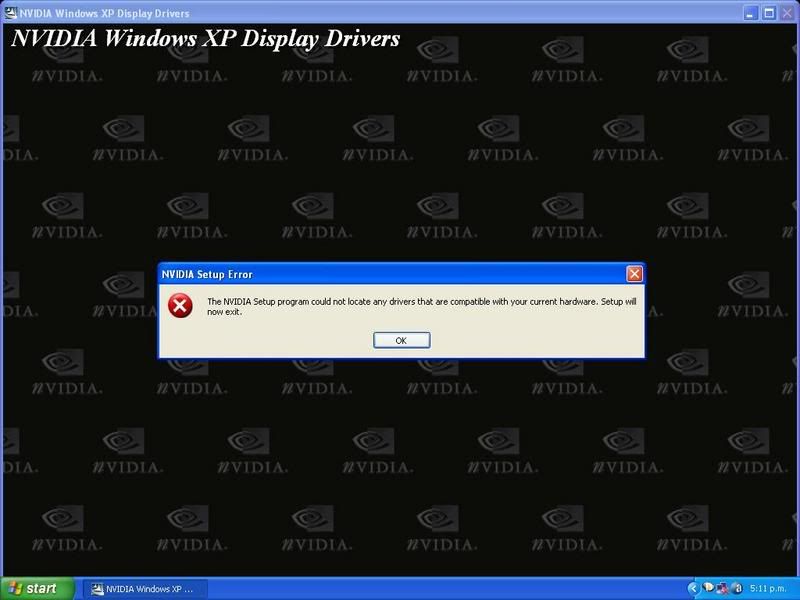
The only driver I can "install" is the 66 one and that one doesn't actuly install anyway. I would try the disc that came with my card (what I used originaly) but my dvd drive is unpluged cos I need the power cable for the graphicsd card.
Oh no, even scrolling in firefox is all odd and stutery, not not not good, proably damageing the card at this every moment.
Help please
[EDIT]
silly jimmy panicing again lol I removed the card restarted then put the card back in (after shuting down of course) and took the power cables from the card so I could use the dvd drive) then did everythign as I did it the first time...
I have driver version 91.31 installer on my h/drive so I thought I would just run that, I get this message:
The only driver I can "install" is the 66 one and that one doesn't actuly install anyway. I would try the disc that came with my card (what I used originaly) but my dvd drive is unpluged cos I need the power cable for the graphicsd card.
Oh no, even scrolling in firefox is all odd and stutery, not not not good, proably damageing the card at this every moment.
Help please
[EDIT]
silly jimmy panicing again lol I removed the card restarted then put the card back in (after shuting down of course) and took the power cables from the card so I could use the dvd drive) then did everythign as I did it the first time...
Last edited by Jimmy on Fri Jan 12, 2007 5:00 pm, edited 1 time in total.
- Jimmy
by Jimmy » Sat Jan 13, 2007 4:49 pm
as many of you know I have never really stoped moaning about my computers perforamce, I do apoligise for going on and on about it, although my complaining is not with out reason it must get rather boring after a while. I thank you all for your paitents.
Since I brought my current system I have been upgrading things in the hope the sims frame rates will eventuly incress. I have upgraded as much as I can afford to, RAM, Harddrive, graphics card, dvd drive, anothor graphics card. So when I touch down in my 767 with 4fps I think "oh itll be fine once I upgrade the.......".
The last few days have really been the last of paintence thow, I have wasted $261 on a brand new graphics card, the only thing this new card has improved is my fps when inside clouds, weather still makes major impacts on perforamce thow.
Jon has been kindly giving advice, he recomended I remove my 256mb ram module witch runs at a lower speed than the 512mb one, I did so and I think, not certain, but think there is a slight fps improvment.
I just atempted my third flight of the day witch ended with me crashing just short of the rwy, thats what 3fps, stuters, textures not loading and a 20knt cross wind will cause. The other two ended well beofre cruise alot due to a major lack of perforamce.
So as you can imagine im getting very sick of this. I am considering selling my system and starting fresh, I am certain my system has something seriosly wrong with it.
I'v put over a thousand dollars into this system, thats quite a few papers been deleverd, I wan't to get some enjoyment out of it, am I best to sell up and try again, or try and solve whatever is wrong?!??! Im uncertain what to do.....
Sorry about the lenght of this post, I am rather grouchy.
James
Since I brought my current system I have been upgrading things in the hope the sims frame rates will eventuly incress. I have upgraded as much as I can afford to, RAM, Harddrive, graphics card, dvd drive, anothor graphics card. So when I touch down in my 767 with 4fps I think "oh itll be fine once I upgrade the.......".
The last few days have really been the last of paintence thow, I have wasted $261 on a brand new graphics card, the only thing this new card has improved is my fps when inside clouds, weather still makes major impacts on perforamce thow.
Jon has been kindly giving advice, he recomended I remove my 256mb ram module witch runs at a lower speed than the 512mb one, I did so and I think, not certain, but think there is a slight fps improvment.
I just atempted my third flight of the day witch ended with me crashing just short of the rwy, thats what 3fps, stuters, textures not loading and a 20knt cross wind will cause. The other two ended well beofre cruise alot due to a major lack of perforamce.
So as you can imagine im getting very sick of this. I am considering selling my system and starting fresh, I am certain my system has something seriosly wrong with it.
I'v put over a thousand dollars into this system, thats quite a few papers been deleverd, I wan't to get some enjoyment out of it, am I best to sell up and try again, or try and solve whatever is wrong?!??! Im uncertain what to do.....
Sorry about the lenght of this post, I am rather grouchy.
James
- Jimmy

by Zöltuger » Sat Jan 13, 2007 11:08 pm
my theories:
a) your graphics card is not AGP 4x compatible, which is causing the same issues as Trolly had with his new card. return it and find one which is compatible
B) your CPU is holding back the graphics card. not much you can do aside from saving your pennies
sorry to see you suffer like this. technology has never been kind to anyone.
a) your graphics card is not AGP 4x compatible, which is causing the same issues as Trolly had with his new card. return it and find one which is compatible
B) your CPU is holding back the graphics card. not much you can do aside from saving your pennies
sorry to see you suffer like this. technology has never been kind to anyone.
Last edited by Zöltuger on Sat Jan 13, 2007 11:13 pm, edited 1 time in total.
- Zöltuger
26 posts
• Page 2 of 2 • 1, 2
Who is online
Users browsing this forum: No registered users and 44 guests