Page 1 of 1

Posted:
Mon Jun 23, 2008 7:37 pmby creator2003
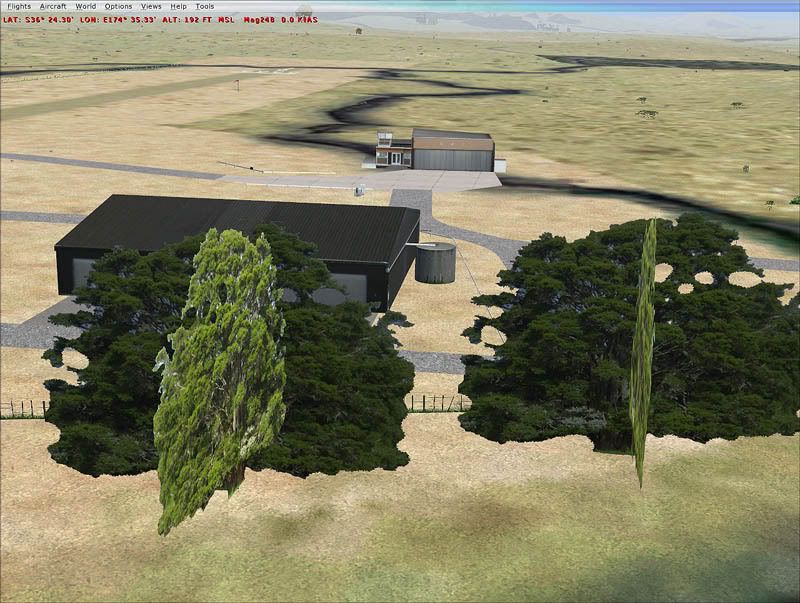
Now ive been coming into problems here with photoshop and transparent textures ie fences mesh etc / i need some help from someone who knows about scenery and fences with the alpha channel etc...
ill start with the way i thought it would work again for me ,ive tryed many different ways but still they are just coming up white and not see through...
first of all i open up photoshop /
new file /
background transparent /
8 bit
like pic

now i make everything up on my doco blend out the white etc and save out ether as a TGA or a PSD which will save the alpha transparent ,but when i put it through imagetool it shows no alpha in the righthand side but if i chose /VIEW,alpha it shows one ,so i save it out again with mipmaps /format to DX3 DX5 DX1 and saved as a DDS but still white ive done this all different ways and still no transparent ,ive even added a alpha to it but that shouldnt be unnecessary after the start with a transparent background ,,really bugging me now as ive got lot more things id rather be working out than this one as i use to be able to do it back in the day no prob
so have you got some help for me on this subject ,,this is for FSX by the way
thanks if you can help or any other tools you mite be able to suggest ...l
Posted:
Mon Jun 23, 2008 7:43 pmby Ian Warren
I guess thats a question i need to address myself , not workin full time on FSX project , but i do want Christchurch back , i brought an AFCAD program that has a good series of fencing , but still havnt even looked at it yet , jumping around to many thing in FS .. come 9 or X
Posted:
Mon Jun 23, 2008 7:54 pmby creator2003
Yeah this will help in many places /signs metal work people netting around helipads alsorts to cut down polys lods etcc... it just bugs me at the moment as im trying to finish some textures and ive done this all before ...i was hoping timmo mite answer this as i know robin uses different tools for this job ..
The fences in fsx are sweet but dont go downhill ,,real easy though Ian with the afcad programs
http://www.scenery.org/tutorials.htm i found acouple here ,but if you can still help a dummy feel free to post away ...
Posted:
Tue Jun 24, 2008 5:55 pmby creator2003
Ok thanks all for even looking at this subject ,ive found the easiest way to do this to date ,even better than the way i had been trying before ,i started with the above tutorials above reading robins and another called Gmax transparents found on the above posting links page ,anyway i had my texture already set on a transparent texture like the above pic i posted ,,i aready had the bits i wanted blended out "like the holes in a fence or the background from a sign .." you can do this easy in photoshop by selecting the layer and rightclick on the layer and selecting blending options,and sliding the white out of the pic or the black ,,
again anyway fill the transparent background will 0,0,0 RGB that is true black and save it out as a bitmap32 -24 up to you i saved out as a 32 ,after this i got that DXTBMP image program and created a alpha black channel to it and saved it out as a DXT3 with mipmaps and then put it through imagetool from the SDK and saved it out again as a DDS texture ...
alot of the ground work is in the base textures and you would have to work out masking out white or black etc ..
so there you have it i suppose this could be done in many different ways but this is worked sweet for me ...
mike
Posted:
Tue Jun 24, 2008 10:21 pmby Timmo
ah yep good stuff that you got it sorted. I also initially had problems and assumed that because I had a transparent background and 'rubbed out' bits, that these would function as alpha.....it doesnt.
I now go (in photoshop) to layers and click the 'new layer' icon which will add an alpha channel. Then colour this up (black for alpha or, when you turn on the RGB layers the alpha parts (i.e. see through) are red.
Then I save the PSD and open it directly in image tool, add mip maps, set format to dxt5 and then save as a DDS (important to save_as to avoid overwriting your PSD document)
Posted:
Wed Jun 25, 2008 12:18 amby creator2003
Yeah was i going along that way and adding the new layer "alpha" within the channels but it wasent giving me what i needed and was just confusing me totally lol, i was just forgetting how i did this back in the day so i tryed another tool to add the alpha channel ,DXTBMP freeware was the key and filling the background black in photoshop ,in DXTBMP it has a option to create a new alpha channel in black/green and some others i think but this was what i needed big time ...
i guess now looking back through out my mistakes i see many ways to achieve this transparency and just laugh at myself for being so dumb about it all ..its good its sorted now
What are your feelings with the DX3 DX5 ? are the DX5 better with showing through without problems ,ive read in some places this mite be the case ..
at lest this post will help others within the design community here if they need it for there future projects Fs9-FSX
cheers

Posted:
Thu Jun 26, 2008 12:12 pmby Timmo
I use DXT5 and DDS....more and more people are getting broadband so im not worried as much about filesizes anymore (in saying that, most of my scenery so far has fit on 3 or less 1024*1024 texture sheets so its not really a problem)
Posted:
Thu Jun 26, 2008 1:34 pmby toprob
First, I got around to testing PhotoShop at my old work, just to see how the alpha creation compared to the imaging tool I use. This is what I did:
Created a new CHANNEL -- this was automatically named Alpha 1;
Cleared this new alpha channel to white; (not really required, but I am used to making reflective maps, where the non-reflective channel is white)
Made the image visible by activating the 'eye' on the RGB channel;
Made my 'mask' by painting on the alpha channel (actually, made a selection of all the windows, and filled with grey -- thinking reflective again);
Saved as a PSD;
...which loaded into ImageTool with alpha no worries.
Anyway, here's what I base my texture type on, courtesy of Bill Leaming over at FSDeveloper:
1. If your image has no alpha, use DXT1 compression. Using DXT3/5 will double your image size over DXT1 and not gain anything.
2. If your image has 1-bit (on or off) alpha information, use DXT1 with one-bit alpha. If the DXT1 image quality is too low and you don't mind doubling image size, use DXT3 or DXT5 (which one doesn't matter, they'll give the same results).
3. If your image has smooth gradations of alpha (fading in/out slowly), DXT5 is almost certainly your best bet, as it will give you the most accurate transparency representation.
4. If your image has sharp transitions between multiple alpha levels (one pixel is 100%, the next one is 50%, and another neighbor is 12%), DXT3 is probably your best bet. You may want to compare the alpha results in DXT1, DXT3 and DXT5 compression, however, to make sure.
So I used different formats for different reasons (specifically scenery, rather than aircraft here) --
For textures with no alpha, I use DXT1;
For full transparency, such as fences etc, I use DXT1, as there is just a single alpha bit here -- white alpha=opaque, black alpha=transparent, no other values needed;
For specular and reflective maps, I normally use DXT3, as normally these are just blocks of different shades of grey, no gradations required;
...but I may use DXT5 if a more complex specular map is needed. There is a case for DXT5 instead of DXT3 for general use, though.
For bump maps, I always use DXT5, as the alpha quality is the most important part here.
Some developers use graduated transparency maps for things like wire fencing, thinking that a smooth graduation will improve the appearance, but in reality this never works well. I only use variable transparency when the real object is variably transparent -- a wire fence is not partially visible ever! but glass/plastic are. The same with trees -- you can't see through a branch, so 'fading' the edges -- sort of anti-aliasing -- is not a good idea. Some people swear by fading alphas for transparency, but I think that's only because they don't take enough care building their textures.
Posted:
Thu Jun 26, 2008 2:47 pmby Timmo
hmm I havent done a lot of tree stuff so far (Im having a problem where the partial alpha on one tree plane cuts through the other plane....maybe I should try a one bit alpha instead- It only effects the areas with an alpha value between 2-254)- What did you use?
However, what stops you using a DXT5 alpha but choosing your paintbrush better in photoshop- I.e. Dont use a 'fuzzy' brush for the trunks (i.e. 1 bit/on-off alpha) and use a graduated brush for the leafy bit?
Posted:
Thu Jun 26, 2008 2:58 pmby toprob
Timmo wrote:However, what stops you using a DXT5 alpha but choosing your paintbrush better in photoshop- I.e. Dont use a 'fuzzy' brush for the trunks (i.e. 1 bit/on-off alpha) and use a graduated brush for the leafy bit?
Nothing, really, although in reality leaves are not transparent -- except at the very end of autumn:)
Posted:
Thu Jul 03, 2008 6:15 pmby Timmo
Hmm Ok- What settings do use to make sure one plane doesnt clip the other?
(ignore the crappy alpha masking for now