Central Plateau Mountains

Share your simulated flights around NZ here. The place to post your flight reports, flight plan instructions and progress on tours

Postby ardypilot » Sat Apr 29, 2006 12:37 pm

user posted image

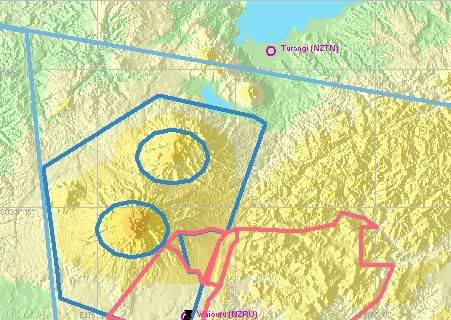
Start at Waiouru (NZRU) and place your aircraft on runway 31.

Take off and head straight ahead towards Mt Ruapheu, and then circle the mountain untill you reach the peak.

Explore around the crater, then begin to descend and head north east to Mt Ngaurahoe and explore around the snow caps there.

When you reach the end of the peaks, continue North East and either land at the nearby Turangi (NZTN), or if your in a float plane, touch down in nearby Lake Taupo!
user posted image
User avatar
ardypilot
NZFF Pro
 
Topic author
Joined: Wed Apr 26, 2006 10:01 am
Posts: 6802
Location: Auckland

Postby Blackmagic » Sat Apr 29, 2006 1:36 pm

Hi Trolly

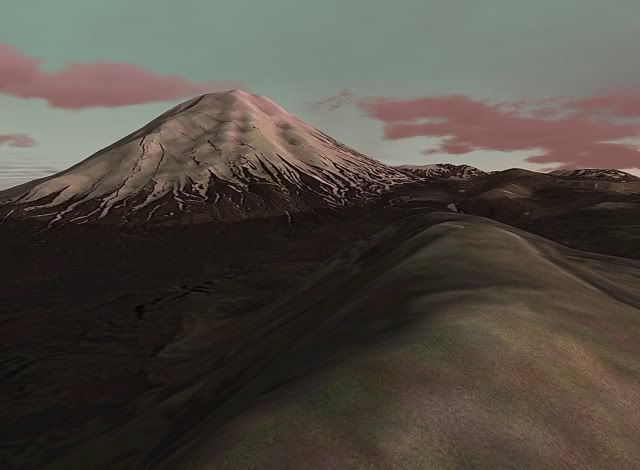
What add on are you using to make Mt Ngaurahoe snow capped? Living in that area I can let you know that this only occurs in winter other than a few low dumps in other times of the year of which currently there is no snow on Ngaurahoe.

Still curious as to the download though as it makes it to more realistic what I see there?

Couple of interesting facts for you in regards the Flight plan! NZRU - Waiouru is hardly used as a runway principly because its got power lines close by and the runway direction is smack into the mountain. Whats funny is how comes MS included this Airstrip yet missed the more used strips at Raetihi and at the Chateau?
Last edited by Blackmagic on Fri Nov 17, 2006 10:06 am, edited 1 time in total.
Blackmagic
 

Postby ardypilot » Sat Apr 29, 2006 7:50 pm

Hi BM,

I am using the "Godzone Magazine" addon, which is payware and available here: http://secure.simmarket.com/product_inf ... cts_id=454

The addon came with heaps and heaps of photoreal areas of NZ including Taupo and Ngaurahoe which I am guessing where photographed at winter...?

As I am not a local, I did not know anything about these airfields, but have to agree, the climb out of Waiouru is very steep, but still a lot of fun to fly at!

It's definatly worth it's money, and very cheap compared to other photoreal addons!
User avatar
ardypilot
NZFF Pro
 
Topic author
Joined: Wed Apr 26, 2006 10:01 am
Posts: 6802
Location: Auckland

Postby creator2003 » Wed Jul 19, 2006 12:22 pm

I FOUND THAT USING THE TOPO FREEWARE LANDCLASS HAS CHANGE THE CAPING OF SNOW THERE ,TO WHAT YOU SEE IN THE PHOTO VERY GOOD ADDON THAT AND THE 75 MESH
creator2003
 

Postby SUBS17 » Wed Jul 19, 2006 5:01 pm

Can you get the weather updated across the internet(yeah real time weather modelling)? There was talk of FighterOps having this feature so the sim mimics real world weather for dynamic weather modelling. I think winter in the Waiouru area would be extremely difficult to model as it has so many variations(yeah 4 seasons in one day and not every snow fall is the same), nice picture of Ngaruhoe though.
User avatar
SUBS17
Senior Member
 
Joined: Mon Jun 05, 2006 11:16 am
Posts: 1745

Postby Alex » Wed Jul 19, 2006 5:40 pm

There is an 'Update Weather' option included in FS9, either a static download, or updated every 15mins. A payware program which does basically the same thing in 'ActiveSky' and if you fly on most multiplayer networks (IVAO, VATSIM, FPI etc etc etc) you will get real-world weather as well.

One of the current limitations is the 'METAR Delay' as there is a time between the METAR being published, and to it being available on the web, so the 'Real-World Weather' will be real - albeit delayed a couple of hours. ;)

Alex
Alex
NZFF Pro
 
Joined: Fri Jul 14, 2006 3:39 pm
Posts: 3620


Return to Flights

Who is online

Users browsing this forum: No registered users and 5 guests