Page 1 of 1

PostPosted: Thu Feb 12, 2009 7:30 pm
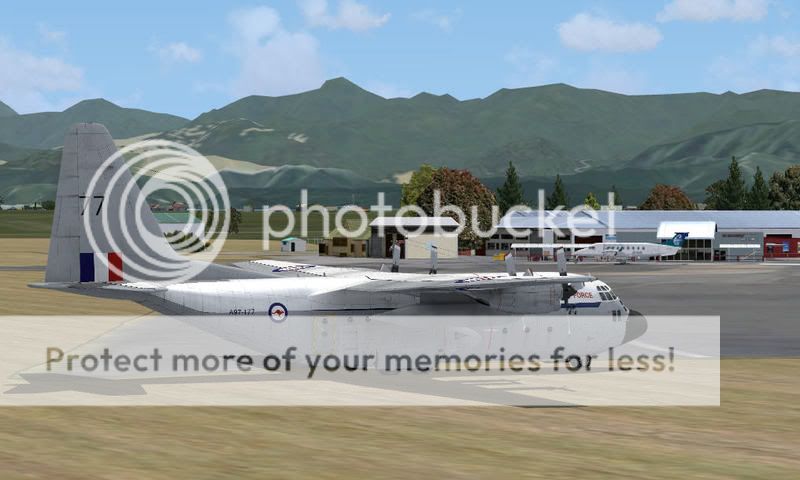
by dbcunnz
First a big thanks to all those who voted for my entry in the January screen competition I now have the FSX C-130 X-perience.


Now I have a problem with the RNZAF repaints the only ones I could find were for the FS9 CS C130 and whe I try ti install them into the FSX CS C130 it tell me that it cannot find the livery.cfg file.
Does anyone know how to fix this problem or know where if there are any FSX repaints for the RNZAF CS C130

PostPosted: Fri Feb 13, 2009 12:41 am
by Ian Warren
dbcunnz wrote:
QUOTE (dbcunnz @ Feb 12 2009, 08:30 PM) <{POST_SNAPBACK}>
First a big thanks to all those who voted for my entry in the January screen competition I now have the FSX C-130 X-perience.
Now I have a problem with the RNZAF repaints the only ones I could find were for the FS9 CS C130 and whe I try ti install them into the FSX CS C130 it tell me that it cannot find the livery.cfg file.
Does anyone know how to fix this problem or know where if there are any FSX repaints for the RNZAF CS C130

Big thumbs up on your FSX CS130 Doug , David has put the .cfg file in the read me , at the moment i only have 05 installed , but send the file thru if required and instuction to install .

PostPosted: Fri Feb 13, 2009 2:38 pm
by BigBird
Mean! You'll love that bird thumbup1.gif

I've been meaning to search for an RNZAF repaint for mine...

PostPosted: Fri Feb 13, 2009 2:58 pm
by dbcunnz
Ian Warren wrote:
QUOTE (Ian Warren @ Feb 13 2009, 01:41 AM) <{POST_SNAPBACK}>
Big thumbs up on your FSX CS130 Doug , David has put the .cfg file in the read me , at the moment i only have 05 installed , but send the file thru if required and instuction to install .

There are no FSX livery.cfg files in the readme files of the 4 CS C130 RNZAF FS9 repaints of Davids that I have downloaded on the 4th Feb.
I sent him an email yesterday morning asking if there were any livery.cfg files available for the repaints but haven't heard back from him yet.
There are 2 text files in each repaint a description.txt and the readme.txt. and neither has anything about a cfg file.

PostPosted: Fri Feb 13, 2009 3:27 pm
by spongebob206
You will love the C130. wub.gif

What a dream to fly, what and awesome addon. best purchase I have made to date as an addon.

Ahhhh.

PostPosted: Fri Mar 06, 2009 10:29 pm
by Trev
"There are no FSX livery.cfg files in the readme files of the 4 CS C130 RNZAF FS9 repaints of Davids that I have downloaded on the 4th Feb.
I sent him an email yesterday morning asking if there were any livery.cfg files available for the repaints but haven't heard back from him yet.
There are 2 text files in each repaint a description.txt and the readme.txt. and neither has anything about a cfg file."

Did you find a CFG for FSX? I've just bought the C130X and would really like the RNZAF schemes for it.

Thanks

Trev

PostPosted: Fri Mar 06, 2009 11:03 pm
by dbcunnz
Trev wrote:
QUOTE (Trev @ Mar 6 2009, 11:29 PM) <{POST_SNAPBACK}>
"There are no FSX livery.cfg files in the readme files of the 4 CS C130 RNZAF FS9 repaints of Davids that I have downloaded on the 4th Feb.
I sent him an email yesterday morning asking if there were any livery.cfg files available for the repaints but haven't heard back from him yet.
There are 2 text files in each repaint a description.txt and the readme.txt. and neither has anything about a cfg file."

Did you find a CFG for FSX? I've just bought the C130X and would really like the RNZAF schemes for it.

Thanks

Trev


Hi Trev
After abit of trial and error I finaly got it all working by using the description.txt and one of the other [fltsim.X] doing some deleting and replacing of text.
If you have the 4 RNZAF texture folders place them in the CS_C130 folder after you have installed it then if you have the [fltsim.0] to the [fltsim.6] [fltsim.6] in your aircraft.cfg file then just copy and paste these 4 into the aircraft.cfg after the end of the [fltsim.6] if you have less or more than the [fltsim.6] just alter the [fltsim.number] to follow on from the last one you already have you will also have to alter the title=CS C130X 7 number to the same as the [fltsim.number] on each one once that is done the RNZAF repaints should work fine

[fltsim.7]
title=CS C130X 7
sim=C130
model=
panel=
sound=
texture=RNZAF_1960
kb_checklists=
kb_reference=
atc_id= NZ 7001
atc_airline = Air Force
atc_flight_number = NZ 7001
ui_manufacturer=Lockheed
ui_type="C-130E"
ui_typerole="Multi-Engine TurboProp"
ui_variation = 40 Squadron, RNZAF, 1960's scheme
description = repaint by David Sweetman. Email: davesweetman@onetel.com
model=0b

[fltsim.8]
title=CS C130X 8
sim=C130
model=
panel=
sound=
texture=RNZAF_1980
kb_checklists=
kb_reference=
atc_id= RNZAF
atc_airline = Air Force
atc_flight_number =7002
ui_manufacturer=Lockheed
ui_type="C-130E"
ui_typerole="Multi-Engine TurboProp"
ui_variation = 40 Squadron, RNZAF, 1980's scheme
description = repaint by David Sweetman. Email: davesweetman@onetel.com
model=0b

[fltsim.9]
title=CS C130X 9
sim=C130
model=
panel=
sound=
texture=RNZAF_2006
kb_checklists=
kb_reference=
atc_id= RNZAF
atc_airline = Air Force
atc_flight_number =7003
ui_manufacturer=Lockheed
ui_type="C-130E"
ui_typerole="Multi-Engine TurboProp"
ui_variation = 40 Squadron, RNZAF, 2006 scheme
description = repaint by David Sweetman. Email: davesweetman@onetel.com
model=0b

[fltsim.10]
title=CS C130X 10
sim=C130
model=
panel=
sound=
texture=RNZAF_Camo
kb_checklists=
kb_reference=
atc_id= RNZAF
atc_airline = Air Force
atc_flight_number =7005
ui_manufacturer=Lockheed
ui_type="C-130E"
ui_typerole="Multi-Engine TurboProp"
ui_variation = 40 Squadron, RNZAF, camo scheme
description = repaint by David Sweetman. Email: davesweetman@onetel.com
model=0b

PostPosted: Fri Mar 06, 2009 11:05 pm
by Ian Warren
Trev , I have the RNZAF paint on the FSX Capsim Herc , if you need direction just PM me .. all four skins/paints work a dream .. me still love the Blue pin stripe , they do required thumbnails to to find /navigate , easy done .

Edit : Thanx Doug smile.gif

PostPosted: Fri Mar 06, 2009 11:32 pm
by dbcunnz
Ian Warren wrote:
QUOTE (Ian Warren @ Mar 7 2009, 12:05 AM) <{POST_SNAPBACK}>
they do required thumbnails to to find /navigate , easy done .

Edit : Thanx Doug smile.gif

Trev
right click mouse on each one and save as thumbnail.jpg into the respective RNZAF Texture folders

Edit : There should be a cs.jpg in each of the RNZAF Texture folders just rename them to thumbnail.jpg

RNZAF_1960


RNZAF_1980


RNZAF_2006


RNZAF_Camo


this should save you a few hassles
Doug

PostPosted: Fri Mar 06, 2009 11:52 pm
by Ian Warren
Great Doug , I didnt think to use the older thumbnails , tongue.gif , I was thinking of updating ... super direction smile.gif

PostPosted: Sat Mar 07, 2009 1:22 am
by Adamski
I also had to tweak my Hercs to work in FSX - pretty well what's been described above.

I also tried to replace the flag.dds to show a Kiwi flag .... but can't get it to work. Does it work for anybody?