Vistaliners Stalling

Discuss aircraft addons and repaints for Flight Simulator here

Postby ardypilot » Wed Oct 24, 2007 7:49 pm


I've heard lots of people are having a stalling problem with the 737-300 model by Vistaliners.

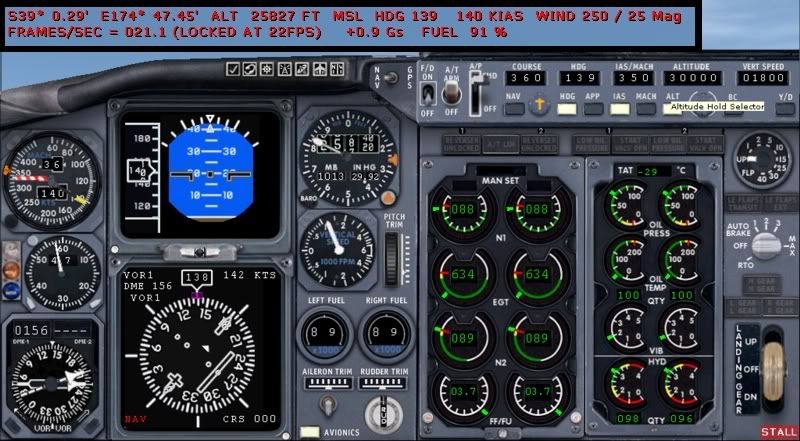
For me, it's happened twice- firstly en-route from Auckland to Port Vila at around FL280, then today on another test flight between Hamilton and Ohakea at 25,827feet.

This was the scenario: I climbed out at speed of 250kias (set on autothrottle) from ground level to 10,000feet with a vertical speed of 1800ft/min. Once I reached 10,000 feet I increased my auto throttle to 350kias (not sure if this was the correct speed for the 733 to climb at, but I know the cruise speed is 477kias). She continued to climb fine yet the speed on the auto throttle only reached 264 kias, then slowly started ticking back slowly before stalling at 140kias.

I then disengaged the autopilot, pointed the nose down until I set back into a manual decent down to Ohakea where I landed with no problems.

It seems the autothottle fails on anything above 264kias- is there any way I can fix this?

I tried replacing the panel folder and panel.cfg in the vistaliners 733 folder with the default fs9 b737-400 ones, yet it made no difference. I compared the default 737 aircraft.cfg and vista 737's aircraft.cfg and they both have the same autopilot lines and values- so that can't be the fix"¦ any other ideas?
User avatar
ardypilot
NZFF Pro
 
Topic author
Joined: Wed Apr 26, 2006 10:01 am
Posts: 6802
Location: Auckland

Postby Kelburn » Wed Oct 24, 2007 8:19 pm

as far as I know, it is all to do with the .air file. So therefore you can edit it using a special program located here or alternatively get the FFX 733 cfg and .air files (as the FFX was never in anydanger of stalling I've had a VS of 5000fpm + on the FFX 733)
There should be tutorials but don't know where to look (try flightsim.com)
Image

Isn't it evident?? Boeing are my favourite aircraft.

P.S. that's is my real birthday but I wish to keep my real age secret to keep you all pondering.
Kelburn
NZFF Pro
 
Joined: Sat Oct 14, 2006 10:59 am
Posts: 2193
Location: On a reverse 'hole'

Postby victor_alpha_charlie » Wed Oct 24, 2007 9:25 pm

Is it possible to use the Vistaliners one with the FFX air file?
User avatar
victor_alpha_charlie
NZFF Pro
 
Joined: Wed Jan 10, 2007 11:09 am
Posts: 2372

Postby ardypilot » Wed Oct 24, 2007 9:33 pm

QUOTE
Is it possible to use the Vistaliners one with the FFX air file?[/quote]
Yeah- just tried that- no visable difference.

I found out that by lowing the VSI as I reach higher altitudes (1000fpm at 15000ft, 900fpm at 20000ft and 8000fpm at 25000ft) I can make it to FL3000. It takes a very long time to get there though, even with the auto throttle programmed at 350kias the aircraft struggles along at 204kias.

What is weird is that when the aircraft levels off at the programmed cruise altitude, the airspeed does not increase very much. It ticks up by about 2 feet per minute for some reason instead.

On the autopilot panel, I wind the autothrottle IAS box up to 477, but nothing happens, so I switch to the MACH hold button instead, and it changes the number to only .20, but it should be .82mach. So, I wind the mach box up to .82, then swap back to the IAS reading and it shows some ridiculous number like 680! I think there must be a fault with the autothrottle somewhere, or I'm doing something very wrong here..

I'm no expert with the heavies, but if someone could give me the correct climbing configurations for the 733 or tell me if I'm making another mistake I would much appeciate it!
User avatar
ardypilot
NZFF Pro
 
Topic author
Joined: Wed Apr 26, 2006 10:01 am
Posts: 6802
Location: Auckland

Postby ooOO00OOoo » Thu Oct 25, 2007 7:24 am

See if it can make it to 340kias manually i.e. you keep adjusting the throttle. See if it can overspeed on full throttle, pretty much anything to do with the throttle try normally until your at cruise
ooOO00OOoo
 

Postby AlisterC » Thu Oct 25, 2007 8:50 am

Try this config. It is edited. I flew from Wellington to Christchurch, and had no problems with the aircraft, it flew well.

cfg - click and save <---- here. (note: I do not take credit for creating this cfg, I am simply sharing it. Nor am I responsible for any problems it may create winkyy.gif . It works fine for me, but as always in the flight sim world you are recommended to take a back up of the original. )

Andrew also reduce your fuel load. 737s never fly around on full fuel. Take just what you need to get there with some reserves smile.gif

Edit:
You are also confusing kias and ground speed. You should climb out at 250 kias to 10000ft, and then nose down a little to increase to 280 - 290 kias. Then adjust your rate of climb to maintain that. The auto throttle will do this for you, and yes, it's in kias. Then above F250, start watching your mach speed. The B733 typical cruising speed is only M073- 075(max), not the 0.82 you thought winkyy.gif . As the aircraft gets to higher cruise level, this mach speed will start increasing, though your kias will be staying the same. Slowly reduce your kias speed on the auto pilot to control your increasing mach speed. Once you've levelled off, you can then just use the mach speed hold on the autopilot. Given my autopilot is usually controlled with fsnav or an FMC, this is how I do it (and how I did it on the Flight Experience 737NG sim).

I've got a fair bit of 737 simming experience, feel free to ask questions Andrew.

(and you might like to try something like this: b737fpl_v12.zip from avsim, a B737 all models fuel planner)
Last edited by AlisterC on Thu Oct 25, 2007 9:47 am, edited 1 time in total.
Image
User avatar
AlisterC
NZFF Pro
 
Joined: Thu Jul 20, 2006 11:13 am
Posts: 2543
Location: Nelson, NZ

Postby ronindanbo » Thu Oct 25, 2007 11:11 am

The FFX models suffered from the same stalling issue guys, I feel this has something to do with the weights set in the config file, I found if you fly her in conjunction with fspassenger you dont get theis stalling issue (as you have to correctly adjust the weights in fspassenger)
BSMP ltd Chairman of the board

Image
Visit www.bsmp.co.nz
User avatar
ronindanbo
Sim-holic
 
Joined: Fri Jul 14, 2006 5:59 am
Posts: 700
Location: Wellington

Postby victor_alpha_charlie » Thu Oct 25, 2007 5:38 pm

Yeah try going into the 'Fuel and Payload' panel and making sure you aren't overweight.
User avatar
victor_alpha_charlie
NZFF Pro
 
Joined: Wed Jan 10, 2007 11:09 am
Posts: 2372

Postby travnz » Thu Oct 25, 2007 9:16 pm

is there any chance of a merge between the wilco 737 PIC panel and FDE with the vistaliners model?
Image
User avatar
travnz
Forum Addict
 
Joined: Tue Mar 27, 2007 8:16 pm
Posts: 216
Location: Pukekohe

Postby ardypilot » Thu Oct 25, 2007 9:23 pm

Thanks for the cfg Alister, I'll just go try it out.

QUOTE
You are also confusing kias and ground speed. You should climb out at 250 kias to 10000ft, and then nose down a little to increase to 280 - 290 kias. Then adjust your rate of climb to maintain that. The auto throttle will do this for you, and yes, it's in kias. Then above F250, start watching your mach speed. The B733 typical cruising speed is only M073- 075(max), not the 0.82 you thought. . As the aircraft gets to higher cruise level, this mach speed will start increasing, though your kias will be staying the same. Slowly reduce your kias speed on the auto pilot to control your increasing mach speed. Once you've levelled off, you can then just use the mach speed hold on the autopilot.[/quote]
I'd always thought knots were directly proportional to mach (ie divided or multiply by 60)? So am I right in thinking that the higher altitude you gain, the constant between the two changes?

Also- is this Vistaliners 737 model much more accuatate than other simular addons? I've always flown the iFDG a320 and Posky 737 with 100% fuel and a constant climb rate of 1200fpm from ground to cruise, plus I had a roughly simular speed on the autothrottle too. I don't understand why the stalling is only occuring with this model.

Thanks for taking the time to explain stuff to me by the way-
Cheers smile.gif
User avatar
ardypilot
NZFF Pro
 
Topic author
Joined: Wed Apr 26, 2006 10:01 am
Posts: 6802
Location: Auckland

Postby ardypilot » Thu Oct 25, 2007 10:33 pm

Update- Well Ive succesfully flown from Invercargill to Christchurch fine with the updated cfg from Alister- seems to sort out the auto throttle problem for me smile.gif

However, I get an overspeed warning at around 390knots/Mach .7 which I didn't expect. The default documentation that comes with the aircraft says the cruising speed is 477knots, and Albatross says its around Mach .73- so does anyone know whats going on here?

Also, with a constant climb rate of 1200fpm from 10,000 feet to cruise level, I notice the attitude angle decreases with altitude, yet maintains a steady climb with the set airspeed of 320 knots (is that a good climb speed by the way) - how can that be explained?
User avatar
ardypilot
NZFF Pro
 
Topic author
Joined: Wed Apr 26, 2006 10:01 am
Posts: 6802
Location: Auckland

Postby HardCorePawn » Fri Oct 26, 2007 7:50 am

Trolly wrote:
QUOTE (Trolly @ Oct 25 2007, 10:23 PM) <{POST_SNAPBACK}>
I'd always thought knots were directly proportional to mach (ie divided or multiply by 60)? So am I right in thinking that the higher altitude you gain, the constant between the two changes?


Mach is related to the speed of sound... as sound is really just energy waves travelling through some sort of fluid medium (ie. air or water), it is not really a constant value as temperature (and pressure as T&P are related) will affect the medium resulting in a change in the speed of sound.

This is the reason why the Mach scale was devised, as it allows you to calculate your speed relative to the speed of sound for the current medium and conditions.

Wikipedia to the rescue!
Last edited by HardCorePawn on Fri Oct 26, 2007 7:52 am, edited 1 time in total.
"Son, we are about the break the surly bonds of gravity, and punch the face of God." -- Homer Simpson

Image
User avatar
HardCorePawn
Senior Member
 
Joined: Fri Sep 01, 2006 4:18 pm
Posts: 1277
Location: 2500' above Godzone

Postby ronindanbo » Fri Oct 26, 2007 8:20 am

HardCorePawn wrote:
QUOTE (HardCorePawn @ Oct 26 2007, 08:50 AM) <{POST_SNAPBACK}>
Mach is related to the speed of sound... as sound is really just energy waves travelling through some sort of fluid medium (ie. air or water), it is not really a constant value as temperature (and pressure as T&P are related) will affect the medium resulting in a change in the speed of sound.

This is the reason why the Mach scale was devised, as it allows you to calculate your speed relative to the speed of sound for the current medium and conditions.

Wikipedia to the rescue!


huh.gif Dan go fast huh.gif
BSMP ltd Chairman of the board

Image
Visit www.bsmp.co.nz
User avatar
ronindanbo
Sim-holic
 
Joined: Fri Jul 14, 2006 5:59 am
Posts: 700
Location: Wellington

Postby AlisterC » Fri Oct 26, 2007 10:55 am

However, I get an overspeed warning at around 390knots/Mach .7 which I didn't expect. The default documentation that comes with the aircraft says the cruising speed is 477knots, and Albatross says its around Mach .73- so does anyone know whats going on here?

Your overspeed warning is also going to depend on what altitude you are flying at. What altitude are you at getting this warning? The 737 isn't capable of mach speeds of 0.7# at all altitudes, just in the upper portions of it's cruise.

Also, with a constant climb rate of 1200fpm from 10,000 feet to cruise level, I notice the attitude angle decreases with altitude, yet maintains a steady climb with the set airspeed of 320 knots (is that a good climb speed by the way) - how can that be explained?

Initially 320 indicated is a ok climb speed (perhaps a little high), but you'll need to reduce that as you get higher into the air.
Ok, this is a bit tougher to answer in a few words, but here goes. As you get higher, the air gets thinner. So, your indicated airspeed is easy to keep high to start with, as you have lots of air to fly through. As you get higher in the atmosphere though, the air is thinner, so in order to maintain 290 indicated, you have to travel at about 480 on the ground. So imagine at ground level, to do 470 knots indicated, you'd have to fly through the air at 470 knots. As there is less air at altitude, doing 470 knots ground speed only equals about 290 at altitude, as there is less air to fly through. There is less air resistance on the aircraft, and thus the instruments reading the speed of the aircraft through the air record less.
As you get higher, and your mach speed increases. HCP has posted answers for this so I won't go into the machanics of it. But, the aircraft has a mach limit. As you get closer to it, you'll need to slow down your indicated airspeed you are trying to achieve. As you get higher with your indicated airspeed locked at say 290, you'll see your mach speed increase. As you approach the limit of your mach, you'll need to lower the kias to keep this in check (or change your autopilot setting to a mach hold). Remember you can't fly Mach 0.7 from 1500 feet up. Mach 0.7 in low altitudes is too stressful on the aircraft, as the air is dense (possibly why you got the overspeed warning)

As the air gets thinner your angle of attack will need to decrease. Imagine the same thing above, trying to do 480 knots ground speed and climb at the same time. The climb performance of the aircraft decreases in higher altitudes. Imagine the weight of the aircraft is the same, but the amount of thrust available is decreasing, and the amount of lift across the wing is reducing, as ...... you got it.... the air outside is decreasing in density. So you have to travel faster to maintain that lift from the wings. In order to travel faster (your indicated speed staying the same, but your ground speed increasing) the aircraft has to level out more and more as it gets closer to top of climb. Thus a limit is reached. Between thrust and lift available vs drag and gravity. The power to weight ratio of a 737 is good, but not as good as something like the Apollo moon rocket. I'll have to re-read this to see if it's any good, but hope that helps a little!
Last edited by AlisterC on Fri Oct 26, 2007 11:14 am, edited 1 time in total.
Image
User avatar
AlisterC
NZFF Pro
 
Joined: Thu Jul 20, 2006 11:13 am
Posts: 2543
Location: Nelson, NZ

Postby ardypilot » Sun Oct 28, 2007 9:09 pm

Awesome thanks for all your help- I flew a successful flight today in the 733 abiding by the rules you have explained and all went well.
User avatar
ardypilot
NZFF Pro
 
Topic author
Joined: Wed Apr 26, 2006 10:01 am
Posts: 6802
Location: Auckland

Postby ronindanbo » Mon Oct 29, 2007 8:14 am

blink.gif Dan go fast blink.gif
BSMP ltd Chairman of the board

Image
Visit www.bsmp.co.nz
User avatar
ronindanbo
Sim-holic
 
Joined: Fri Jul 14, 2006 5:59 am
Posts: 700
Location: Wellington

Postby HardCorePawn » Mon Oct 29, 2007 10:53 am

Ivan make basket??? (bonus points if you get the reference)

Yes, it's all very technical... but worth learning if you want to fly the heavy metal correctly... this is why i potter about with C-152's and the like... K.I.S.S.
"Son, we are about the break the surly bonds of gravity, and punch the face of God." -- Homer Simpson

Image
User avatar
HardCorePawn
Senior Member
 
Joined: Fri Sep 01, 2006 4:18 pm
Posts: 1277
Location: 2500' above Godzone

Postby ronindanbo » Mon Oct 29, 2007 11:20 am

And its why I build turboprops laugh.gif
BSMP ltd Chairman of the board

Image
Visit www.bsmp.co.nz
User avatar
ronindanbo
Sim-holic
 
Joined: Fri Jul 14, 2006 5:59 am
Posts: 700
Location: Wellington

Postby deeknow » Tue Nov 09, 2010 11:25 am

Albatross wrote:
QUOTE (Albatross @ Oct 25 2007, 09:50 AM) <{POST_SNAPBACK}>
Try this config. It is edited. I flew from Wellington to Christchurch, and had no problems with the aircraft, it flew well. cfg - click and save <---- here. (note: I do not take credit for creating this cfg, I am simply sharing it. Nor am I responsible for any problems it may create winkyy.gif . It works fine for me, but as always in the flight sim world you are recommended to take a back up of the original. )

Hey Alister, Trolly, or anyone else. Don't spose you still have a copy of this edited AIR file lying about do you?
Last edited by deeknow on Tue Nov 09, 2010 11:25 am, edited 1 time in total.
Deans repaints: http://www.deeknow.com/
X570 Mini-ITX m/b - Ryzen7 5700X3D (8c/16t) - RTX 2060-super - 32GB 3600MHz DDR4 - Win10 - P3Dv5.3
User avatar
deeknow
NZFF Pro
 
Joined: Tue Sep 18, 2007 10:15 pm
Posts: 4448
Location: NZHN

Postby SeanG » Tue Nov 09, 2010 12:13 pm

If I may add my 2c here, late in the piece I know....

The Vista model flies fine, so long as you manage your airspeed/vertspeed. I note from the initial screenie that the VS is plugged in at 1800fpm, which for lower alts is perfectly fine for the 733, but at higher altitude, and at potentially heavy weights will be un-attainable. Since the default panel has no "Level Change" function, and with a fixed V/S set the autopilot will merely pitch to attain the pre-set vert speed with no reference to airspeed. So, in this scenario you will be climbing happily at 1800fpm and a respectable IAS until you pass the point at which the aircraft wont be able to continue making a good airspeed *and* match the pre-set vert speed. When this happens you will see a steady decrease in airspeed, meanwhile the nose will pitch up trying to make 1800fpm. This becomes a viscious cycle, as the slower you get, the more nose up you need to make the V/S, the higher the nose gets the slower the speed goes etc.....

I fly the Vista 733 a bit (I'm a classic kinda guy) and have never had a drama with it "unexpectadly" stalling... here's what I'd do:
After takeoff, setup and initial climb at 250KIAS, and set somewhere towards 3000fpm in the V/S window. At low levels the 733 climbs like a rocket smile.gif
Once you pass about 8-10,000ft, increase IAS to 285-300 (I use 297 which is the magic number from 200's... but that's just me) and keep the climb going, but watch the IAS..
You will notice at some point that the airspeed will start to drop. At this point *lower* the vert speed. Depending on weight you may need to lower it quite a bit....
Assuming you are using an airspeed in the 285-300KIAS range during the climb, watch the Mach# increase as you climb. At the point that you make M0.70 switch the A/T mode to Mach, and continue climbing at M0.7, adjusting vert speed as you go so that your *mach #* doesn't decrease.
Once you hit your cruise, wind the Mach# up to anywhere from 0.76 to 0.8 (if you are in a hurry) and enjoy.
What we have just done is, in essence, manually achieved a "Level Change", of "FL Change", and is really just an extention of the age old "power,attitude,speed" equation....

Flying heavy metal by the numbers is great fun, just takes a little learning, and understanding of what is really a series of complex physics calculations smile.gif
For further entertainment, use a really heavy aircraft, and learn all about step climbs... without an FMS to help ;-)

Ok, so I didn't intend writing a novel, but there you have it... hope someone gets something out of this, and at the very least I didn't put you all to sleep!

SeanG
Please note I have left this forum, due to an unfortunate incident. I can be contacted on the MilitaryAIWorks forum at http://www.militaryaiworks.com/
SeanG
Member
 
Joined: Thu Oct 18, 2007 8:05 pm
Posts: 128
Location: Christchurch

Next

Return to Aircraft

Who is online

Users browsing this forum: No registered users and 14 guests