Eagle Air B1900D - All Black Repaint for the PMDG

Discuss aircraft addons and repaints for Flight Simulator here

Postby deeknow » Fri Jan 13, 2012 8:33 pm

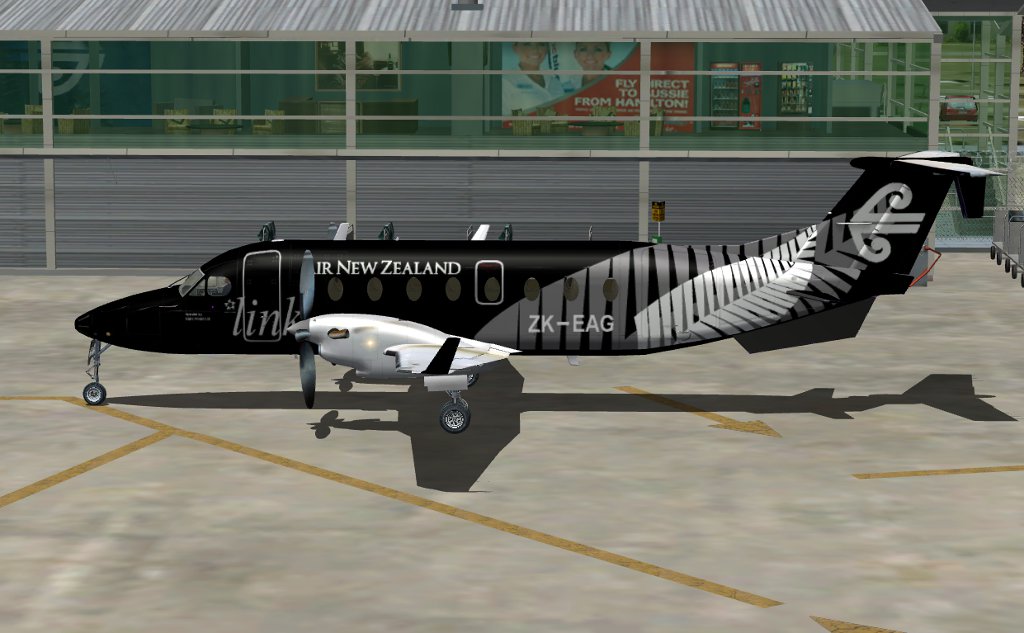
Have made a start on the new "Black" livery for the PMDG B1900D.
Still LOTs of work to do on the fern detailing, just outlining it now really, a few more leaves of it to add and gotta make all the edges curvy etc, but getting there...
Deans repaints: http://www.deeknow.com/
X570 Mini-ITX m/b - Ryzen7 5700X3D (8c/16t) - RTX 2060-super - 32GB 3600MHz DDR4 - Win10 - P3Dv5.3
User avatar
deeknow
NZFF Pro
 
Topic author
Joined: Tue Sep 18, 2007 10:15 pm
Posts: 4448
Location: NZHN

Postby lowflier » Fri Jan 13, 2012 9:41 pm

Looks like a bugger of a task, but yours looks great! Good luck, I can't wait to see the result
Image
lowflier
Forum Addict
 
Joined: Wed Feb 16, 2011 5:15 pm
Posts: 362
Location: New Zealand

Postby Ian Warren » Fri Jan 13, 2012 10:02 pm

Bloody Well Done Dean thumbup1.gif I have,nt had the 1900 on my PC since FS9


Image
User avatar
Ian Warren
NZFF Pro
 
Joined: Fri May 05, 2006 5:23 pm
Posts: 41187
Location: AREA 51

Postby Dash8captain » Sat Jan 14, 2012 5:39 am

Good Man!!!!!!! cant wait!!!!!!!!!!! thumbup1.gif thumbup1.gif clapping.gif clapping.gif
'All things are possible to him that believes'
User avatar
Dash8captain
Senior Member
 
Joined: Fri Apr 08, 2011 10:24 am
Posts: 1643
Location: Nelson

Postby Snowman » Sat Jan 14, 2012 10:37 am

Another NZ paint for the PMDG 1900. YES !!
Its a regular flier for me, in both FS9 and FSX.
Cant wait !! smile.gif

Lawrie. New_Zealand_etc.gif
Image

Image
User avatar
Snowman
NZFF Pro
 
Joined: Wed Jul 26, 2006 3:52 pm
Posts: 2427
Location: Tauranga, NZ.

Postby deeknow » Sat Jan 14, 2012 11:57 am

Getting there lads, fern pattern all in place, gotta get it repeating/stretching round the belly too, and a little work on those stabilisers under the tail, and play w the alpha layer a little, shouldnt take long...
Deans repaints: http://www.deeknow.com/
X570 Mini-ITX m/b - Ryzen7 5700X3D (8c/16t) - RTX 2060-super - 32GB 3600MHz DDR4 - Win10 - P3Dv5.3
User avatar
deeknow
NZFF Pro
 
Topic author
Joined: Tue Sep 18, 2007 10:15 pm
Posts: 4448
Location: NZHN

Postby Ian Warren » Sat Jan 14, 2012 12:28 pm

Superb , No excuse for me not to reinstall the 1900 after these years now , really is a brilliant job smile.gif
Last edited by Ian Warren on Sat Jan 14, 2012 12:39 pm, edited 1 time in total.
Image
User avatar
Ian Warren
NZFF Pro
 
Joined: Fri May 05, 2006 5:23 pm
Posts: 41187
Location: AREA 51

Postby goingboeing » Mon Jan 16, 2012 2:55 pm

looks awesome I saw the real one at work yesterday in Rotorua looks wicked compared to the normal beech, probably better than A320 or 777 due to size.
goingboeing
Forum Addict
 
Joined: Thu Jul 14, 2011 2:22 pm
Posts: 179
Location: Rolleston

Postby AlisterC » Mon Jan 16, 2012 5:45 pm

Looking good Dean, thanks
Image
User avatar
AlisterC
NZFF Pro
 
Joined: Thu Jul 20, 2006 11:13 am
Posts: 2543
Location: Nelson, NZ

Postby Kahu » Mon Jan 16, 2012 6:41 pm

looks good, might have to reinstall the 1900d
Image
User avatar
Kahu
Sim-holic
 
Joined: Sat May 05, 2007 3:59 pm
Posts: 578
Location: Tauranga

Postby Dean » Tue Jan 17, 2012 7:34 pm

Looks great mate! I fly the B1900D regularly in FSX now and this paint will definitely find its way onto my sim when it becomes available. Keep up the great work!
Image
Dean Bielanowski
Manager - PC Aviator Australia
The Flight Simulation Company!
Retailing Sim DVD Software, Downloads, Hardware and Accessories
Online Store: http://www.pcaviator.com.au/store
-------------------------------------------------------------------------
Dean
Sim-holic
 
Joined: Sat Jan 08, 2011 1:54 am
Posts: 576
Location: Brisbane, Australia

Postby deeknow » Tue Jan 17, 2012 10:21 pm

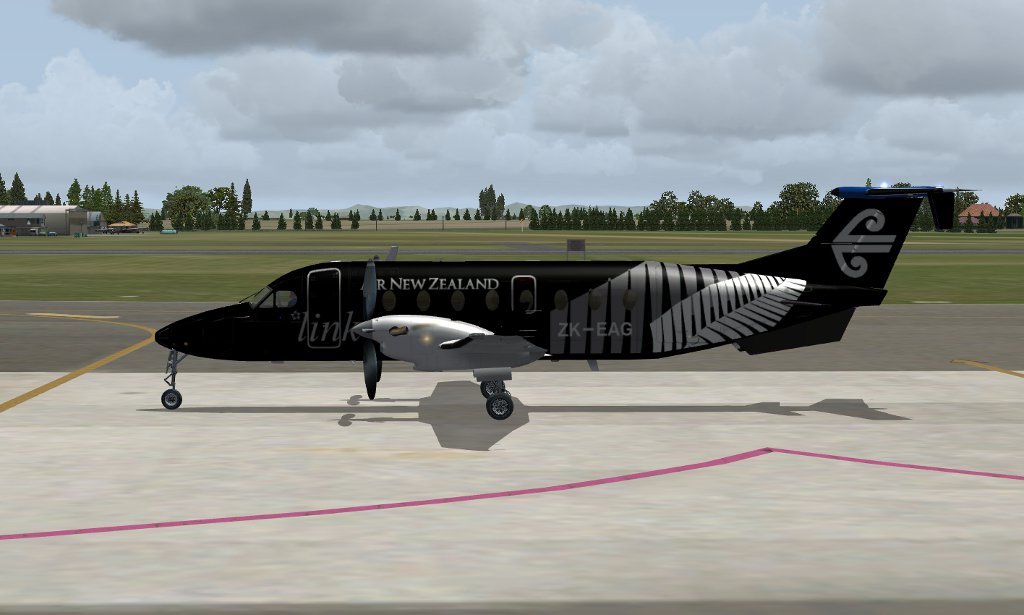
Thanks lads, turned out to be a bit of a pain doin the fern detailing wrapping under the tail, but got there in the end.

File has been uploaded to avsim tonight, give it a day or so then search for "Air New Zealand B1900D" or similar, should turn up. If you notice anything weird drop me a line and I'll patch it. I ended up painting it with the alpha layer on to give it a little reflection as in the real-world machine (based on photos I've seen) and have included a set of alternatives with no alpha should you prefer them. Here's the finished product...
Last edited by deeknow on Tue Jan 17, 2012 10:23 pm, edited 1 time in total.
Deans repaints: http://www.deeknow.com/
X570 Mini-ITX m/b - Ryzen7 5700X3D (8c/16t) - RTX 2060-super - 32GB 3600MHz DDR4 - Win10 - P3Dv5.3
User avatar
deeknow
NZFF Pro
 
Topic author
Joined: Tue Sep 18, 2007 10:15 pm
Posts: 4448
Location: NZHN

Postby SeanTK » Wed Jan 18, 2012 7:24 am

It looks excellent!

Just one thing though....is it possible to "chrome" the prop caps/spinners instead of leaving them in mat grey?

(I use FSX and don't have this addon anyway, but I just thought that it may be possible...)
User avatar
SeanTK
Senior Member
 
Joined: Sun Feb 28, 2010 9:27 am
Posts: 1617

Postby deeknow » Wed Jan 18, 2012 7:29 am

Nice spotting Sean, yeah will do, guess I'll post a fix here for anyone who wants it, seeing as the upload is now on avsim
Deans repaints: http://www.deeknow.com/
X570 Mini-ITX m/b - Ryzen7 5700X3D (8c/16t) - RTX 2060-super - 32GB 3600MHz DDR4 - Win10 - P3Dv5.3
User avatar
deeknow
NZFF Pro
 
Topic author
Joined: Tue Sep 18, 2007 10:15 pm
Posts: 4448
Location: NZHN

Postby Ian Warren » Wed Jan 18, 2012 9:26 am

Best just to re-post the entire aircraft Dean , saves the hassle when people forget the fix a ask 'were do you get that with the chrome spinners' blink.gif
Last edited by Ian Warren on Wed Jan 18, 2012 9:26 am, edited 1 time in total.
Image
User avatar
Ian Warren
NZFF Pro
 
Joined: Fri May 05, 2006 5:23 pm
Posts: 41187
Location: AREA 51


Return to Aircraft

Who is online

Users browsing this forum: No registered users and 3 guests