Alphasim Harvard
 by K5054NZ » Mon Apr 07, 2008 2:27 pm
Ok, the shots aren't as detailed as I hoped. However! The starboard side lettering under the canopy reads (aft) HOOD RELEASE OTHER SIDE and (forward) CUT HERE FOR EMERGENCY RESCUE. I can't make out the lettering above the tailwheel in my pic so I'll trawl through my old WoW books for other shots.
-

K5054NZ - Senior Member
- Joined: Sun Jul 30, 2006 4:53 pm
- Posts: 1036
- Location: NZOM
by Wildbillkelso » Wed Jul 28, 2010 3:59 am
Lots of Harvards already done...
But what about this one here?
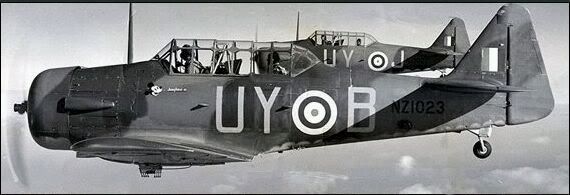
Just found it over at
http://rnzaf.proboards.com/index.cgi
This bird just screams for a repaint, eh?
Any more details on the camo scheme?
I'm presuming RAF dark green / dark earth / pale blue (or sky?)?
This "wavey" demarcation line to the lower paint looks interesting too.
The A.1 fuselage roundel makes me guess it's a pre-1942 scheme, so it should have had type A roundels on upper and lower wings?
Any additional information helping me to make the repaint as accurate as possible would be highly appreciated!
Cheers,
Markus.
But what about this one here?
Just found it over at
http://rnzaf.proboards.com/index.cgi
This bird just screams for a repaint, eh?
Any more details on the camo scheme?
I'm presuming RAF dark green / dark earth / pale blue (or sky?)?
This "wavey" demarcation line to the lower paint looks interesting too.
The A.1 fuselage roundel makes me guess it's a pre-1942 scheme, so it should have had type A roundels on upper and lower wings?
Any additional information helping me to make the repaint as accurate as possible would be highly appreciated!
Cheers,
Markus.
-
Wildbillkelso - Forum Addict
- Joined: Fri Feb 19, 2010 7:58 pm
- Posts: 361
- Location: Berlin, Germany
by Wildbillkelso » Sat Jul 31, 2010 4:32 am
Hi, folks!
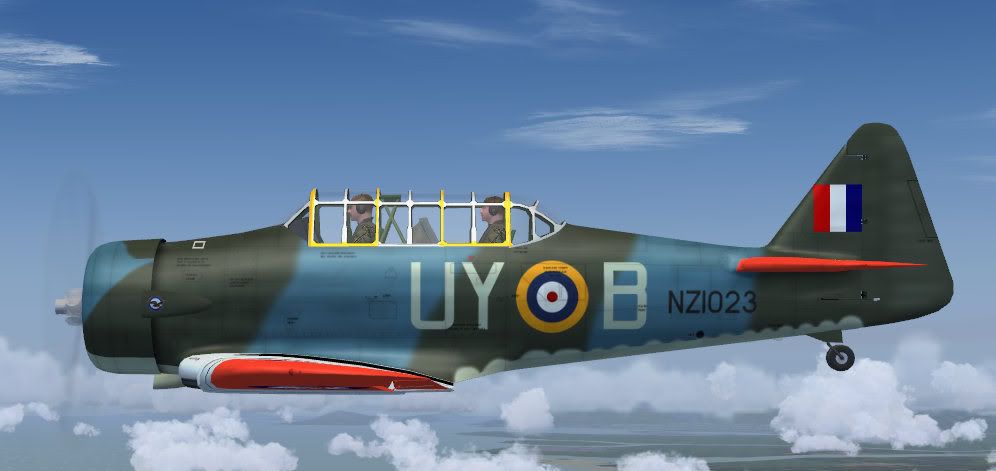
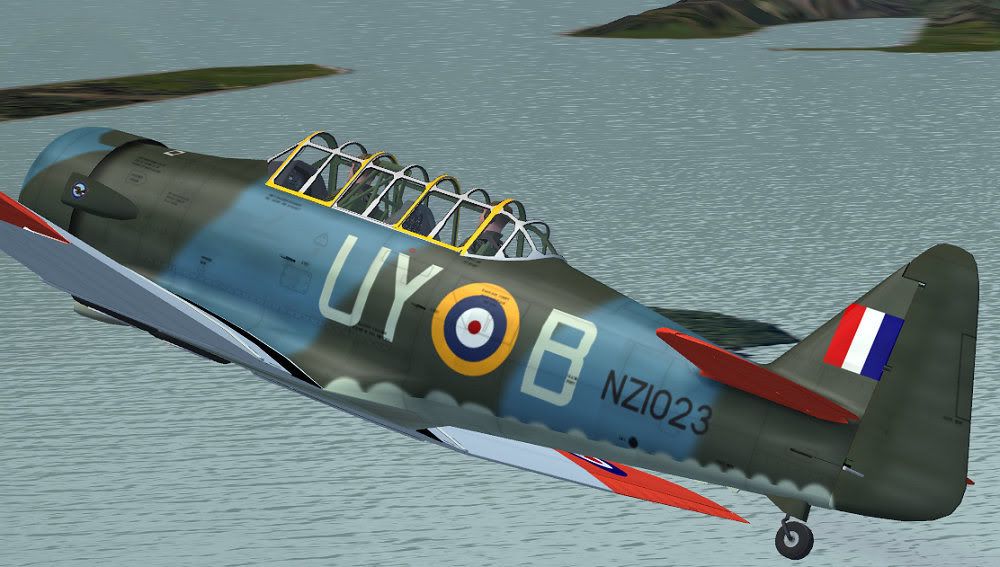
I've just received some useful details on this paint:
The camo scheme consists of
- Dark Green
- Pacific Blue (Blue Sea Grey) and
- Sky.
Comes along quite nice, doesn't it?
I've just received some useful details on this paint:
The camo scheme consists of
- Dark Green
- Pacific Blue (Blue Sea Grey) and
- Sky.
Comes along quite nice, doesn't it?
-
Wildbillkelso - Forum Addict
- Joined: Fri Feb 19, 2010 7:58 pm
- Posts: 361
- Location: Berlin, Germany
by Charl » Sat Jul 31, 2010 11:05 am
Intriguing...wonder where you'd park that one, so it couldn't be seen from above?
In a shallow lagoon maybe, with lots of seaweed???
What's your plan with the canopy frame, perhaps just carry the camo through?
In a shallow lagoon maybe, with lots of seaweed???
What's your plan with the canopy frame, perhaps just carry the camo through?
-

Charl - NZFF Pro
- Joined: Mon May 01, 2006 8:28 am
- Posts: 9691
- Location: Auckland
 in its war time guise
 by Wildbillkelso » Sun Aug 01, 2010 4:20 am
Charl wrote:QUOTE (Charl @ Jul 31 2010, 12:05 PM) <{POST_SNAPBACK}>What's your plan with the canopy frame, perhaps just carry the camo through?
Considering the pic of the real one, I'd guess the frame was camoed too. The adjustment should become quite interesting...
I took my abandoned NZ1015 repaint as base, so there's some contemporary paint still shining through.
-
Wildbillkelso - Forum Addict
- Joined: Fri Feb 19, 2010 7:58 pm
- Posts: 361
- Location: Berlin, Germany
by Ian Warren » Sun Aug 01, 2010 12:24 pm
The Yellow cockpit frame was introduced when reverted back to the US type stencils and markings , The frame is Camo , the little badge logo appears to be an early Micky mouse , i have a photo off UY-L NZ1029 that has a Pinnocio character and named 'Joan II' ,
Last edited by Ian Warren on Sun Aug 01, 2010 12:29 pm, edited 1 time in total.

-

Ian Warren - NZFF Pro
- Joined: Fri May 05, 2006 5:23 pm
- Posts: 41187
- Location: AREA 51
by Wildbillkelso » Mon Aug 02, 2010 4:17 am
Thanks, Ian!
NZ1023 did bear this mouse and was called "Josephine III", as the kind folks over at the rnzaf board confirmed.
Now she's more or less ready to roll:
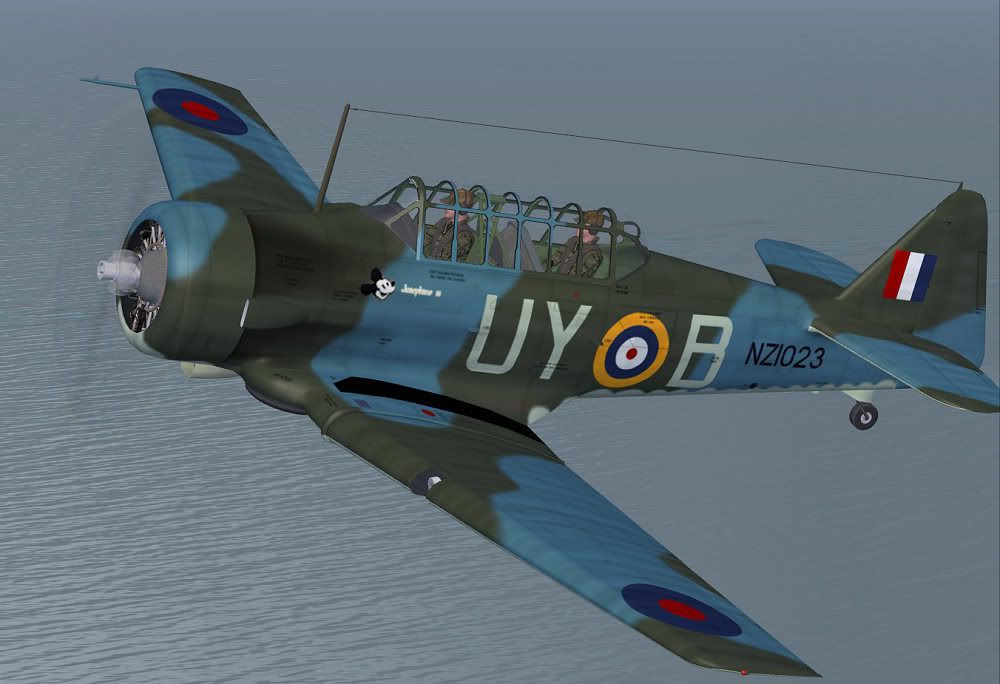
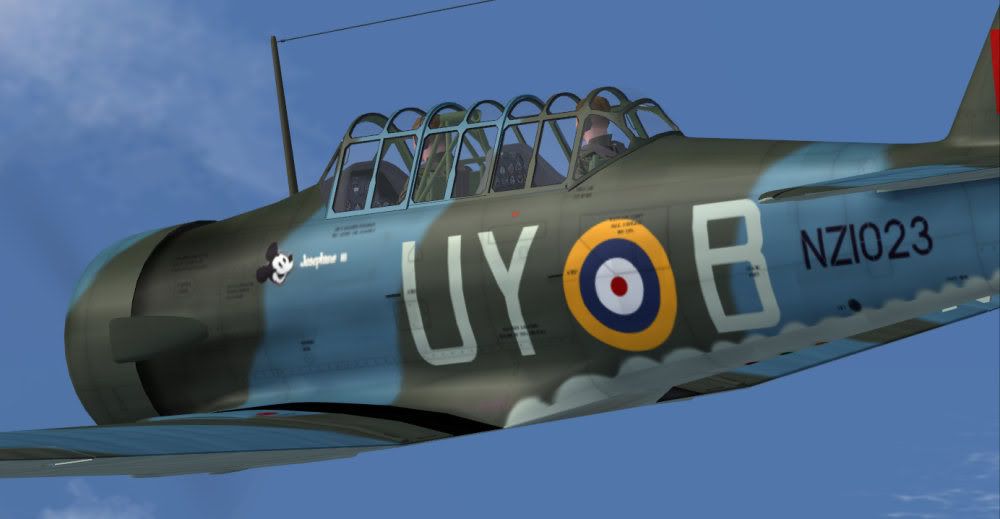
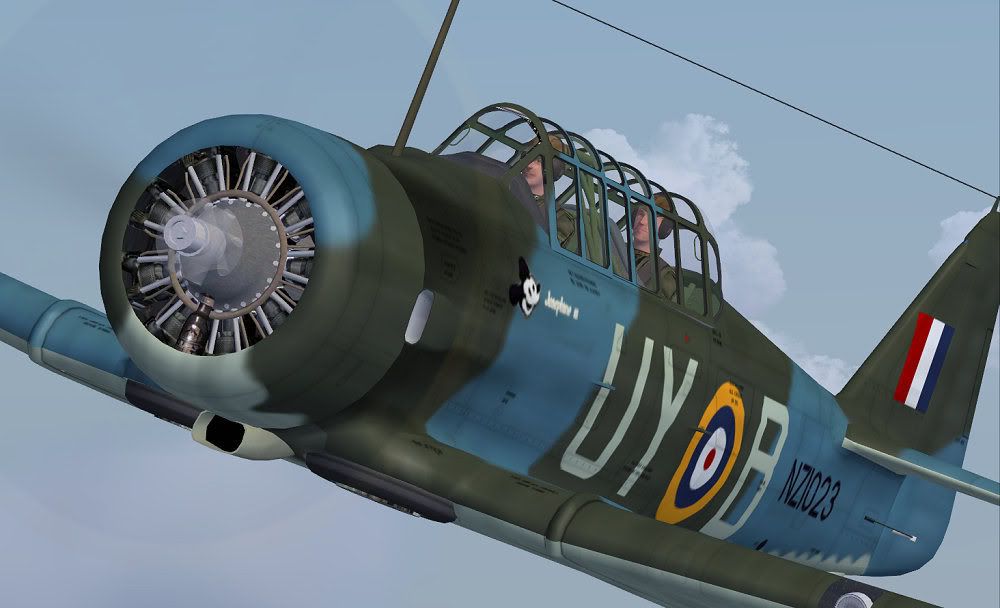
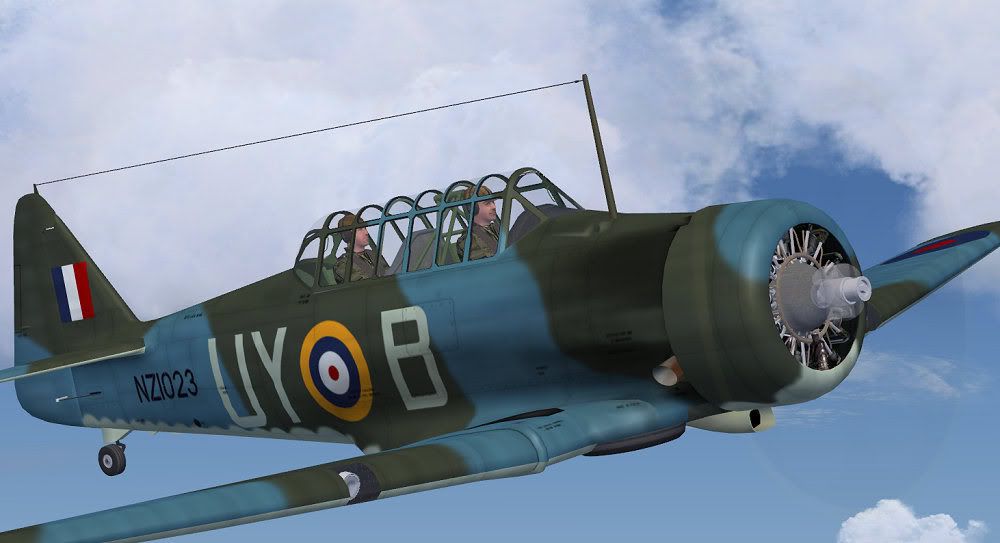
I tried to give her some war-beaten attitude, hope you like this weary appearance.
But what about the underwing lettering?
Does she have to carry her serial there too?
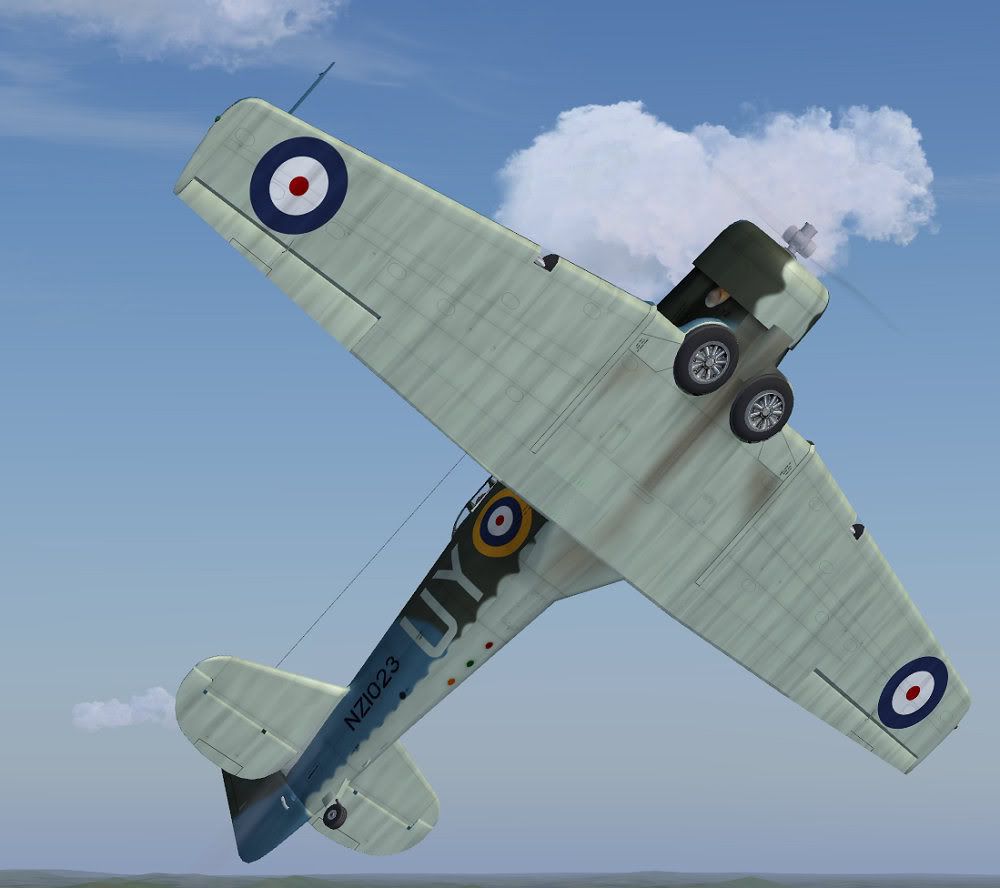
Everything else should be in place so far...
Any comments, especially on things to be improved, highly welcome!
Cheers,
Markus.
NZ1023 did bear this mouse and was called "Josephine III", as the kind folks over at the rnzaf board confirmed.
Now she's more or less ready to roll:
I tried to give her some war-beaten attitude, hope you like this weary appearance.
But what about the underwing lettering?
Does she have to carry her serial there too?
Everything else should be in place so far...
Any comments, especially on things to be improved, highly welcome!
Cheers,
Markus.
-
Wildbillkelso - Forum Addict
- Joined: Fri Feb 19, 2010 7:58 pm
- Posts: 361
- Location: Berlin, Germany


by jankees » Mon Aug 02, 2010 9:08 pm
It looks great!
Will be a great addition to my hangar!
Since you asked, a few small remarks though:
I think the tail marking is a bit too large.
Something is not quite right with the roundel and letters on the fuselage, either the roundel is too large, or the letters too small. If you look at the original pic, the roundel and letters are more or less level at the bottom, but the letters are higher on top, so the are taller than the roundel.
I'm missing the green 'bump' in the camo just below Mickey.
I think the tip of the tail is also grey.
Finally, you make the grey coming from the Mickey logo stop on top of the wing. Shouldn't it continue to the leading edge?
Cheers,
Jan Kees
Will be a great addition to my hangar!
Since you asked, a few small remarks though:
I think the tail marking is a bit too large.
Something is not quite right with the roundel and letters on the fuselage, either the roundel is too large, or the letters too small. If you look at the original pic, the roundel and letters are more or less level at the bottom, but the letters are higher on top, so the are taller than the roundel.
I'm missing the green 'bump' in the camo just below Mickey.
I think the tip of the tail is also grey.
Finally, you make the grey coming from the Mickey logo stop on top of the wing. Shouldn't it continue to the leading edge?
Cheers,
Jan Kees

All my repaints for MSFS can be found on flightsim.to
Older repaints for FS9, FSX and P3D are on avsim
More screenshots can be found here
- jankees
- Senior Member
- Joined: Tue Jan 08, 2008 9:31 pm
- Posts: 1800
- Location: B/NL/S
by Ian Warren » Tue Aug 03, 2010 2:05 am
Markus  Going to have to reinstall my Harvard for sure !
As for under-wing markings and buzz code it appears not to have any in this scheme , have to pull out my paint plans to shed any light , 2 photos show nothing , were i do have a all yellow paint with the buzz code .
Going to have to reinstall my Harvard for sure ! As for under-wing markings and buzz code it appears not to have any in this scheme , have to pull out my paint plans to shed any light , 2 photos show nothing , were i do have a all yellow paint with the buzz code .
-
Ian Warren - NZFF Pro
- Joined: Fri May 05, 2006 5:23 pm
- Posts: 41187
- Location: AREA 51
by Wildbillkelso » Tue Aug 03, 2010 3:53 am
Thank you for your kind feedback, gents!
jankees wrote:QUOTE (jankees @ Aug 2 2010, 09:08 PM) <{POST_SNAPBACK}>I think the tail marking is a bit too large.
Something is not quite right with the roundel and letters on the fuselage, either the roundel is too large, or the letters too small. If you look at the original pic, the roundel and letters are more or less level at the bottom, but the letters are higher on top, so the are taller than the roundel.
I'm missing the green 'bump' in the camo just below Mickey.
I think the tip of the tail is also grey.
Finally, you make the grey coming from the Mickey logo stop on top of the wing. Shouldn't it continue to the leading edge?
I'm very grateful for your remarks, Jan Kees!
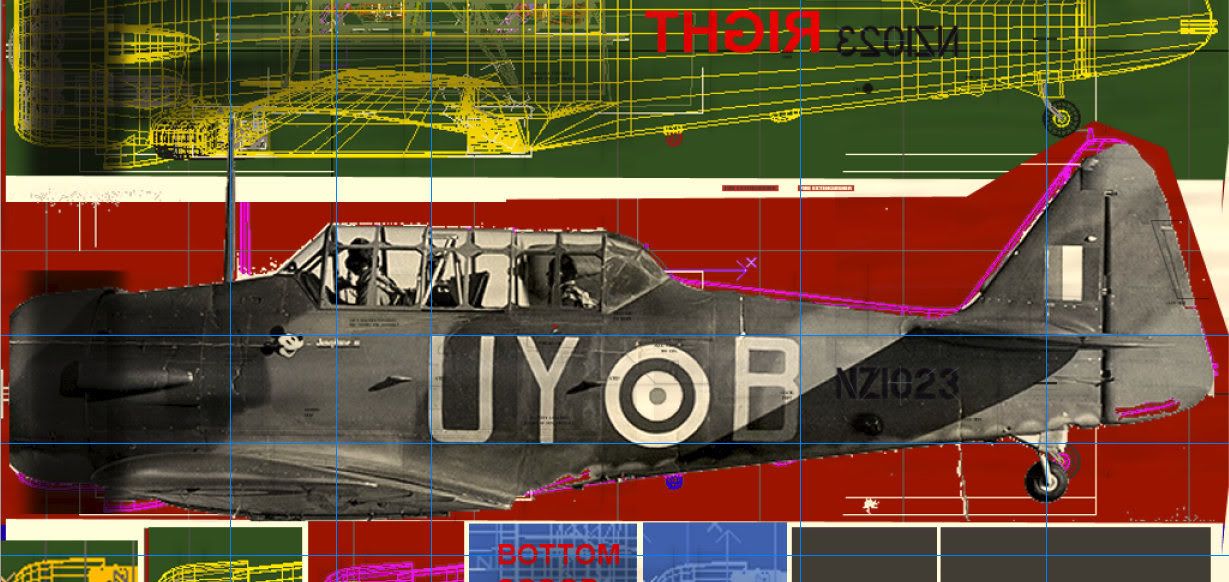
In order to adjust the camo & markings, I've created an 'overlay' layer from this fascinating and almost unblurred 'full sideview' photograph. In the paint kit, it comes up like that:
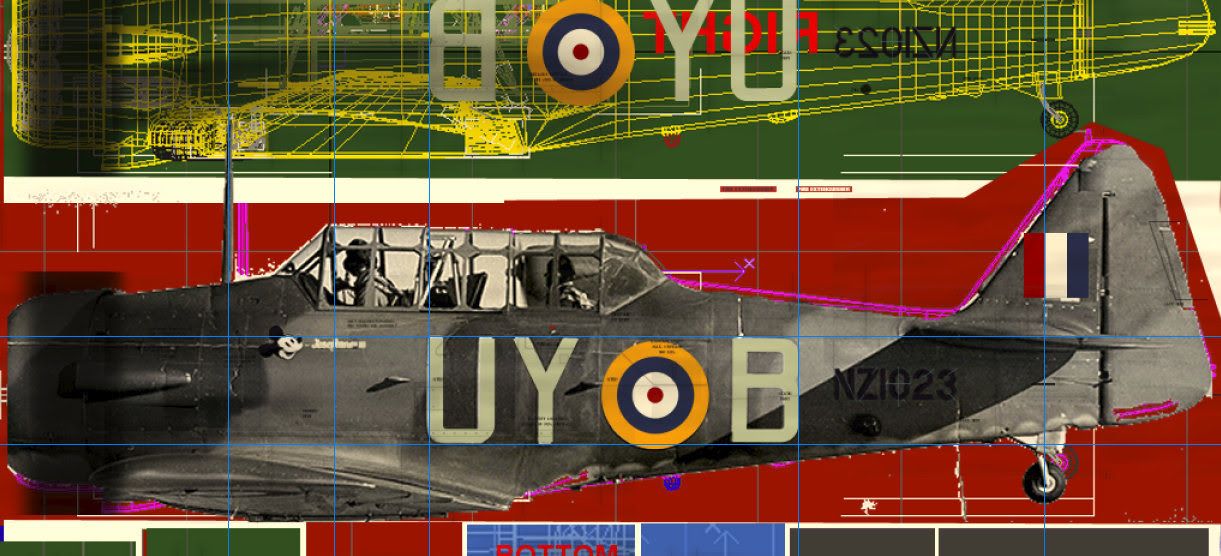
With the roundel, fin flash and lettering layers added, the adjustment lines make it quite obvious that the roundel's size actually has to be decreased for a small number of pixels. Same goes for the fin flash:
Hartelijk bedankt for pointing me to these issues, mate!
Finally, the camo chips indeed need some overhauling, but that won't be a hard thing to do...
Cheers,
Markus.
-
Wildbillkelso - Forum Addict
- Joined: Fri Feb 19, 2010 7:58 pm
- Posts: 361
- Location: Berlin, Germany
by Wildbillkelso » Fri Aug 06, 2010 12:40 am
Hi, guys!
"Josephine III" was pushed to the usual places (AVSIM, Flightsim, Sim-Outhouse) some hours ago. She should be available soon.
Have fun with her!
Cheers,
Markus.
"Josephine III" was pushed to the usual places (AVSIM, Flightsim, Sim-Outhouse) some hours ago. She should be available soon.
Have fun with her!
Cheers,
Markus.
-
Wildbillkelso - Forum Addict
- Joined: Fri Feb 19, 2010 7:58 pm
- Posts: 361
- Location: Berlin, Germany
by GDNZ » Mon Jul 11, 2011 8:10 pm
Alphasim/Virtavia T-6 Texan/Harvard engine rotation
Which way does the engine rotate?
http://www.youtube.com/watch?v=EEeG37Ca9NY&NR=1
and again:
http://www.youtube.com/watch?v=czeBiK8l6uQ...feature=related
Right... clockwise (from the pilot's point of view).
Now which way does the Alphasim/Virtavia engine rotate?
Backwards.
The blades are on the correct angle so it's just a matter of correcting the direction of rotation.
Anybody got a fix?
Gary
Which way does the engine rotate?
http://www.youtube.com/watch?v=EEeG37Ca9NY&NR=1
and again:
http://www.youtube.com/watch?v=czeBiK8l6uQ...feature=related
Right... clockwise (from the pilot's point of view).
Now which way does the Alphasim/Virtavia engine rotate?
Backwards.
The blades are on the correct angle so it's just a matter of correcting the direction of rotation.
Anybody got a fix?
Gary
Last edited by GDNZ on Mon Jul 11, 2011 8:27 pm, edited 1 time in total.
Fan of: FSX, Carenado Cessnas, Orbx FTX, & VLC.
-

GDNZ - Member
- Joined: Mon Oct 15, 2007 8:50 am
- Posts: 38
- Location: Palmerston North
by Ian Warren » Mon Jul 11, 2011 8:49 pm
They rotate clockwise , Alpha did a damn good job off this one , very sure they nailed it , I would have to reinstall to check your findings .
-
Ian Warren - NZFF Pro
- Joined: Fri May 05, 2006 5:23 pm
- Posts: 41187
- Location: AREA 51
by Adrian Brausch » Tue Jul 12, 2011 9:38 am
Ian Warren wrote:QUOTE (Ian Warren @ Jul 11 2011,8:49 PM) <{POST_SNAPBACK}>They rotate clockwise , Alpha did a damn good job off this one , very sure they nailed it , I would have to reinstall to check your findings .
I had a look at it and yus sure enough alphasim have the blades correct but their rotation arse about face, you can fix the animation by adding this to the " [propeller] " section in the aircraft.cfg for the alpha T-6. problem is that the blades will show ( bit like watching an aircraft video with slow frames per second...which i dont actually mind...)., that and the actual visible prop disk no longer shows for some reason..
[propeller]
rotation=-1 <----------------------------- ADD THIS to the [propeller] section of the aircraft.cfg..
you can add this to each paint variation (doesnt matter where) ,..it seems to my eyes to make the now visible blades seem more natural in their rotation speed..
prop_anim_ratio=1.65 <----------------------------- ADD THIS to each paint variation section of the aircraft.cfg
eg :
[fltsim.0]
title=ALPHA T-6 Texan 2
prop_anim_ratio=1.65 <-----------------------------
If you don't like what you see then just delete the new entry, or even better still,...BACK UP THE AIRCRAFT.CFG FIRST !!!!
-
Adrian Brausch - Senior Member
- Joined: Tue May 15, 2007 11:39 am
- Posts: 1437
- Location: Auckland
Who is online
Users browsing this forum: No registered users and 7 guests