K5054NZ wrote:QUOTE (K5054NZ @ Feb 24 2008, 08:37 PM) <{POST_SNAPBACK}>*drools*
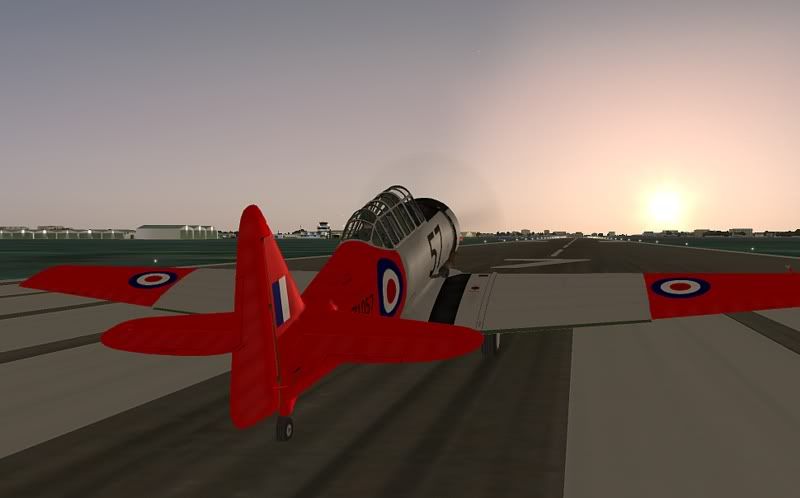
Is it too much to ask to have 98's black checks in red? Or is it something I should do myself?
Aaargh, how stupid! I completely forgot to change the color of the **** things. Expect an update.
As for the propellor hub, if you take it off, you're stuck with an exhaust that is too big...
edit: I've uploaded an update on avsimLast edited by jankees on Tue Feb 26, 2008 7:46 pm, edited 1 time in total.
All my repaints for MSFS can be found on flightsim.to
Older repaints for FS9, FSX and P3D are on avsim
More screenshots can be found here
Alphasim Harvard
 by jankees » Tue Feb 26, 2008 6:51 pm

- jankees
- Senior Member
- Joined: Tue Jan 08, 2008 9:31 pm
- Posts: 1800
- Location: B/NL/S
by Ian Warren » Tue Feb 26, 2008 8:34 pm
jankees wrote:QUOTE (jankees @ Feb 26 2008, 06:51 PM) <{POST_SNAPBACK}>As for the propellor hub, if you take it off, you're stuck with an exhaust that is too big...
exhaust that is too big...the huge exhaust was an addon to keep the display aircraft clean from stains from the early oils and dies , NEVER had a Hub'ed AT6 in RNZAF other than 2 commercial that now live in Aussie that were in private hands , end off the day , historically BIG is better than a KNOB
.
PS : NZ1098 is an old paint , using a dull silver/grey dope paint as used with final in RNZAF
Great Works Jan.
Last edited by Ian Warren on Tue Feb 26, 2008 8:36 pm, edited 1 time in total.

-

Ian Warren - NZFF Pro
- Joined: Fri May 05, 2006 5:23 pm
- Posts: 41187
- Location: AREA 51

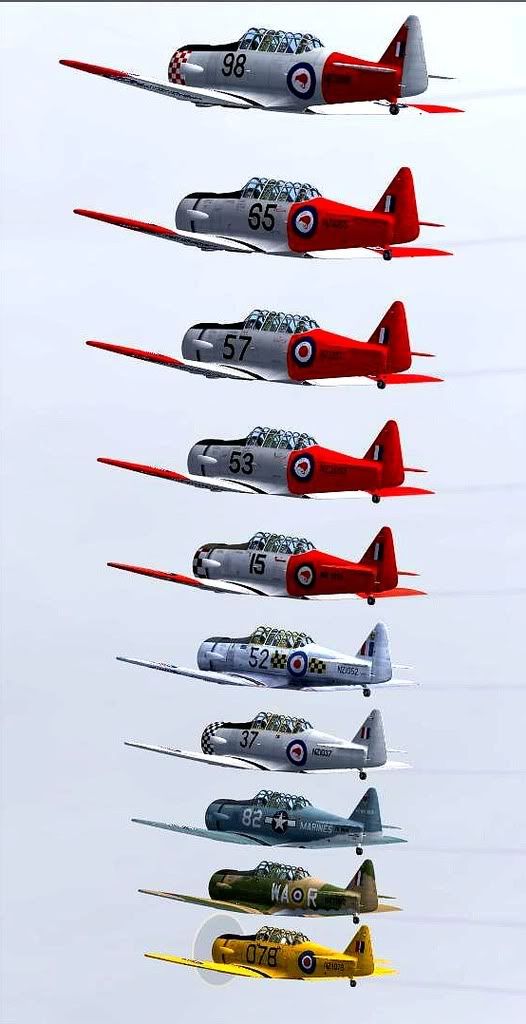
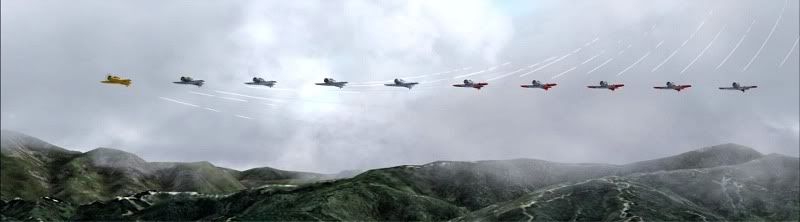
by Naki » Wed Feb 27, 2008 3:08 pm
woo nice shots - I have to update my repaint list - I am getting a bit behind on the Harvards and Mustangs and now I am lost - Charl, if possible, can you summarise the WOP Mustang & Alpha Harvard repaints and where we can get them (presumably they are available from Avsim) and who did them. Can't identify all the markings on the shot above.
Cheers
Cheers
-

Naki - NZFF Pro
- Joined: Sat Aug 05, 2006 10:03 pm
- Posts: 7170
- Location: Tauranga
by ardypilot » Thu Feb 28, 2008 4:07 pm
Great formation Charl- could you post the tracks for that? All these new paints coming out recently are really making me get back into flying this beast, I havn't flown anything else in the sim in about the last 6 sessions I've played!
Also Jankees, are the 1098 and 1037 paints meant to be installed to the ALPHA T-6 Harvard folder or the ALPHA T-6 Texan folder? And what is the corrent model= lines meant to be? None of the real life ones have antenna one them like they do in the sim. (Charl seems to have got rid of them somehow in the above screenies)
Also Jankees, are the 1098 and 1037 paints meant to be installed to the ALPHA T-6 Harvard folder or the ALPHA T-6 Texan folder? And what is the corrent model= lines meant to be? None of the real life ones have antenna one them like they do in the sim. (Charl seems to have got rid of them somehow in the above screenies)
QUOTE
Jan Kees, thanks for the quick update on 98[/quote]
Do have you got a link for that please?
Do have you got a link for that please?
QUOTE
And don't forget to change both lines in the aircraft.cfg to read
fuel_metering_type=1
so your Harvard splutters when downside up.[/quote]
Got a video of that happening? It doesn't seem to work for me
fuel_metering_type=1
so your Harvard splutters when downside up.[/quote]
Got a video of that happening? It doesn't seem to work for me
QUOTE
just a few more required to fill up the entire horizon.[/quote]
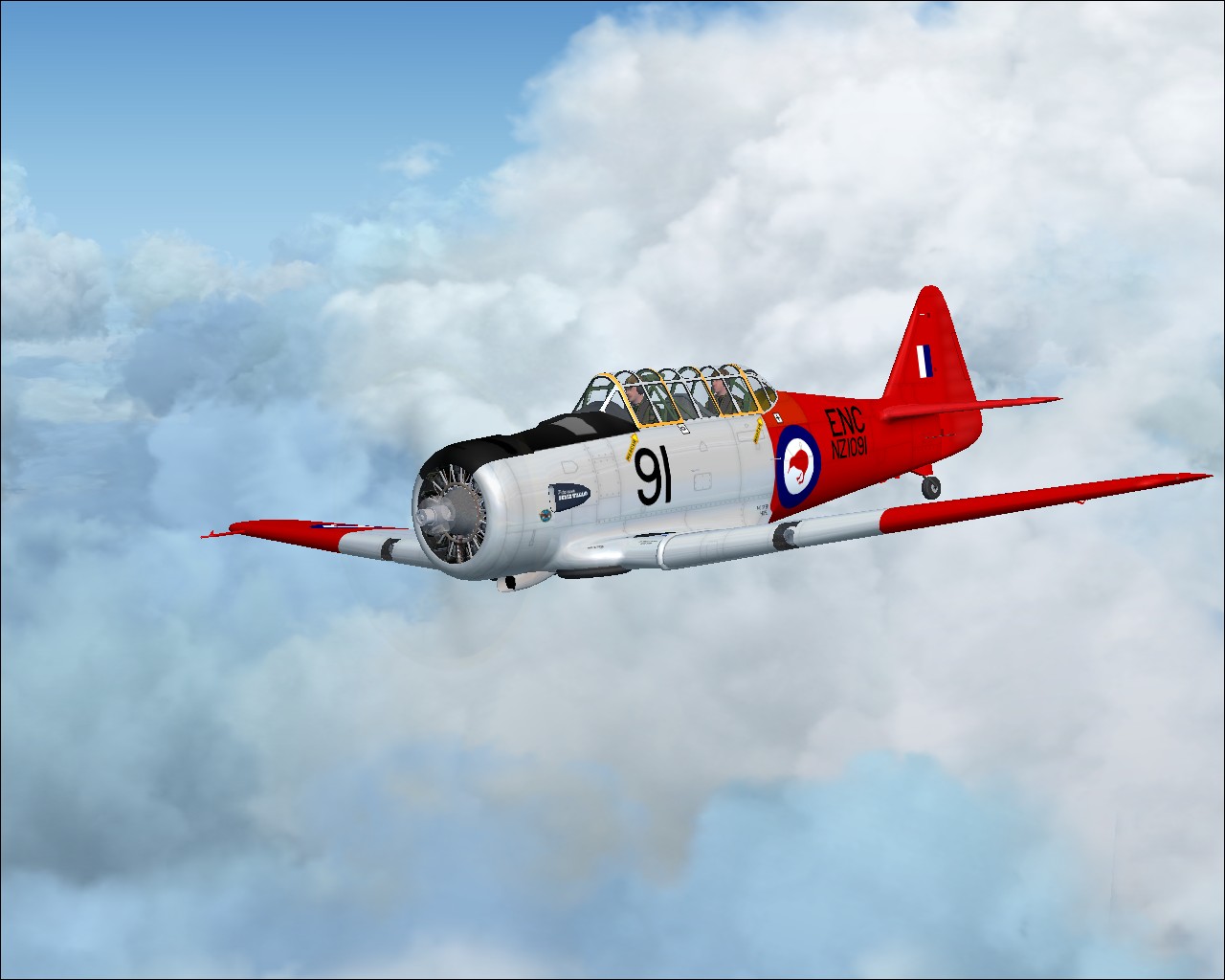
NZ1091 is the last remaining Auckland based one that needs doing as far as I can remember:
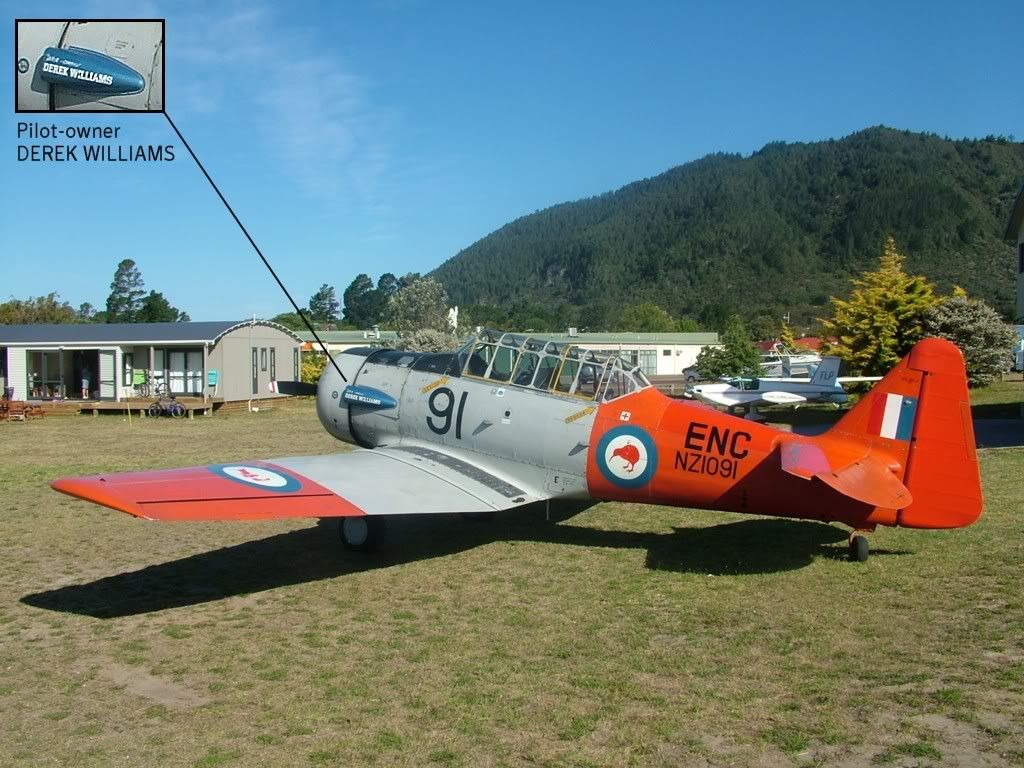
NZ1091 is the last remaining Auckland based one that needs doing as far as I can remember:
Last edited by ardypilot on Thu Feb 28, 2008 4:13 pm, edited 1 time in total.
-

ardypilot - NZFF Pro
- Joined: Wed Apr 26, 2006 10:01 am
- Posts: 6802
- Location: Auckland
by Alfashark » Thu Feb 28, 2008 4:58 pm
Trolly wrote:QUOTE (Trolly @ Feb 28 2008, 05:07 PM) <{POST_SNAPBACK}>NZ1091 is the last remaining Auckland based one that needs doing as far as I can remember
You mean 1091 has finally left Tauranga? Old 91 and 96 were part of the furniture around there from the moment they were sold (1978?)
As for Derek Williams... A legend! Korean War vet, topdressing pilot since then... flew out of Tga with a 400hp Fletcher (ZK-CBA) for many years, gapped it to Malaysia/Indonesia and was based in the jungle there with a Cresco and a loader driver as his only company for a year. Returned after an accident which saw the Cresco go up in flames (Derek got out pretty much unharmed, and got a few Kodak moments of the Cresco's demise on film).
Now based back in Tga with another 400hp Fletcher, the Harvard and a Mooney M20.
Made the papers a couple of months back after completing 30000hrs
Lived next door to him for a while, which probably (along with being directly under the final approach to rwy 25) got me into flyingLast edited by Alfashark on Thu Feb 28, 2008 8:19 pm, edited 1 time in total.
-
Alfashark - Sim-holic
- Joined: Wed Jul 25, 2007 7:45 pm
- Posts: 549
- Location: Putaruru
by ardypilot » Thu Feb 28, 2008 5:20 pm
QUOTE
You mean 1091 has finally left Tauranga?[/quote]
Whoops, no, I thought I had seen it at Ardmore but thinking about it, the only time I've seen it was when I took this picture at Pauanui. Great story about Derek by the way- saw his Fletcher parked up at the Tauranga airshow, wish it had been on flying display rather than just a static!
Whoops, no, I thought I had seen it at Ardmore but thinking about it, the only time I've seen it was when I took this picture at Pauanui. Great story about Derek by the way- saw his Fletcher parked up at the Tauranga airshow, wish it had been on flying display rather than just a static!
-
ardypilot - NZFF Pro
- Joined: Wed Apr 26, 2006 10:01 am
- Posts: 6802
- Location: Auckland
by Alfashark » Thu Feb 28, 2008 5:38 pm
Phew! Ya had me sweating there Trolly... Horrible thoughts of him selling the old girl 
It was bad enough when they tore down the big old ex-airforce hangar (known to everybody as "the Main hangar"), personally I think the whole airport lost a huge chunk of its character then.
As long as theres two Harvards still there, I'm happy
The other Harvard, 1096 (ZK-END) is owned by Rob and Jenny Gordon who also own a D.H Chipmunk (rego escapes me, callsign Chipmunk 96) and D.H Tigermoth (Tiger 43).
It was bad enough when they tore down the big old ex-airforce hangar (known to everybody as "the Main hangar"), personally I think the whole airport lost a huge chunk of its character then.
As long as theres two Harvards still there, I'm happy
The other Harvard, 1096 (ZK-END) is owned by Rob and Jenny Gordon who also own a D.H Chipmunk (rego escapes me, callsign Chipmunk 96) and D.H Tigermoth (Tiger 43).


-
Alfashark - Sim-holic
- Joined: Wed Jul 25, 2007 7:45 pm
- Posts: 549
- Location: Putaruru
by Charl » Thu Feb 28, 2008 6:42 pm
Naki wrote:QUOTE (Naki @ Feb 27 2008, 04:08 PM) <{POST_SNAPBACK}>... Charl, if possible, can you summarise the WOP Mustang & Alpha Harvard repaints ...
OK I've put the present list in to the payware list
Think maybe Fauville is the expert on the Mustangs...Trolly wrote:QUOTE (Trolly @ Feb 28 2008, 05:07 PM) <{POST_SNAPBACK}>Great formation Charl- could you post the tracks for that?
Mmm here's one you can add to the tutorial page:
If you create an frc file with offsets, then convert it back to a text file, the offsets are gone!
The convertor changes the co-ordinates to include the offset update.
SO keep the text file...I didn't, and so the offsets are gone, sorry.
aircraft.cfg has TWO entries, BOTH must read fuel_metering_type=1
For no antenna, you need model.Harvard2 which Phil emailed me.Last edited by Charl on Thu Feb 28, 2008 6:45 pm, edited 1 time in total.
Charl- NZFF Pro
- Joined: Mon May 01, 2006 8:28 am
- Posts: 9691
- Location: Auckland
by ardypilot » Thu Feb 28, 2008 7:47 pm
QUOTE
If you create an frc file with offsets, then convert it back to a text file, the offsets are gone!
The convertor changes the co-ordinates to include the offset update.[/quote]
Learnt that myself the hard way, no biggie but it would be good if they could update that in the next version of the module.
The convertor changes the co-ordinates to include the offset update.[/quote]
Learnt that myself the hard way, no biggie but it would be good if they could update that in the next version of the module.
QUOTE
aircraft.cfg has TWO entries, BOTH must read fuel_metering_type=1[/quote]
Huh? Mine looks like this:
[piston_engine]
power_scalar=1.0
cylinder_displacement=149.330
compression_ratio=6.300
number_of_cylinders=9
max_rated_rpm=2250.000
max_rated_hp=650.000
fuel_metering_type=1
cooling_type=0
normalized_starter_torque=0.035
turbocharged=1
max_design_mp=36.000
min_design_mp=5.000
critical_altitude=5000.000
emergency_boost_type=0
emergency_boost_mp_offset=0.000
emergency_boost_gain_offset=0.000
fuel_air_auto_mixture=0
auto_ignition=0
max_rpm_mechanical_efficiency_scalar=1.000000
idle_rpm_mechanical_efficiency_scalar=1.000000
max_rpm_friction_scalar=1.000000
idle_rpm_friction_scalar=1.000000
When I press CTRL+F and search 'fuel_metering', this is the only result it can find.
Huh? Mine looks like this:
[piston_engine]
power_scalar=1.0
cylinder_displacement=149.330
compression_ratio=6.300
number_of_cylinders=9
max_rated_rpm=2250.000
max_rated_hp=650.000
fuel_metering_type=1
cooling_type=0
normalized_starter_torque=0.035
turbocharged=1
max_design_mp=36.000
min_design_mp=5.000
critical_altitude=5000.000
emergency_boost_type=0
emergency_boost_mp_offset=0.000
emergency_boost_gain_offset=0.000
fuel_air_auto_mixture=0
auto_ignition=0
max_rpm_mechanical_efficiency_scalar=1.000000
idle_rpm_mechanical_efficiency_scalar=1.000000
max_rpm_friction_scalar=1.000000
idle_rpm_friction_scalar=1.000000
When I press CTRL+F and search 'fuel_metering', this is the only result it can find.
QUOTE
For no antenna, you need model.Harvard2 which Phil emailed me.[/quote]
Thanks for forwarding that through, I already had a model.Harvard2 but replacing it with your one fixes it up nicely:
I've gone through my cfg and changed all the model assignments but for some reason #98 still shows the antenna, I've looked at it long and hard and can't come up with any explanation to why it does this!
EDIT: After loading the sim up again, the correct model shows. I think it was because I had $98 originally selected as my default aircraft while I was editing the aircraft.cfg and the visual model was saved in the cache.
Thanks for forwarding that through, I already had a model.Harvard2 but replacing it with your one fixes it up nicely:
I've gone through my cfg and changed all the model assignments but for some reason #98 still shows the antenna, I've looked at it long and hard and can't come up with any explanation to why it does this!
EDIT: After loading the sim up again, the correct model shows. I think it was because I had $98 originally selected as my default aircraft while I was editing the aircraft.cfg and the visual model was saved in the cache.
Last edited by ardypilot on Thu Feb 28, 2008 8:17 pm, edited 1 time in total.
-
ardypilot - NZFF Pro
- Joined: Wed Apr 26, 2006 10:01 am
- Posts: 6802
- Location: Auckland
by jankees » Thu Feb 28, 2008 8:36 pm
Charl wrote:QUOTE (Charl @ Feb 28 2008, 07:42 PM) <{POST_SNAPBACK}>For no antenna, you need model.Harvard2 which Phil emailed me.
I would be interested in that too, as my Harvard2 model still gives me an antenna
All my repaints for MSFS can be found on flightsim.to
Older repaints for FS9, FSX and P3D are on avsim
More screenshots can be found here
- jankees
- Senior Member
- Joined: Tue Jan 08, 2008 9:31 pm
- Posts: 1800
- Location: B/NL/S
by Charl » Thu Feb 28, 2008 9:01 pm
Trolly wrote:QUOTE (Trolly @ Feb 28 2008, 08:47 PM) <{POST_SNAPBACK}>When I press CTRL+F and search 'fuel_metering', this is the only result it can find.
You may need to search earlier in the file, here's my first entry, in addition to the one you have:
[GeneralEngineData]
//0=Piston, 1=Jet, 2=None, 3=Helo-Turbine, 4=Rocket, 5=Turboprop
engine_type = 0
fuel_flow_scalar = 1.000
min_throttle_limit = 0.000000
engine.0 = 7.9, 0, 0
fuel_metering_type=1Last edited by Charl on Thu Feb 28, 2008 9:01 pm, edited 1 time in total.
-

Charl - NZFF Pro
- Joined: Mon May 01, 2006 8:28 am
- Posts: 9691
- Location: Auckland
by Fauville » Sat Mar 01, 2008 9:45 pm
Charl wrote:QUOTE (Charl @ Mar 4 2008, 07:42 AM) <{POST_SNAPBACK}>Think maybe Fauville is the expert on the Mustangs...
All for the WWII Fighters P-51 Mustang (high res version, not the original WOP version)
NZ2415 Zk-TAF
NZ2410
NZ2423
All in kiwis.zip on Avsim by Jan Kees Blom
NZ2413 - NZ2413.zip on SOH by Jan Kees
Miss Torque ZK-PLI - jk_miss_torque.zip on Avsim by Jan Kees
NZ2417 aka ZK-CCG Mobil Mustang on Avsim by Jan Kees
Dove of Peace Zk-SAS on Avsim by John Terrell


-
Fauville - Forum Addict
- Joined: Thu May 24, 2007 10:46 pm
- Posts: 317
- Location: Beach Haven, Auckland
 ...............
 by Charl » Mon Mar 03, 2008 7:00 pm
Message for "Wingman":
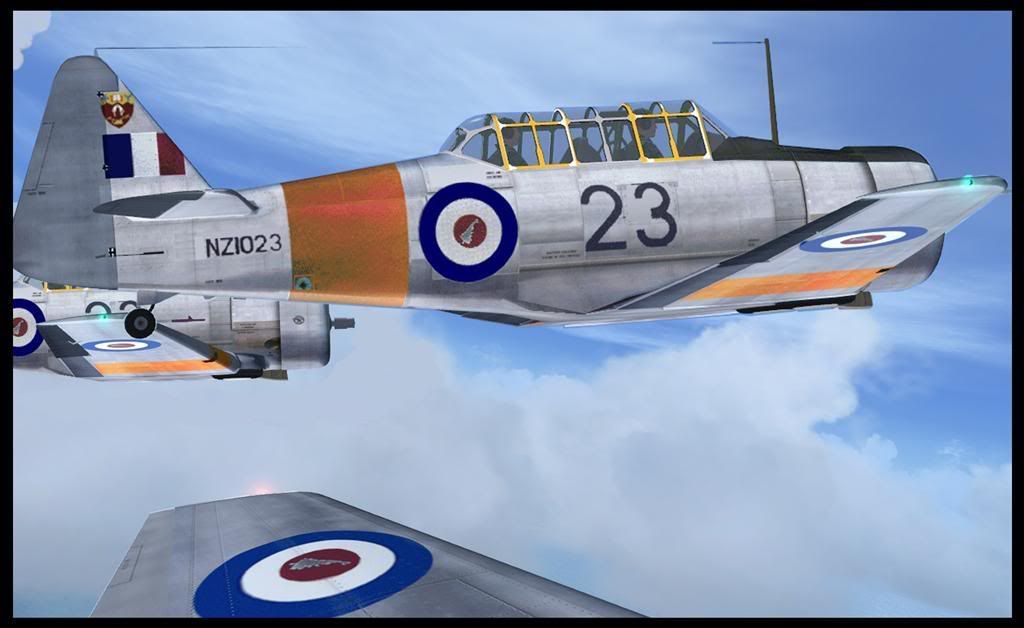
Oi! Where'd you get that Harvard???
(Very nice Harvard, BTW what's with the dartboard effect on the bullseye??)
Oi! Where'd you get that Harvard???
(Very nice Harvard, BTW what's with the dartboard effect on the bullseye??)
Last edited by Charl on Mon Mar 03, 2008 7:02 pm, edited 1 time in total.
-
Charl - NZFF Pro
- Joined: Mon May 01, 2006 8:28 am
- Posts: 9691
- Location: Auckland
by jankees » Thu Mar 06, 2008 1:42 am
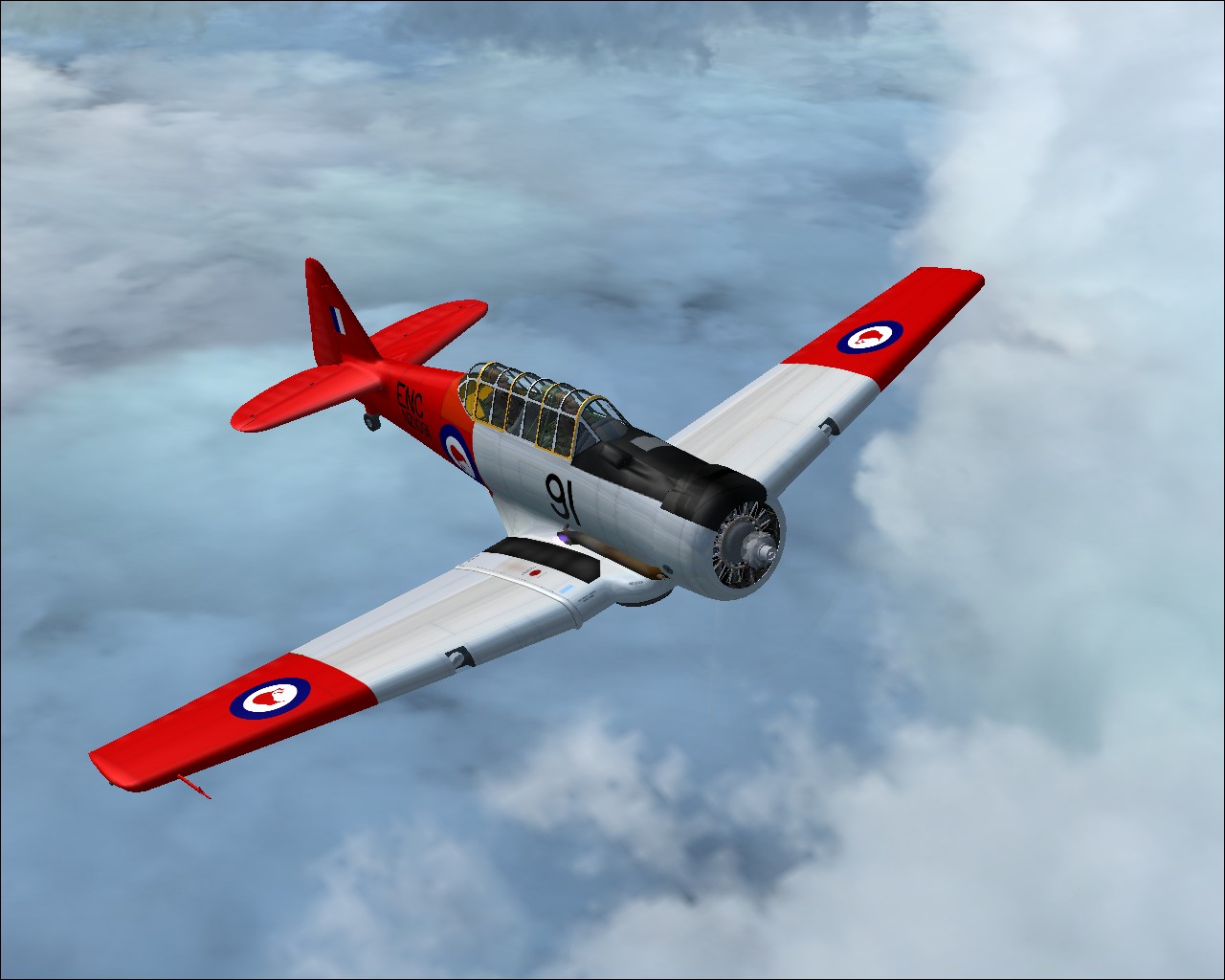
Trolly wrote:QUOTE (Trolly @ Feb 28 2008, 04:07 PM) <{POST_SNAPBACK}>NZ1091 is the last remaining Auckland based one that needs doing as far as I can remember:
I'm working on it, here are some WiP shots. Any comments so far?
Jan Kees
All my repaints for MSFS can be found on flightsim.to
Older repaints for FS9, FSX and P3D are on avsim
More screenshots can be found here
- jankees
- Senior Member
- Joined: Tue Jan 08, 2008 9:31 pm
- Posts: 1800
- Location: B/NL/S
by Ian Warren » Thu Mar 06, 2008 8:28 am
Looking good Jan , maybe some weathering ?
Charl wrote:QUOTE (Charl @ Mar 3 2008, 07:00 PM) <{POST_SNAPBACK}>Message for "Wingman":
Oi! Where'd you get that Harvard???
(Very nice Harvard, BTW what's with the dartboard effect on the bullseye??)
still original photo pixels , needs smooth'n and ageing

-
Ian Warren - NZFF Pro
- Joined: Fri May 05, 2006 5:23 pm
- Posts: 41187
- Location: AREA 51
Who is online
Users browsing this forum: No registered users and 3 guests