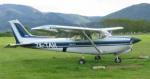
Fletcher Black Window

Discuss aircraft addons and repaints for Flight Simulator here

Postby bevok » Tue Dec 02, 2008 1:19 pm

Hi

I wonder if anyone has a solution for this, my beloved new Fletcher in FSX has black glass on the sliding windshield of the cockpit hatch (in the VC only), bit of a problem when I'm craning my neck coming into those airstrips! I've got the v2 from Avsim, tried completely deleting it and re-adding but still the same issue. Any ideas?

Much appreciated

Bevan


Last edited by bevok on Tue Dec 02, 2008 1:24 pm, edited 1 time in total.
bevok
 

Postby Adamski » Tue Dec 02, 2008 2:59 pm

bevok wrote:
QUOTE (bevok @ Dec 2 2008, 02:19 PM) <{POST_SNAPBACK}>
I wonder if anyone has a solution for this, my beloved new Fletcher in FSX has black glass on the sliding windshield of the cockpit hatch (in the VC only), bit of a problem when I'm craning my neck coming into those airstrips! I've got the v2 from Avsim, tried completely deleting it and re-adding but still the same issue. Any ideas?

Hmmm ... no problems with mine. I'm running FSX+Acceleration (SP2). What version of FSX are you running? Does it happen with a of the models/variants?

I can't see any reference in my archive as to whether it's v.2 or not (nothing in the readme.txt). I'll check on Avsim.

1) Did you copy the FSX panels folder over?
2) Do you have DX10 textures enabled, maybe?

Just checked ... my archive is FU24WALT.zip .... the archive on Avsim is fu24_v2.zip ... so I'll grab it and give it a whirl.

UPDATE: Hmmmm ... interesting. The only model that DOESN'T black out the canopy is the yellow Marlborough one in my WALT archive. I'm going to try copy & pasting the various BMP files to see if I can find the culprit ... unless it's in a .cfg or mdl file <???>.

UPDATE2: Tried pasting over the BMP files from the working model. No go ... so it must be a fault somewhere else. Any ideas, anyone?
Last edited by Adamski on Tue Dec 02, 2008 4:00 pm, edited 1 time in total.
Image
User avatar
Adamski
NZFF Pro
 
Joined: Thu Nov 01, 2007 2:22 am
Posts: 5029
Location: Birkenhead, Auckland

Postby BigBird » Tue Dec 02, 2008 3:05 pm

Updated Fletchers are running sweet on my system too. Also running FSX+Acceleration.
Last edited by BigBird on Tue Dec 02, 2008 3:05 pm, edited 1 time in total.
BigBird
Forum Addict
 
Joined: Mon Nov 10, 2008 6:15 pm
Posts: 422

Postby waka172rg » Tue Dec 02, 2008 4:11 pm

i have had mine like that ever since release i asked Ian,Creator and Deaneb all cant find anything wrong very frustrating!
fsx Acceleration. and yes the yellow EML doesn't Black out in mine too
ImageImage
User avatar
waka172rg
Sim-holic
 
Joined: Wed Jan 23, 2008 2:45 pm
Posts: 796
Location: Motueka

Postby deaneb » Tue Dec 02, 2008 5:18 pm

OK - we need to try and establish some facts here. I'm running FSX with SP2 / Accel installed as well. The two packages - FU24WALT.zip and fu24_v2.zip were both made to specifically work for SP2 / Acceleration and I have no problems on my machine. Because we are getting different results I'm wondering if its a Vista / 64 bit or video card issue. Im running FS on XP and all is good. This is not a texture issue as the same texture is applied to all the canopy and windshield elements.

So - for both those with black canopies and those that are displaying fine - can you reply with operating system and any other specs which may be affecting the outcome

Deane
Image
User avatar
deaneb
Senior Member
 
Joined: Sat Aug 12, 2006 4:40 pm
Posts: 1561
Location: Blenheim

Postby waka172rg » Tue Dec 02, 2008 6:28 pm

mine.....fsx accel i had Sp2 on my system i don't know if acell has Sp2 in it as well?
system 32bit,vista,4GHz process,3GB ram,350 mb geforce graphic card.
mine does it on all Fletcher's turb and piston
Last edited by waka172rg on Tue Dec 02, 2008 6:31 pm, edited 1 time in total.
ImageImage
User avatar
waka172rg
Sim-holic
 
Joined: Wed Jan 23, 2008 2:45 pm
Posts: 796
Location: Motueka

Postby Njbb1995 » Tue Dec 02, 2008 7:26 pm

I think it is because Marlborough is awesome and they (the computer) don't want to black it out. well thats my theory.
User avatar
Njbb1995
Sim-holic
 
Joined: Fri Nov 23, 2007 5:02 pm
Posts: 860
Location: Blenheim

Postby bevok » Tue Dec 02, 2008 8:00 pm

In my case I'm running FSX Acceleration, Windows XP on an ATI card, I hadn't flown the Walthers before but you're right, the yellow one is absolutely fine, the others exhibit the same problem. 32 bit dual core 2Ghz with 2Gb of RAM.
bevok
 

Postby Adamski » Tue Dec 02, 2008 8:46 pm

njbb1995 wrote:
QUOTE (njbb1995 @ Dec 2 2008, 08:26 PM) <{POST_SNAPBACK}>
I think it is because Marlborough is awesome and they (the computer) don't want to black it out. well thats my theory.

Hehehehe ... priceless!!! laugh.gif I just love this forum! BTW - I looked at the BMP file for the cockpit ... had the words "all your bases are belong to us" in tiny writing at the bottom. I think the message is an afront to nVidia cards that are well known to go off in a huff when threatened.

To Deane ... will get back to you on my spec. ASAP. Great to be able to speak to the ....errrm ... horse's mouth!

Before I get down to boring technicalities though ... many thanks for this *superb* aircraft. Great fun to fly (provided you go in a straight line, that is laugh.gif). I can't believe something as good as this is actually free.

OK my specs:

Vista Home Premium 6 - fully patched - UAC turned off.
CPU: 2.4 GHHz dual core.
RAM: 4Gb.
nVidia 8800 GTS 512Mb on-board.
nVidia WHQL 178.24. Run at 1600*1200, 32-bit (desktop and FSX).
FSX - Acceleration, fully patched.

Would you need to know my specific display settings - anti-aliasing etc??

If it's any help - I see the proper view for a moment before "the blind" comes down.
Last edited by Adamski on Tue Dec 02, 2008 8:57 pm, edited 1 time in total.
Image
User avatar
Adamski
NZFF Pro
 
Joined: Thu Nov 01, 2007 2:22 am
Posts: 5029
Location: Birkenhead, Auckland

Postby waka172rg » Thu Dec 04, 2008 4:24 pm

Adamski wrote:
QUOTE (Adamski @ Dec 2 2008, 08:46 PM) <{POST_SNAPBACK}>
Hehehehe ... priceless!!! laugh.gif I just love this forum! BTW - I looked at the BMP file for the cockpit ... had the words "all your bases are belong to us" in tiny writing at the bottom. I think the message is an afront to nVidia cards that are well known to go off in a huff when threatened.

To Deane ... will get back to you on my spec. ASAP. Great to be able to speak to the ....errrm ... horse's mouth!

Before I get down to boring technicalities though ... many thanks for this *superb* aircraft. Great fun to fly (provided you go in a straight line, that is laugh.gif). I can't believe something as good as this is actually free.

OK my specs:

Vista Home Premium 6 - fully patched - UAC turned off.
CPU: 2.4 GHHz dual core.
RAM: 4Gb.
nVidia 8800 GTS 512Mb on-board.
nVidia WHQL 178.24. Run at 1600*1200, 32-bit (desktop and FSX).
FSX - Acceleration, fully patched.

Would you need to know my specific display settings - anti-aliasing etc??

If it's any help - I see the proper view for a moment before "the blind" comes down.
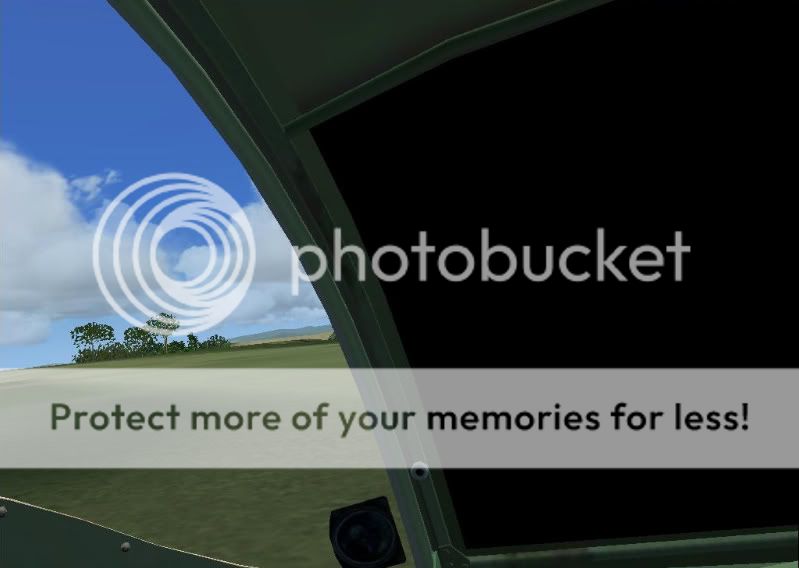
mine does that too i see the wing then it goes black
ImageImage
User avatar
waka172rg
Sim-holic
 
Joined: Wed Jan 23, 2008 2:45 pm
Posts: 796
Location: Motueka

Postby deaneb » Thu Dec 04, 2008 4:44 pm

I have found the issue with this . I have compared my model files and found that the canopy area where you guys are seeing black is mapped to a texture that does not exist !! This obviously works in different ways depending and video cards. I can fix this two ways - remap the texture and update the MDL files or the easiest is probably just to make a texture of the correct name and release it.

If anybody knows how to make transparent textures - all you need to do is make a 256 x 256 pixel texture and name it: Canopy_T.bmp - put this in the texture folder and all should be good. Another way to try it is to copy a transparent "glass" texture from another model and rename it.

I can't do this until the weekend.

Deane
Image
User avatar
deaneb
Senior Member
 
Joined: Sat Aug 12, 2006 4:40 pm
Posts: 1561
Location: Blenheim

Postby Adamski » Thu Dec 04, 2008 5:28 pm

deaneb wrote:
QUOTE (deaneb @ Dec 4 2008, 05:44 PM) <{POST_SNAPBACK}>
I have found the issue with this . I have compared my model files and found that the canopy area where you guys are seeing black is mapped to a texture that does not exist !! This obviously works in different ways depending and video cards. I can fix this two ways - remap the texture and update the MDL files or the easiest is probably just to make a texture of the correct name and release it.

If anybody knows how to make transparent textures - all you need to do is make a 256 x 256 pixel texture and name it: Canopy_T.bmp - put this in the texture folder and all should be good. Another way to try it is to copy a transparent "glass" texture from another model and rename it.

I can't do this until the weekend.

Deane

Good on yer, Deane!!! thumbup1.gif

I haven't looked yet - but wouldn't that texture be in the "yellow" (Marloborough) version that works? We could just copy across.
Image
User avatar
Adamski
NZFF Pro
 
Joined: Thu Nov 01, 2007 2:22 am
Posts: 5029
Location: Birkenhead, Auckland

Postby deaneb » Thu Dec 04, 2008 5:30 pm

Adamski wrote:
QUOTE (Adamski @ Dec 4 2008, 06:28 PM) <{POST_SNAPBACK}>
Good on yer, Deane!!! thumbup1.gif

I haven't looked yet - but wouldn't that texture be in the "yellow" (Marloborough) version that works? We could just copy across.


No the Marlb Fletcher maps to an area within the "FU24W_Parts_T" texture.
Image
User avatar
deaneb
Senior Member
 
Joined: Sat Aug 12, 2006 4:40 pm
Posts: 1561
Location: Blenheim

Postby waka172rg » Thu Dec 04, 2008 5:30 pm

ho ok but Canopy_T.bmp doesn't replace anything in the texture folder?
Last edited by waka172rg on Thu Dec 04, 2008 5:36 pm, edited 1 time in total.
ImageImage
User avatar
waka172rg
Sim-holic
 
Joined: Wed Jan 23, 2008 2:45 pm
Posts: 796
Location: Motueka

Postby deaneb » Thu Dec 04, 2008 6:59 pm

waka172rg wrote:
QUOTE (waka172rg @ Dec 4 2008, 06:30 PM) <{POST_SNAPBACK}>
ho ok but Canopy_T.bmp doesn't replace anything in the texture folder?


Correct its an extra thats needed to texture those incorrectly tagged windows
Image
User avatar
deaneb
Senior Member
 
Joined: Sat Aug 12, 2006 4:40 pm
Posts: 1561
Location: Blenheim

Postby Adamski » Thu Dec 04, 2008 7:48 pm

deaneb wrote:
QUOTE (deaneb @ Dec 4 2008, 07:59 PM) <{POST_SNAPBACK}>
Correct its an extra thats needed to texture those incorrectly tagged windows

Jackpot, Deane clapping.gif I found a file (with exactly the same name, thankfully) ... copied it into all the misbehaving texture folders .... and BINGO!

I've put a copy of it on my server if anyone's in a hurry and wants it:
Canopy_T.zip
Last edited by Adamski on Sun Mar 25, 2012 4:31 pm, edited 1 time in total.
Image
User avatar
Adamski
NZFF Pro
 
Joined: Thu Nov 01, 2007 2:22 am
Posts: 5029
Location: Birkenhead, Auckland

Postby waka172rg » Thu Dec 04, 2008 8:13 pm

WOW after just about a year looking at a black window descending in2 nelson/Motueka a dropping meat bombs had to have the window open and it got cold!! now THANKS DEANE AND ADAMSKI the heater will be on awsome!! New_Zealand_etc.gif notworthy.gif thumbup1.gif clapping.gif groupwave.gif cheers1.gif groupwave.gif sleep1.gif
Last edited by waka172rg on Thu Dec 04, 2008 8:14 pm, edited 1 time in total.
ImageImage
User avatar
waka172rg
Sim-holic
 
Joined: Wed Jan 23, 2008 2:45 pm
Posts: 796
Location: Motueka

Postby Adamski » Thu Dec 04, 2008 8:57 pm

Yay! Great to hear it's sorted!!!

For some reason I'm trying to get my brain round programming the FMC (I'm a masochist!) ... so it's always a delight to jump into the old Fletch and spread some anthrax around ninja.gif

Great plane, Deane - much appreciated!
Image
User avatar
Adamski
NZFF Pro
 
Joined: Thu Nov 01, 2007 2:22 am
Posts: 5029
Location: Birkenhead, Auckland

Postby deaneb » Thu Dec 04, 2008 9:43 pm

I'm so pleased we got this one sorted - glad you guys all like the model - thats what its all about - I do it because enjoy it and sharing with others.

Deane
Image
User avatar
deaneb
Senior Member
 
Joined: Sat Aug 12, 2006 4:40 pm
Posts: 1561
Location: Blenheim

Postby Adamski » Thu Dec 04, 2008 10:58 pm

deaneb wrote:
QUOTE (deaneb @ Dec 4 2008, 10:43 PM) <{POST_SNAPBACK}>
I'm so pleased we got this one sorted - glad you guys all like the model - thats what its all about - I do it because enjoy it and sharing with others.

Many of the aircraft in FSX (MS, payware or freeware) often have some pretty bizarre flight models. This one is a fun little plane to fly and feels "right". That said, I've only ever solo'd in gliders winkyy.gif

Got any others waiting in the [ouch] wings??? laugh.gif
Image
User avatar
Adamski
NZFF Pro
 
Joined: Thu Nov 01, 2007 2:22 am
Posts: 5029
Location: Birkenhead, Auckland

Next

Return to Aircraft

Who is online

Users browsing this forum: No registered users and 4 guests