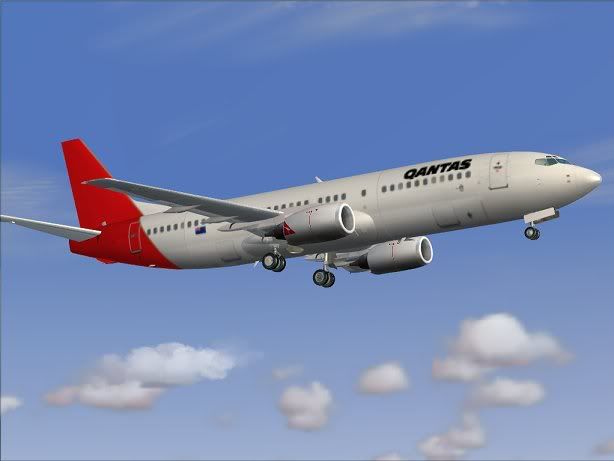
Qantas 737-400 (Jetconnect)

Discuss aircraft addons and repaints for Flight Simulator here

Postby Alex » Fri Dec 14, 2007 10:07 pm

Well, probably part of it at least. :) I can't remember where I downloaded it from; a quick google search should yield some useful results though.

Once installed it's fairly straightforward, you open the image with DXTBmp, send it to your editor, save it back to the temporary file, refresh the image in DXTBmp, and then save it back to it's original (final?) location. :wink2:

Alex
Last edited by Alex on Fri Dec 14, 2007 10:07 pm, edited 1 time in total.
Alex
NZFF Pro
 
Joined: Fri Jul 14, 2006 3:39 pm
Posts: 3620

Postby gw54 » Fri Dec 14, 2007 10:11 pm

Thanks Alex,

I'll give it a try and let you know how I get on.
gw54
Member
 
Topic author
Joined: Wed Nov 21, 2007 6:35 pm
Posts: 34
Location: Wellington

Postby gw54 » Mon Dec 31, 2007 8:27 am

Anybody keen to try a Jetconnect 400 using the Vistliners model. I think every 300 in this part of the world has been done,it would be good to see a few 400's, in particular QFA and QFNZ. Anybody game ?
gw54
Member
 
Topic author
Joined: Wed Nov 21, 2007 6:35 pm
Posts: 34
Location: Wellington

Postby Daniel » Mon Jul 14, 2008 4:51 pm

gw54 wrote:
QUOTE (gw54 @ Dec 31 2007, 08:27 AM) <{POST_SNAPBACK}>
Anybody keen to try a Jetconnect 400 using the Vistliners model. I think every 300 in this part of the world has been done,it would be good to see a few 400's, in particular QFA and QFNZ. Anybody game ?


I tried to start a repaint on it but am finding it quite difficult to repaint aircraft altogether sad.gif
Will still try but I think I need a bit of help.
Daniel
Sim-holic
 
Joined: Tue Aug 28, 2007 9:42 pm
Posts: 946
Location: New Zealand

Postby NZ255 » Mon Jul 14, 2008 5:34 pm

Daniel wrote:
QUOTE (Daniel @ Jul 14 2008, 04:51 PM) <{POST_SNAPBACK}>
I tried to start a repaint on it but am finding it quite difficult to repaint aircraft altogether sad.gif
Will still try but I think I need a bit of help.

You could start off by using Dan's (if he doesn't mind), pulling over textures from the -300 to the -400 (might need to re arrange a few things first) then give him the credit.
Nick
User avatar
NZ255
NZFF Pro
 
Joined: Wed Jun 20, 2007 12:57 pm
Posts: 2475

Postby Daniel » Mon Jul 14, 2008 9:45 pm

Hey Guys,

Here is a picture of the Jet connect 734 I have started repainting.
However close up it looks really blurry but futher back it looks ok sad.gif Any suggestions on this?
I still need to put on the Kangaroo on the tail and do a few other things.


I probably need someone to fix it up a bit and make it look a bit better.
I will still try and see if I finish it but it won't be a fine job at all.
Daniel
Sim-holic
 
Joined: Tue Aug 28, 2007 9:42 pm
Posts: 946
Location: New Zealand

Postby Alex » Mon Jul 14, 2008 9:49 pm

That's the first step Daniel - always room to improve. thumbup1.gif

For the blurriness - maybe try changing the export file encoding (File>Save As>... in DXTbmp). smile.gif

Alex
Alex
NZFF Pro
 
Joined: Fri Jul 14, 2006 3:39 pm
Posts: 3620

Postby Daniel » Mon Jul 14, 2008 9:50 pm

Alex wrote:
QUOTE (Alex @ Jul 14 2008, 09:49 PM) <{POST_SNAPBACK}>
That's the first step Daniel - always room to improve. thumbup1.gif

For the blurriness - maybe try changing the export file encoding (File>Save As>... in DXTbmp). smile.gif

Alex


Thanks Alex thumbup1.gif
I will try that tommorow.
Any ideas on the best way to put a kangaroo on the tail?
Daniel
Sim-holic
 
Joined: Tue Aug 28, 2007 9:42 pm
Posts: 946
Location: New Zealand

Postby Alex » Mon Jul 14, 2008 9:55 pm

Try getting a photo eh - it'd be a pain to hand-draw....

Alex
Alex
NZFF Pro
 
Joined: Fri Jul 14, 2006 3:39 pm
Posts: 3620

Postby Ian Warren » Mon Jul 14, 2008 10:17 pm

Daniel .. good start smile.gif ... It dose not happen straight off .. do , try , do then ya get it .. With the Kangaroo , not sure what program you have , very carefully draw around the logo save .. then place onto your paint .
Image
User avatar
Ian Warren
NZFF Pro
 
Joined: Fri May 05, 2006 5:23 pm
Posts: 41187
Location: AREA 51

Postby jastheace » Mon Jul 14, 2008 11:09 pm

if you are using photoshop, give me a pm i should be able to help you out. or use the magic wand and select the kangaroo, then cut and paste

jason
In the ongoing battle between objects made of aluminum going hundreds of miles per hour and the ground going zero miles per hour, the ground has yet to lose.

Image
User avatar
jastheace
Senior Member
 
Joined: Sun Aug 13, 2006 1:33 pm
Posts: 1032
Location: Hastings

Postby Anthony » Tue Jul 15, 2008 11:28 am

From what I know, Daniel's using Microsoft Paint winkyy.gif
But then people like Ansel Adams (photographer who made some really good photo art) used a camera like a Holga (bad quality, cheap and nasty disposable camera).

Anyway it actually looks pretty good for a first go. Keep going with the repaint.
As for the kangaroo in MS Paint, it might not be very easy and it might not look great, but it's doable. Just try and copy and paste one from somewhere I guess.
Image
User avatar
Anthony
Sim-holic
 
Joined: Mon Dec 03, 2007 4:07 pm
Posts: 947
Location: Rotorua

Postby ronindanbo » Tue Jul 15, 2008 12:31 pm

Daniel the reason for your bluriness is that you have no alpha layer applied, if you are using MS paint you cant do it either if not go into your alpha layer and apply a slightly off white alpha.
BSMP ltd Chairman of the board

Image
Visit www.bsmp.co.nz
User avatar
ronindanbo
Sim-holic
 
Joined: Fri Jul 14, 2006 5:59 am
Posts: 700
Location: Wellington

Postby Daniel » Tue Jul 15, 2008 4:57 pm

ronindanbo wrote:
QUOTE (ronindanbo @ Jul 15 2008, 12:31 PM) <{POST_SNAPBACK}>
Daniel the reason for your bluriness is that you have no alpha layer applied, if you are using MS paint you cant do it either if not go into your alpha layer and apply a slightly off white alpha.


Um..ok unsure.gif Not as easy as I first thought pirate.gif
I have been using a combination of Paint and GIMP.
I am quite lost about the alpha layer thing unsure.gif
Daniel
Sim-holic
 
Joined: Tue Aug 28, 2007 9:42 pm
Posts: 946
Location: New Zealand

Previous

Return to Aircraft

Who is online

Users browsing this forum: No registered users and 10 guests