Aerodesigns A318

Discuss aircraft addons and repaints for Flight Simulator here

Postby Jimmy » Tue Jul 04, 2006 3:20 pm

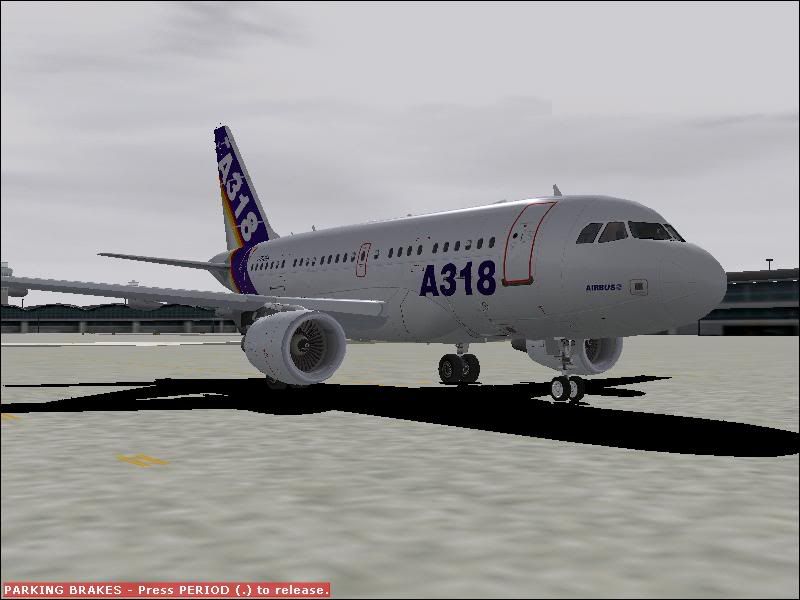
I came across this awsome A318 pakage on avsim yesterday and want to share it wiht you.

user posted image

Its great, clickable vc, over head panel, great mfd and eicas and great paint job too.

Aerodesigns is proud to present the Airbus A318 for use with Microsoft's Flight Simulator 2004! The model includes all of the standard features (animated control surfaces, reflective textures, Wing Vortices, accurate FDE, and full lighting effects), as well as many extra features such as animated wipers, rain drops on the windows, clickable virtual cockpit, virtual cabin, Maintenance Mode, and much more. We also boast our "Weekly update program" where you can request/suggest updates or features you would like to see implemented in the model, and then download the updated model from our website within a week! See our forum and the enclosed readme for more! This file contains the Base Pack and is required for all our A318 downloads.


ftp://library.avsim.net/civil_flight/ms ... 8_base.zip

hope this link works ;)

enjoy
Jimmy
 

Postby ardypilot » Tue Jul 04, 2006 4:05 pm

Great find Jimmy (nice new sig too ;) )

Prehaps someone should suggest an ANZ repaint in the "Weekly update program"

Heres a link to the info page:
http://library.avsim.net/search.php?Sea ... &Go=Search
User avatar
ardypilot
NZFF Pro
 
Joined: Wed Apr 26, 2006 10:01 am
Posts: 6802
Location: Auckland

Postby Jimmy » Mon Aug 28, 2006 6:27 pm

When I loed this ac up i get this message:

Flight Simulator was unable to load some aircraft or software. You can continue using Flight Simulator but this aircraft or software will be disabled.

File: GAUGES\A320.GAU


This comes up like 100 times then on the panel theres no gauges at all.

Thanks
James
Jimmy
 

Postby Jimmy » Thu Aug 31, 2006 5:10 pm

Does anyone know how to ix this? :( pleeeeeeeeeeaase :unsure:
Jimmy
 

Postby Muppet » Thu Aug 31, 2006 6:28 pm

Has it always been like this? Have you tried a complete reinstall? Sounds like faulty or missing gauge files.
Muppet
Member
 
Joined: Sat Apr 29, 2006 1:38 am
Posts: 124
Location: NZQN

Postby Jimmy » Thu Aug 31, 2006 6:36 pm

Yeah I reinstalled and registerd the gauge with fsuipc like it said to do, this never happend with my old pc hmm very annoying, I get a blank panel after I click the ok on the error massage for about 2mins lol :blink:
Jimmy
 

Postby Charl » Thu Aug 31, 2006 8:10 pm

Jimmy I'm in rebuild mode and don't have the A318 to hand, but from memory:
Many of the Airbus panels rely on Eric Marciano's gauges.
These are great but fussy about how you install them, and may need a FSUIPC key. There are also patches essential for specific models of Airbus!
Perhaps you should back up a step or two, and re-read the readme that came with the panel.
Hope this helps.
User avatar
Charl
NZFF Pro
 
Joined: Mon May 01, 2006 8:28 am
Posts: 9691
Location: Auckland

Postby Jimmy » Thu Aug 31, 2006 10:20 pm

Yeah it was a self installer that claims to have all the patches and stuff for the A320 panel in the A318.

I registerd the gauge with fsuipc and reinstalled the aerodesgns a318 3 times.
And in the panel readme that came with the package it says this in the FAQs section :
When I load an aircraft that uses one of your panel, I get a message saying that FS2002 can't load the gauge, and the panel appears almost empty. Why?

Answer
You get this because the gauge uses the module FSSound.dll, and this module was designed for FS2000. This is why it has to be declared as an old module for FS2002.
To do this, edit your FS2002.cfg file, and add the following lines:

[OldModules]
FSSound.dll=1


I did that too and it didnt have any effect. :blink:

Thanks again
James
Jimmy
 

Postby Charl » Fri Sep 01, 2006 11:31 am

Mmm last resort: go find a later version of the FSSound.dll file and drop it in the Modules folder. There are varius flavours of these, and I see yours is talking FS2000/FS2002 which may be too old for FS9.
Last edited by Charl on Fri Sep 01, 2006 11:31 am, edited 1 time in total.
User avatar
Charl
NZFF Pro
 
Joined: Mon May 01, 2006 8:28 am
Posts: 9691
Location: Auckland

Postby Jimmy » Tue Sep 12, 2006 6:36 pm

yay thank you so much charl :D It's working great now :) .

yet now I run into anothor problem with eric's A330 panel this time, I installed the posky 330 with vc and i got the mulfunciton message in the eicas display and none of the gauges work.
So I got the 330 panel from eric's site and installed the fix for fs9, but the sam ething happedn again.

On the "faqs" section of the site theres a link to download a fix wich i suppose is what I need for it too work ,but the files no longer on the server :angry:
Theres one for both of his panels (330 +320) maby the aerodesigns pack had this update init since it claims to always have the most upto date version.

Does anyone have the fix for the A330 panel from the FAQs section of: http://emarciano.free.fr/


James
Jimmy
 

Postby gokanru » Wed Sep 13, 2006 11:19 pm

Hi Jimmy,

A great tool to use is flight sim manager,it can tell you alot about what is wrong with an aircraft,what gauges are missing,ettc ,etc,.Its free also,URL=http://www.ranainside.com
Last edited by gokanru on Wed Sep 13, 2006 11:23 pm, edited 1 time in total.
gokanru


Return to Aircraft

Who is online

Users browsing this forum: No registered users and 8 guests