I have installed Real NZ Wellington and love it but it does not gave the roads around the airport, can I get roads for it or do I have to have it as is ?
Cheers cdsam
Wgton roads
10 posts
• Page 1 of 1
 by Timmo » Wed Sep 12, 2007 3:36 pm
Can you confirm what you mean by 'No roads'?
the usual way of rendering roads in the sim is to use vector lines with a road texture...of course when a photoreal layer is utilised, the roads are on the aerial photo anyway so they arent re-drawn. This is to avoid visual conflicts between the two (i.e. if the vector road was slightly out you would see two roads, the vector road and the one on the aerial photo....this would look odd and possibly obscure another feature)
In FS2004 the low resolution of photoreal layers can mean roads can be hard to see since they are typically around 10m which is only a few pixels wide.
the usual way of rendering roads in the sim is to use vector lines with a road texture...of course when a photoreal layer is utilised, the roads are on the aerial photo anyway so they arent re-drawn. This is to avoid visual conflicts between the two (i.e. if the vector road was slightly out you would see two roads, the vector road and the one on the aerial photo....this would look odd and possibly obscure another feature)
In FS2004 the low resolution of photoreal layers can mean roads can be hard to see since they are typically around 10m which is only a few pixels wide.
- Timmo
- NZFF Pro
- Joined: Wed Oct 25, 2006 6:28 pm
- Posts: 2056
- Location: Tauranga

by ranm » Wed Sep 12, 2007 7:22 pm
Alex wrote:QUOTE(Alex @ Sep 17 2007, 07:08 AM) <{POST_SNAPBACK}>I remember seeing somewhere a project for roads/streetlights for the Wellington area you could download and install, unfortunately I can't remember where this is...
Are you referring to this one ? http://homepages.ihug.co.nz/~nzcoaster/
Ran

-

ranm - Forum Addict
- Joined: Sat Dec 09, 2006 10:54 pm
- Posts: 161

by toprob » Fri Sep 14, 2007 10:26 am
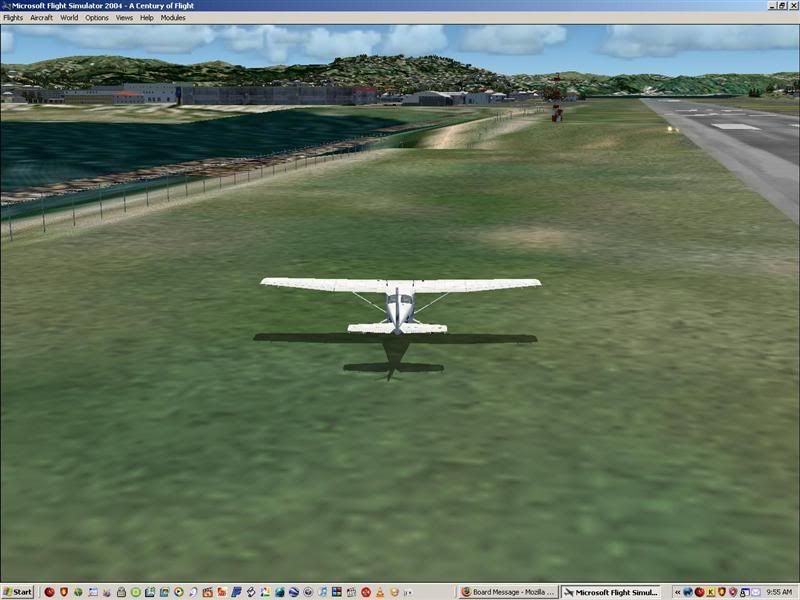
Yes, that's pretty much the way the photoreal works -- at 4.8 metres per pixel, the roads won't be that well defined. Even if you have a good set of roads, the photo will always go over the top. You can in fact see the road here -- it's the light strip down the fenceline. The Auckland screenshots you sent me are particularly blurry -- check your graphics settings, you may be able to get it clearer, in particular the Terrain Texture Size, which should be turned right up.
However, you do seem to suffer from 'dimples'. Here's the fix from the Wellington FAQ:
Why do I have 'dimples' near the western fence and retaining wall?
If you notice an uneven surface here, or the retaining wall is a bit jumbled, you should make one small change to your FS9.cfg file. Finding this file is tricky, but you can follow the instructions to find and edit it on the Wreckless Behaviour section of the Wellington manual. Take note of the need to make a backup of your FS9.sfg file in case of a problem.
You will need to find and change the TERRAIN_MAX_VERTEX_LEVEL= setting. It is easiest to just copy the bold text and paste it into the Edit:Find box within Notepad.
This setting is normally changed only when you install a high-resolution elevation mesh, and the correct values should be:
75 metre mesh = 19
40 metre mesh = 20
20 metre mesh = 21
However, the Wellington scenery requires a setting of at least 20 if you use a 75 metre mesh -- such as the mesh supplied with on the Wellington CD. If the default value is 18 or 19, change it to 20 and save the FS9.sfg file.
If you have a higher resolution mesh, and haven't changed this setting, now would be a good time to do so, as it will improve the display of your mesh New Zealand-wide.
However, you do seem to suffer from 'dimples'. Here's the fix from the Wellington FAQ:
Why do I have 'dimples' near the western fence and retaining wall?
If you notice an uneven surface here, or the retaining wall is a bit jumbled, you should make one small change to your FS9.cfg file. Finding this file is tricky, but you can follow the instructions to find and edit it on the Wreckless Behaviour section of the Wellington manual. Take note of the need to make a backup of your FS9.sfg file in case of a problem.
You will need to find and change the TERRAIN_MAX_VERTEX_LEVEL= setting. It is easiest to just copy the bold text and paste it into the Edit:Find box within Notepad.
This setting is normally changed only when you install a high-resolution elevation mesh, and the correct values should be:
75 metre mesh = 19
40 metre mesh = 20
20 metre mesh = 21
However, the Wellington scenery requires a setting of at least 20 if you use a 75 metre mesh -- such as the mesh supplied with on the Wellington CD. If the default value is 18 or 19, change it to 20 and save the FS9.sfg file.
If you have a higher resolution mesh, and haven't changed this setting, now would be a good time to do so, as it will improve the display of your mesh New Zealand-wide.
Last edited by toprob on Fri Sep 14, 2007 10:26 am, edited 1 time in total.
-

toprob - NZFF Pro
- Joined: Sat Apr 29, 2006 4:56 pm
- Posts: 6741
- Location: Upper Hutt
 Ha! Ha! Ya beat me to it Robin.
10 posts
• Page 1 of 1
Who is online
Users browsing this forum: No registered users and 23 guests