Gmax to FS9

An area to discuss scenery addons for virtual NZ

Postby ashton » Sun Aug 26, 2007 8:08 pm

need a little help here.
I dont know how to Export from Gmax into FS9 scenery sad.gif

help
please

ashton b
Ashton B

Intel core 2 duo E6750 2.66GHz 4MB L2 Chche Dual core Processor
Transcend 4G DDR2 800MHz Dual channel Memory
Asus P5K SE Intel P95/ICH9 Chipset Motherboard
XFX nVIDIA Geforce 8800GTS 640MB
Ninja Gaming Tower
Raidmax 520W
Microsoft Windows Vista Home Premium 64bit
User avatar
ashton
Member
 
Topic author
Joined: Thu Oct 19, 2006 7:38 am
Posts: 118
Location: Waihi Beach

Postby toprob » Sun Aug 26, 2007 8:12 pm

Do you have the FS2004 gamepack installed and working? (You'll be able to export as a 'Flight Scenery Object (MDL)')
User avatar
toprob
NZFF Pro
 
Joined: Sat Apr 29, 2006 4:56 pm
Posts: 6711
Location: Upper Hutt

Postby ashton » Sun Aug 26, 2007 8:45 pm

no cause i cant find it to download
Ashton B

Intel core 2 duo E6750 2.66GHz 4MB L2 Chche Dual core Processor
Transcend 4G DDR2 800MHz Dual channel Memory
Asus P5K SE Intel P95/ICH9 Chipset Motherboard
XFX nVIDIA Geforce 8800GTS 640MB
Ninja Gaming Tower
Raidmax 520W
Microsoft Windows Vista Home Premium 64bit
User avatar
ashton
Member
 
Topic author
Joined: Thu Oct 19, 2006 7:38 am
Posts: 118
Location: Waihi Beach

Postby toprob » Sun Aug 26, 2007 8:57 pm

User avatar
toprob
NZFF Pro
 
Joined: Sat Apr 29, 2006 4:56 pm
Posts: 6711
Location: Upper Hutt

Postby ashton » Sun Aug 26, 2007 9:17 pm

thanks toprob for the link

see ya

ashton b
Ashton B

Intel core 2 duo E6750 2.66GHz 4MB L2 Chche Dual core Processor
Transcend 4G DDR2 800MHz Dual channel Memory
Asus P5K SE Intel P95/ICH9 Chipset Motherboard
XFX nVIDIA Geforce 8800GTS 640MB
Ninja Gaming Tower
Raidmax 520W
Microsoft Windows Vista Home Premium 64bit
User avatar
ashton
Member
 
Topic author
Joined: Thu Oct 19, 2006 7:38 am
Posts: 118
Location: Waihi Beach

Postby ashton » Mon Aug 27, 2007 8:02 am

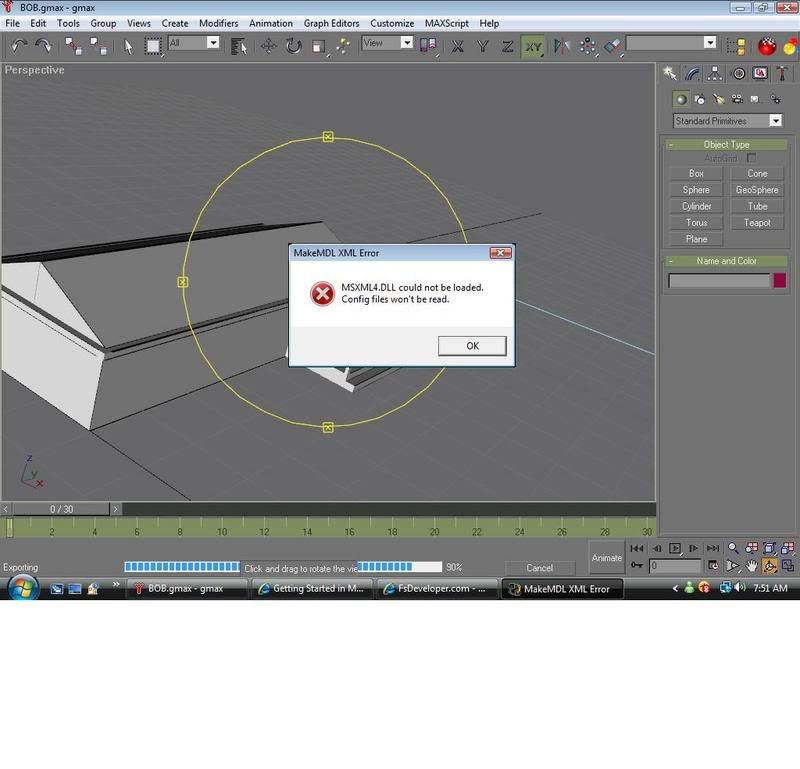
ok i dont now what this means


could soom one please help me out here

ashton b
Ashton B

Intel core 2 duo E6750 2.66GHz 4MB L2 Chche Dual core Processor
Transcend 4G DDR2 800MHz Dual channel Memory
Asus P5K SE Intel P95/ICH9 Chipset Motherboard
XFX nVIDIA Geforce 8800GTS 640MB
Ninja Gaming Tower
Raidmax 520W
Microsoft Windows Vista Home Premium 64bit
User avatar
ashton
Member
 
Topic author
Joined: Thu Oct 19, 2006 7:38 am
Posts: 118
Location: Waihi Beach

Postby HardCorePawn » Mon Aug 27, 2007 8:58 am

You need to install the MSXML4 package, so that various things can parse/read XML files etc. You can get it from microsoft:

MSXML 4 SP2

You may possibly want to get the latest (v6) as well... note that as far as I can tell, there is no version5??!??! Anyway, I am not sure if this is entirely necessary, but it cannot hurt to have the latest:

MSXML v6


ps. it looks like you are not actually using the FS2004 gamepack properly... after you install the gamepack into the c:\gmax directory, you need to make sure that you start Gmax using the FS2004 shortcut that you can find in the c:\gmax\gamepacks\fs2004 directory. If you right-click the short cut and choose "Send To icon_arrow.gif Desktop (create shortcut)" you will be able to find it easier.

You will know if it has loaded correctly as the gmax title bar will say [FS2004 game pack]...
Last edited by HardCorePawn on Mon Aug 27, 2007 9:06 am, edited 1 time in total.
"Son, we are about the break the surly bonds of gravity, and punch the face of God." -- Homer Simpson

Image
User avatar
HardCorePawn
Senior Member
 
Joined: Fri Sep 01, 2006 4:18 pm
Posts: 1277
Location: 2500' above Godzone


Return to Scenery

Who is online

Users browsing this forum: No registered users and 12 guests