Harden up!

An area to discuss scenery addons for virtual NZ

Postby HardCorePawn » Wed Aug 01, 2007 1:46 pm

Ok, so I made the mistake of getting annoyed that I could not land my helo on the RW helipad area of Auckland Hospital in the RealNZ Auckland City scenery...

So I got hold of some scenery libraries (FinneryAir chopper pads etc) from Hovercontrol and set about adding a couple of helipads to the roof.

Only problem is that its a real PITA to try to harden the whole roof (kinda necessary as I suck at flying Helo's so need a big target to aim at! dry.gif), as the biggest 'invisibile' hardened object is a 12m square, and the entire roof is about 140m by 30m...

So, me being clever and all, decided to install GMAX + FS2004 Gamepak + BGLcomp + MakeMDL unsure.gif

So far, I have managed (following along with Robin's basic GMAX tut) to create a 140m x 30m 'plane' object, texture it with some random texture (although I will eventually make it transparent a-la FinneyAir), export the MDL, create a BGL Library object using "Library Creator XML" and put it into the game... BUT for some reason, I cannot seem to make it "hard", so I can land on it.

I tried running the 'AttachTool' script and selecting 'Platform' with a surface of 'Concrete', as suggested on a couple of forum posts that I found, but it did not seem to work (MakeMDL actually choked while attempting to export it until I also ran the AttachTool script to remove the crash boxes).

I tried a suggestion I saw on a forum post saying that you should create the item, AttachTool - Platform it, clone it, AttachTool - NoCrash the clone and then export both of them together, but that did not seem to work either.

Is this because I used the 'Plane' (as in 2D shape, not flying thing with wings winkyy.gif) object rather than a (very thin) 3D Box?

Any help would be appreciated... unfortunately, I am currently unable to bother the very knowledgeable people on hovercontrol as their forum requires your account to be manually vetted after registration... sad.gif
"Son, we are about the break the surly bonds of gravity, and punch the face of God." -- Homer Simpson

Image
User avatar
HardCorePawn
Senior Member
 
Topic author
Joined: Fri Sep 01, 2006 4:18 pm
Posts: 1277
Location: 2500' above Godzone

Postby toprob » Wed Aug 01, 2007 1:56 pm

Just a quick heads-up -- the reason there's no platform there is that I just couldn't get it to work. If I move the platform 20 metres up the road, it works, but right at that spot I can't get it to work. I have no idea why.
User avatar
toprob
NZFF Pro
 
Joined: Sat Apr 29, 2006 4:56 pm
Posts: 6711
Location: Upper Hutt

Postby Bandit » Wed Aug 01, 2007 3:32 pm

Don't know if this would work or not. So I may be speaking through a hole in me bum. I also normally use the FinneyAir surfaces as well, but agree doing a bigger area using the 12m pad would be a pain.

But here's a couple of alternative ideas I'll chuck into the pot.

1. Use AFCAD2 to create a surface just below or equal to the roof top height. You can define the length and width. If you land too hard you may fall through it possibly? The ones I have created in error when designing my own airstrips seem pretty solid though.

2. Use FSFlatten to create a polygon and bring the ground elevation up to the roof height but hidden by the building object. I read this somewhere a while back. This sounds do able in theory.

Anybody else tried these methods?

Let us know how you get on Jared.
Last edited by Bandit on Wed Aug 01, 2007 3:34 pm, edited 1 time in total.
Testers are born to fiddle. What does this button do? Oh! Never mind.....
User avatar
Bandit
Forum Addict
 
Joined: Fri Jul 21, 2006 10:08 pm
Posts: 423
Location: Palmerston North

Postby Timmo » Wed Aug 01, 2007 3:45 pm

Here is my idea into the pot: Have a look at the Oil Platform example that comes with the FSX SDK......i think this has a landable surface so perhaps you could see how they did it?
Timmo
NZFF Pro
 
Joined: Wed Oct 25, 2006 6:28 pm
Posts: 2056
Location: Tauranga

Postby HardCorePawn » Thu Aug 02, 2007 12:11 am

idea.gif icon_redface.gif

Not sure what happened there, but I think I may have left my brain in my other pants! I figured out what my problem was... there wasn't one! It was working perfectly... at least it would have if I had actually stopped and restarted FS so it could reload the scenery! rolleyes.gif

Basically the method to create a harden pad (in Gmax) is:

- Create 'Plane' in Gmax with the dimensions you require
- Set Opacity to 0% (makes it invisible)
- Run Script - AttachTool - Platform (Surface = Concrete)
- Clone the object
- Select Clone
- Run Script - AttachTool - NoCrash
- Export to MDL

Then its just a small matter to place it where you want in your universe... I did the following:

- Used Library Creator XML to create Library object containing my models
- Place harden pad using EZ-Scenery

I actually created 2 copies of the model (the transparent one, and a white one) and put them in my Library, so I could use the white object to line it up within the scenery and then switch to the invisible one to actually add the object (FinneyAir harden pad-style). Then I dropped on a couple of the pre-built FinneyAir Chopper Pads.

So anyway... we now have this:


which I think is a pretty fair representation of this:


So the entire rooftop of the helipad area is hardened (yes, I tested the whole thing! dry.gif) and I actually found out how to create an XML definition file for an 'airport', so created one of those so you can actually spawn at NZJL (aka Auckland Hospital), rather than have to fly/slew from NZAA.

Thinking about doing the same for Mechanics Bay and the ASB Bank Centre... the XML airport, not the harden pad, although I think the pad on the ASB could do with some work winkyy.gif


ps. Big thanks to Robin (for his Gmax tutorials), Jeffrey Stanyer for his XML Helipad Tutorials, and various people/resources on www.fsdeveloper.com and www.scenery.org
Last edited by HardCorePawn on Thu Aug 02, 2007 12:15 am, edited 1 time in total.
"Son, we are about the break the surly bonds of gravity, and punch the face of God." -- Homer Simpson

Image
User avatar
HardCorePawn
Senior Member
 
Topic author
Joined: Fri Sep 01, 2006 4:18 pm
Posts: 1277
Location: 2500' above Godzone

Postby creator2003 » Thu Aug 02, 2007 8:30 am

Nice one HCP you will have to explain more to me laters ,just gets to me that ive never worked out that part of it to many tutorails that i could never understand ,ive always got lost with gooblly gook ,xml this xml that ,
strange that it didnt work for robin like that ,even though he wrote part of the tutorial that you used to make it ,
Nice effort dude im jelous now drool.gif
User avatar
creator2003
NZFF Pro
 
Joined: Fri Jun 16, 2006 12:08 am
Posts: 4633
Location: Cant U C im LOCO

Postby Charl » Thu Aug 02, 2007 2:30 pm

Good one, I've had my try at the ASB helipad, just doing an invisible AFCAD for the 10 Squirrels AI project.
The result looked like a giant antheap all over downtown Auckland!
Be great if you uploaded this stuff somewhere.
User avatar
Charl
NZFF Pro
 
Joined: Mon May 01, 2006 8:28 am
Posts: 9691
Location: Auckland

Postby HardCorePawn » Thu Aug 02, 2007 3:19 pm

Thinking about doing the same for Mechanics Bay and the ASB Bank Centre... the XML airport, not the harden pad, although I think the pad on the ASB could do with some work


Well I was messing about with the ASB (coz, I get a bit obsessive some times and dont like to be beaten)... and it was driving me nuts... no matter what I did, it would be very unstable and more often than not, I'd go sinking right through the top of the building... sad.gif

UNTIL I found the asbpad.BGL in the FS9/AucklandCity/scenery directory. By 'removing' that (rename to asbpad.BGL.REMOVE), and then adding in an elongated octagonal hardened pad, along with an XML 'airport' descriptor, I now have ASB working sweet like a sweet thing... clapping.gif

I have also done an XML descriptor for Mechanics Bay, so you can start directly there rather than having to fly/slew. thumbup1.gif

I will package it up (along with install instructions) when I get some spare time...


cheers,
Jared
"Son, we are about the break the surly bonds of gravity, and punch the face of God." -- Homer Simpson

Image
User avatar
HardCorePawn
Senior Member
 
Topic author
Joined: Fri Sep 01, 2006 4:18 pm
Posts: 1277
Location: 2500' above Godzone

Postby Bandit » Thu Aug 02, 2007 6:04 pm

Well done that man!

Agree with Charl - I'd be keen for a completed copy as well.

Did you create the building in the background as well? (the one with the windsock on top and the one behind it)

I have Robins Akld scenery but my hospital doesn't look like that.
Testers are born to fiddle. What does this button do? Oh! Never mind.....
User avatar
Bandit
Forum Addict
 
Joined: Fri Jul 21, 2006 10:08 pm
Posts: 423
Location: Palmerston North

Postby creator2003 » Thu Aug 02, 2007 7:21 pm

Yeah i cant say mine looks like that ether
EDIT:mine does look like the above pic ,l i just never remembered seeing it there..
Last edited by creator2003 on Fri Aug 03, 2007 7:57 pm, edited 1 time in total.
User avatar
creator2003
NZFF Pro
 
Joined: Fri Jun 16, 2006 12:08 am
Posts: 4633
Location: Cant U C im LOCO

Postby creator2003 » Thu Aug 02, 2007 10:19 pm

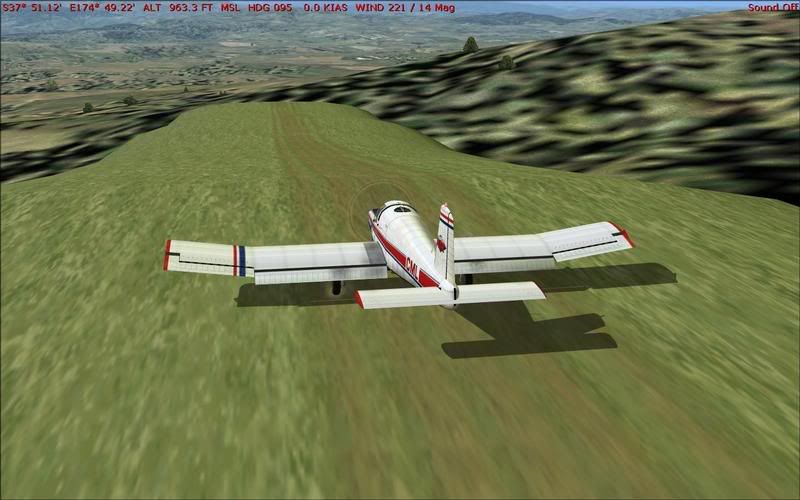
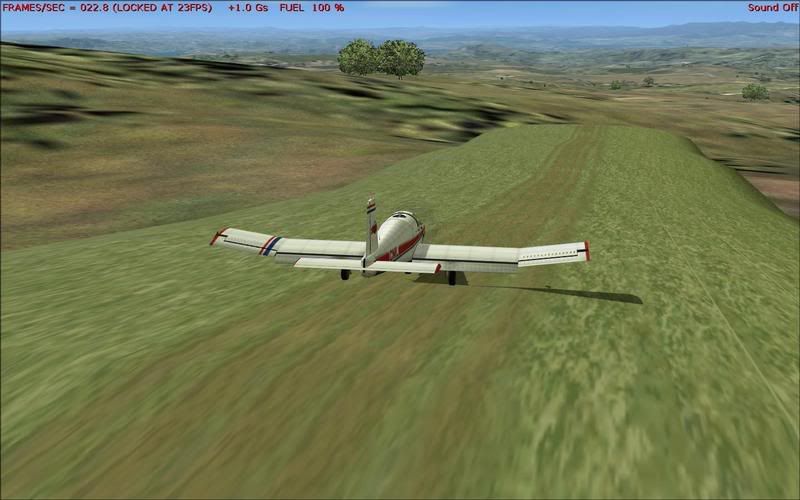
After alot of working out with HCP and alot of "oh that make sence now " we managed to work out this aswell
if it looks like fun it is thumbup1.gif


man ive got to thank you so much hcp ive been working on doing this for ages New_Zealand_etc.gif thumbup1.gif
Last edited by creator2003 on Thu Aug 02, 2007 11:44 pm, edited 1 time in total.
User avatar
creator2003
NZFF Pro
 
Joined: Fri Jun 16, 2006 12:08 am
Posts: 4633
Location: Cant U C im LOCO

Postby Naki » Thu Aug 02, 2007 10:28 pm

wow cool - a real Fletcher airstrip!
User avatar
Naki
NZFF Pro
 
Joined: Sat Aug 05, 2006 10:03 pm
Posts: 7170
Location: Tauranga

Postby Timmo » Fri Aug 03, 2007 12:16 pm

Cool!- Can you make a 'how to?' I want to do this to the airstrip on Tarawera if possible!
Timmo
NZFF Pro
 
Joined: Wed Oct 25, 2006 6:28 pm
Posts: 2056
Location: Tauranga

Postby ardypilot » Fri Aug 03, 2007 5:11 pm

Both the Auckland Hospital pad and Fletcher stip look awesome- I hope they are released soon! tongue.gif
User avatar
ardypilot
NZFF Pro
 
Joined: Wed Apr 26, 2006 10:01 am
Posts: 6802
Location: Auckland

Postby creator2003 » Fri Aug 03, 2007 6:08 pm

Ive placed about four or five of them around nzreal marlborough by robin corn and most are close together on the way from nzwb to picton just as you enter the gully ,"youll see them Click here


have fun while i make some more shapes and stuff
and no i havent tested in fsx and no i dont think they will work in fsx
Last edited by creator2003 on Fri Aug 03, 2007 6:15 pm, edited 1 time in total.
User avatar
creator2003
NZFF Pro
 
Joined: Fri Jun 16, 2006 12:08 am
Posts: 4633
Location: Cant U C im LOCO

Postby HardCorePawn » Sun Aug 05, 2007 2:52 am

I figured that the guys in NZAA tower needed an easier way to commute to work... winkyy.gif


So it looks like you can create landable platforms in Gmax for FSX as well... its a bugger placing the objects in the scenery tho! angry.gif

ps. for those waiting for my RealNZ AKL City Helipads, unfortunately, I seem to have hit a small snag. For some reason, with an identical mesh/scenery setup, other people are getting the pads at a different height. So, until i can figure out why, and then fix it, I will not be releasing this sad.gif
Last edited by HardCorePawn on Sun Aug 05, 2007 2:55 am, edited 1 time in total.
"Son, we are about the break the surly bonds of gravity, and punch the face of God." -- Homer Simpson

Image
User avatar
HardCorePawn
Senior Member
 
Topic author
Joined: Fri Sep 01, 2006 4:18 pm
Posts: 1277
Location: 2500' above Godzone


Return to Scenery

Who is online

Users browsing this forum: No registered users and 12 guests