Page 1 of 1
P3Dv4 Nelson dynamic lighting

Posted:
Sun May 12, 2019 10:57 amby falconrae


Hello,
I am using Nelson in P3Dv4. I made my first experience flying at Nelson at night and found the dynamic lighting to be very bright - see attached cockpit and spot view screenshots.
Is there a way to reduce the lighting intensity or remove the files responsible for dynamic lightning so as not to have to switch it on / off every time I fly out / in of Nelson?
Thanks for your assistance
Richard
Re: P3Dv4 Nelson dynamic lighting
Posted:
Sun May 12, 2019 11:26 amby toprob
I have had one other report of this, which we've been trying to sort out. Just a couple of questions:
Is this Prepar3d v4.5?
Do you use Rex Environment Force?
Any other shading/environment tools?
Do you have a Nvidia GPU?
Do you have any Nvidia tweaking tool?
At the moment the other user and I are exploring the affects of EF, which seems to have messed up some people's lighting, and has apparently been patched for this recently. If we can't figure this out, I will supply a way to tone down or remove the dynamic lights.
Nelson lights can appear bright, as the dynamic tarmac lighting was added in an update, but I left the 'lit' night textures as-is. But there's no way it should look like your screenshots:) Here's the comparison shot I took this week, showing how it appears for me.
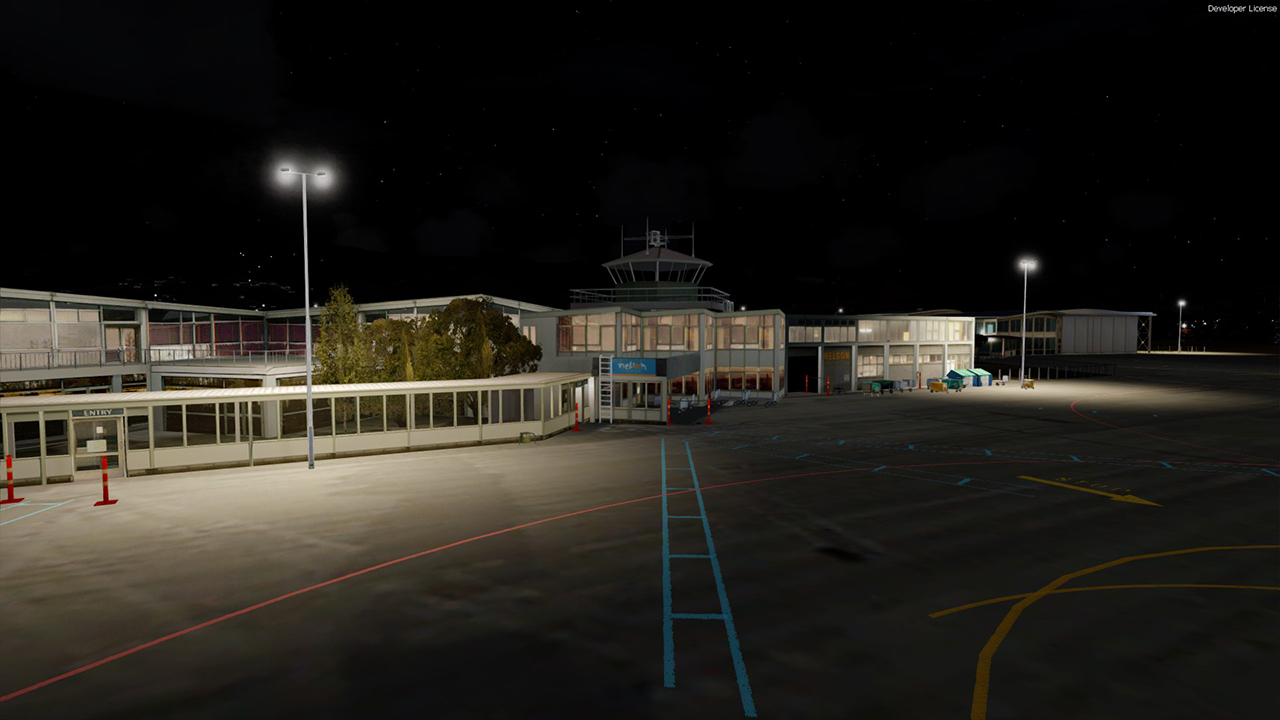
-Robin
Re: P3Dv4 Nelson dynamic lighting
Posted:
Sun May 12, 2019 6:01 pmby falconrae
Hello Robin
Thank you for your reply. I am using v4.5 with REX EF and its most recent fix. No other shader tools. I have an Nvidia 1080 TI with latest drivers and have no Nvidia tweaking tool.
Best regards
Richard
Re: P3Dv4 Nelson dynamic lighting
Posted:
Sun May 12, 2019 7:06 pmby toprob
Richard, have you seen the AVSIM discussion here - ?
https://www.avsim.com/forums/topic/5540 ... on-thread/It's a lengthy thread:) but some of it covers the burnt-out lighting that you are experiencing. There may be a solution there for you.
-Robin
Re: P3Dv4 Nelson dynamic lighting
Posted:
Sun May 12, 2019 7:13 pmby falconrae
Robin,
Not yet - thanks I will have a look,
Richard
Re: P3Dv4 Nelson dynamic lighting
Posted:
Sun May 12, 2019 7:39 pmby toprob
I've just downloaded the EF manual (I don't own it) and I think the relevant settings to control the bloom are on page 56?
EDIT: there's another AVSIM thread here, shorter this time:
https://www.avsim.com/forums/topic/5538 ... oom-in-ef/
Re: P3Dv4 Nelson dynamic lighting
Posted:
Sun May 12, 2019 8:20 pmby toprob
Richard -
I am sorry, this does seem to be an issue with my Nelson. Hold off for the moment and I'll come up with a fix.
Re: P3Dv4 Nelson dynamic lighting
Posted:
Sun May 12, 2019 9:42 pmby falconrae
Robin,
Thanks for these very useful links - I have read through and there is a suggestion to disable to the HDR in EF as well as in P3D. I have done this but it does not seem to help. What makes a big difference is if I disable the dynamic lights in P3D. Attached I show 3 screenshots, the one with the black cockpit is with dynamic lights off and HDR on. The two with the white washed out cockpit both have dynamic lights on and are differentiated by switching HDR on and off (the one with the "clean" PFD is with HDR off)


Richard
Re: P3Dv4 Nelson dynamic lighting
Posted:
Sun May 12, 2019 10:45 pmby toprob
Yeah, that makes sense, based on what I've found this evening. The problem is that I used a default light effect for the actual bulb glow, then later added the dynamic light which just adds the beam. Since then Lockheed Martin seem to have turned the default light into a powerful dynamic light, and that is what you see here. The light is part of the VLC libraries, which I'll need to update. I was planning to do an update when I release NZCH, but I may do an interim update soon.
Sorry about this, when you reported this, and earlier in the week when another person had the same issue, I only really looked at my dynamic light, not the other one, so I missed this completely. It does seem that at some point recently I 'fixed' this for NZCH, but I don't remember doing so:)
After mulling it over, I can't really do a patch, as there are version issues with the VLC Libraries, so an update is called for. Thanks for your patience, in the meantime put your sunnies on when you fly into Nelson at night....
Re: P3Dv4 Nelson dynamic lighting
Posted:
Mon May 13, 2019 12:01 amby falconrae
Robin
Thanks for the quick feedback - great to know that the root cause is known. I was pulling my hair out yesterday. But have learnt a lot in the process and will keep my sunglasses and hat on whilst flying around Nelson at night for the time being,
Best regards
Richard
Re: P3Dv4 Nelson dynamic lighting
Posted:
Sun Jul 14, 2019 6:05 pmby falconrae
Hello Robin,
Congratulations on the release of NZCH. Are the VLC libraries updated with this release and if so is it possible to get the update for the Nelson light issue per this topic (or do I need to purchase NZCH which I am tempted in buying).
Best regards
Richard
Re: P3Dv4 Nelson dynamic lighting
Posted:
Sun Aug 11, 2019 8:10 pmby falconrae
Hello Robin,
With reference to our exchange in May, please let me know what the status is of the VLC library update following the release of NZCH, so that I can resolve the Nelson lighting problem,
Kind regards and thank you,
Richard
Re: P3Dv4 Nelson dynamic lighting
Posted:
Sun Aug 11, 2019 8:38 pmby toprob
Sorry, Richard, I did have a fix ready to go, but this has been put on hold while I dealt with one other issue with the Libraries. At the moment I'm not sure when this will be ready, but it is on the list:)
The lighting issue was fixed in the Library installer which went out with Real NZ NZCH, but that version turns out to have another issue with Prepar3d v4.5. I just need to decide on how best to release a fix. It may be very soon, I just can't promise anything because of some unrelated things which may take up all my time for the next week or two.
Re: P3Dv4 Nelson dynamic lighting
Posted:
Sun Aug 11, 2019 10:35 pmby falconrae
Hello Robin
Thank you for your quick feedback
Kind regards
Richard