Page 1 of 1

PostPosted: Tue Feb 20, 2007 9:54 pm
by Barrington
Hopefully Ive got the hang of uploading, so here goes................
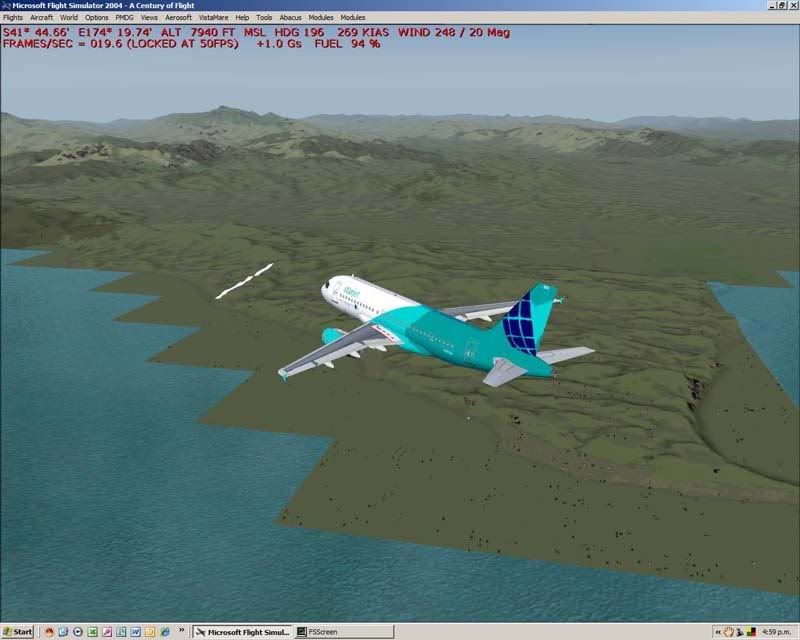
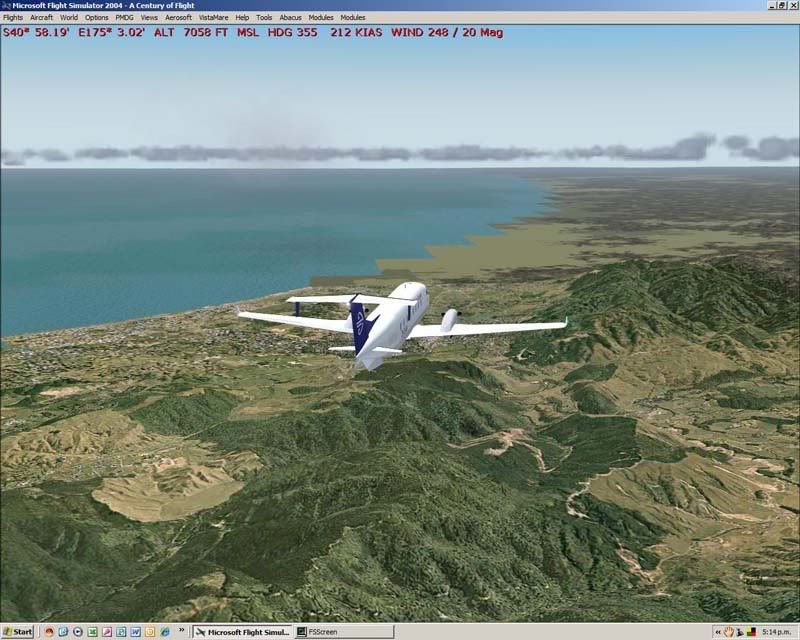
This will give a better indication of the problems I am having and hopefully a better opportunity to see if anyone can help..........
By the way I am running 1280x1024 (32bit) and both the AA and AF is set at 4x on the video card..............
[IMG]http://i163.photobucket
[IMG]http://i163.photobucket
[IMG]http://i163.photobucket
[IMG]http://i163.photobucket
Would love to get this fixed somehow, and am confident that someone can help out there.
Let's hope......................... :unsure:
PostPosted: Tue Feb 20, 2007 10:04 pm
by ardypilot
Hi there Barrington, your images are not displaying from those links there.

They should look something like this: "http://i177.photobucket.com/albums/w207/andrew-89/summerpics10. jpg" (without the space between the . and the jpg.

Just clicking once in the 'URL Link' or 'IMG Code' line of text underneath your uploaded thumbnail on photobucket will instantly copy the URL info to your clipboard, so all you will need to do is open up a reply to this thread and hit CTRL+V to paste it.

PostPosted: Tue Feb 20, 2007 10:12 pm
by Barrington
user posted image

PostPosted: Tue Feb 20, 2007 10:14 pm
by Barrington
This is the problem.............................
user posted image

PostPosted: Tue Feb 20, 2007 10:18 pm
by Barrington
user posted image
The top shot is around Levin where RealNZ Wgtn finishes and default starts.
The other two are North of Kaikoura heading to chch....... you wouldn't think so!!!
So any feedback will be gratefully recieved..........thanks :blink:

PostPosted: Tue Feb 20, 2007 10:27 pm
by ardypilot
What the heck?!?! I have never seen anything like that before Barrington! :o

I think the problem may lie somewhere in a cfg file line (maybe in the fs9.cfg or the fs9.cfg) to try makinga back up copy of it, delete it, and when you next start up fs9, it will automatically make a new one. See if you have the same probelm then... all your scenery and aircraft addons will not be touched.

By the way, are you running any other scenery/envirmoment addons as well as the REAL NZ Wellington there? What mesh do you have?

PostPosted: Wed Feb 21, 2007 8:42 am
by Barrington
Hi Trolly,
No nothing additional and have Red Baron 20mesh.
Will try your suggestion and come back to you.
Thanks..

PostPosted: Wed Feb 21, 2007 11:10 am
by Christian
Hi Barrington

Have you added the topo to the scenery list within FS9?

Cheers,
Christian

PostPosted: Wed Feb 21, 2007 7:50 pm
by Barrington
Hi Christian,
Have tried a number of times and it locks up continuously. Mind you I haven't tried since I followed Trolly suggestion of creating a new fs9.CFG file which I did, but it did not make any difference.....................
What do you think.
It's so frustrating when it used to have great graphics..... :(

PostPosted: Wed Feb 21, 2007 7:58 pm
by Christian
Hmm, does it lockup straight away or can you fly for a bit?

Lockups usually are caused if your textures are stuffed up somehow. Do you own FScene or Ground Environment or something similar?

Christian

PostPosted: Wed Feb 21, 2007 9:24 pm
by Barrington
Hi again Christian,
Locks up straight away when loading scenery.no flightscene or ground environment.

PostPosted: Wed Feb 21, 2007 9:27 pm
by Barrington
Christian & Trolly
just a thought.
Am running fs9 on my laptop without any major problem - frame rates occasionaly but that's all.............
Would it be worth a try to load the fs9.CFG file from there - would it accept ok? :unsure:

PostPosted: Thu Feb 22, 2007 11:13 am
by Christian
you could give it a try. At the stage you're at the best I can recommend is a complete reinstall. However, what you could try is copy the complete install from your laptop to your PC into a different folder. This means that you have 2 installs on your PC, but the one copied from your laptop should in theory work just fine on your PC. At least that would give you working version back.

Christian

PostPosted: Thu Feb 22, 2007 1:18 pm
by ardypilot
Try removing all of your scenery addons, then just reloading the mesh/topo perhaps (via the Scenery Libary in fs9)

PostPosted: Thu Feb 22, 2007 3:48 pm
by Snowman
Christian,...................... it wouldnt be anything along the lines of the "Ghost in the computer" problem i had a while back would it ??? With the doubling up up of both the original and your files ??? See link below.......

http://z11.invisionfree.com/nzff/index. ... wtopic=677

Lawrie. >nzflag<