Page 1 of 1

PostPosted: Thu Jan 11, 2007 2:08 pm
by Timmo
Some of you know im working on Whakatane Airport for FSX

I just noticed after I put some photoreal scenery into FSX that the photo and the runway dont line up
It appears that the FSX data is incorrect as im confident that the photos are correct and the road way lines up with the road on the photo.....
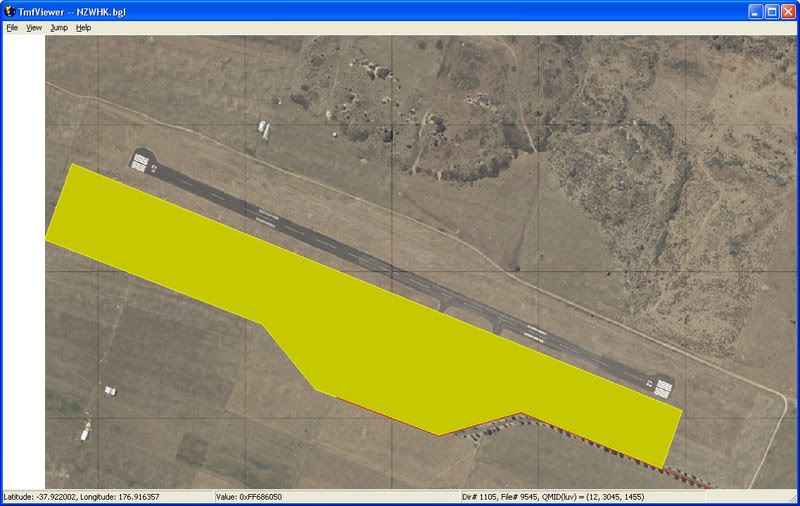
user posted image

I see two possible solutions- move the photo or move the airport.

Moving the airport seems like a lot of work (especially stuff like the nav aids?) but the default data is clearly wrong!

What to do what to do??

PostPosted: Thu Jan 11, 2007 3:57 pm
by toprob
May as well move the airport while you have the chance -- FSX airport placement is a lot better than FS2004, but there are still a lot in the wrong place.

PostPosted: Fri Jan 12, 2007 8:48 am
by Timmo
How difficult is it to move all the other ancillary stuff though? (Like navigation equipment etc)....

Im fairly confident i can model the airport buildings OK but the inner workings of the airport in the sime may pose problems

PostPosted: Fri Jan 12, 2007 9:40 am
by creator2003
afcad builder stuff will do all that moving of nav stuff runway etc ... simple really ,,only way to see is to have a go... :clap:

PostPosted: Fri Jan 12, 2007 9:47 am
by toprob
I was hoping you wouldn't ask that...
(My first stop every morning is the SceneryDesign.org site, where they are working on a super-scenery design tool for FSX. This is still some time away though....)
I've been following some interesting discussions on how to shift FSX airports, and yes, it can be a bit tricky. However if you have FS2004 installed then it should be possible to shift the FS2004 airport using AFCAD2, then move the AFCAD file into FSX. This is what I've been doing.
You can certainly shift navaids etc, but not physical objects. These need to be excluded and then put back either from default library objects or your own models.

To shift the underlying airport polygons, I use FSX KML.
This will exclude the default polygons (with photoreal you only really need to worry about the Flatten) and put them back where you want them. FSX KML uses Google Earth as an interface -- you draw the polygons directly in GE, attach tags to the resulting KML data file depending on what you want to achieve, then compile it using FSX KML.

PostPosted: Fri Jan 12, 2007 10:50 am
by ardypilot
Sorry I can't help on the scenery design issue, but I am just wondering where you got that Whakatane area photoreal texture from and if it is available in fs2004?

I have the old Godzone one, but it does not reach Whakatane airport.

PostPosted: Fri Jan 12, 2007 11:01 am
by Timmo
Toprob- Is that SDE that you are referring to on the scenerydesign site? (an english guy is working on it from memory?)...ive also been watching that with interest....it will be a while till im at that stage so hopefully it will be ready then.
I use ArcGIS as part of my job (ESRI is the creator the 'Shapefile' format that the Shp2Vec convertor uses) so im using that.....im building up a series of shapefiles for use in this scenery (including two coastlines- one used for landwatermask and the other for clipping the imagery by using the 'nullvalue' in the resample.....thats the theory anyway ;)

Trolly- Im in the geospatial industry and work for the Bay of Plenty Regional council so I have access to 0.8m pixel resolution images for the whole of the bay plus higher resolution imagery for the urban areas.....im working on some scenery areas for Whakatane.

I hope to have some photoreal scenary for Whale, White, and Motiti Islands coming out soon....im using the FSX SDK so im not sure it will work in fs2004? I havent tested that yet

I trialled some high resolution terrain mesh last night (5m de-sampled from 2m) for the Rotorua lakes but it looks bad where there is no phototexture over the top since every little bit of high slope is covered in bush (its a FSX way of colouring steep areas as cliffs)......so i can either cover the whole area in photoreal or maybe try some different .inf settings for the resample.

PostPosted: Fri Jan 12, 2007 11:14 am
by ardypilot
Trolly- Im in the geospatial industry and work for the Bay of Plenty Regional council so I have access to 0.8m pixel resolution images for the whole of the bay plus higher resolution imagery for the urban areas.....im working on some scenery areas for Whakatane.

I hope to have some photoreal scenary for Whale, White, and Motiti Islands coming out soon....im using the FSX SDK so im not sure it will work in fs2004? I havent tested that yet

Ah ok - sounds like your in the right job for the hobby then :D I'd be happy to test any of your work in fs2004 by the way!

PostPosted: Fri Jan 12, 2007 6:36 pm
by Codge
Being a very understanding sort of guy about the limltations of this or that program and of Flight Simulator itself, I understand that the available data at the time to make FS9 was the reason given as to why airports and other things were in the wrong place.
Now with FSX which I don't have yet,but take an interest in you guys who do have its comments, what on earth (excuse any puns) is the excuse this time? When we have things like the RBE 20m where everything is in the right place, Christian Stock on his own can get it right,yet all the money that Microsoft, or Aces Studios have to spend on getting correct data, you would think that they would have got it right this time!
Everyone I've ever spoken to around the world have said that their own local area is pretty much a bad joke!
But if I am not familiar with an area in real life , I'm none the wiser and still have an enjoyable time with it. Maybe the excuse is simply that it is a game (not to me,it is a simulation as far as I'm concerned) after all and not that important!
They do in FSX claim to have over 10,000 stars at night that are in their right places! So if a stars correct position is considered important enough to get it right then surely an airport would be too! >nzflag<

PostPosted: Fri Jan 12, 2007 7:29 pm
by Christian
Hi Timmo

I've done this with some of the FS airports in FS2004. I'm pretty hardcore though and work with xml source files. For FS2004 there is a bgl2xml decompiler which is handy. However, I don't know if it's been updated to read FSX afcads. Then again, it's open source so you can edit and recompile.

The other thing I do is grab the AIP drawing from the AIP pdf. You can georeference it with ArcGIS and get the coordinates from ArcGIS. This works really well in general, but there is the odd AIP that isn't quite correct (which then always raises the question if you should trust the mapping data, the aerial photo or the AIP).

Let me know what you want to do and as time permits I might give you a hand.

Cheers,
Christian

PostPosted: Fri Jan 12, 2007 9:11 pm
by toprob
Timmo wrote: Toprob- Is that SDE that you are referring to on the scenerydesign site? (an english guy is working on it from memory?)...ive also been watching that with interest....it will be a while till im at that stage so hopefully it will be ready then.
I use ArcGIS as part of my job (ESRI is the creator the 'Shapefile' format that the Shp2Vec convertor uses) so im using that.....im building up a series of shapefiles for use in this scenery (including two coastlines- one used for landwatermask and the other for clipping the imagery by using the 'nullvalue' in the resample.....thats the theory anyway ;)

This is what I meant here.
It sounds like you have the polys sussed. The clipping file sounds like a cool idea.

PostPosted: Sun Jan 14, 2007 8:47 am
by Timmo
Codge wrote: Being a very understanding sort of guy about the limltations of this or that program and of Flight Simulator itself, I understand that the available data at the time to make FS9 was the reason given as to why airports and other things were in the wrong place.
Now with FSX which I don't have yet,but take an interest in you guys who do have its comments, what on earth (excuse any puns) is the excuse this time? When we have things like the RBE 20m where everything is in the right place, Christian Stock on his own can get it right,yet all the money that Microsoft, or Aces Studios have to spend on getting correct data, you would think that they would have got it right this time!
Everyone I've ever spoken to around the world have said that their own local area is pretty much a bad joke!
But if I am not familiar with an area in real life , I'm none the wiser and still have an enjoyable time with it. Maybe the excuse is simply that it is a game (not to me,it is a simulation as far as I'm concerned) after all and not that important!
They do in FSX claim to have over 10,000 stars at night that are in their right places! So if a stars correct position is considered important enough to get it right then surely an airport would be too! >nzflag<

Its a variety of reasons- Notice how areas like America have really good coverage of high resolution/accuracy data in programs like Google Earth and FS? One of the reasons is they have a large GIS industry (i.e. They invented GIS pretty much), access to a variety of remote sensing technology (I think NZ just got its first LiDaR transceiver recently), a central geospatial organisiton which collects and collates all the information and goverment policies that encourage data sharing....

Compare this to NZ- As far as i know, the best NZ wide DEM/Mesh is based on LINZ contours which were captured ages ago (im not sure exactly when.....the 60s or 70s maybe?) and cant reliably used at anything better than 1:20 000 or so, many of the organisations that capture/collect this type of data are very stingy with sharing it (Cough*NIWA Cough*), there isnt really a central repository for the data or a organisation that does it (well there is.....but...there are lots of errors)

Etc Etc

New Zealand isnt very switched on (yet) when it comes to knowledge of the power of GIS.....its building all the time (and programs like Google Earth have made people more aware)...Flight sim is, in effect, a large GIS program and it is based on data that was provided to MS...its not reasonable to expect that they can check every airport, lake edge, township in the world.

PostPosted: Sun Jan 14, 2007 11:51 am
by toprob
I remember being somewhat devastated during the FSX beta to discover that we would be stuck with SRTM mesh. There was a lot of discussion though about MS's access to worldwide data, so I kind of understand their position.
MS use whatever data they can get hold of, but this may result is an imbalance for many parts of the world. For instance, we have a great set of roads here in NZ, but poor quality mesh. Our coastlines are lovely, but the landclass is rubbish.
Luckily we have access to a better mesh and landclass.
Timmo is right, the sim is data-dependent, and the reality is that NZ airport positions are not stored in a handy database somewhere, ready to be plonked into FSX. Sure, MS could have paid someone to check the position of every airport, but I work that out as more than a year's work, to fix a problem which only a small percentage of users will even be aware of.