Page 1 of 1

PostPosted: Sat Nov 25, 2006 8:06 am
by JonARNZ
Hi everyone,

Did some work modifying a few of the AGN's around NZDN (trees and buildings) and fixed the AFCAD file so the default runway sits in the right place if you have this photoreal scenery installed. This wont work for FSX, I am looking at that as well.

Unzip the folder and place the agn's in the texture folder, and the AFCAD in the scenery folder.

DOWNLOAD HERE

PostPosted: Sat Nov 25, 2006 8:51 am
by Ian Warren
Super , Look's Brilliant ! :)

PostPosted: Sat Nov 25, 2006 10:27 am
by ardypilot
Thanks for releasing this update Jon!

I am a little unsure of the installation process though- are these files meant to be put into Ian's new Duneden city folder, or the old Godzone Tairai folder?

I tried putting them in Ian's folder and get this:
user posted image
Is this correct?

Cheers!

PostPosted: Sat Nov 25, 2006 10:57 am
by Ian Warren
Hi Andrew , Put the files into your ADDON SCENERY/Scenery folder :thumbup:

PostPosted: Sat Nov 25, 2006 5:21 pm
by JonARNZ
Trolly wrote: Thanks for releasing this update Jon!

I am a little unsure of the installation process though- are these files meant to be put into Ian's new Duneden city folder, or the old Godzone Tairai folder?

I tried putting them in Ian's folder and get this:
user posted image
Is this correct?

Cheers!

Just to clarify, the agn's are updated versions of Ians, so they need to go in the NZ Dunedin/Texture folder, the AFCAD file can go in the NZ Dunedin/Scenery folder.

If you have Dunedin airport scenery installed, dont worry about either as its intended for default/Ians scenery.

Apologies for any confusion. :unsure:

PostPosted: Mon Jun 09, 2008 3:52 pm
by gojozoom
Hi All, the link doesn't work anymore :huh: and I need that fix very much. The perfection is my addiction B-) ...Cheers! :bow:

PostPosted: Mon Jun 09, 2008 4:07 pm
by Mattnz
Thanks for finding this topic :D

I'd also like to see a fix to this problem, so it would be great if someone could upload it again ;)

PostPosted: Mon Jun 09, 2008 6:57 pm
by Alex
Try getting in touch with Jon - email address on his site shows as "jonmurchison"_at_"hotmail"_dot_"com". ;)

Alex

PostPosted: Fri Aug 08, 2008 2:40 pm
by gojozoom
I tried to contact John who seems to be confused about what Dunedin scenery I'm referring to. After my answer I didn't get any coments /fix from him, so can I please ask any of you to share the afcad or the fix for nzdn please?

Many Thanks
Daniel

I tried to contact John who seems to be confused about what Dunedin scenery I'm referring to. After my answer I didn't get any coments /fix from him, so can I please ask any of you to share the afcad or the fix for nzdn please?

Many Thanks
Daniel

PostPosted: Fri Aug 08, 2008 3:46 pm
by Ian Warren
Daniel , I'll re-install Dunedin scenery and search the NZDN AFCAD that suits , give you the HU and post when found smile.gif

PostPosted: Sat Aug 09, 2008 1:14 pm
by Ian Warren
Cant go wrong ... scroll down FSX AF2-AFCAD by Scott Hickey at http://www.flightsim.co.nz/ smile.gif

PostPosted: Sun Aug 10, 2008 12:15 am
by NZ255
Ian Warren wrote:
QUOTE (Ian Warren @ Aug 9 2008, 01:14 PM) <{POST_SNAPBACK}>
Cant go wrong ... scroll down FSX AF2-AFCAD by Scott Hickey at http://www.flightsim.co.nz/ smile.gif

That's just FSX though isn't it?

I can't find your NZDN scenery anywhere. Do you/anyone have it who could upload it?

PostPosted: Wed Mar 18, 2009 11:51 am
by cooldad
Anyone got an answer yet? I need to get my Dunedin runway over the photoreal in the right place. Does the above AFCAD work for FS9?

Cheers
Paul

PostPosted: Wed Mar 18, 2009 12:07 pm
by Ian Warren
To my knowledge , no FS9 afcad has been made , this was in my transition period between the two sims

PostPosted: Wed Mar 18, 2009 5:32 pm
by cooldad
Thanks Ian.

I'm sure an AFCAD was released that moved the runway to the correct position. Nothing worse when taking off and seeing the photoreal one next door!
I seem to remember a fix came out 'cause I was really pleased with the result.

Cheers
Paul

PostPosted: Wed Mar 18, 2009 6:12 pm
by ZK-LGD
Howdy CoolDad,

I have a copy of this file on disk somewhere. PM me your email addy (and I'll forward it on when I find what disc it's on).

PostPosted: Tue Mar 24, 2009 11:41 am
by cooldad
Thanks ZK-LGD. Dunedin now looks like it's supposed to.

Great work, much appreciated.... tongue.gif

PostPosted: Tue Mar 24, 2009 3:16 pm
by Snowman
Coming soon to a sim near you...........................


Lawrie. New_Zealand_etc.gif

PostPosted: Thu Mar 26, 2009 4:05 pm
by Daniel
How much longer Lawrie drool.gif Are you using many photoreal buildings?
More screenies please biggrin.gif

PostPosted: Thu Mar 26, 2009 4:19 pm
by Snowman
Daniel wrote:
QUOTE (Daniel @ Mar 26 2009, 05:05 PM) <{POST_SNAPBACK}>
How much longer Lawrie drool.gif Are you using many photoreal buildings?
More screenies please biggrin.gif


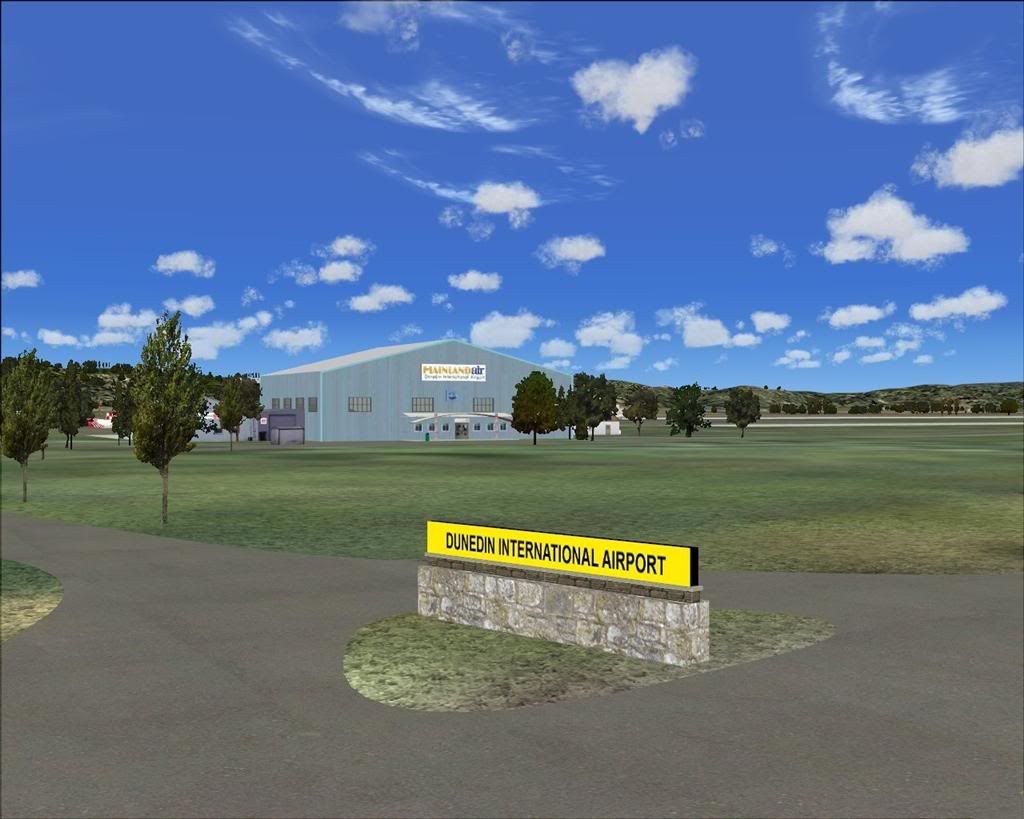
That pic is the first i took, i had only just barely started the scenery at that stage.
All that i had placed in the scenery at that time was the road entry gate sign you see in the foreground, and the Mainland Air hanger in the background, and a few trees.
Its advanced considerably since then.
No photoreal buildings at this stage, ............... but,......... there may be an update later with custom terminal etc in it.........
So far,........ its pretty damned close to the real thing.........
The scenery will fit the RBE NZ Topo Scenery (SimPilot Xperience Roads and Rivers of NZ), but to my surprise, it fits Ian Warren's "Dunedin City" photoreal scenery PERFECTLY as well !! The runway and taxiways etc sit perfectly over the photoreal ground textures at the airport.
So good news there for both those that do, and those that dont have Ian's photoreal ground scenery.

Lawrie. New_Zealand_etc.gif