 Posted: Fri Feb 11, 2011 7:16 am
I just noticed this yesterday
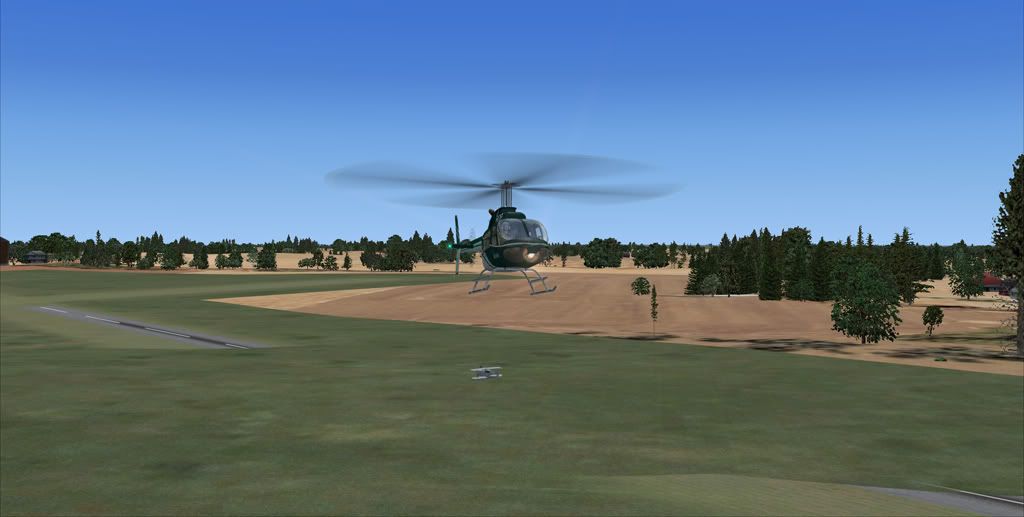
It is quite frustrating and I would like to know how to fix it. Does anybody know?
It is quite frustrating and I would like to know how to fix it. Does anybody know?
Posted: Fri Feb 11, 2011 7:16 amPosted: Fri Feb 11, 2011 7:51 amPosted: Fri Feb 11, 2011 7:55 am Posted: Fri Feb 11, 2011 11:31 am
connor wrote:QUOTE (connor @ Feb 11 2011, 08:55 AM) <{POST_SNAPBACK}>Ok, how do I do that?
Is this scenery you are designing or somebody elses?
To do it in ADE (Airport Design Editor) you simply add a polygon which bounds the area you want to flatten. The tag for the polygon in properties is "flatten" and it needs to be at the same elevation your airport is set at.
Posted: Fri Feb 11, 2011 11:34 amconnor wrote:QUOTE (connor @ Feb 11 2011, 08:55 AM) <{POST_SNAPBACK}>Ok, how do I do that?
I think you may be able to do it in ADE (Airport Design Editor - free). Otherwise, I'm sure you can do it using various BGL compilers etc. ... but I've never been able to get my poor old head around them
Posted: Fri Feb 11, 2011 11:52 amdeaneb wrote:QUOTE (deaneb @ Feb 11 2011, 12:31 PM) <{POST_SNAPBACK}>Is this scenery you are designing or somebody elses?
From memory the airfield it self came from troy chapman's NZCH v1.3, but there were only runways with no parking for AI or any buildings, so I fixed that. Speaking of troy chapman, does he float around here? I wouldn't mind contacting him.
Posted: Fri Feb 11, 2011 12:19 pmconnor wrote:QUOTE (connor @ Feb 11 2011, 12:52 PM) <{POST_SNAPBACK}>Speaking of troy chapman, does he float around here? I wouldn't mind contacting him.
Try over at ARNZ.
