adding my airfield to fsx

An area to discuss scenery addons for virtual NZ

Postby Tommyj » Thu Jun 09, 2011 9:06 pm

pirate.gif Having got my addon tools and ADEX working, i now find i cannot get the airfield across to FSX.
i have saved it, compiled it and i thought, added it to addon scenery but it will not appear. i managed to get one version to move across and appear. i then redid the airfield with some more added aprons and taxiways etc but i am unable to get it to appear, i believe i have followed the steps exactly when i got the last one to appear but am finding it very frustrating as every forum i have visited and every tutorial i have watched and read seems to say something and counters the previous one i have read or watched. i would appreciate if anyone could explain the steps (in slow time) i am using Vista,

Tom Johnson
Gore
Southland

Tom Johnson
Gore Eastern Southland
Tommyj
Member
 
Topic author
Joined: Sat Dec 18, 2010 7:07 am
Posts: 39
Location: Gore

Postby Ian Warren » Thu Jun 09, 2011 9:26 pm

Tom - have you created 'Gore' as your main scenery file name with a two file folders - Scenery & Texture , saved all your BGL's into the created Scenery folder .
Image
User avatar
Ian Warren
NZFF Pro
 
Joined: Fri May 05, 2006 5:23 pm
Posts: 41187
Location: AREA 51

Postby Tommyj » Thu Jun 09, 2011 9:45 pm

Ian Warren wrote:
QUOTE (Ian Warren @ Jun 9 2011,9:26 PM) <{POST_SNAPBACK}>
Tom - have you created 'Gore' as your main scenery file name with a two file folders - Scenery & Texture , saved all your BGL's into the created Scenery folder .

Hi Ian,
No i havn't i just copied it into the addon scenery. Do i create a folder "Gore" within the addon scenery with sub folders?

Tom
Tom Johnson
Gore Eastern Southland
Tommyj
Member
 
Topic author
Joined: Sat Dec 18, 2010 7:07 am
Posts: 39
Location: Gore

Postby Ian Warren » Thu Jun 09, 2011 9:54 pm

Tom , Yes indeed , and then place your works into that Scenery folder .
Image
User avatar
Ian Warren
NZFF Pro
 
Joined: Fri May 05, 2006 5:23 pm
Posts: 41187
Location: AREA 51

Postby Tommyj » Thu Jun 09, 2011 10:00 pm

Ian Warren wrote:
QUOTE (Ian Warren @ Jun 9 2011,9:54 PM) <{POST_SNAPBACK}>
Tom , Yes indeed , and then place your works into that Scenery folder .

Hi Ian,
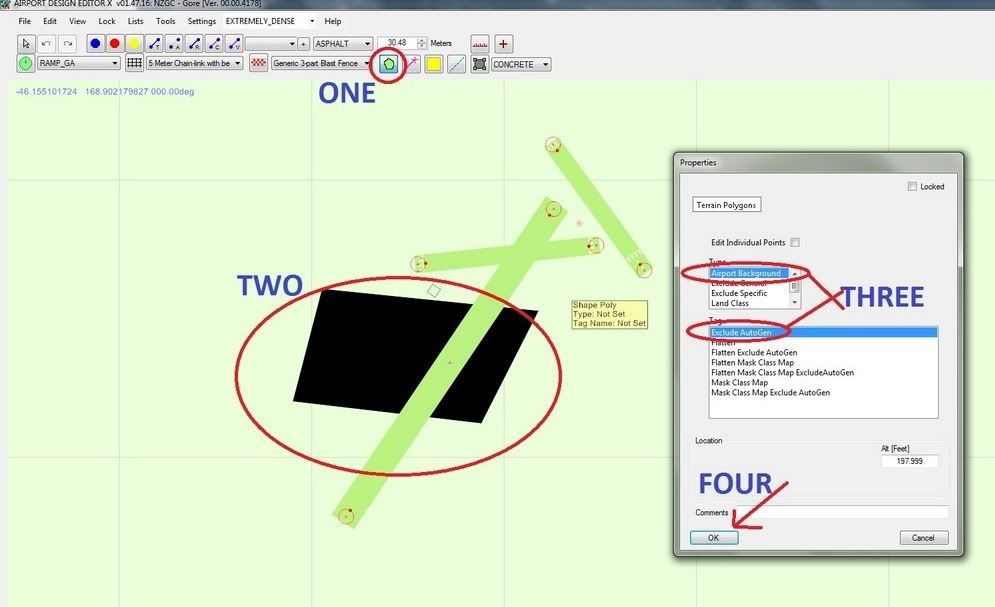
i thanks you are a ripper it has appeared, another area you may be of assistance, i have tried to exclude some of the trees and shrubs so that i can put down an apron and taxiways etc however the exclusion zone that i create in adex does not seem to activate any advice?

Tom
Tom Johnson
Gore Eastern Southland
Tommyj
Member
 
Topic author
Joined: Sat Dec 18, 2010 7:07 am
Posts: 39
Location: Gore

Postby Ian Warren » Thu Jun 09, 2011 10:07 pm

Now this is trial and error and depends on your choice , AFCAD tools , Airport design , part and parcel , build as an Afcad or a Bgl - would have thought ADEX would be able to do that ?
Image
User avatar
Ian Warren
NZFF Pro
 
Joined: Fri May 05, 2006 5:23 pm
Posts: 41187
Location: AREA 51

Postby Tommyj » Thu Jun 09, 2011 10:46 pm

Ian Warren wrote:
QUOTE (Ian Warren @ Jun 9 2011,10:07 PM) <{POST_SNAPBACK}>
Now this is trial and error and depends on your choice , AFCAD tools , Airport design , part and parcel , build as an Afcad or a Bgl - would have thought ADEX would be able to do that ?

Thanks Ian.
others have said that exclusion tools in adex will do it, i have put an exclusion box over the entire airfield but to no avail. will keep trying,
Area 51 is that true to form, as in the US of A?

Tom
Tom Johnson
Gore Eastern Southland
Tommyj
Member
 
Topic author
Joined: Sat Dec 18, 2010 7:07 am
Posts: 39
Location: Gore

Postby Ian Warren » Thu Jun 09, 2011 11:08 pm

Tommyj wrote:
QUOTE (Tommyj @ Jun 9 2011,11:46 PM) <{POST_SNAPBACK}>
Area 51 is that true to form, as in the US of A?

Nah , Christchurch NZ born and breed .. ole days when Andy 'Trolly' started this forum I waited for the member list number ...or did i ninja.gif I could tell ya but would have to shoot myself dry.gif ... and frankly that would hurt tongue.gif
Image
User avatar
Ian Warren
NZFF Pro
 
Joined: Fri May 05, 2006 5:23 pm
Posts: 41187
Location: AREA 51

Postby Nzeddy » Thu Jun 09, 2011 11:41 pm


Then save / compile and add the Gore.bgl and gore_cvx.bgl into your gore scenery folder.

I usually just throw my ADEX airports into FSX/Addon Scenery/Scenery folder.
Last edited by Nzeddy on Thu Jun 09, 2011 11:45 pm, edited 1 time in total.
- Eddy
User avatar
Nzeddy
Sim-holic
 
Joined: Thu Jun 12, 2008 7:52 pm
Posts: 866

Postby Tommyj » Fri Jun 10, 2011 6:12 am

Ian Warren wrote:
QUOTE (Ian Warren @ Jun 9 2011,11:08 PM) <{POST_SNAPBACK}>
Nah , Christchurch NZ born and breed .. ole days when Andy 'Trolly' started this forum I waited for the member list number ...or did i ninja.gif I could tell ya but would have to shoot myself dry.gif ... and frankly that would hurt tongue.gif


Thanx Warren.

Tom
Tom Johnson
Gore Eastern Southland
Tommyj
Member
 
Topic author
Joined: Sat Dec 18, 2010 7:07 am
Posts: 39
Location: Gore

Postby Tommyj » Fri Jun 10, 2011 6:18 am

Nzeddy wrote:
QUOTE (Nzeddy @ Jun 9 2011,11:41 PM) <{POST_SNAPBACK}>


Then save / compile and add the Gore.bgl and gore_cvx.bgl into your gore scenery folder.

I usually just throw my ADEX airports into FSX/Addon Scenery/Scenery folder.


Hi Eddy,

Excellent that is brilliant, cant go wrong here.

Tom
Tom Johnson
Gore Eastern Southland
Tommyj
Member
 
Topic author
Joined: Sat Dec 18, 2010 7:07 am
Posts: 39
Location: Gore

Postby Nzeddy » Fri Jun 10, 2011 12:45 pm

Tommyj wrote:
QUOTE (Tommyj @ Jun 10 2011,6:18 AM) <{POST_SNAPBACK}>
Hi Eddy,

Excellent that is brilliant, cant go wrong here.

Tom

Sweet as! biggrin.gif
- Eddy
User avatar
Nzeddy
Sim-holic
 
Joined: Thu Jun 12, 2008 7:52 pm
Posts: 866

Postby Tommyj » Tue Jun 21, 2011 9:58 pm

Nzeddy wrote:
QUOTE (Nzeddy @ Jun 10 2011,12:45 PM) <{POST_SNAPBACK}>
Sweet as! biggrin.gif

Hi to the Group,
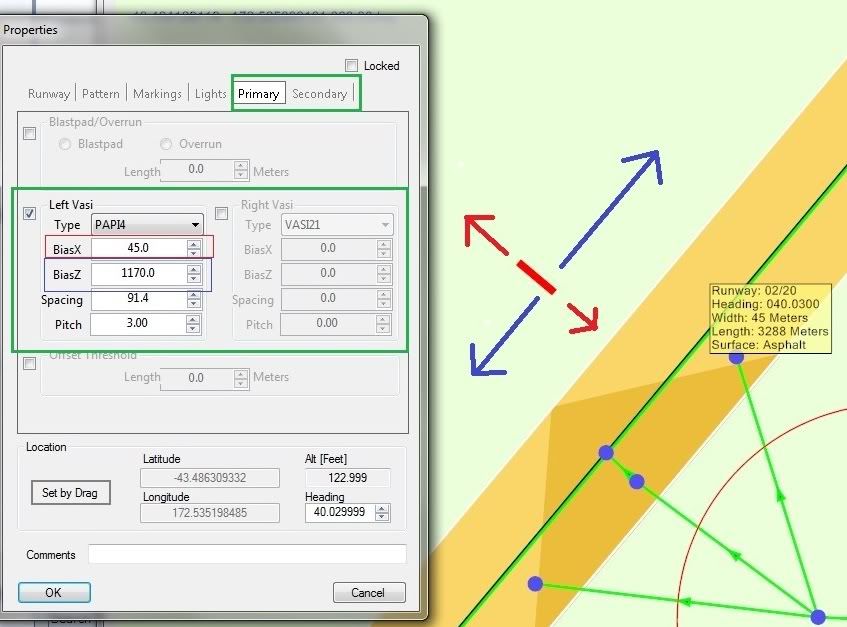
Have now got it working at what i consider great, however i have found if you miss a step s....t it doesn't work so i have made several different mods to my airport and dumped the old one each time as i couldnt keep track of the files (it happens when you get old) if my airport was actual the Gore locals would be really hacked as the flight path goes over the town (Great Ah). i have one query though and that is trying to get the touchdown lights in the right location so i can fly down the glidepath, any help would be appreciated. In the meantime very many thanks to all who have posted assistance.

Tom
Gore
Tom Johnson
Gore Eastern Southland
Tommyj
Member
 
Topic author
Joined: Sat Dec 18, 2010 7:07 am
Posts: 39
Location: Gore

Postby Nzeddy » Tue Jun 21, 2011 10:22 pm

Hey Tom,

Here's a quick tutorial for ya. biggrin.gif

Click then right click on the runway | Edit object.
Last edited by Nzeddy on Tue Jun 21, 2011 10:23 pm, edited 1 time in total.
- Eddy
User avatar
Nzeddy
Sim-holic
 
Joined: Thu Jun 12, 2008 7:52 pm
Posts: 866

Postby Tommyj » Wed Jun 22, 2011 6:20 am

Nzeddy wrote:
QUOTE (Nzeddy @ Jun 21 2011,10:22 PM) <{POST_SNAPBACK}>
Hey Tom,

Here's a quick tutorial for ya. biggrin.gif

Click then right click on the runway | Edit object.


Hi NZEddy,

excellent thanks for that, I was on track I just didn't put large enough values in the boxes.
Hope your not located in Quakeville sounds like they had another night of rockin and rollin.

regards Tom thumbup1.gif
Tom Johnson
Gore Eastern Southland
Tommyj
Member
 
Topic author
Joined: Sat Dec 18, 2010 7:07 am
Posts: 39
Location: Gore


Return to Scenery

Who is online

Users browsing this forum: No registered users and 6 guests