Scenery order

An area to discuss scenery addons for virtual NZ

Postby cowpatz » Mon Dec 08, 2008 9:45 am

Just wondering what is the correct priority for scenery with regards to Topo, mesh and airfields? I have bought NZ roads and rivers but I am not sure that it is prioritised correctly as there does not seem to much noticeable change. I have posted my library (still in the process of re-installing my sceneries.


Thanks
Remember the 50-50-90 rule. Anytime you have a 50-50 chance of getting something right, there's a 90% probability you'll get it wrong!

Image
User avatar
cowpatz
NZFF Pro
 
Topic author
Joined: Wed Mar 07, 2007 3:28 pm
Posts: 3739

Postby toprob » Mon Dec 08, 2008 10:00 am

You are right, in that it doesn't really make much difference, generally, FSX knows what to do with all types of scenery it can utilise, so it can look after itself. There is just too much talk about scenery priority, which leads to a lot of people getting into a bit of a mess.

However, there are some times where FSX does need to know what you actually intended to have displayed. For instance, Landclass tends to cover aerial photo scenery if it has a higher priority, so this should always be way down the list. I think that the Topo scenery includes a landclass file, so this should go before all addon airports, just in case they use an aerial photo component.

The same goes for airport facility files (what were AFCADs in FS2004) -- there is some information in these which FSX may require before it loads addon airports, and since these sometimes go in the Addon Scenery folder, this should be located before any specific airport scenery.

I don't think mesh matters -- in my experiments, FSX will always find and use the highest resolution mesh no matter where it is in the library.

Once you get into addon texture sets, like FEX/REX/TEX/MEX things can get a bit more complicated, since you need to know what is installed as an addon scenery in it's own folder, and what actually replaces the default textures.
User avatar
toprob
NZFF Pro
 
Joined: Sat Apr 29, 2006 4:56 pm
Posts: 6711
Location: Upper Hutt

Postby ronindanbo » Mon Dec 08, 2008 10:23 am

I beleive this is FS9 Robin, I generally put my airports I use above any topo scenery. Dont know if it makes a difference its just what I do.
BSMP ltd Chairman of the board

Image
Visit www.bsmp.co.nz
User avatar
ronindanbo
Sim-holic
 
Joined: Fri Jul 14, 2006 5:59 am
Posts: 700
Location: Wellington

Postby toprob » Mon Dec 08, 2008 11:16 am

ronindanbo wrote:
QUOTE (ronindanbo @ Dec 8 2008, 11:23 AM) <{POST_SNAPBACK}>
I beleive this is FS9 Robin, ...


Oh yeah. I think the principle is the same, it's just that I haven't done any experiments with FS2004.
With FS2004, I used to layer the scenery from general to specific -- for example, anything which covered the country in general (such as mesh/landclass/topo) came first, more specific stuff -- photo scenery of a large area, for example -- came next, then specific airports sat on top.
User avatar
toprob
NZFF Pro
 
Joined: Sat Apr 29, 2006 4:56 pm
Posts: 6711
Location: Upper Hutt

Postby creator2003 » Mon Dec 08, 2008 11:41 am

Should be all default stuff then mesh then topo then addon scenery folder then above that you have all those airports going up towards the top of the page ...
User avatar
creator2003
NZFF Pro
 
Joined: Fri Jun 16, 2006 12:08 am
Posts: 4633
Location: Cant U C im LOCO

Postby Charl » Mon Dec 08, 2008 4:24 pm

Looking at that list...it is almost EXACTLY inverted from what it should be!
It's that stupid "higher on the list" vs "priority on the list" description that no-one understands without a picture.

The General stuff goes at the bottom of the picture - Addon Scenery and the stock photoreals etc.
Your trees would go higher up the picture, then static objects, then custom sceneries.
Coolangatta belongs elsewhere laugh.gif entirely.

Noting the strips you have in the Wanganui area, assume you have been able to park a Fletcher without falling off the cliff?
User avatar
Charl
NZFF Pro
 
Joined: Mon May 01, 2006 8:28 am
Posts: 9691
Location: Auckland

Postby cowpatz » Mon Dec 08, 2008 7:28 pm

QUOTE
Noting the strips you have in the Wanganui area, assume you have been able to park a Fletcher without falling off the cliff?[/quote]

I haven't found any yet. Mind you I have not been looking yet.
Remember the 50-50-90 rule. Anytime you have a 50-50 chance of getting something right, there's a 90% probability you'll get it wrong!

Image
User avatar
cowpatz
NZFF Pro
 
Topic author
Joined: Wed Mar 07, 2007 3:28 pm
Posts: 3739

Postby Snowman » Tue Dec 09, 2008 3:55 pm

Charl wrote:
QUOTE (Charl @ Dec 8 2008, 05:24 PM) <{POST_SNAPBACK}>
Looking at that list...it is almost EXACTLY inverted from what it should be!
It's that stupid "higher on the list" vs "priority on the list" description that no-one understands without a picture.

The General stuff goes at the bottom of the picture - Addon Scenery and the stock photoreals etc.
Your trees would go higher up the picture, then static objects, then custom sceneries.
Coolangatta belongs elsewhere laugh.gif entirely.


I find that i have to AGREE with Charl on this one.................
Addon Scenery folder for example, should be down the bottom of the list, but just ABOVE all the default sceneries and propellor objects etc.
Mesh should be BELOW (ie: a HIGHER number) any New Zealand Sceneries, and if you read the instructions for the 20m NZ mesh, it tells you that very same thing. Just like a house, the foundations hold it all up, well the mesh is the foundations for all the sceneries, and should be underneath them holding it all up.
Your Coolangatta scenery for example, should be BELOW (A HIGHER number) any NZ scenery, including the NZ mesh.
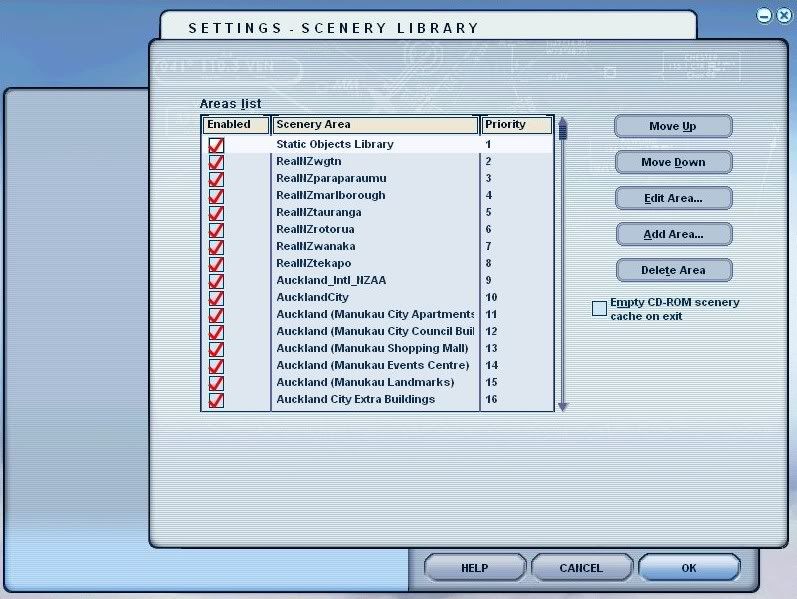
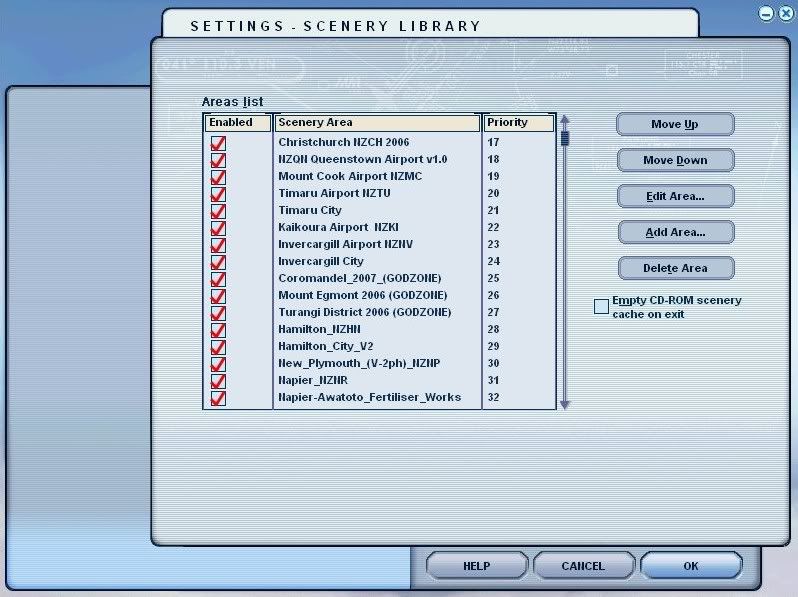
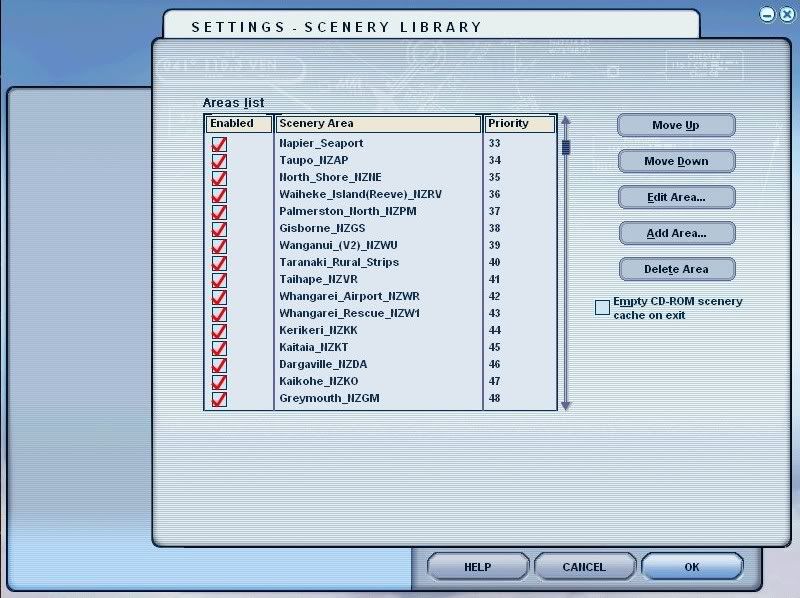
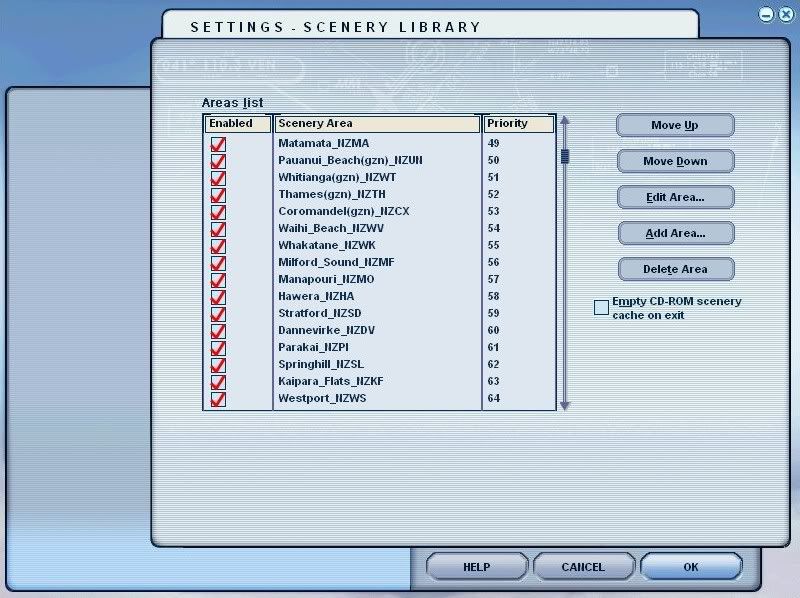
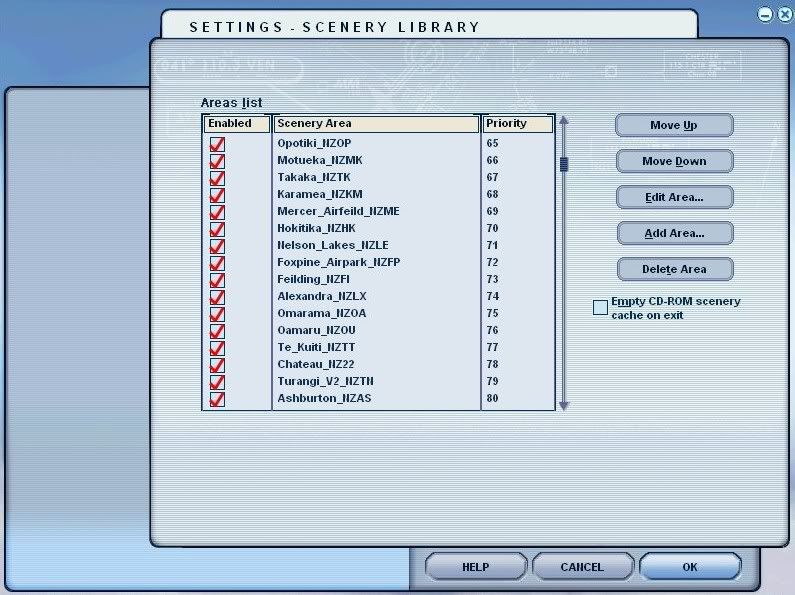
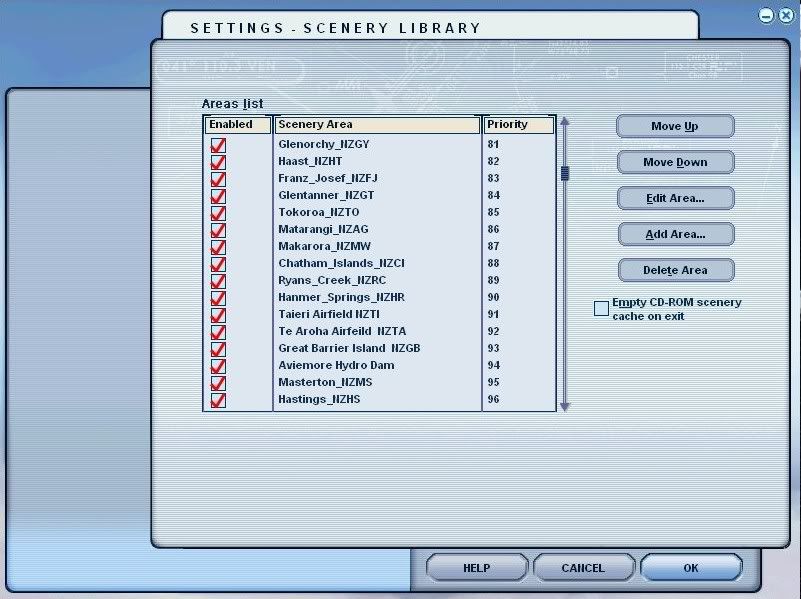
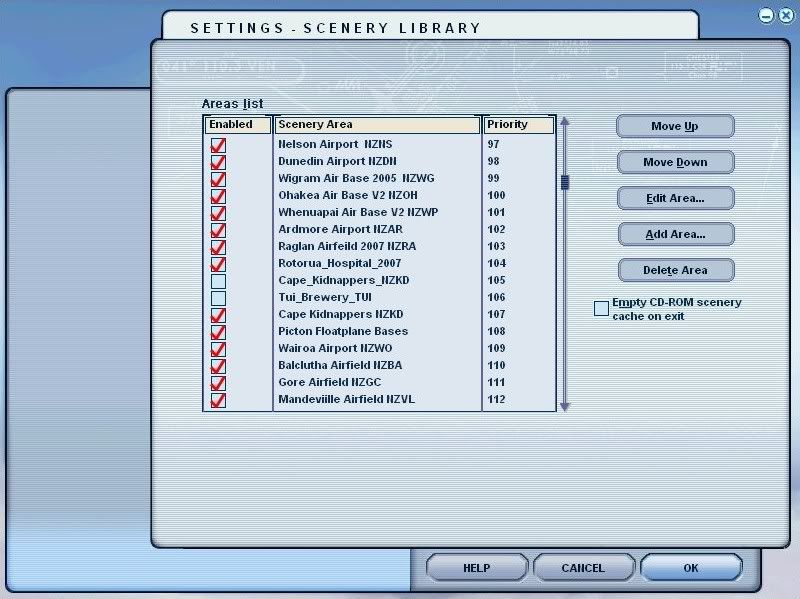
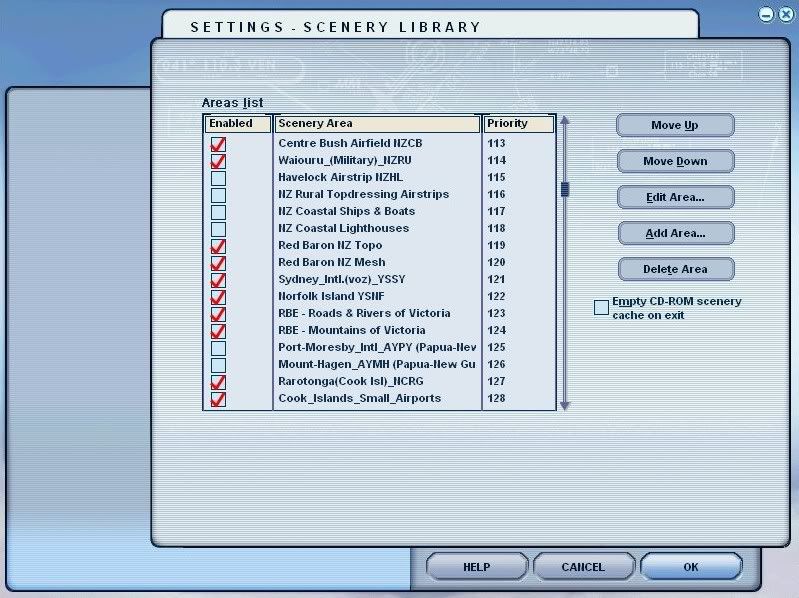
As an example, here are shots of my addons for New Zealand. Bear in mind, i fly mostly in NZ, so i give the NZ stuff priority over any overseas stuff, hence its higher up the list.
You will note , my NZ mesh at the bottom of the list, BELOW any NZ sceneries, but above any other overseas sceneries.
The "Static Objects Library" in mine is at the number 1 position,..... it can go further down the list, and in some peoples setups, works perfectly from further down, but in mine, i find i get faster texture load times at sceneries when i first start off at any given scenery in an aircraft.
These findings are based on what i have read in various scenery forums over the years, and from my own experiences with FS9 since i first got it in Oct 2003.


Once again,............ note the NZ Mesh is BELOW all the NZ sceneries....................
I currently have 645 addon sceneries ACTIVE in FS9, and all are built on the same principle, no matter what country they are in, in the FS world.
The sceneries for any given country are grouped together, with any Landclass and Mesh BELOW the sceneries (mesh at very BOTTOM), and all works perfectly.

Lawrie. New_Zealand_etc.gif
Last edited by Snowman on Tue Dec 09, 2008 4:02 pm, edited 1 time in total.
Image

Image
User avatar
Snowman
NZFF Pro
 
Joined: Wed Jul 26, 2006 3:52 pm
Posts: 2427
Location: Tauranga, NZ.

Postby Charl » Tue Dec 09, 2008 4:16 pm

Good heavens Lawrie - you have Havelock unchecked!! ohmy.gif laugh.gif
My Static Objects goes at the bottom of the NZ list (which itself is at the bottom, just above Addon Objects) because AES demands to be at the Number One spot.
User avatar
Charl
NZFF Pro
 
Joined: Mon May 01, 2006 8:28 am
Posts: 9691
Location: Auckland

Postby cowpatz » Wed Dec 10, 2008 8:42 am

Thanks for that guys. It looks like you have ALL of NZ covered there Lawrie. You must be able to cook dinner whilst waiting for FS9 to load up!
Remember the 50-50-90 rule. Anytime you have a 50-50 chance of getting something right, there's a 90% probability you'll get it wrong!

Image
User avatar
cowpatz
NZFF Pro
 
Topic author
Joined: Wed Mar 07, 2007 3:28 pm
Posts: 3739

Postby Snowman » Wed Dec 10, 2008 2:10 pm

cowpatz wrote:
QUOTE (cowpatz @ Dec 10 2008, 09:42 AM) <{POST_SNAPBACK}>
Thanks for that guys. It looks like you have ALL of NZ covered there Lawrie. You must be able to cook dinner whilst waiting for FS9 to load up!


Nope,........ FS still loads in under 60 seconds.............
Number of aircraft installed, affects the time it takes FS to start up,.......... not the number of addon sceneries...........

Lawrie. New_Zealand_etc.gif
Image

Image
User avatar
Snowman
NZFF Pro
 
Joined: Wed Jul 26, 2006 3:52 pm
Posts: 2427
Location: Tauranga, NZ.


Return to Scenery

Who is online

Users browsing this forum: No registered users and 2 guests