Page 1 of 2

Posted:
Sun Sep 24, 2006 11:24 amby ardypilot
I was flying from Reeve to Ardmore yesterday afternoon, and as I entered the Clevedon River approaching runway 21 I saw an HTAI Cessna approaching me from the airport direction.
As it flew straight past me going the opposite direction I noticed it was ZK-DOL of the GNZLAP. I continued my approach, but slowed down once I noticed ZK-DOL had turned around in the gulf behind me and was now heading back along my path to land at NZAR!

I flew in formation with it and we touched down together.
I have a few questions:
1) Why is ZK-DOL in the Great Barrier Airlines colours? I recall that it got sold recently to a private individual and after searching on
http://www.caa.govt.nz/ it confirms that ' Gerard Joseph P O BOX 28 568 REMUERA' owns it.
2) Why did the aircraft take off from NZAR, spin around and make a landing again, is this maybe an error in a flightplan?
3) Not really a question but more of an observation. The GNZLAP afcad looks like this on my system (the runways have dissapeared and there are buildings sitting on top of taxiways):


When I landed along with the DOL, I touched down fine but DOL disappeared under the ground for a while, then emerged at the other end of the runway and pulled up making a touch and go landing.
BTW- I am not trying to criticise your work at all guys- just point out stuff I have noticed.

Posted:
Sun Sep 24, 2006 11:59 amby Charl
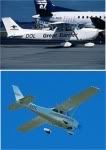
DOL leaves NZAR at 20:30 (GMT) VFR and does TNG til 21:30 at NZTH. It departs there at 22:30 for TNG at NZTA til 23:29. It parks and leaves an hour later for TNG back at Ardmore til 01:30. After a quick cuppa it's off to Thames again for TNG til 03:00. Leaving there at 04:00 it goes to NZTA, TNG til 05:00, parks up and leaves for home at 07:00 after a long day's work.
You may have met it at the end of a circuit.
DOL also has a fair bit of history: it's had no less than 7 owners in NZ!
Two of them were GBA in various guises so that's what we used. It's had several liveries, a couple of them are:
Regarding the AFCAD, looks like you have Rob Diebold's scenery: it needs a flatten switch (see his documentation) and everything works fine.
BTW- I am not trying to criticise your work at all guys- just point out stuff I have noticed.
I love user feedback, it means someone has actually taken an interest, and if it's broken we can then fix it. We aim to be authentic!
I hope having read this long ramble, you also have some insight into what goes into producing the GNZLAP
Posted:
Sun Sep 24, 2006 12:28 pmby ardypilot
Ah ok, thanks for the quick response Charl.
The only Rob Diebold scenery I think I have was the Great Barrier pack- which I have now removed. What scenery are you referring to?
Posted:
Sun Sep 24, 2006 12:37 pmby Charl
Rob Diebold has assembled a package of airports for the Auckland region: NZAA, NZAR, NZWP and NZNE.
Although these were originally made for FS2002, they still add to the experience. Download the file from AVSIM.com:
auckland_real_nz_airports.zip
The GNZLAP uses his Ardmore AFCAD which requires a flatten switch: (Per Rob's readme). This assumes you use RealNZ Auckland scenery.
Go into your main FS9 folder and open the "scenery.cfg" file. Find your Auckland Airports or Auckland 2005 section and add this line at the end of it:
Flatten.0=110,S37 1.45,E174 57.57,S37 2.65,E174 57.88,S37 1.92,E174 59.30,S37 1.38,E174 58.92
This flattens the area around Ardmore. Save and close the "scenery.cfg" file.
Posted:
Tue Sep 26, 2006 12:01 amby ardypilot
ind your Auckland Airports or Auckland 2005 section and add this line at the end of it:
I don't have either of those addons installed, although I do have the REAL NZ photoreal.
Where do you suggest I add that line?
Posted:
Tue Sep 26, 2006 11:46 amby Snowman
Trolley, once you have installed and activated the scenery as per Robs instructions, copy and paste that line to the BOTTOM of that scenery's entry in the scenery.cfg file in the main FS9 folder using notepad. (right click on the scenery.cfg file, open with notepad) Mine looks like this...........
[Area.064]
Title=Auckland Airports 2006
Local=Addon Scenery\Auckland Airports 2006
Remote=
Active=TRUE
Required=FALSE
Layer=103
Flatten.0=110,S37 1.45,E174 57.57,S37 2.65,E174 57.88,S37 1.92,E174 59.30,S37 1.38,E174 58.92
Lawrie.
DONT forget to SAVE it before closing the scenery.cfg after adding the line !!!!!
Posted:
Tue Sep 26, 2006 11:49 amby Snowman
Trolly, dont forget to remove the original AFCAD as well, and use the one that comes with Rob's scenery, or you might get some unpredictable results if you have 2 different AFCADS for the same airport.
Lawrie.
Posted:
Tue Sep 26, 2006 1:32 pmby Charl
You can add the flatten anywhere in the scenery.cfg file if you don't want to install the scenery files themselves.
You'd better have a good book keeping system though, so you can find stray flatten files later....
Posted:
Wed Sep 27, 2006 12:25 pmby ardypilot
I tried adding the flatten line, and all the taxiways, AI and parking spaces appear to be floating on top of the ground:

I removed the flatten line and removed the NZAR afcad and now have nothing but photoreal- no runways or nothing... any tips on what to do next?
Also
Charl, I have found a new image which may help you for future Ardmore parking in the GNZLAP:

Posted:
Wed Sep 27, 2006 2:00 pmby Snowman
If you are using Rob's Auckland 2006 version of Ardmore, did you remove the original AFCAD and use Robs one ONLY ?? IF you are using Robs Auckland 2006, and AFCAD, try again, and put a COPY of the afcad in Scenery/World/Scenery folder, and see if that helps. Also, if you are using the 20m Topo Scenery, you need to make sure that you DONT have the aiport afcads installed that come with the package. They will produce unpredictable results. You can uninstall these easily. See instruction pdf file that comes with the Topo Scenery.
I am using RealNZ Auckland, Rob Diebolds Auckland 2006 Airports, and the flatten switch he made, along with Topo Scvenery and 20m Mesh, and have no problems.
Hope this helps............................. anybody else got any ideas, nows the time .....
Lawrie.
Posted:
Wed Sep 27, 2006 2:44 pmby Charl
I have found a new image which may help you for future Ardmore parking
Cool. Could you flesh it out with who parks where?
Posted:
Wed Sep 27, 2006 4:11 pmby ardypilot
Cool. Could you flesh it out with who parks where?
For sure. I'm off to Ardmore right now actually so I might be able to get a few aircraft photos too!
Posted:
Sat Sep 30, 2006 3:37 pmby ardypilot
Cool. Could you flesh it out with who parks where?
Have done my best:

Got the image off Google Maps (Search Ardmore, Auckland, New Zealand)
Can't remember where EVERYTHING go's, but next time I visit NZAR, I will make sure I take a pic of the billboard at the entrance which has a diagram and key. Cheers
P.S.
My Ardmore AFCAD is still compleatly screwed

Posted:
Sat Sep 30, 2006 4:44 pmby Charl
Lovely stuff Trolly, thanks for the post.
Re your AFCAD issue:
Put a COPY of the AFCAD file in:
Scenery\World\scenery
Posted:
Sat Sep 30, 2006 10:46 pmby ardypilot
No worries Charl,
Re your AFCAD issue:
Put a COPY of the AFCAD file in:
Scenery\World\scenery
Huh? Which AFCAD, I'm confused. Should I just wait untill the next GNZLAP version to come out?
Posted:
Sat Sep 30, 2006 11:40 pmby Charl
When installing the GNZLAP AFCADs you probably put them into "C:\Program Files\Microsoft Games\Flight Simulator 9\Addon Scenery\scenery"
Copy and paste AF2_NZAR.bgl to "C:\Program Files\Microsoft Games\Flight Simulator 9\Scenery\World\scenery"

Posted:
Sun Oct 01, 2006 9:33 amby ardypilot

Thanks, all sorted now!
Posted:
Mon Oct 02, 2006 10:16 amby ardypilot
About my Ardmore map... after further research I have a few changes:
-Where I have Coastguard is Dennis Thompsons
-Airline flying club is next door.
-Where I have tecnam is Hawker Pac. That satpic doesnt have tecnams new building on it as it was only just built recently.Where I have put hawker pac is south pacific avionics and next door is eagle flight training
-where I have christian is airwork rotor..christian is three doors to the left
-Taildragger classics is next door to the old waitemata building
-warbirds hanger is the long skinny one on the southern apron
Posted:
Mon Oct 02, 2006 1:05 pmby Charl
About my Ardmore map... after further research I have a few changes:
OK could you maybe re-upload your map with the changes? (use the same filename then one can just go back to that post)
Thanks
Posted:
Mon Oct 02, 2006 3:20 pmby HardCorePawn
Trolly,
I saw your posts on PPRUNE about the ardmore layout... and the link that one of the other guys gave that you said you could not see? well, it has quite a definitive map:

and the directory is on
this pageenjoy... B)
