Posted: Wed Jan 31, 2007 10:59 pm
Well I after my windows reinstall and getting better fps in fs9 I thought I may as well reinstall fs10. Didn't go all nice and well thow, waited half an hour for it to install and once the installer had finished I got this message:
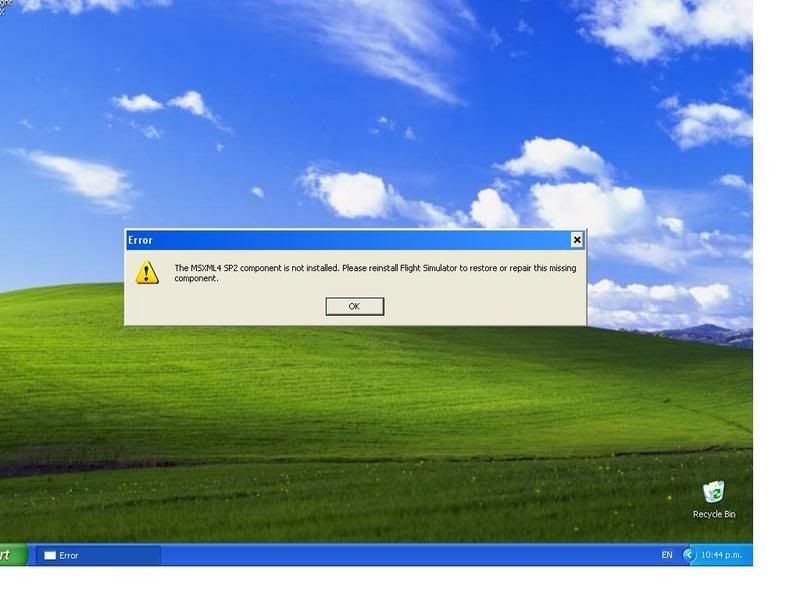
So I tried the repair, another 20mins, so I uninstalled, 15mins then reinstalled all over again. Only to be having files happily copy over get too 100percent then get this message again! The message also comes up whenever I click the fsx icon to try and start it up.
So i;m woundering if I haven't got something installed on my fresh new win xp (sp2 pro) that it requires.
"MSXML 4.0" is showing as a installed program on the add/remove list, so is microsoft visual and of course fsx, (btw what are these two ather programs that get installed for?)
Please someone help me with this, im dieing to try fsx with my nice clean system and harddrives
Thanks
James
So I tried the repair, another 20mins, so I uninstalled, 15mins then reinstalled all over again. Only to be having files happily copy over get too 100percent then get this message again! The message also comes up whenever I click the fsx icon to try and start it up.
So i;m woundering if I haven't got something installed on my fresh new win xp (sp2 pro) that it requires.
"MSXML 4.0" is showing as a installed program on the add/remove list, so is microsoft visual and of course fsx, (btw what are these two ather programs that get installed for?)
Please someone help me with this, im dieing to try fsx with my nice clean system and harddrives
Thanks
James