Track IR Pro

A forum specifically to discuss the latest and greatest of all flight simulators

Postby JonARNZ » Thu Jan 18, 2007 4:56 pm

Well wasn't quite sure where to put this, I know Robin did a post on the same topic but couldn't find that, so since I am using it in FSX, this is the place by default. (Mr Moderator man, feel free to relocate as you see fit, oh wait, I am a moderator..anyway)

I got Track IR Pro today, having seen Robins post and watched the video I thought Hmmm, that looks cool. Brought it home, did some other stuff not really having huge expectations on what it would be like. Got it installed, updated and everything was running perfectly straight from the box, yay!

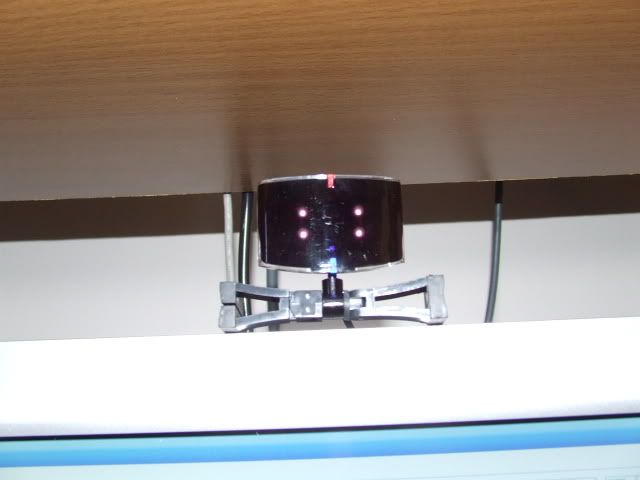
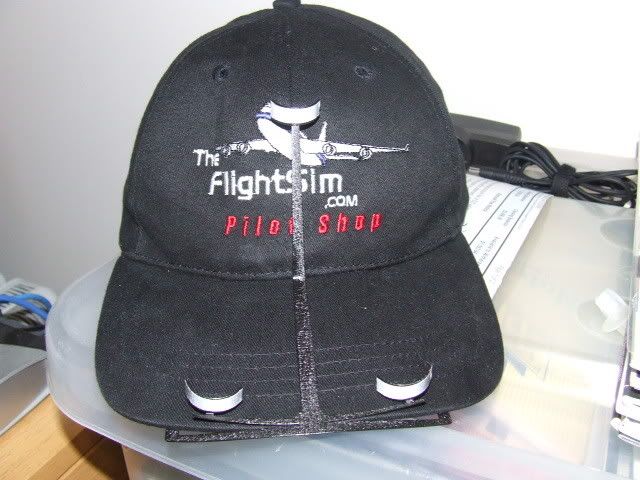
All the lights were blinking and flashing on this little 'thing' sitting on my monitor, for some reason I thought it would be bigger, but it aint, only 4.5cms's wide and the same tall. I could feel the infrared beams piercing my skull and cooking my brain through the cap you wear.

Heres the Track IR itself..
user posted image

And the cap with the sensor points the infrared beams bounce back from..
user posted image

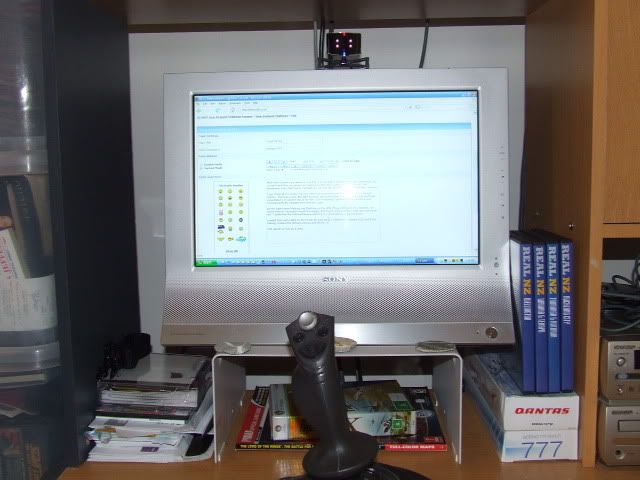
And heres my set-up so you can get a sense of how small it is.
user posted image

Loaded FSX and a light on the Track IR goes blue, I believe that means FSX and it are talking. Loaded the default Cessna and WOW :o

Talk about as real as it gets. I couldn't believe how fast it was, and how you can turn full 360, lean over things, like the seats and look inthe back of the Cessna, lean forward to look closely at the panel etc. My expectations were exceeded with this thing, it lived up to everything Robin had said and more, and I havnt even flown yet. So, next flight I shall tell you how it went, and also post a short video on Youtube to give you an idea of how this looks in FSX.

All I can say is if you get the chance to buy one, grab it while you can.

>nzflag<
ARNZX flightsim.co.nz
Asus Sabretooth X79 MB | i73930K CPU | 8GB DDR3 1600 C7 Ram | GTX 560Ti DCII OC | Corsair H80 Water Cooling
User avatar
JonARNZ
Senior Member
 
Topic author
Joined: Sat Oct 21, 2006 12:49 pm
Posts: 1523
Location: Auckland

Postby Ian Warren » Thu Jan 18, 2007 5:44 pm

Hey Jon , can u move thru the internals of a PMDG737 for example or restricted to pilots seat ? I no TRACK-IR its not happy with ActiveCam in FS9 .. but in X ? no A/Cam yet , ... thought this might be possible with new hardware :unsure:
Image
User avatar
Ian Warren
NZFF Pro
 
Joined: Fri May 05, 2006 5:23 pm
Posts: 41187
Location: AREA 51

Postby ZK-Brock » Thu Jan 18, 2007 6:09 pm

So what exactly does TrackIR do? DOes it like sense where your head is facing and move the VC camera to suit?
ZK-Brock
NZFF Pro
 
Joined: Sun Jul 23, 2006 3:35 pm
Posts: 2035

Postby towerguy » Thu Jan 18, 2007 6:32 pm

welcome to the track club - been using one of these for over a year now and wouldn't fly without it - can also be used in lots of other sims as well - works really well in battle of britain2 - nothing like being able to keep eyes on the bandit , glance inside and back outside without even touching a button. I still have to download and install the fsx update but will be doing it soon.

my son also loves it in motor racing games like supercars etc.
CPU- i7 4790K @4.0Gb Cooler- Noctua NH-D15 M/B- Z97 ProGamer P/S- 750W RAM- 16Gb
Graphics- Nvidia GTX970 16Gb Drives- 2x 120Gb SSD Samsung 850EVO, 1x 2Tb HD, 1x DVD-RW
Sound- on M/B Logitec 5.1 surround sound system OS- Win 10 pro , all wrapped in a black Corsair case Display - Panasonic UHD 4k 50" Flatscreen TV.( 3840x2160 Res)
User avatar
towerguy
Sim-holic
 
Joined: Mon Aug 07, 2006 4:27 pm
Posts: 886

Postby Craig » Thu Jan 18, 2007 7:14 pm

I've had mine for bout a month, mostly use it for multiplayer. LOVE IT :clap: :thumbup:
Craig
 

Postby scon » Thu Jan 18, 2007 7:43 pm

I got that to, got it for Xmas

Took a bit to get working ( I think i didn't install right at first ) but now it goes great, really cool :thumbup: :thumbup:
scon
Sim-holic
 
Joined: Mon Oct 16, 2006 7:16 pm
Posts: 963
Location: NZ

Postby Alex » Thu Jan 18, 2007 7:53 pm

Ah, what next? Graphics Card? Matrox Triple head to go? Or the Track IR? Too many choices, all soo good. I think I had better wait a while, just splashed out $500 on a couple more gigs of ram... :P

Alex
Alex
NZFF Pro
 
Joined: Fri Jul 14, 2006 3:39 pm
Posts: 3620

Postby Jimmy » Thu Jan 18, 2007 8:06 pm

wow sounds awsome. I imigaine there would be proablems too thow. Like running it with a low spec system that can hardly handle fs how plesent would it be trying to pan around in a vc? especialy with stuters.. Whats it like useing it when ya trying to switch switchs or wind up somethign like the airspeed hold.. youd needa hold ya head rather still. :lol:

btw I have considerd buying one of those flightsim.com hats, but I think I may look odd in public... lol
Jimmy
 

Postby JonARNZ » Thu Jan 18, 2007 8:39 pm

Good questions Jimmy, not sure how it would run on a system that struggles already, probably lousy I would say.

I found it takes some time to get use to it, yes you have to hold your head still turning dials etc, but its no worse than normal, the beauty is you can get close to make it easier. I found it best on approach, normally visual approaches you cant see the runway and rely on whatever u use to turn and be lined up, with this I could keep my eye on the airport and fly to line up, totally different experience.
ARNZX flightsim.co.nz
Asus Sabretooth X79 MB | i73930K CPU | 8GB DDR3 1600 C7 Ram | GTX 560Ti DCII OC | Corsair H80 Water Cooling
User avatar
JonARNZ
Senior Member
 
Topic author
Joined: Sat Oct 21, 2006 12:49 pm
Posts: 1523
Location: Auckland

Postby scon » Thu Jan 18, 2007 9:50 pm

It doesn't seem to make my system any slower in FS, but yes you have to remember that it is on your head, take one look at your approach chart and your looking and your rudder pedals the next :D ;)
scon
Sim-holic
 
Joined: Mon Oct 16, 2006 7:16 pm
Posts: 963
Location: NZ

Postby JonARNZ » Fri Jan 19, 2007 6:19 am

I imagine Track IR, pedals and yoke would make it about as real as you could possibly get.

I wondered how people found performance and what impact TIR had on it.
Last edited by JonARNZ on Fri Jan 19, 2007 6:21 am, edited 1 time in total.
ARNZX flightsim.co.nz
Asus Sabretooth X79 MB | i73930K CPU | 8GB DDR3 1600 C7 Ram | GTX 560Ti DCII OC | Corsair H80 Water Cooling
User avatar
JonARNZ
Senior Member
 
Topic author
Joined: Sat Oct 21, 2006 12:49 pm
Posts: 1523
Location: Auckland

Postby Zöltuger » Fri Jan 19, 2007 8:44 am

I always thought TrackIR only measured the look left/right function, I had no idea you could zoom in.
But this is what I don't get- If I want to look right, I turn my head right, but then I won't be looking at the monitor anymore. How does that work?
Zöltuger
 

Postby scon » Fri Jan 19, 2007 9:01 am

Well I have the CH pedals Track IR and the Saitek X52 and it feels quite realistic now and I have noticed no change in performance since having the Track IR installed.

Also you just havn to keep your head movements small, a small turn in the reall world is much bigger in FS using Track IR.
scon
Sim-holic
 
Joined: Mon Oct 16, 2006 7:16 pm
Posts: 963
Location: NZ

Postby SUBS17 » Fri Jan 19, 2007 9:30 am

Zöltuger wrote: I always thought TrackIR only measured the look left/right function, I had no idea you could zoom in.
But this is what I don't get- If I want to look right, I turn my head right, but then I won't be looking at the monitor anymore. How does that work?

The trakir used to be just 2 axis originally (look left/right/up/down) but with vector upgrade you could zoom in or out. Now with trakir 4 pro you have 6dof (left/right/up/down/zoom in/zoom out/head up/head down/lean left/lean right/ head sideways left/ sideways right) So in some of the new sims you can now have buttons behind the joystick as in real life locations and the pilot has to move his head to flick the switch with the mouse. You can also look out and lean to get a closer look at ground objects etc. In a dogfight you can better keep a visual on opponents and your instruments at the same time its very good to use and most ACE pilots are very good using it. You can also now get a new trakir device that clips to your headset instead of the hat.
User avatar
SUBS17
Senior Member
 
Joined: Mon Jun 05, 2006 11:16 am
Posts: 1745

Postby toprob » Fri Jan 19, 2007 11:50 am

Zöltuger wrote: But this is what I don't get- If I want to look right, I turn my head right, but then I won't be looking at the monitor anymore. How does that work?

Here's the illustration from my review, showing the actual head rotation (left) and how it translates to the sim (right).
user posted image

Here's the full review.
User avatar
toprob
NZFF Pro
 
Joined: Sat Apr 29, 2006 4:56 pm
Posts: 6711
Location: Upper Hutt

Postby Zöltuger » Fri Jan 19, 2007 12:22 pm

SUBS17 wrote: Now with trakir 4 pro you have 6dof (left/right/up/down/zoom in/zoom out/head up/head down/lean left/lean right/ head sideways left/ sideways right)

very impressive B)
Zöltuger
 

Postby Geoffhop » Fri Jan 19, 2007 2:12 pm

I can recommend the trackclippro which fits on your headset. This a available from vrconcepts.co.nz. I use a programme called "shoot" to talk to ATC so this all works together very well. One of the problems is that you cannot adjust the initial head position as you can in FS9. You can overcome this by raising up in youir chair clicking the centre button and then settling back in your seat. You can then see all the instruments without cricking your neck.
Image
Geoffhop
Member
 
Joined: Thu Dec 07, 2006 12:22 pm
Posts: 26

Postby JonARNZ » Fri Jan 19, 2007 3:12 pm

Thanks for the tip, and welcome to the forums.
ARNZX flightsim.co.nz
Asus Sabretooth X79 MB | i73930K CPU | 8GB DDR3 1600 C7 Ram | GTX 560Ti DCII OC | Corsair H80 Water Cooling
User avatar
JonARNZ
Senior Member
 
Topic author
Joined: Sat Oct 21, 2006 12:49 pm
Posts: 1523
Location: Auckland

Postby Cbris » Fri Jan 19, 2007 6:45 pm

Someone was wondering about looking down at the flipcharts and ending up looking at the rudder.

F9

Press that key and Trackir locks out the head movement detection while you look around your desktop. F9 again and you're back.

Cockpit viewpoint and/or cabin walkaround doesn't need active camera or the like. FS has had its own build in cabin walk function for years - use shift, control or both with the backspace and enter keys and you can move your viewpoint artound the cabin. Rotation using the coolie hat on your joystick. There's more viewpoint movement tools and it's a case of RTFM.

Look in the FS9 or X setup options and control assignments (keyboard and joystick). You can even point the viewpoint commands at your joystick if you wish.
Chris Brisland a.k.a. 'EagleSkinner' or 'Dances with Paintbrushes'

Visit my site below (Click the pic) for all my latest FSX paints and much more

Image

Drop by my blog sometime

[url=http://www.facebook.com/christopher.brisland?ref=name#!/pages/Eagleskinner/119483578109942]Follow me on Facebook too[/url]
User avatar
Cbris
Forum Addict
 
Joined: Sat Aug 12, 2006 9:43 pm
Posts: 399
Location: EGNE - well, 7 1/2 miles from threshhold of 03

Postby Ian Warren » Fri Jan 19, 2007 7:59 pm

Thanx Cbris , I'll have a play around with that as i install further , I think Active Cam was the easy and cheap to install when released ,no muckin around with the many hundreds of MSFS switchs , maybe lazziness , I have a looksie , and may put TrackerIR on needed list :)

Cheers Matey :thumbup:
Image
User avatar
Ian Warren
NZFF Pro
 
Joined: Fri May 05, 2006 5:23 pm
Posts: 41187
Location: AREA 51

Next

Return to All Flight Simulators

Who is online

Users browsing this forum: No registered users and 4 guests