FSX "WARNING"

A forum specifically to discuss the latest and greatest of all flight simulators

Postby Redda03 » Thu Mar 17, 2011 9:22 am

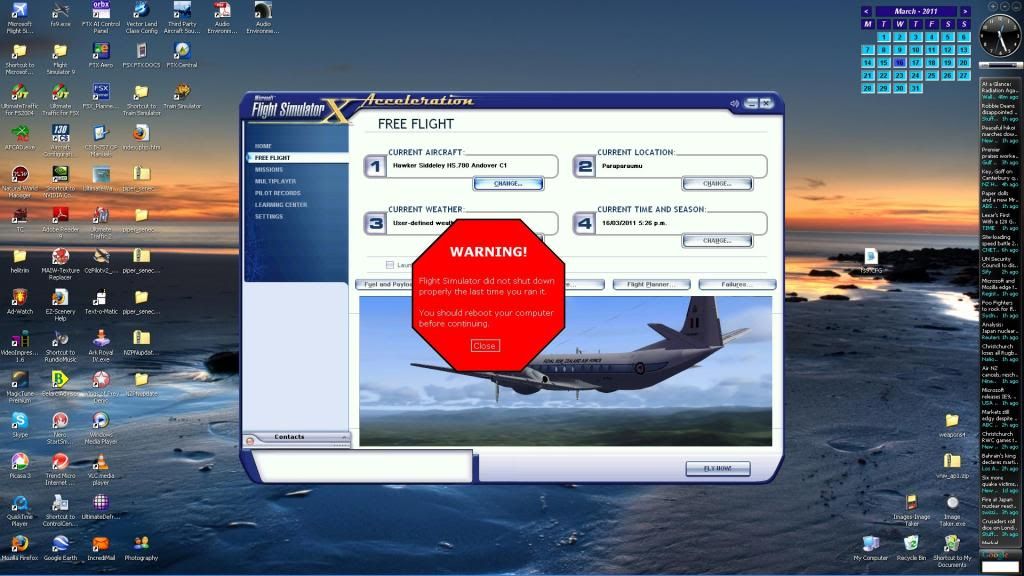
WARNING
Flight Simulator did not shut down properly
the last time you ran it

You should reboot your computer
before continuing

[CLOSE]


Attached is a "WARNING" that sometimes appears on my screen when I reactivate FSX a short period after I have shutdown the program......initially I followed the instructions and rebooted my computer and have since discovered FSX operates perfectly by simply selecting the "CLOSE" option box in the "WARNING"!!


Do I have a "major" or should I just keep ignoring the "WARNING"??

Bob R
url="http://www.VectorLandclass.co.nz/"]
Image[/url]
Redda03
Forum Addict
 
Topic author
Joined: Tue Aug 08, 2006 12:31 pm
Posts: 205
Location: Waikanae Beach

Postby toprob » Thu Mar 17, 2011 9:47 am

Do you know what program is giving the warning? It seems to be some sort of system monitor software which is just being overly careful. I'd assume it has a manual somewhere which shows how to change this behaviour.
User avatar
toprob
NZFF Pro
 
Joined: Sat Apr 29, 2006 4:56 pm
Posts: 6711
Location: Upper Hutt

Postby connor » Thu Mar 17, 2011 10:08 am

Looks a bit dodgy to me. dry.gif
Going completely off topic here but what Andover is that?
connor
Senior Member
 
Joined: Sat Nov 27, 2010 11:01 am
Posts: 1616
Location: Christchurch

Postby creator2003 » Thu Mar 17, 2011 10:09 am

Ive had the warning before ,looks pretty bad when it comes up but i to just close it and carry on and all works sweet and has done for months ,ive had it again once or twice same deal ,its ether bloom effect /aircraft /camera /fsrecorder issues when this has popped up 4 me ,anyways all i can say is that it hasn't done anything bad to me
User avatar
creator2003
NZFF Pro
 
Joined: Fri Jun 16, 2006 12:08 am
Posts: 4633
Location: Cant U C im LOCO

Postby Redda03 » Thu Mar 17, 2011 7:57 pm

connor wrote:
QUOTE (connor @ Mar 21 2011,10:08 PM) <{POST_SNAPBACK}>
Going completely off topic here but what Andover is that?


It is Rick Piper's superb 2006 download for FS9...works well in FSX....have checked various websites and it appears the package is no longer available for downloading .......apart from the RNZAF VIP repaint at : http://www.britsim.com/index.php?option=co...search.....(FYI I completed Andover Conversion training in the UK 1976/77 as a Navigator and accumulated 1200 hrs flying on the aircraft up until 1980)

My Andover software package (FSND HS.780) is 222Mbs...you are welcome to PM me and I will arrange to send you a copy.

Bob R
url="http://www.VectorLandclass.co.nz/"]
Image[/url]
Redda03
Forum Addict
 
Topic author
Joined: Tue Aug 08, 2006 12:31 pm
Posts: 205
Location: Waikanae Beach

Postby Chairman » Thu Mar 17, 2011 9:04 pm

When you close FSX (or anything else complex) it can take 20-30 seconds or more after the screens have disappeared for the actual FSX process to stop closing itself down - if you tried to start it a new copy of it while the old copy was still closing, getting a big red warning is probably the best thing that could happen :-)
The above post is in the public domain and is guaranteed by the manufacturer to contain no references to anything illegal or discussion of piracy, although this signature may contain traces of nuts.
Chairman
Sim-holic
 
Joined: Wed Feb 13, 2008 8:07 pm
Posts: 912

Postby Dontcopy » Fri Mar 18, 2011 3:34 pm

Um I used to get that message with the Flight 1 stuff I have. As soon as I got rid of UT2 it stopped happening.
Intel Core i7 870 @ 3.90Ghz
8GB Corsair Dominator @ 1790mhz CL8 8-8-8-21
P55-GD65
Corsair H80
Two HD 7950 Vapor X cards in Crossfire
40GB Intel 320 SSD
1TB WD Caviar Blue
150GB WD Velociraptor
Corsair 400R
Seasonic 850W 80+ Gold Modular PSU
3 x Samsung Syncmaster 22" LED 1920x1080P
User avatar
Dontcopy
Forum Addict
 
Joined: Thu Aug 05, 2010 5:29 pm
Posts: 283
Location: Palmerston North


Return to All Flight Simulators

Who is online

Users browsing this forum: No registered users and 7 guests