Page 1 of 1

Posted:
Mon Feb 11, 2008 8:00 pmby ardypilot
The other day I looked in my FS9.cfg and realised my terrain_max_vertex setting was =19, so I changed it to =21 and my mountains started looking much more detailed

However, lots of my NZ airports are now sitting in trenches, with little lumps connecting parts of the runways to the ground- examples are Queenstown and Wanaka:
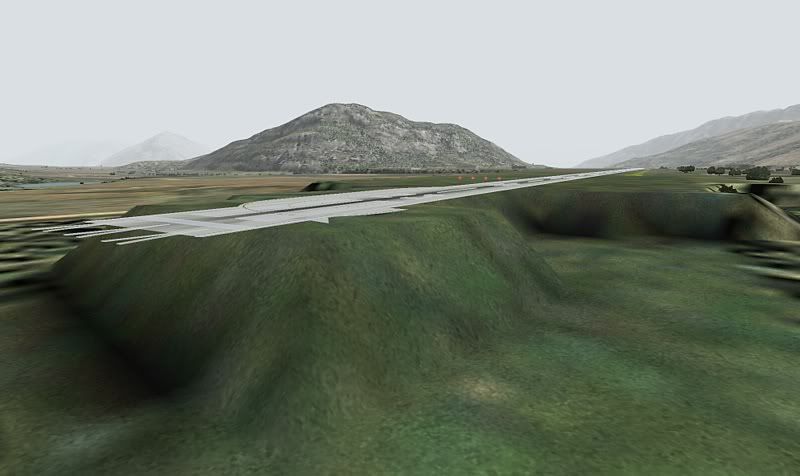
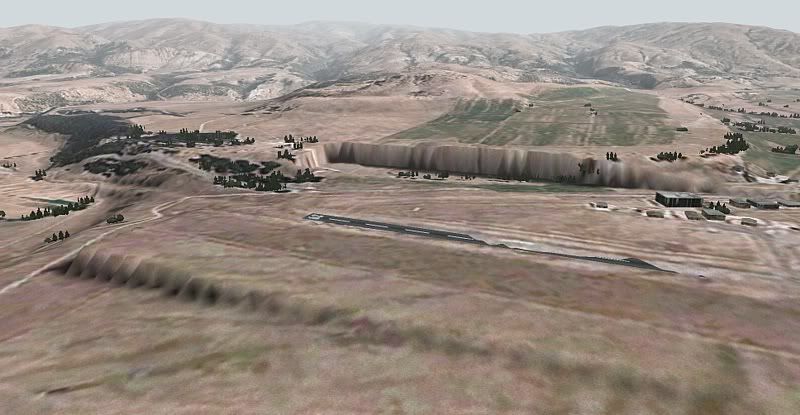
I've also noticed simular effects at Whenuapai and Ardmore- any idea how to fix this?
Posted:
Mon Feb 11, 2008 8:10 pmby NZ255
Have you got the 20m mesh?If not it should be set to 19
Posted:
Mon Feb 11, 2008 8:21 pmby ardypilot
Yeah I have the 20m mesh and topo pack installed.
Posted:
Tue Feb 12, 2008 7:11 amby kimz28
Yeah I have the same problem, though not as bad as the first screen shot!, my problem is a few airports sit on small raised hills Whenuapai and Mt Cook are the worst
I also have the 20M mesh, with RealNZ everywhere and NZTopo as well (vertex set to 21) no doubleup of AFCAD's or anything like that either!
Posted:
Tue Feb 12, 2008 9:27 amby toprob
This really just shows the difference between the default FS2004 mesh and the 20 metre mesh. The airport elevations are not based on reality, they are based on the average default mesh elevation, which as you've discovered can be vastly different.
This is one of the issues which I assumed that FRENZY would address -- it would mean redoing all the flattens as well as the AFCADs.
Posted:
Tue Feb 12, 2008 1:22 pmby ardypilot
Hmmm ok then, can anyone recommend me the best currently available afcad for Whenuapai, Queenstown, Wanaka and Ardmore then please?
I'm sure I've seen screenshots of Wanaka with the 20m mesh without the big cliffs and dips (Or does only the Real NZ addon fix this?), have I got an incorrect flatten installed or something- and how would I get rid of it?
Posted:
Tue Mar 18, 2008 2:21 pmby s0cks
The Queenstown airport by Peter Lohr seems to fit nicely. Its raised very slightly but looks good.
Posted:
Thu Jul 16, 2009 9:25 pmby shotgun
My friend had the same problem. Microsoft needs to learn that airports do exist on slopes
Posted:
Wed Aug 05, 2009 7:55 amby madkudu
I have a problem of the similar kind, and sorry if this is repeated somewhere else I tried searching for the appropriate thread but couldnt find one. Most of my airports dont even fit the RBE mesh ie the airports are either in big holes or on small raised plateaus. I thought this would be caused by the airport having the wrong elevation so i managed to make one of my favourite airfields (NZSL) be the same elevation as the surrounding mesh with ADE which worked. Would this mean I would have to change all the airport.bgl's to the right elevation in the whole of NZ? So far only the 'Real NZ' airports have kinda the same elevation as surrounding mesh. I was hoping there was a simpler fix or maybe I have the addon scenery priorities wrong (Red Barron NZ mesh and Red Barron NZ topo under all other NZ addon airports). Any suggestions?
Jimmy.
Posted:
Thu Aug 06, 2009 2:35 pmby Christian
Jimmy, unfortunately there is no easier option. What's worse is that a lot of runways are in fact sloped, and MSFS just doesn't cope with that...
Posted:
Thu Aug 06, 2009 4:37 pmby madkudu
OK, yea that sucks. I agree with the person that said Microsoft needs to learn that airports exist on slopes! lol awell thanks for the quick reply
