Page 1 of 1

PostPosted: Thu Aug 24, 2006 10:14 pm
by Naki
Hi Guys

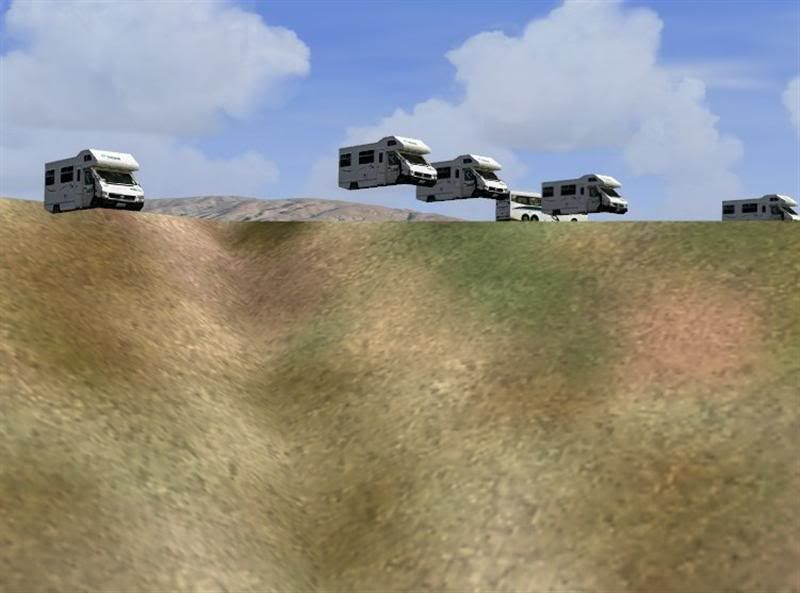
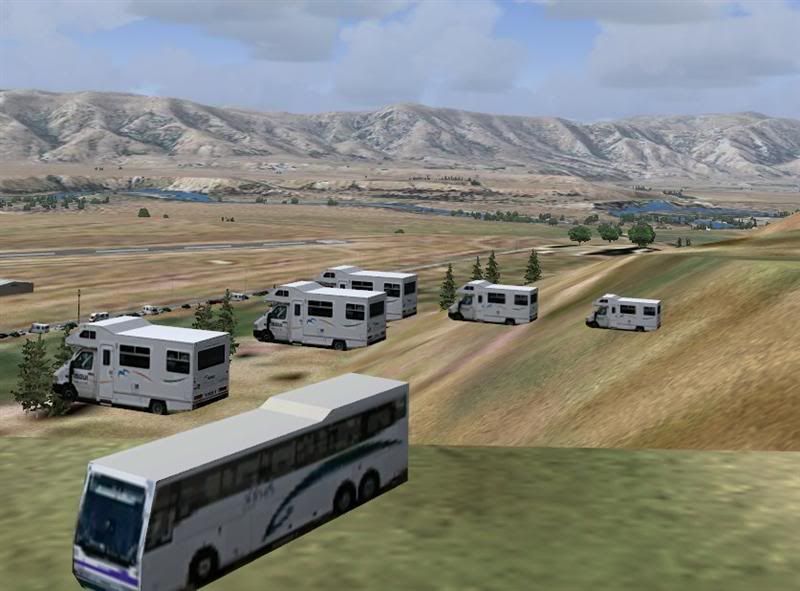
My Wanaka Airshow scene has floating camper vans and camper vans sticking out of the hillside on the hill behind the airfield. I have the RBE 20m mesh & topo. Is this a problem with the mesh, topo or scenery? Is there a fix?

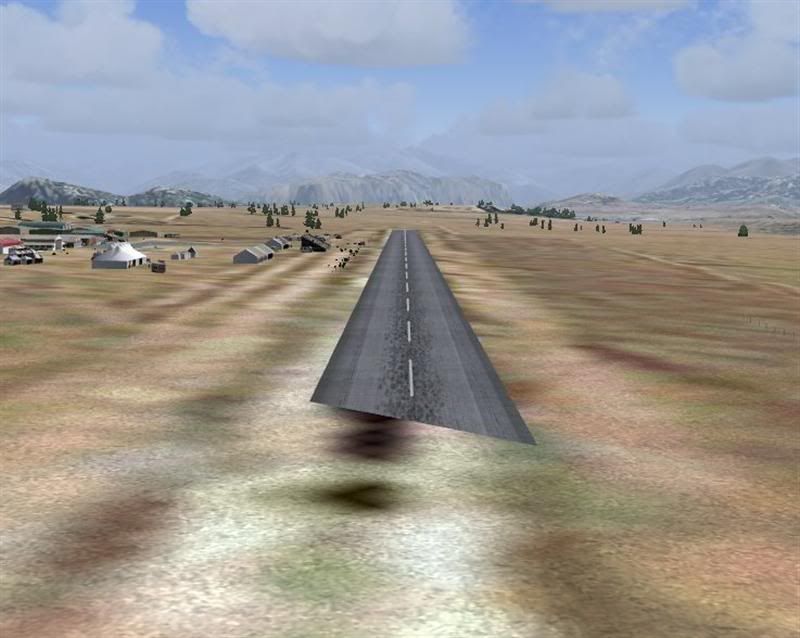
Also the part of the end of the runway disappears on approach from the Luggate end of the airfield although this not a biggy.

Overall though a great scenery package.

I am currently fiddling around trying to get the AI warbirds incorporated into the package but they don't seem to be parking in the regular warbird parking space. I'll keep fiddling with the AI


Cheers

Naki

PostPosted: Sat Aug 26, 2006 8:17 am
by AlisterC
Hi Naki, I can't speak for the creator, but having been to the airshow twice, I can tell you every year I was there, there actually was caravans up on the hill behind the airshow. So I think you can safely say they are meant to be there. People hire caravans, travel to the airshow, and all camp-out up in the hill behind the show. It's very much a part of the event and pretty cool if that's been modelled in! :D

PostPosted: Sat Aug 26, 2006 10:55 am
by toprob
Can you send me a screenshot of the campervans? they should be very well-behaved with the 20 metre/topo, with varying degrees of misbehaving with anything else. Do you have a normal hill there, or a cliff-face?
It may be that there is a slight problem with your installation. The disappearing runway is a tricky issue -- normally its fixed by a reinstall, but I'd sure like to know why it sometimes doesn't work the first time.
Remember that Wanaka requires an installation in the default flightsim path -- the ability to change the installation path is there only for those who have messed with their FS installation so that the installer can't find it. Choosing any other path will not install the flattens!
If you don't like the default install path, you can move the 'RealNZwanaka' folder afterwards.

PostPosted: Sat Aug 26, 2006 6:29 pm
by mavman
I too am experiencing the same problems with the Wanaka scenery, and i have both the 20m mesh and topo installed and i had no problems installing any of these sceneries. Incidentally since i have had the NZWF scenery installed a couple of other airports runways disappear when on final approach (visible from above but not when the dangling dunlops are about to touch down! these being Oamaru and Alex).
Luggate end of NZWF (disappearing rwy)
user posted image
Floating Campervans...magic!
user posted image
user posted image
And this is my Iroquois sitting at the threshold!
user posted image

PostPosted: Sat Aug 26, 2006 6:54 pm
by toprob
mavman wrote: I too am experiencing the same problems with the Wanaka scenery, and i have both the 20m mesh and topo installed and i had no problems installing any of these sceneries. Incidentally since i have had the NZWF scenery installed a couple of other airports runways disappear when on final approach (visible from above but not when the dangling dunlops are about to touch down! these being Oamaru and Alex).

Mm, something wrong with the image links, but from the one image I can see it certainly looks like a faulty installation. My guess is that the old flatten is still showing up.
The installer renames the default flatten to disable it. The default file includes all the flattens for the surrounding area, so the installer puts these back. The actual Wanaka flatten is included in the RealNZwanaka\scenery folder, so this normally doesn't cause a problem.
You can check to see if the installation is correct. There are a couple of things to look at in this folder:
Flight Simulator 9\Scenery\Ocen\scenery
There should be a file called FL993470.gvf
There should also be a file called GVF993470.bgl

Also in this folder:
Flight Simulator 9\Scenery\World\scenery
there should be a backup of the AFCAD file, called AF2_NZWF.bgl

If all these files show up, then the installation should be ok, and we'll have to look at something else.

PostPosted: Sat Aug 26, 2006 7:26 pm
by mavman
Ok thanks will have a look and see if it looks ok otherwise i'll just uninstall the scenery and reinstall!
BTW....screenies should show now!

PostPosted: Sat Aug 26, 2006 7:50 pm
by toprob
One issue which can cause problems here is where I've changed the default flatten file. This is normally not recommended, as it can cause chaos if more than one designer is working on a single flatten file. This is possible, given that this particular file covers a large chunk of the South Island.
The problem is that it is not possible to exclude a default flatten, you can only delete it from the default flatten file, which covers more than one airport. The default airport flatten at Wanaka was particularly annoying, because it cut a huge chunk out of the hill.
I considered that altering the default file in this case would be worth the risk, as it removed the only truly false scenery element in the airport area.
If anyone is aware of any other scenery which attempts to alter these default flattens, please let me know as I'll have to take this into account in future. I've checked all the scenery I can find, but haven't found any which do this. However it is possible, especially if someone has had a go at changing the default elevations to match the new mesh.
Wellington is very similar, it relies heavily on accurate mesh up close to the airport, and the default flatten cuts unnaturally into the hillside. If some people have different flatten files -- apart from the default -- then I may need to leave out the flatten fixes.

PostPosted: Sat Aug 26, 2006 8:14 pm
by toprob
Actually I have been able to reproduce the campervan problem shown here, but not the runway.
When you install the 20 metre mesh you need to make one change to your FS9.cfg file to activate the mesh. If I change this back to the default I get this problem.
Check page 2 of the Mesh manual -- 'enabling high resolution meshes.'

PostPosted: Sat Aug 26, 2006 8:17 pm
by Naki
Thanks Rob will have a look at the files as well and adjust if necessary or reinstall.

Sorry didn't get a chance to send a screnshot (Actaully I haven't worked out to thse yet!) but the above shots are the same as the fault I have

excuse the typos

Cheers

Naki

PostPosted: Sat Aug 26, 2006 8:31 pm
by Naki
Hi Rob Again

our posts crossed and I didn't see your last one - whoops! should of read the manuals ! - I wondered why the detail in the mesh didn't seem as quite as good as what it should

Cheers

Naki

PostPosted: Sun Aug 27, 2006 1:48 pm
by mavman
All fixed! :lol: hadn't saved the terrain max vertex from 19 to 21 when i changed it!
Thanks heaps for you help!

PostPosted: Sun Apr 29, 2007 6:00 am
by Bluebird
Hi all

i have a prob my runway at wanaka only shows up once i'm in the air i have reed the forums about it and none of that stuff could help me. If anyone knows why could u please let me know

PostPosted: Sun Apr 29, 2007 4:35 pm
by Mattnz
I think you may have a similar problem to the one I had at Wellington a few weeks back:
http://z11.invisionfree.com/nzff/index. ... topic=3083

PostPosted: Mon Apr 30, 2007 5:25 pm
by toprob
Bluebird wrote: Hi all

i have a prob my runway at wanaka only shows up once i'm in the air i have reed the forums about it and none of that stuff could help me. If anyone knows why could u please let me know

Things to watch for at Wanaka are:
The installation needs to go to the default FS2004 folder -- anything else will cause problems. You can shift the RealNZwanaka folder anywhere you like after the installation, but if you install it elsewhere the flattens just won't work properly.
The flattens used only really work with the Terrain_Max_Vertex setting of 21. (I think you can get away with 20.) Even though you normally set this to match the mesh resolution, the flattens are rendered pretty much the same as mesh, and require a higher TMV setting.
If you have replaced the AFCAD which comes with the scenery then let me know where you got the replacement from.
-Robin

PostPosted: Tue Jan 29, 2008 3:06 pm
by K5054NZ
So, can someone please explain to me simply, HOW I alter this vertex, or flatten, or whatever, to get the Campervans to sit properly and the runway to be solid? Because reading this thread results in a very confused sim aviator.

PostPosted: Tue Jan 29, 2008 3:12 pm
by toprob
K5054NZ wrote:
QUOTE (K5054NZ @ Jan 29 2008, 04:06 PM) <{POST_SNAPBACK}>
So, can someone please explain to me simply, HOW I alter this vertex, or flatten, or whatever, to get the Campervans to sit properly and the runway to be solid? Because reading this thread results in a very confused sim aviator.


Do you have the 20 metre mesh installed?

PostPosted: Wed Jan 30, 2008 11:24 am
by K5054NZ
To be brutally honest I'm not that sure! If the filenames are anything to go by, I think it's just 75m......I can't see ANYTHING telling me exactly what it is.

PostPosted: Wed Jan 30, 2008 12:07 pm
by toprob
K5054NZ wrote:
QUOTE (K5054NZ @ Jan 30 2008, 12:24 PM) <{POST_SNAPBACK}>
To be brutally honest I'm not that sure! If the filenames are anything to go by, I think it's just 75m......I can't see ANYTHING telling me exactly what it is.


I'll assume you haven't then -- one good way of knowing is if there is a $100-odd hole in your bank balance:)

If you had, then the best way to deal with this is to follow the instructions in the Mesh Manual ,but failing that I'll run through them here.

You need to edit the FS9.cfg file. If you haven't done this before, then there are a couple of things to watch for. First, this is located in X:\Documents and Settings\YourName\Application Data\Microsoft\FS9\, where X is your Windows drive, and YourName is probably, well, your name...

This file is normally hidden, so if you haven't done so already you will need to make hidden files visible. Since this is a fundamental change to the way Windows displays files, you need to be aware of the ramifications, and as this isn't flightsim-related, you should use the Windows help system to do this. Try typing 'hidden files' into the Windows Help.

Open the FS9.cfg file in Notepad.

Find the entry called TERRAIN_MAX_VERTEX_LEVEL=
(You can use Notepad's search function -- just copy/paste the text string here.)

If this is set to 19, and you have the 75 metre mesh, then change it to 20.
If it is set to 19 and you have the 20 metre mesh, then change it to 21.
If it set to something else, get back to me:)

Now save the file and exit Notepad. That's all there is to it.


EDIT: this assumes that you installed the scenery directly into the recommended Flight Simulator 9 folder. If you didn't, then the scenery won't work until you reinstall it there.

PostPosted: Thu Jan 31, 2008 3:30 pm
by K5054NZ
Thanks Robin! It's a bit shocking, being able to see the runway where i start........gonna take some getting used to ;)