Page 1 of 1

PostPosted: Thu Sep 20, 2007 9:53 pm
by toprob
Well, this has survived the first beta, and I'll post a test patch tomorrow for those who tested the Rotorua patch.


It'll be available -- both the update and for purchase from SimMarket or via CD -- early next week.

PostPosted: Fri Sep 21, 2007 4:51 pm
by toprob
Ok, here's a patch for those who wish to give this a go. Of course you will need to already own Real NZ Tauranga.
The manual screenshots are yet to be updated, apart from that it should be all ready to go.
Please let me know of any problems with installation or performance, or if your results differ greatly from the screenshots supplied below.

Real New Zealand Tauranga FSX update (57MB)

There are some FSX screenshots here for comparison.

Blatant sales pitch: needless to say, the price will revert back to $15 when the patch goes 'live'. The CD will also become full-priced, at $39.50. You've got a day or two to save 5 bucks....

PostPosted: Fri Sep 21, 2007 10:48 pm
by G-HEVN
In the middle of the airport pics, you have a caption referring to the extent of the photo scenery. You might want to move it to a more appropriate pic... smile.gif

PostPosted: Sat Sep 22, 2007 11:23 am
by Charl
Some issues I found around NZTG, remembering that I just plopped my FS9 into FSX warts+all before running the patch.
Seems to be a misalignment somewhere for the grass runways:
not sure what it is but it's different from the FS9 one if I remember
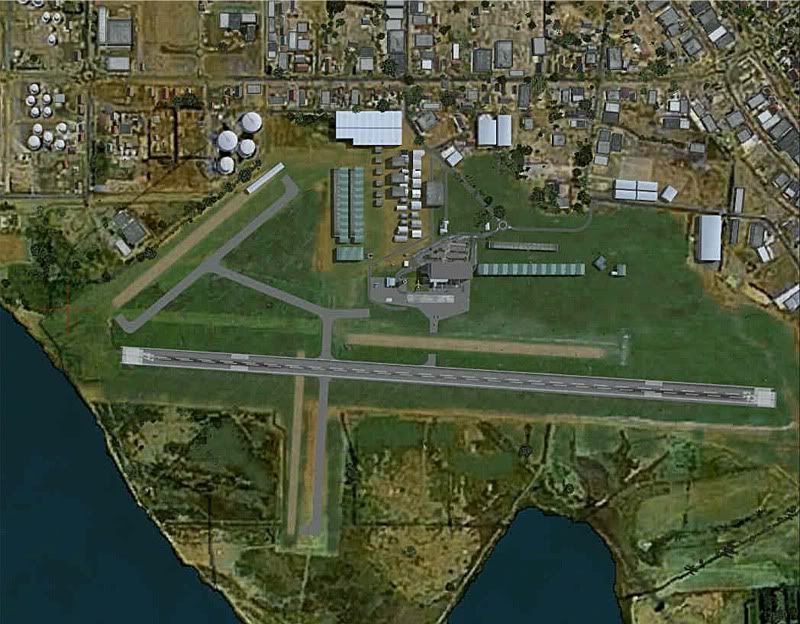
I couldn't catch it, but there was a bright green flash-through from the grass runways as I took this
The refueling seems to have got stranded on the apron edge:
and a lost taxiway, also parking misaligned
I haven't installed GNZLAP in FSX so can't see Bay Flight, but did notice no little concrete pads around their area.

EDIT:
(After reading Robin's admonition below)
If you have an overdeveloped sense of tidiness,
and renamed your FS9 installation to RealNZTauranga,
and copied it over to FSX,
then the patch won't find it (Doh).
You will then get some funny effects
But not as strange as you'd expect, somehow.

Anyway, perhaps this will help some other dummy with a similar problem, later.

PostPosted: Sat Sep 22, 2007 11:53 am
by toprob
Charl --
Your shots don't seem to show any of the update at all. They even include the default AFCAD, which seems strange even if you only installed the FS2004 version (except that maybe it doesn't if you have removed the AFCAD file from the FS2004 version and replaced it with a GNZLAP version in Addon Scenery\scenery). I also see default hangers, which should be long-gone.
Could you reinstall the patch?

EDIT: Just a couple of thoughts about why the patch wouldn't 'take'. First, if you have changed the name of the Tauranga folder then the patch won't install into the correct location.
If you have ever installed a CD backup of your original scenery, then the files may be write-protected, even if you copy the folder to the FSX location.

PostPosted: Sat Sep 22, 2007 1:13 pm
by Grumble
Robin,

Thank you.

Thankyouthankyouthankyou.ThankyouthankyouthankyouThankyouthankyouthankyouThankyo
thankyouthankyouThankyouthankyouthankyou.

ThankyouthankyouthankyouThankyouthankyouthankyouThankyouthankyouthankyouThankyou
hankyouthankyouThankyouthankyouthankyouThankyouthankyouthankyouThankyouthankyout
ankyouThankyouthankyouthankyouThankyouthankyouthankyouThankyouthankyouthankyouTh
nkyouthankyouthankyouThankyouthankyouthankyouThankyouthankyouthankyouThankyoutha
kyouthankyou.

Grumble.

Ps... thankyou!

thumbup1.gif

PostPosted: Sun Sep 23, 2007 6:48 am
by ashton
cool

but the fire truck some times flickers and the harbour brigde goes black some times

but other than that all cool

ashton b

PostPosted: Sun Sep 23, 2007 9:04 am
by emmarcel
Hi Robin

Thanks for the updates, also for Rotorua.

I also saw some flickering underneath the fire truck and the bridges were doubled. BTW I'm also using RBE NZ Topo and 20 mesh and I already made an exclusion file for the bridges and buildings, but removed this after the patch to be able to test the patch.

Marcel

PostPosted: Sun Sep 23, 2007 11:39 am
by Charl
All good (See edited post above), it has some nice glinty bits as FSX does.

Just a note for FS9 GNZLAP users with RealNZ sceneries:
The AFCADs included in GNZLAP are specifically designed for RealNZ and so can be used, safely overwriting the originals.
That way you get the Bay Flight Cessna's in the right place, for example.
Fot that matter Robin, I wouldn't mind if you used the GNZLAP AFCAD in your patch, I assume it will work OK.


Did I mention that I wasn't concentrating the first time around, because of the noise?
My oath, what a racket!
Also, over 6g you can't see the scenery...

PostPosted: Sun Sep 23, 2007 12:30 pm
by toprob
emmarcel wrote:
QUOTE(emmarcel @ Sep 23 2007, 09:04 AM) <{POST_SNAPBACK}>
Hi Robin

Thanks for the updates, also for Rotorua.

I also saw some flickering underneath the fire truck and the bridges were doubled. BTW I'm also using RBE NZ Topo and 20 mesh and I already made an exclusion file for the bridges and buildings, but removed this after the patch to be able to test the patch.

Marcel


Can Marcel and Ashton confirm that they both installed the patch directly over the original Tauranga scenery folder?
The installer is meant to disable the bridge files. It should rename railbridge.bgl to railbridge.bak, and roadbridge.bgl to roadbridge.bak. Did this work for anyone? The default bridges are a better choice than my old models, because they allow future development of moving traffic. (One day I hope to see moving trains on the rail bridge...)

Charl wrote:
QUOTE(Charl @ Sep 23 2007, 11:39 AM) <{POST_SNAPBACK}>
Just a note for GNZLAP users with RealNZ sceneries:
The AFCADs included in GNZLAP are specifically designed for RealNZ and so can be used, safely overwriting the originals.
That way you get the Bay Flight Cessna's in the right place, for example.
Fot that matter Robin, I wouldn't mind if you used the GNZLAP AFCAD in your patch, I assume it will work OK.


I wouldn't recommend using the GNZLAP AFCAD at present. First, the whole airport has been picked up and moved (as a result of a more accurate placement tool:) and also the supplied AFCAD file isn't really an AFCAD2 file, even though it uses the naming convention. The old AFCAD name has been retained just for ease of update (allowing it to overwrite the old AFCAD) and contains FSX-specific elements which are not available in the old AFCAD, in particular excludes and fuel triggers.

PS -- Charl, could you hold off on promoting your new toy until after the end of the month? I'd like to pretend it doesn't exist until I get my credit card under control... :)

PostPosted: Sun Sep 23, 2007 3:12 pm
by Timmo
Charl the green flash a base colour while the runway texture loads....not sure why MS decided on such an obviously bright colour but....

PostPosted: Sun Sep 23, 2007 8:00 pm
by emmarcel
Hi Robin

The patch have been installed correctly and the file names have been renamed. After disabling RBE Topo the double bridges were gone. So far I only noticed some flickering of a texture underneath the fire truck.

Marcel

PostPosted: Sun Sep 23, 2007 8:37 pm
by toprob
emmarcel wrote:
QUOTE(emmarcel @ Sep 23 2007, 08:00 PM) <{POST_SNAPBACK}>
Hi Robin

The patch have been installed correctly and the file names have been renamed. After disabling RBE Topo the double bridges were gone. So far I only noticed some flickering of a texture underneath the fire truck.

Marcel


Thanks for getting back, Marcel. Do you normally get some bridges doubled up using the Topo? The bridges at Tauranga are now default in FSX, so I would assume that you are seeing the default and the Topo bridge.
I'll look at the flickering under the truck, I'm pretty sure I can make that go away.

PostPosted: Sun Sep 23, 2007 10:02 pm
by ashton
yea me got NZRO and NZreal NZTG every thing else is default for FSX.yea the default bridge and yours show up to and the cargo boat is very close to one of the cranes (e.g. hitting it.)

PostPosted: Sun Sep 23, 2007 10:47 pm
by toprob
ashton wrote:
QUOTE(ashton @ Sep 23 2007, 10:02 PM) <{POST_SNAPBACK}>
yea me got NZRO and NZreal NZTG every thing else is default for FSX.yea the default bridge and yours show up to and the cargo boat is very close to one of the cranes (e.g. hitting it.)


Can you just confirm how you installed the original scenery and the update in FSX? I need to figure out why the bridge files were not deactivated.

PostPosted: Tue Sep 25, 2007 1:21 am
by Grumble
toprob wrote:
QUOTE(toprob @ Sep 27 2007, 04:47 AM) <{POST_SNAPBACK}>
Can you just confirm how you installed the original scenery and the update in FSX? I need to figure out why the bridge files were not deactivated.


Hi Robin,

Getting a CTD over the Te Puke area. Install is exactly per your instructions in the readme, direct into FSX.

PostPosted: Tue Sep 25, 2007 9:59 am
by toprob
Grumble wrote:
QUOTE(Grumble @ Sep 25 2007, 01:21 AM) <{POST_SNAPBACK}>
Getting a CTD over the Te Puke area. Install is exactly per your instructions in the readme, direct into FSX.


Do you get an error message? I've had a look at the autogen around there, and there's nothing unusual, except for a handful of vege polygons north of Te Puke. What area is visible when it crashes? What autogen setting do you use?

PostPosted: Tue Sep 25, 2007 3:16 pm
by Grumble
toprob wrote:
QUOTE(toprob @ Sep 28 2007, 03:59 PM) <{POST_SNAPBACK}>
Do you get an error message? I've had a look at the autogen around there, and there's nothing unusual, except for a handful of vege polygons north of Te Puke. What area is visible when it crashes? What autogen setting do you use?


No error message, just a direct CTD. Crash occurs at a any height, in two different airframes so far. Autogen is pretty far right (maybe one off maximum). Area would be somewhere over the Papamoa hills, or perhaps on the junction between Tga and Rotorua.