Page 1 of 1

PostPosted: Mon Sep 13, 2010 10:28 am
by toprob
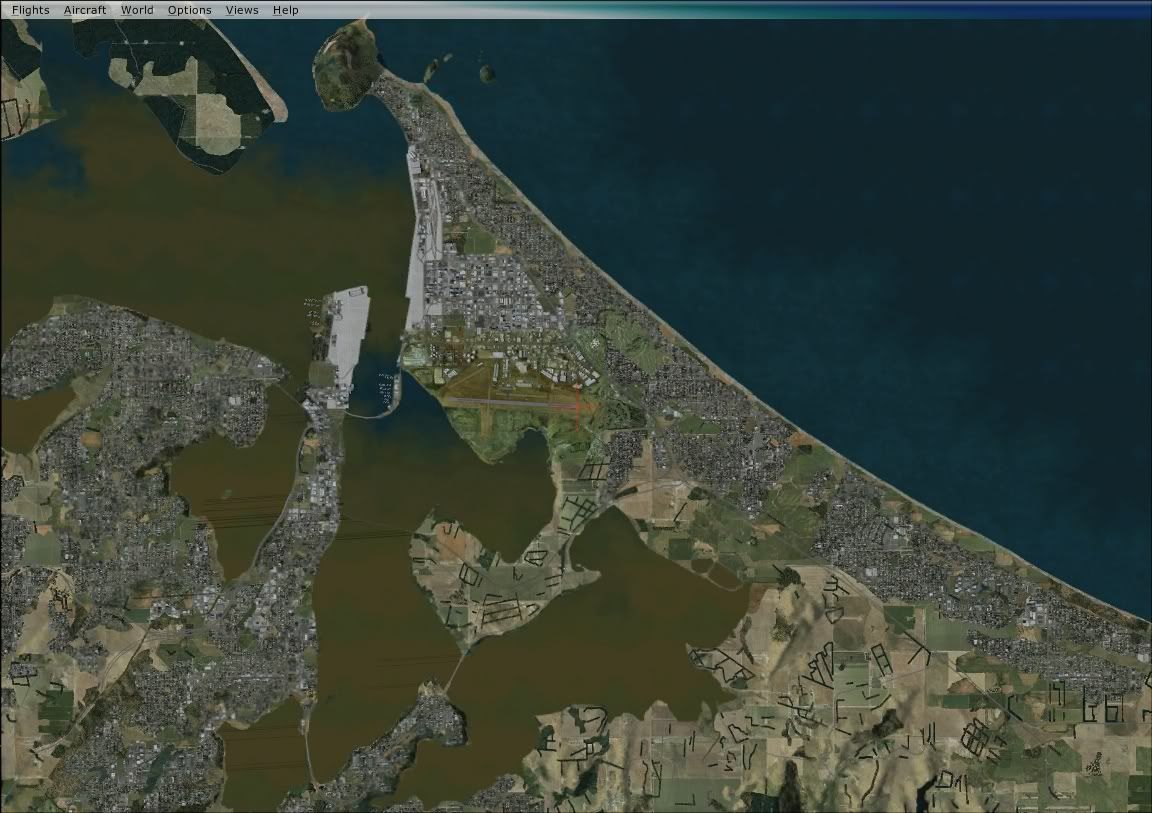
Real NZ Tauranga is probably my favourite Real NZ airport, but let down by the colourised city aerial image.
If you have both this and VLC, then you might want to dispense with the city aerial, and let the airport blend to VLC instead. To do this, you just need to disable the city aerial image in the RealNZtauranga\Scenery folder.
This scenery file is called TGcityAerial.bgl. To disable it, rename it to something with an extension other than BGL -- such as TGcityAerial.bak. Don't touch the airport aerial! -- TGairportAerial.bgl.


PostPosted: Mon Sep 13, 2010 10:31 am
by Naki
Thanks for the tip ..I wil give this a go

PostPosted: Mon Sep 13, 2010 3:34 pm
by Nzeddy
Thanks for this. biggrin.gif

PostPosted: Mon Sep 13, 2010 6:02 pm
by ZK-MAT
What is the other aerial there do (tgaerial.bgl)?

PostPosted: Mon Sep 13, 2010 6:43 pm
by ZK-MAT
I think i have a real mess on my hands here. I originally bought TG via download, and over the years have got various updates and the FSX update. I have so many folders in archive with Tauranga on them I actually don't know what is what. I just deleted all from FSX, ran the origginal installer then the FSX update, and now don't even have the TG Airport or TG City aerials, just "tgaerial"...

I'll start again I think lol. Any help would be appreciated.

Ohh I see Robins online .. smile.gif May be easier to call in and see you mate - I should be down your way by this weekend all going well
Edit:

I found another folder with the files as mentioned above .. will give them a crack... this is becoming a one man post crusade!

PostPosted: Mon Sep 13, 2010 6:55 pm
by NZ255
Have you got the updated NZTG?

PostPosted: Mon Sep 13, 2010 7:02 pm
by ZK-MAT
I "think" so lol

Anyhow, I have tried different combos of files and now got this which looks a lot better


PostPosted: Mon Sep 13, 2010 7:07 pm
by toprob
Yes, I didn't quite make it clear that this requires the latest update, which completely replaces any previous RealNZtauranga.

PostPosted: Mon Sep 13, 2010 7:09 pm
by Naki
How do you stop scenery.dat file error thingie from coming up...had to punch the ok button about a million times before it loaded and then it kept coming up in the sim itself.

PostPosted: Mon Sep 13, 2010 7:27 pm
by toprob
Naki wrote:
QUOTE (Naki @ Sep 13 2010, 07:09 PM) <{POST_SNAPBACK}>
How do you stop scenery.dat file error thingie from coming up...had to punch the ok button about a million times before it loaded and then it kept coming up in the sim itself.


Not too sure what you mean there -- what exactly is the error message?

PostPosted: Mon Sep 13, 2010 7:37 pm
by Ian Warren
I will stick with my photoreal onto VLC then photoreal with some off Tims photoreal back to VLC and repeat .. its just to damn nice not to use everything smile.gif

PostPosted: Mon Sep 13, 2010 7:59 pm
by Naki
toprob wrote:
QUOTE (toprob @ Sep 13 2010, 07:27 PM) <{POST_SNAPBACK}>
Not too sure what you mean there -- what exactly is the error message?


Dont worry - took the file out then renamed it and then put it back in stopped it.

PostPosted: Mon Sep 13, 2010 8:04 pm
by Timmo
Naki wrote:
QUOTE (Naki @ Sep 13 2010, 07:09 PM) <{POST_SNAPBACK}>
How do you stop scenery.dat file error thingie from coming up...had to punch the ok button about a million times before it loaded and then it kept coming up in the sim itself.


It happens when you rename or remove a scenery folder on your hard drive without first removing it from the scenery library in FSX- You need to remove that entry from your FSX scenery library (and, if need be, re-add the correct one)

PostPosted: Mon Sep 13, 2010 8:32 pm
by Naki
Ahh yes I did that too so thats probably what stopped it

PostPosted: Mon Sep 27, 2010 5:41 pm
by toprob
Sorry, Matt, I just remembered that I was going to show you this on my PC when you popped in last week. Anyway, I hope you've got it sorted now.

PostPosted: Mon Sep 27, 2010 6:52 pm
by ZK-MAT
It was awesome seeing you and Ian! I didn't feel it was right to talk "shop" (and to be honest I was running on empty energy wise) but I would love to see how things look on your system - when I am back down I will come abck and catch up with you again if that's ok.

Cheers

PostPosted: Mon Sep 27, 2010 7:36 pm
by Ian Warren
Matt , Great meeting you to , not the best circumstanse with quake and brain noggin rocking smile.gif

You are more than Welcome to stop back through